
1. Wprowadzenie
Thank you for choosing the DEVAISE ASJZ031 Electric Standing Desk. This manual provides essential information for the safe assembly, operation, and maintenance of your new desk. Please read these instructions thoroughly before use and retain them for future reference.
This electric standing desk is designed to provide a versatile workspace, allowing seamless transitions between sitting and standing positions to promote better posture and productivity. It features a robust steel frame, a powerful lift system, and a seamless one-piece desktop for enhanced stability.
2. Instrukcje bezpieczeństwa
- Przed montażem należy upewnić się, że wszystkie elementy są obecne i nieuszkodzone.
- Aby zapobiec obrażeniom, podczas pracy biurka należy trzymać dzieci i zwierzęta z dala od niego.
- Nie przeciążaj biurka. Maksymalne obciążenie wynosi 80 kg (176 funtów).
- Podczas regulacji wysokości biurka należy upewnić się, że nie ma żadnych przeszkód nad nim ani pod nim.
- Podczas regulacji wysokości trzymaj dłonie i palce z dala od ruchomych części.
- Należy używać wyłącznie dołączonego zasilacza i kabli.
- Nie rozmontowuj ani nie modyfikuj podzespołów elektrycznych biurka. Skontaktuj się z obsługą klienta w celu uzyskania pomocy.
- Aby zapewnić stabilność biurka, należy je ustawić na równej powierzchni.
3. Zawartość opakowania
Verify that all parts are included in your package. Refer to the diagram below for identification.

Image: All components of the DEVAISE Electric Standing Desk laid out for assembly.
- Desktop (1 piece)
- Nogi (2 sztuki)
- Stopy (2 sztuki)
- Crossbar/Motor Assembly
- Panel sterowania
- Zasilacz i kable
- Zaczep na słuchawki
- Sprzęt montażowy (śruby, klucz imbusowy)
4. Instrukcja montażu
Follow these steps for assembling your DEVAISE Electric Standing Desk. It is recommended to have two people for certain steps.
- Przymocuj stopy do nóg: Secure the two feet to the bottom of each leg using the provided screws.
- Install Crossbar/Motor Assembly: Connect the crossbar, which contains the motor, between the two legs. Ensure it is securely fastened.
- Przymocuj nogi do biurka: Carefully place the desktop upside down on a soft, clean surface. Align the assembled leg frame with the pre-drilled holes on the desktop and secure it with the appropriate screws.
- Podłącz panel sterowania i zasilanie: Mount the control panel to the underside of the desktop in the designated area. Connect all motor and power cables as per the diagram in your included paper manual.
- Montaż haka na słuchawki: Attach the headphone hook to the desired side of the desk.
- Zarządzanie kablami: Use the included cable ties or clips to organize and secure all cables to prevent tangling and damage.
- Początkowe uruchomienie: Plug the desk into a power outlet. The control panel should light up.
Aby uzyskać podgląd wizualnyview of the desk's features and operation, please refer to the video below:
Wideo: Ponadview of the DEVAISE Adjustable Electric Standing Desk, demonstrating its features and height adjustment.
5. Instrukcja obsługi
Your DEVAISE Electric Standing Desk is equipped with an intuitive digital control panel for easy height adjustment and memory presets.
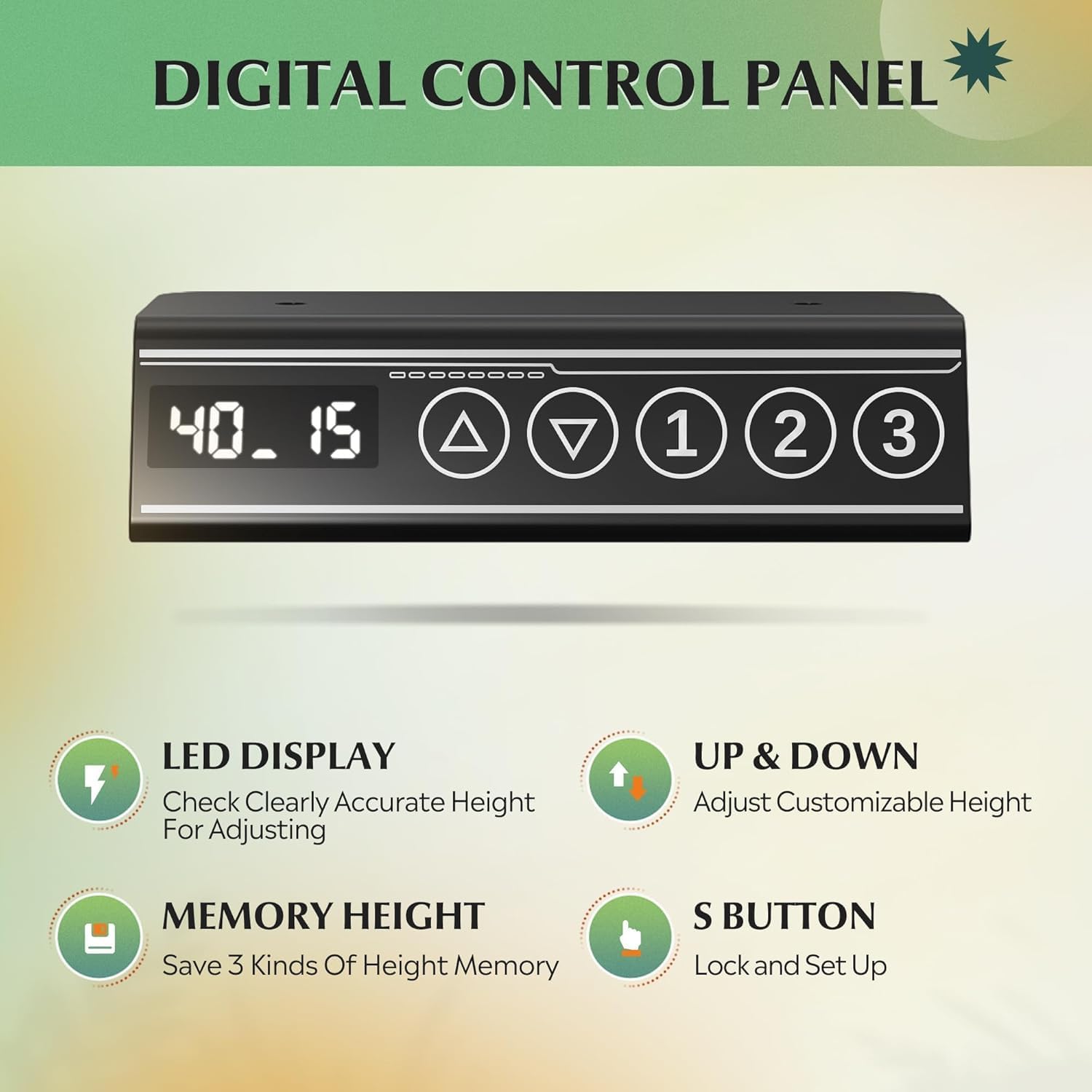
Image: Close-up of the digital control panel with LED display, up/down arrows, and three memory preset buttons.
Regulacja wysokości
- Podnieś biurko: Naciśnij i przytrzymaj Strzałka w górę (▲) przycisk umożliwiający podniesienie biurka do żądanej wysokości.
- Dolne biurko: Naciśnij i przytrzymaj Strzałka w dół (▼) przycisk, aby obniżyć biurko do żądanej wysokości siedzenia.
- The LED display will show the current height in inches. The adjustable height range is approximately 28.35 inches to 46.46 inches.

Image: Illustration showing the DEVAISE Standing Desk adjusting from its lowest height (28.35 inches) to its highest height (46.45 inches).
Ustawienia pamięci
The desk features three programmable memory presets to save your favorite sitting and standing heights.
- Dostosuj wysokość biurka do swoich potrzeb, korzystając ze strzałek w górę/w dół.
- Naciśnij 'S' button (Set button). The display will flash.
- Immediately press one of the numbered memory buttons (1, 2 lub 3) aby zapisać aktualną wysokość w tym ustawieniu wstępnym.
- To recall a saved height, simply press the corresponding numbered memory button (1, 2 lub 3). Biurko automatycznie przesunie się do zapisanej pozycji.
System antykolizyjny
The desk is equipped with an anti-collision system that automatically stops and slightly reverses movement if it encounters an obstruction during height adjustment. This feature enhances safety and prevents damage to the desk or surrounding objects.
Video: Demonstration of the DEVAISE Electric Standing Desk in various home office settings, highlighting its smooth operation and cable management features.
6. Konserwacja
- Czyszczenie: Przetrzyj blat i ramę miękką szmatką.amp szmatką. Unikaj silnych środków chemicznych i ściernych środków czyszczących.
- Zarządzanie kablami: Periodically check that all cables are securely fastened and not pinched or tangled.
- Elementy złączne: Od czasu do czasu sprawdzaj i dokręcaj poluzowane śruby, aby zachować stabilność.
- Silnik: Silnik jest bezobsługowy. Nie należy podejmować prób smarowania ani otwierania obudowy silnika.
7. Rozwiązywanie Problemów
| Problem | Możliwa przyczyna | Rozwiązanie |
|---|---|---|
| Biurko się nie porusza. | Power cable disconnected; motor cable loose. | Check all power and motor connections. Ensure the desk is plugged into a working outlet. |
| Biurko porusza się nierównomiernie lub wydaje nietypowe dźwięki. | Nierównomierne obciążenie, luźne zapięcia, przeszkoda. | Distribute weight evenly. Check and tighten all screws. Ensure no obstructions are interfering with movement. |
| Częsta aktywacja systemu zapobiegającego kolizjom. | Sensitivity too high; frequent obstructions. | Ensure clear path for desk movement. Refer to the full manual for adjusting anti-collision sensitivity if available. |
| Ustawienia pamięci nie działają. | Ustawienia predefiniowane nie zostały zapisane prawidłowo. | Re-program the memory presets following the operating instructions. |
If you encounter issues not listed here or if solutions do not resolve the problem, please contact DEVAISE customer support.
8. Specyfikacje
| Marka | ZDEMASKOWAĆ |
| Numer modelu | ASJZ031-new |
| Wymiary produktu | 27.5" gł. x 55" szer. x 28" wys. |
| Zakres regulacji wysokości | od 28.35" do 46.46" |
| Kolor | Czarny |
| Najlepszy rodzaj materiału | Drewno inżynieryjne |
| Materiał bazowy | Żelazo |
| Maksymalna zalecana waga | 180 funtów (81.6 kg) |
| Waga przedmiotu | 37 funtów (16.8 kg) |
| Cechy specjalne | 3 Preset Memories, Adjustable Height, Electric, Quiet, Whole Piece Desktop |
9. Gwarancja i wsparcie
The DEVAISE ASJZ031 Electric Standing Desk comes with a 1 lat gwarancji na ramę. For any questions regarding assembly, product selection, or warranty claims, please contact our U.S.-based product support team. We offer 24/7 customer service to assist you.
For further assistance, please visit the official DEVAISE website or contact the customer service number provided with your purchase documentation.
