
1. Wprowadzenie
This manual provides detailed instructions for the ANBERNIC RG476H handheld game console. Please read this manual thoroughly before using the device to ensure proper operation and to maximize your gaming experience.

Obraz 1.1: Koniecview of the ANBERNIC RG476H handheld game console, showcasing its full-screen design and available colors.
2. Koniec produktuview
2.1 Główne cechy
- System operacyjny: Android 13 with built-in game frontend.
- Edytor: Dimensity T820 (6nm EUV 5G SoC chip, 8-core: 1*A76@2.7GHz + 3*A76@2.3GHz + 4*A55@2.1GHz).
- Wyświetlacz: 4.7-inch LTPS in-cell OCA full lamination touchscreen, 1280x960 resolution, up to 120Hz refresh rate.
- Pamięć i przechowywanie: 8GB LPDDR4X RAM, 128GB UFS2.2 ROM, expandable up to 2TB via TF card.
- Łączność: WiFi (2.4G/5G 802.11a/b/g/n/ac), Bluetooth 5.0.
- Sterownica: Dual Hall joysticks, 6-axis gyroscope, Hall triggers, vibration motor.
- Bateria: 5000mAh Lithium-ion battery, providing up to 7 hours of continuous use.
- Chłodzenie: Active cooling system with high-speed fan and heat pipe.
- Wyjście: HDMI output, USB Type-C with 1080p DisplayPort output (supports dual-screen display for NDS/3DS games).
- Dodatkowe funkcje: RGB joystick lighting with multiple effects, FOTA wireless upgrades, online multiplayer, streaming, wireless screen projection, 3.5mm stereo headphone jack, power-saving settings.
2.2 Komponenty i elementy sterujące
Familiarize yourself with the physical components and controls of your RG476H console.

Image 2.1: Technical diagram illustrating the layout of buttons, ports, and internal components of the RG476H.
- Lewy joystick: For directional control in games.
- Prawy joystick: For camera control or other directional inputs.
- Pad kierunkowy: Do precyzyjnego wprowadzania kierunku.
- Przyciski A/B/X/Y: Standardowe przyciski akcji.
- Przyciski L1/L2/R1/R2: Przyciski na ramionach i spustowe.
- Przyciski Start/Wybierz: Game control functions.
- Klawisz funkcyjny: For system-specific actions.
- Przycisk powrotu: For navigating back in menus.
- Gniazdo karty TF: Do rozszerzenia pamięci zewnętrznej.
- Port USB typu C: For charging, data transfer, and DisplayPort output.
- Gniazdo słuchawkowe 3.5 mm: Do wyjścia audio.
- Mikrofon: Do wprowadzania głosowego.
- Prelegenci: Dual stereo speakers located at the bottom.
- Przycisk zasilania: Aby włączyć/wyłączyć urządzenie lub przełączyć je w tryb uśpienia.
- Zwiększanie/zmniejszanie głośności: Aby dostosować poziom dźwięku.
3. Konfiguracja
3.1 Pierwsze ładowanie
Before first use, fully charge your RG476H console.
- Connect the provided USB Type-C cable to the console's charging port.
- Connect the other end of the cable to a compatible 5V/2A power adapter (not included) or a USB port on a computer.
- Zaświeci się kontrolka ładowania. Pełne naładowanie trwa zazwyczaj około 3 godzin.
3.2 Włączanie/wyłączanie
- Włączanie: Naciśnij i przytrzymaj przycisk zasilania, aż ekran się zaświeci.
- Aby wyłączyć: Press and hold the Power button, then select "Power Off" from the on-screen options.
- Aby zasnąć/obudzić się: Briefly press the Power button to put the device into sleep mode or wake it up.
3.3 Instalacja karty TF (opcjonalnie)
To expand storage for games and media, you can install a TF (microSD) card. The device supports up to 2TB.

Image 3.1: The TF card slot for storage expansion, shown alongside other features.
- Znajdź gniazdo karty TF w urządzeniu.
- Insert the TF card gently into the slot until it clicks into place.
- To remove, push the TF card inward until it clicks, then release. It will spring out.
4. Instrukcja obsługi
4.1 Nawigacja i interfejs użytkownika
The RG476H runs on Android 13, providing a familiar and intuitive interface.
- Use the joysticks or D-pad to navigate through menus and select options.
- The touchscreen allows for direct interaction with the Android interface.
- The built-in game frontend organizes your games for easy access.
4.2 Granie w gry
The console supports a wide range of Android games and up to 30 types of simulator games.
- Access the game frontend from the main menu.
- Select your desired game from the list.
- Use the physical controls (joysticks, D-pad, A/B/X/Y, L/R buttons) for gameplay.
- For simulator games, you may need to configure controls within the emulator settings.
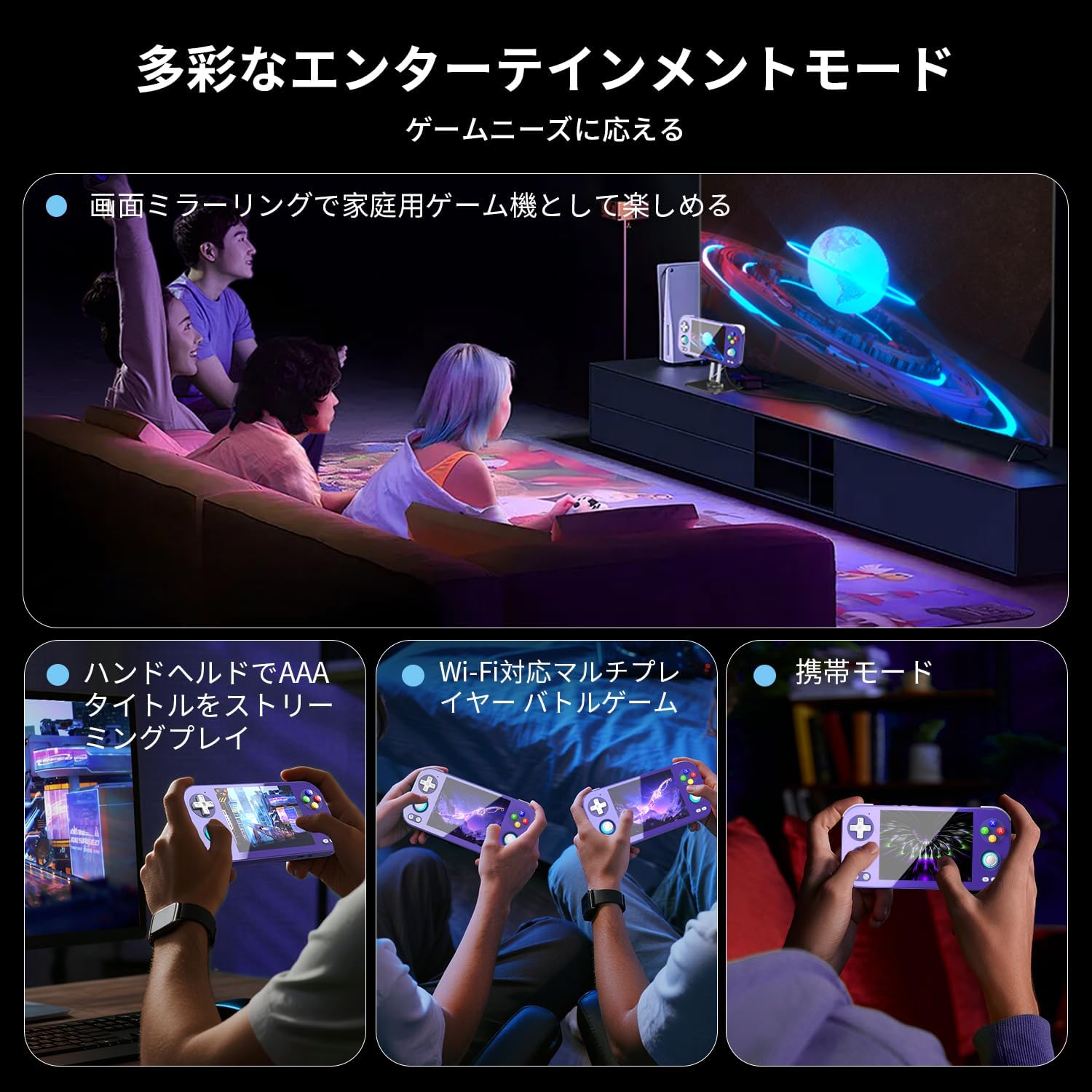
Image 4.1: The RG476H supports various entertainment modes, including handheld play, Wi-Fi multiplayer, and screen mirroring to a TV.
4.3 Funkcje zaawansowane
- Transmisja strumieniowa Moonlight: Supports Moonlight Streaming for playing PC games on your console. Refer to Moonlight documentation for setup.
- Wyjście HDMI: Connect the console to a TV or monitor via HDMI for a larger display.
- USB Type-C DisplayPort: Use a compatible USB-C to DisplayPort cable for 1080p video output. This feature also supports dual-screen display for NDS/3DS games.
- Wi-Fi i Bluetooth: Connect to Wi-Fi networks for online gaming, updates, and browsing. Pair Bluetooth accessories like headphones or controllers.
- RGB Joystick Lighting: Customize the RGB lighting effects of the joysticks (e.g., constant light, breathing, rainbow, marquee, chase, gaming mode) and adjust brightness through system settings.
- ANBERNIC AI Assistant: Utilize the built-in AI features for real-time translation, game assistance, and other smart functions.

Image 4.2: The ANBERNIC AI Assistant offers features like AI Square, real-time translation, game assistance, and image processing.
5. Konserwacja
5.1 Czyszczenie
- Do czyszczenia zewnętrznej części konsoli należy używać miękkiej, suchej ściereczki.
- For the screen, use a microfiber cloth specifically designed for electronics. Do not use abrasive cleaners or solvents.
- Utrzymuj porty wolne od kurzu i zanieczyszczeń.
5.2 Aktualizacje oprogramowania
The RG476H supports FOTA (Firmware Over-The-Air) wireless upgrades.
- Upewnij się, że Twoje urządzenie jest połączone z Wi-Fi.
- Navigate to System Settings and check for available updates.
- Follow the on-screen prompts to download and install updates. Ensure the device has sufficient battery life or is connected to power during updates.
6. Rozwiązywanie Problemów
6.1 Typowe problemy i rozwiązania
| Wydanie | Możliwa przyczyna / rozwiązanie |
|---|---|
| Urządzenie nie włącza się. | Battery may be depleted. Connect to charger and try again. Ensure power button is pressed and held sufficiently. |
| Ekran nie reaguje. | Perform a soft reset by holding the power button for 10-15 seconds. If issue persists, ensure the screen is clean and free of obstructions. |
| Games are lagging or performing poorly. |
|
| Brak połączenia Wi-Fi lub Bluetooth. |
|
| Brak dźwięku z głośników. | Check volume settings. Ensure headphones are not connected if you expect sound from speakers. |
7. Specyfikacje
| Funkcja | Szczegół |
|---|---|
| Model | RG476H |
| Edytor | Unisoc T820, 6nm EUV 5G SoC |
| Procesor graficzny | Czterordzeniowy Mali-G57, 850 MHz |
| BARAN | 8 GB LPDDR4X |
| Składowanie | 128GB UFS2.2 (Expandable via TF card up to 2TB) |
| Wyświetlacz | 4.7-inch LTPS in-cell OCA full lamination touchscreen, 1280x960 resolution, up to 120Hz refresh rate |
| System operacyjny | Android 13 |
| Łączność | 2.4G/5G Wi-Fi 802.11a/b/g/n/ac, Bluetooth 5.0 |
| Bateria | 5000mAh Lithium-ion, up to 7 hours usage |
| Audio | High-quality dual stereo speakers, 3.5mm stereo headphone jack |
| Czujniki | 6-axis gyroscope, Hall joysticks, Hall triggers, Vibration motor |
| Porty | USB Type-C (charging, data, 1080p DisplayPort output), TF card slot |
| Wymiary | Wymiary 21.1 x 11.1 x 4.2 cm |
| Waga | 470 gramów |
8. Gwarancja i wsparcie
For warranty information and technical support, please refer to the official ANBERNIC webOdwiedź witrynę lub skontaktuj się ze sprzedawcą. Zachowaj dowód zakupu na wypadek reklamacji.
Producent: ANBERNIC
Webstrona: www.anbernic.com (Byłyample link, rzeczywisty link może się różnić)


