
Wstęp
This manual provides detailed instructions for the installation, operation, and maintenance of your Reobiux 2K Outdoor WiFi Surveillance Camera, Model K6Q-1P. Please read this manual thoroughly before using the product to ensure proper functionality and safety.
Zawartość opakowania
Sprawdź, czy wszystkie wymienione poniżej elementy znajdują się w Twojej paczce. Jeśli brakuje któregokolwiek z nich lub jest on uszkodzony, skontaktuj się z obsługą klienta.
- 1 x Surveillance Camera
- 1 x zasilacz
- 1 x Zestaw śrub montażowych
- 1 x Waterproof Cover Kit
- 1 x Instrukcja obsługi
Produkt ponadview
The Reobiux 2K Outdoor WiFi Surveillance Camera (Model K6Q-1P) is an advanced security solution featuring a dual-lens design for comprehensive monitoring. It offers 2K resolution, color night vision, motion detection, two-way audio, and compatibility with Amazon Alexa.
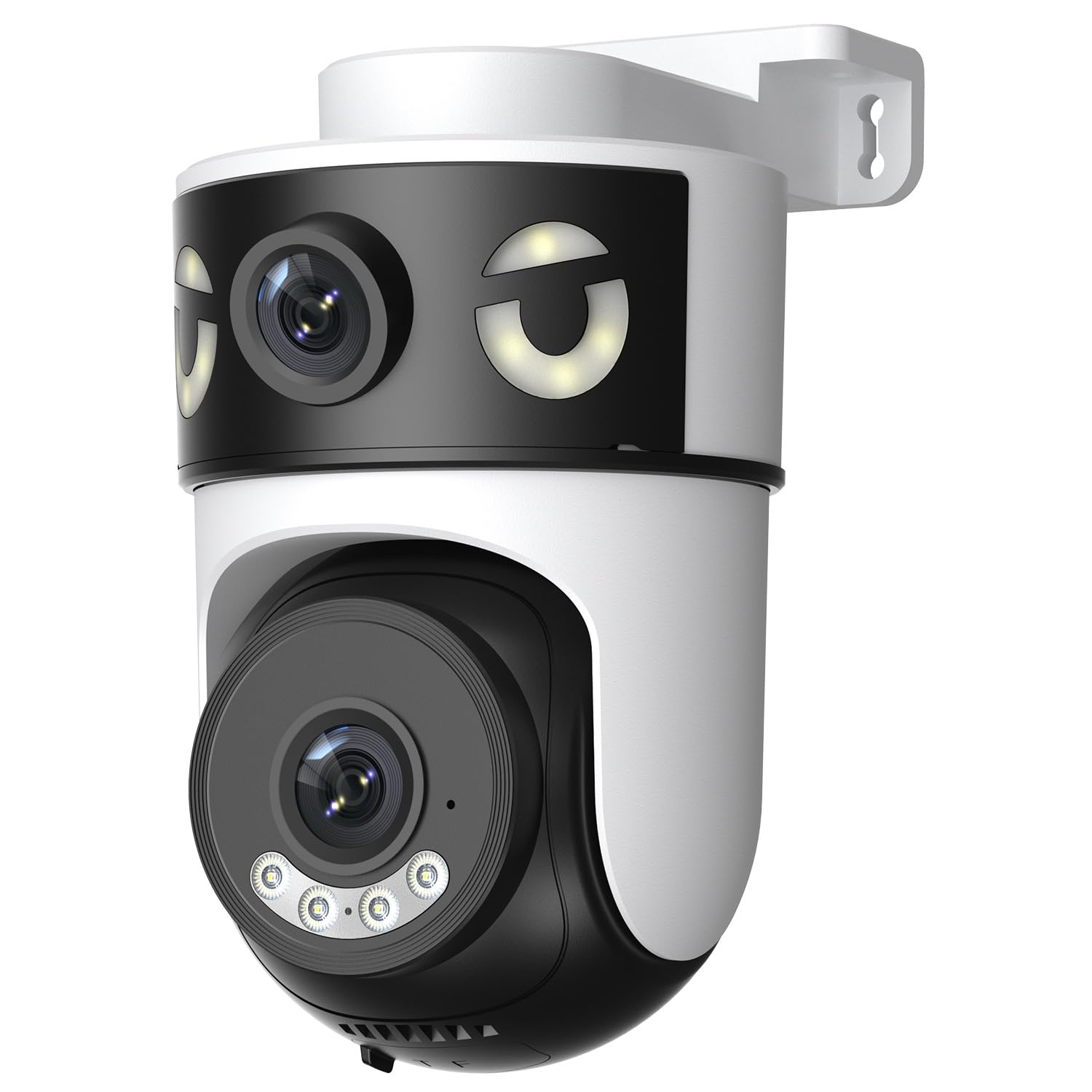
Image: Reobiux 2K Outdoor WiFi Surveillance Camera, Model K6Q-1P. This image shows the camera unit with its dual lenses, two external antennas, and a wall-mount bracket.
Główne cechy
- Dual Lens & 355° View: Unique 2-in-1 design supporting fixed area surveillance and mobile full-view monitoring. Features two high-resolution lenses; one fixed and one rotatable for wide panoramic views.
- Rozdzielczość 2K i kolorowa wizja nocna: Delivers clear and detailed images and videos. Offers three night vision modes: Infrared, Color, and Smart Night Vision for reliable 24-hour surveillance.
- Motion Detection & Alarm Siren: Advanced motion detection sends real-time alarm notifications to your mobile device upon detecting movement.
- Two-Way Audio & Multi-User Access: Built-in microphone and speaker allow for remote communication. Supports sharing camera access with multiple users.
- SD Card/Cloud Storage & Alexa Compatibility: Supports 24-hour continuous recording to a Micro SD card (max 128GB) or cloud server. Compatible with Amazon Alexa for voice control.
Przewodnik po konfiguracji
1. Montaż kamery
The camera is designed for wall mounting. Choose a suitable location that provides the desired surveillance coverage and is within range of your Wi-Fi network and a power outlet.
- Zaznacz punkty wiercenia na ścianie, korzystając z podstawy kamery jako szablonu.
- W razie potrzeby wywierć otwory i włóż kołki rozporowe.
- Przymocuj kamerę do ściany za pomocą dołączonych śrub montażowych.
- Ensure the camera is firmly attached and the waterproof cover kit is properly installed to protect connections.
2. Włączanie
Connect the provided power adapter to the camera's power input and then plug it into a standard electrical outlet. The camera will power on and initiate its startup sequence.
3. Połączenie sieciowe (Wi-Fi)
The camera connects via 2.4GHz Wi-Fi. Follow these steps to connect your camera to your home network:
- Pobierz O-kam Pro application from the App Store (iOS) or Google Play Store (Android) on your smartphone or tablet.
- Zarejestruj nowe konto lub zaloguj się, jeśli już je posiadasz.
- Postępuj zgodnie z instrukcjami w aplikacji, aby dodać nowy aparat. Zazwyczaj polega to na zeskanowaniu kodu QR na aparacie lub ręcznym wpisaniu jego identyfikatora.
- Wybierz sieć Wi-Fi 2.4 GHz i po wyświetleniu monitu wpisz hasło.
- Wait for the camera to connect to the network. A voice prompt or indicator light will confirm a successful connection.

Image: Reobiux camera with a smartphone displaying the O-kam Pro app interface, demonstrating remote control and live view możliwości.
Instrukcja obsługi
Na żywo View i sterowanie obrotem/pochyleniem
Once connected, open the O-kam Pro app to access the live feed from your camera. The dual-lens system provides both a fixed wide view and a movable PTZ (Pan-Tilt-Zoom) view.
- Kliknij kamerę w aplikacji, aby view strumień na żywo.
- Use the on-screen controls to pan (horizontal rotation up to 355°) and tilt (vertical movement) the movable lens to adjust the viewkąt.
- Switch between the fixed and movable lens views within the app interface.
Tryby noktowizyjne
Kamera oferuje trzy tryby widzenia nocnego:
- Nocna Nocna Wizja: Provides black and white images in low-light conditions using infrared LEDs.
- Kolorowe widzenie nocne: Utilizes built-in spotlights to provide full-color images at night.
- Inteligentne widzenie w nocy: Automatycznie przełącza się między widzeniem nocnym w podczerwieni a kolorowym widzeniem nocnym na podstawie wykrytego ruchu lub warunków oświetlenia.
- You can select your preferred night vision mode in the O-kam Pro app settings.
Wykrywanie ruchu i alerty
Configure motion detection settings and receive alerts on your mobile device:
- Navigate to the camera settings in the O-kam Pro app.
- Włącz wykrywanie ruchu i dostosuj poziom czułości według potrzeb.
- Set up alert notifications to be sent to your smartphone.
- You can also enable the alarm siren to deter intruders.
Dwukierunkowy dźwięk
Use the two-way audio feature to communicate through the camera:
- Na żywo view interface of the O-kam Pro app, tap the microphone icon to speak. Your voice will be transmitted through the camera's speaker.
- Kliknij ikonę głośnika, aby słuchać dźwięku z otoczenia kamery.
Nagrywanie i przechowywanie wideo
The camera supports continuous 24-hour recording. You have two storage options:
- Karta micro sd: Insert a Micro SD card (up to 128GB, not included) into the designated slot on the camera. The camera will automatically begin recording to the card.
- Przechowywanie w chmurze: Subscribe to a cloud storage plan through the O-kam Pro app for secure off-site video storage.
- Uzyskaj dostęp do nagranego pliku footage via the O-kam Pro app.
Integracja z Amazon Alexa
Integrate your Reobiux camera with Amazon Alexa for voice control:
- Otwórz aplikację Amazon Alexa na swoim urządzeniu mobilnym.
- Go to "Skills & Games" and search for the "O-kam Pro" skill.
- Enable the skill and link your O-kam Pro account.
- Discover devices. You can now use voice commands like "Alexa, show me the front door camera" to view transmisja na żywo na kompatybilnych urządzeniach Alexa.
Konserwacja
- Czyszczenie: Regularnie czyść obiektyw i korpus aparatu miękką, miękką szmatką.amp Do usuwania kurzu i brudu należy używać ściereczki. Nie należy używać silnych środków chemicznych ani ściernych środków czyszczących.
- Ochrona przed warunkami atmosferycznymi: The camera is waterproof, but ensure all connections are sealed properly, especially the power cable and any SD card slots, to maintain its weather resistance.
- Aktualizacje oprogramowania układowego: Check the O-kam Pro app periodically for firmware updates to ensure optimal performance and security.
Rozwiązywanie problemów
- Kamera nie włącza się:
- Ensure the power adapter is securely connected to both the camera and a working electrical outlet. Verify the outlet has power.
- Nie można połączyć się z siecią Wi-Fi:
- Ensure your Wi-Fi network is 2.4GHz. Check your Wi-Fi password for accuracy. Move the camera closer to your Wi-Fi router to improve signal strength. Restart your router and the camera.
- Brak życia view or recording:
- Check your internet connection. Ensure the camera is connected to Wi-Fi. Verify that the Micro SD card is inserted correctly and not full, or that your cloud storage subscription is active.
- Nie otrzymano alertów o wykryciu ruchu:
- Check app notification settings on your phone and within the O-kam Pro app. Ensure motion detection is enabled and sensitivity is set appropriately. Verify your phone has an active internet connection.
- Dwukierunkowa transmisja dźwięku nie działa:
- Ensure your phone's microphone and speaker are enabled for the O-kam Pro app. Check the volume settings on your phone and within the app. Ensure there are no obstructions blocking the camera's microphone or speaker.
Specyfikacje
| Funkcja | Specyfikacja |
|---|---|
| Marka | Reobiux |
| Nazwa modelu | K6Q-1P |
| Numer modelu | REO-K6Q-1P |
| Typ montażu | Montaż ścienny |
| Rozdzielczość nagrywania wideo | 2K |
| Liczba elementów | 1 |
| Technologia komunikacji bezprzewodowej | Wi-Fi (2.4 GHz) |
| Viewing kąt | 355 stopni (Pan) |
| Typ instalacji | Wkręcane |
| Tworzywo | Plastikowy |
| Tomtage | 5 V (prąd stały) |
| Moc | 5 watów |
| Poziom wodoodporności | Wodoodporny |
| Cechy specjalne | Two-Way Audio, Local Recording, HD Resolution, PTZ Technology |
| Zalecane zastosowanie | Bezpieczeństwo na zewnątrz |
| Kompatybilne urządzenia | Laptop, smartfon, tablet, telewizor |
| Źródło zasilania | Kabel elektryczny |
| Protokół łączności | RTSP |
| Typ kontrolera | O-kam Pro App |
Gwarancja i wsparcie
For warranty information and technical support, please refer to the official Reobiux website or contact Reobiux customer service directly. Keep your purchase receipt as proof of purchase for warranty claims.
Manufacturer: Reobiux