
JideTech P10
JideTech P10 4K 8MP Outdoor PTZ IP PoE Camera Instruction Manual
Model: P10
Wstęp
This manual provides detailed instructions for the installation, operation, and maintenance of your JideTech P10 4K 8MP Outdoor PTZ IP PoE Camera. Please read this manual thoroughly before using the product to ensure proper functionality and safety.
Co jest w pudełku
Sprawdź, czy w opakowaniu znajdują się wszystkie komponenty:
- 1 x 8MP PoE PTZ Camera
- 1 x Pakiet śrub
- 1 x Instrukcja obsługi
- 1 x zasilacz
- 1 x 1M kabel sieciowy

Image: Contents of the JideTech P10 camera box, showing the camera, power adapter, network cable, screw pack, and instruction manual.
Cechy produktu
- 4K 8MP Ultra-High-Definition Imaging: Captures every detail with precision using a 1/2.8-inch IMX415 CMOS sensor.
- 200-krotny zoom hybrydowy: Features 20x optical zoom and 10x digital zoom for detailed viewing without image quality loss.
- Funkcjonalność Pan-Tilt-Zoom (PTZ): Supports dual-axis rotation with 360° horizontal and 90° vertical movement, up to 90°/sec.
- Zaawansowane widzenie w nocy: Equipped with 6 infrared lights and 4 white LEDs, providing up to 492ft night vision with starlight-level performance and enhanced color reproduction. Offers Full IR, White Light, and Smart night vision modes.
- Human/Vehicle Detection & Auto Tracking: Automatically tracks human movement and sends alerts via the Videolink APP upon detecting suspicious activity. Supports up to 256 preset positions for area cruise detection.
- Zasilanie przez Ethernet (PoE): Simplifies installation by allowing data transmission and power supply through a single network cable.
- Wysoka kompatybilność: Supports RTSP and ONVIF 2.4 standard protocols, compatible with most NVRs and third-party software like Blue Iris, iSpy, and NAS Storage.
- Dwukierunkowy dźwięk: Built-in microphone and speaker enable real-time conversations.
- Odporność na warunki atmosferyczne IP66: Wytrzymały aluminiowy casing ensures resistance to rain, snow, and sun, with an operating temperature range of -20°C to +60°C.
Konfiguracja i instalacja
Metody połączenia
The JideTech P10 camera offers multiple connection options for flexible deployment:
- Connect via NVR PoE: Connect the camera directly to a PoE NVR using a single Ethernet cable for both power and data.
- Connect by DC12V Power Supply: Power the camera using the provided DC12V power adapter and connect to your network via a standard router.
- Connect via PoE Injector or PoE Switch: Use a PoE injector or PoE switch to provide power and data over a single Ethernet cable, then connect to your router.
Video: Demonstrates three methods to connect the PoE IP Camera: via NVR PoE, DC12V power supply, and PoE injector/switch.
Montowanie
The camera is designed for Montaż ścienny installation. Ensure the mounting surface is sturdy enough to support the camera's weight and provide a clear field of view. Use the included screw pack for secure installation.

Image: JideTech P10 camera mounted on a wall, highlighting its IP66 weatherproof rating.
Instrukcja obsługi
Pan, Tilt i Zoom Control
The P10 camera features Pan-Tilt-Zoom (PTZ) capabilities, allowing you to remotely adjust the camera's viewing angle and zoom level. It supports 360° horizontal pan and 90° vertical tilt. The 20x optical zoom combined with 10x digital zoom provides a total of 200x hybrid zoom for capturing distant details.

Image: Diagram illustrating the 360° pan and 90° tilt capabilities, along with multiple preset positions for automated monitoring.
Video: Demonstrates the 200x hybrid zoom capability of the JideTech 4K 8MP PTZ camera, showing clear detail from a distance.
Tryby noktowizyjne
The camera offers three night vision modes to adapt to various lighting conditions:
- Full IR: Utilizes infrared illumination for clear black and white images in complete darkness.
- Białe światło: Activates built-in white LEDs to provide full-color night vision. This mode can also act as a deterrent.
- Inteligentne widzenie w nocy: Automatically switches between IR and white light based on detected motion, providing color vision when activity is present and conserving power with IR otherwise.

Image: Visual comparison of Infrared Night Vision, Smart Color Night Vision, and Full Color Night Vision modes, showing the camera's capabilities in low-light conditions.
Human/Vehicle Detection and Auto Tracking
The camera's intelligent detection system can differentiate between humans, vehicles, and other moving objects like animals or leaves, reducing false alarms. When a human or vehicle is detected, the camera can automatically track its movement and send an alert to your connected device via the Videolink APP.
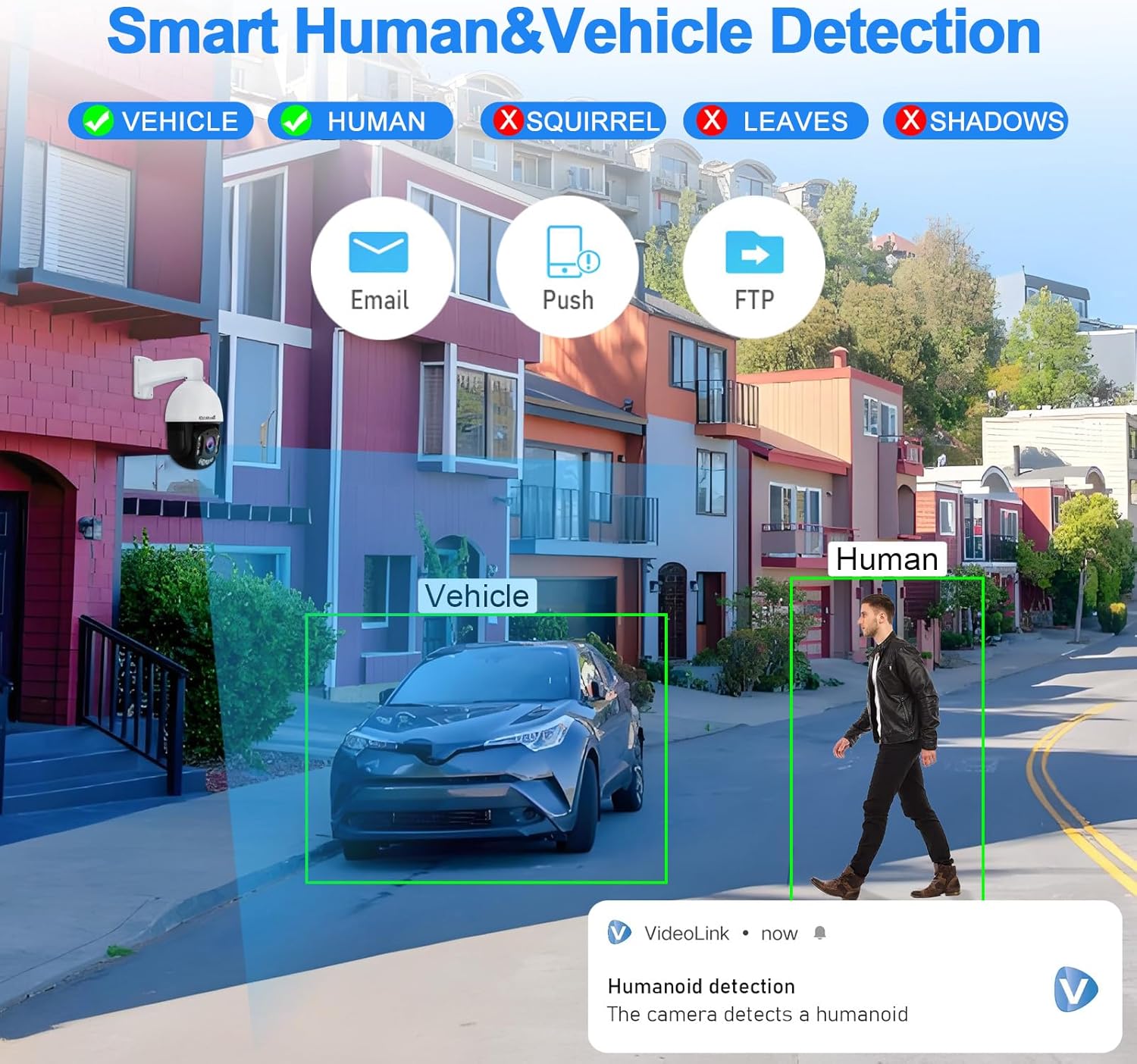
Image: Illustration of Smart Human and Vehicle Detection, showing the camera identifying and tracking a person and a vehicle while ignoring other elements.
Dwukierunkowy dźwięk
The integrated microphone and speaker allow for two-way communication. You can listen to the audio from the camera's location and speak through the camera using the Videolink app on your smartphone or tablet.

Image: Depiction of the two-way audio function, showing a user speaking through their phone to someone near the camera.
Remote Access and Compatibility
Access your camera feed and controls remotely from anywhere using the "Videolink" app (available for Android and iOS), PC client software, or other compatible third-party applications like Blue Iris, iSpy, and NAS Storage. The camera supports ONVIF 2.4, RTSP, and RTMP protocols for broad integration.

Obraz: Ponadview of remote access options, including mobile apps, PC clients, and compatibility with various protocols and software.
Konserwacja
Odporność na warunki atmosferyczne
The JideTech P10 camera has an IP66 rating, indicating it is protected against dust and powerful water jets. Its aluminum casing is designed to withstand outdoor conditions, including rain, snow, and direct sunlight, within an operating temperature range of -20°C to +60°C.

Image: The IP66 waterproof camera shown mounted outdoors, enduring rain, snow, and sun.
Składowanie
The camera supports local storage via a Micro SD card, with a maximum supported size of 256 GB. This allows for continuous recording or event-triggered recording directly on the device. For extended storage and backup, the camera is compatible with ONVIF NVRs and can work with FTP/NAS storage solutions.

Image: Visual representation of the camera's Micro SD card slot (supports up to 256GB), its ability to work with ONVIF NVRs for 24/7 recording, and compatibility with FTP/NAS for storage.
Specyfikacje
| Funkcja | Szczegół |
|---|---|
| Nazwa modelu | P10 |
| Efektywna rozdzielczość wideo | 8 MP (4K) |
| Technologia czujnika fotograficznego | CMOS (1/2.8-inch IMX415) |
| Zoom optyczny | 20x |
| Zoom cyfrowy | 10x |
| Typ powiększenia | Hybrid Zoom (200x total) |
| Viewing kąt | 360 stopni (obrót), 90 stopni (pochylenie) |
| Zakres noktowizora | 492 stóp |
| Typ źródła światła | Podczerwień + LED |
| Technologia łączności | Ethernet, PoE, RTSP, RTMP, Wired |
| Protokół łączności | Blue Iris, Ethernet, ONVIF, RTMP, RTSP |
| Źródło zasilania | Elektryczny przewodowy |
| Typ kontrolera | Android, iOS (App Control) |
| Typ montażu | Montaż ścienny |
| Międzynarodowa Ocena Ochrony | IP66 (wodoodporne) |
| Tworzywo | Aluminium, Metal |
| Wymiary produktu | 5.7 x 7.48 x 9.25 cala |
| Waga przedmiotu | 4.18 funta |
| Maksymalny obsługiwany rozmiar pamięci Flash | 256 GB (Micro SD) |
| Kodowanie wideo | H.264; H.265; H.265+ |
| Możliwości nagrywania dźwięku i obrazu | Video + Audio |
Rozwiązywanie problemów
If you encounter issues with your JideTech P10 camera, consider the following general troubleshooting steps:
- Brak zasilania: Ensure the power adapter is securely connected to both the camera and a working power outlet, or that the PoE connection is active and functional.
- Brak transmisji wideo: Check network cable connections. Verify that the camera is properly connected to your router or NVR. Ensure the camera's IP address is correctly configured and accessible on your network. Restart the camera and viewurządzenie.
- Słaba jakość obrazu: Clean the camera lens. Check network bandwidth if streaming is choppy. Adjust camera settings such as resolution, frame rate, and WDR (Wide Dynamic Range) for optimal performance in your environment.
- Problemy z wykrywaniem ruchu: Review the motion detection sensitivity settings in the app. Ensure the detection zones are correctly configured and not obstructed.
- Problemy z dwukierunkową transmisją dźwięku: Sprawdź ustawienia mikrofonu i głośników w aplikacji. Upewnij się, że poziom głośności jest odpowiedni po obu stronach.
- Błąd dostępu zdalnego: Verify your internet connection. Ensure port forwarding (if required by your network setup) is correctly configured on your router. Confirm the Videolink app or other software is up to date.
Aby uzyskać dalszą pomoc, zapoznaj się z informacjami pomocy technicznej podanymi poniżej.
Gwarancja i wsparcie
JideTech is committed to providing reliable products and customer satisfaction. Your JideTech P10 camera includes:
- Polityka wymiany na okres 1 roku: In case of product defects, JideTech offers a replacement within one year of purchase.
- 30-dniowa gwarancja zwrotu pieniędzy: Jeśli nie jesteś zadowolony z zakupu, możesz ubiegać się o zwrot pieniędzy w ciągu 30 dni.
- Wsparcie online 24/7: Dedicated one-on-one online support is available to assist with any questions or issues you may encounter.
For support, please contact JideTech customer service through the official channels provided with your product or on the JideTech webstrona.
Ask a question about this manual
Ask about setup, troubleshooting, compatibility, parts, safety, or missing instructions. Manuals+ will review the question and use this page’s manual context to help answer it.