
1. Wprowadzenie
This manual provides essential information for the installation, operation, and maintenance of your keepLiNK 5-Port 10G Multi-Gigabit Unmanaged Network Switch. Please read this manual thoroughly before using the device to ensure proper and safe operation. This switch is designed to provide high-speed network connectivity for various devices in home and small office environments.
2. Informacje dotyczące bezpieczeństwa
- Zasilanie: Use only the power adapter provided with the device. Ensure the power source matches the voltagwymagania określone na adapterze.
- Wentylacja: Nie zasłaniaj żadnych otworów wentylacyjnych. Zapewnij odpowiedni przepływ powietrza wokół urządzenia, aby zapobiec przegrzaniu.
- Środowisko: Avoid placing the switch in areas with high humidity, extreme temperatures, direct sunlight, or near water. Keep the device away from flammable materials.
- Czyszczenie: Disconnect the power before cleaning. Use a dry, soft cloth. Do not use liquid or aerosol cleaners.
- Ochrona odgromowa: The device features 4KV lightning protection. However, for enhanced safety during thunderstorms, it is recommended to disconnect the power adapter.
3. Zawartość opakowania
Sprawdź, czy w przesyłce znajdują się następujące elementy:
- keepLiNK 5-Port 10G Multi-Gigabit Unmanaged Network Switch
- Zasilacz
- Instrukcja obsługi (ten dokument)
If any item is missing or damaged, please contact your retailer.
4. Koniec produktuview
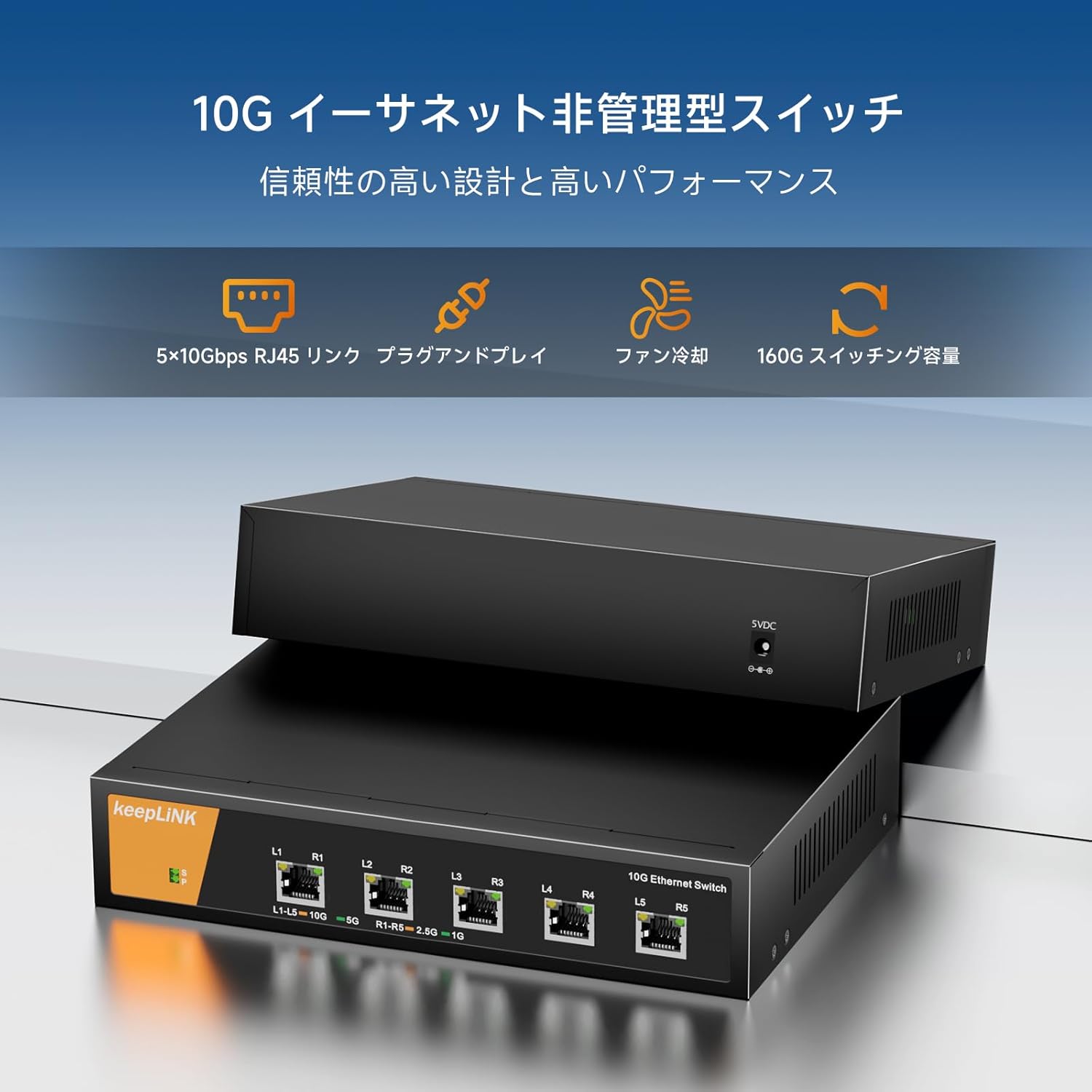
The keepLiNK 5-Port 10G Multi-Gigabit Unmanaged Network Switch provides five 10 Gigabit Ethernet ports for high-speed network connections. Its metal casing ensures durability and efficient heat dissipation.

Rysunek 1: Przód view of the keepLiNK 5-Port 10G Multi-Gigabit Unmanaged Network Switch, showing the five RJ45 ports and status indicators.
The switch features LED indicators for each port to show link status and activity. The auto-negotiation function intelligently detects the link speed of connected devices and adjusts to 100Mb, 1G, 2.5G, 5G, or 10G for optimal performance.
Rysunek 2: Z bliska view of the switch ports with labels indicating link speed and activity.
5. Konfiguracja
The keepLiNK 5-Port 10G Multi-Gigabit Unmanaged Network Switch is designed for simple plug-and-play operation, requiring no software installation or complex configuration.

Rysunek 3: Visual representation of the switch's plug-and-play functionality and other features like energy saving and lightning protection.
- Umieszczenie: Choose a stable, flat surface for the switch. Ensure there is adequate space around the device for ventilation.
- Podłącz zasilanie: Connect the provided power adapter to the switch's power input port and then plug the adapter into a standard electrical outlet. The power LED indicator on the switch should illuminate.
- Podłącz urządzenia: Use Ethernet cables (Cat6a or higher recommended for 10G speeds) to connect your network devices (e.g., computers, NAS, routers, servers) to any of the five RJ45 ports on the switch.
- Sprawdź połączenie: Once a device is connected, the corresponding port LED on the switch should light up, indicating an active link. The color or blinking pattern of the LED may indicate the link speed and activity.
Important Note on Cables: For optimal 10G performance, Cat6a or Cat7 Ethernet cables are required. Cat5e cables are typically limited to 1 Gigabit per second (1Gbps) and Cat6 cables may support 10G over shorter distances (up to 55 meters).

Rysunek 4: Chart illustrating the maximum supported speeds for different Ethernet cable types (Cat5, Cat5e, Cat6, Cat6A).
6. Instrukcja obsługi
The keepLiNK 5-Port 10G Multi-Gigabit Unmanaged Network Switch operates automatically once connected. It functions as a central connection point for your wired network devices, facilitating high-speed data transfer.
- Autonegocjacja: Each port on the switch automatically detects the speed of the connected device (100Mbps, 1Gbps, 2.5Gbps, 5Gbps, or 10Gbps) and adjusts its operating mode accordingly.
- Obsługa pełnego dupleksu: All ports support full-duplex mode, allowing data to be sent and received simultaneously, maximizing network efficiency.
- Architektura nieblokująca: The switch features a non-blocking switching architecture, meaning it can forward packets at full wire speed on all ports simultaneously, ensuring maximum throughput. The total switching capacity is 160Gbps.
- Wskaźniki LED: Observe the LED indicators on the front panel to monitor the status of each port. A solid light typically indicates a stable link, while a blinking light indicates data activity. Refer to the product's specific LED behavior if detailed information is needed.

Rysunek 5: Nadview of key features including 5x 10Gbps RJ45 links, plug-and-play, fan cooling, and 160G switching capacity.
7. Konserwacja
To ensure the longevity and optimal performance of your keepLiNK network switch, follow these maintenance guidelines:
- Czyszczenie: Periodically clean the exterior of the switch with a soft, dry cloth. Do not use abrasive cleaners or solvents. Ensure no dust accumulates in the ventilation holes.
- Wentylacja: Regularly check that the ventilation openings are clear and unobstructed. The metal casing and internal fan are designed for efficient heat dissipation, but proper airflow is crucial.
- Warunki środowiskowe: Operate the switch within the specified temperature and humidity ranges (refer to Specifications section). Avoid exposing it to extreme conditions.
- Zarządzanie kablami: Ensure all connected Ethernet cables are properly routed and not excessively bent or strained. Damaged cables can lead to performance issues.
- Aktualizacje oprogramowania układowego: As an unmanaged switch, firmware updates are generally not required or available.
8. Rozwiązywanie Problemów
If you encounter issues with your keepLiNK network switch, refer to the following common troubleshooting steps:
- Brak zasilania:
- Upewnij się, że zasilacz jest solidnie podłączony do przełącznika i do sprawnego gniazdka elektrycznego.
- Sprawdź, czy gniazdko elektryczne działa prawidłowo, podłączając do niego inne urządzenie.
- Brak światła łącza:
- Sprawdź, czy kabel Ethernet jest prawidłowo podłączony do portu przełącznika i podłączonego urządzenia.
- Wypróbuj inny kabel Ethernet.
- Sprawdź, czy podłączone urządzenie jest włączone i czy jego karta sieciowa działa prawidłowo.
- Spróbuj podłączyć urządzenie do innego portu przełącznika.
- Niska prędkość sieci:
- Verify that your Ethernet cables are Cat6a or higher for 10G connections. Older cables (e.g., Cat5e) will limit speeds.
- Ensure your connected devices (e.g., network cards, NAS) support 10G or multi-gigabit speeds.
- Check for network congestion on your overall network.
- Restart the switch and all connected devices.
- Połączenie przerywane:
- Sprawdź kable Ethernet pod kątem uszkodzeń.
- Upewnij się, że przełącznik znajduje się w dobrze wentylowanym pomieszczeniu i nie jest narażony na przegrzanie.
- Sprawdź źródła zakłóceń elektromagnetycznych.
Jeśli po wypróbowaniu tych kroków problem nadal występuje, skontaktuj się z obsługą klienta.
9. Specyfikacje
| Funkcja | Opis |
|---|---|
| Marka | zachowajLiNK |
| Numer modelu | Przełącznik sieciowy 10G |
| Liczba portów | 5 |
| Typ interfejsu | RJ45 |
| Szybkość przesyłu danych | 10 Gigabits per second (per port) |
| Przełączanie pojemności | 160 Gb/s |
| Rodzaj materiału obudowy | Metal |
| Maksymalne zużycie energii | 24 watów |
| Maksymalna temperatura oceny | 55 ℃ (131 ℉) |
| Wymiary produktu | Wymiary 16.1 x 4.4 x 22 cm |
| Waga produktu | 1.3 kilogramów |
| Wymagane baterie | NIE |
| Kompatybilne urządzenia | Game consoles, Tablets, Laptops, Printers, Routers |
10. Gwarancja i wsparcie
keepLiNK products are designed for reliability and performance. For information regarding warranty coverage and technical support, please refer to the warranty card included with your product or visit the official keepLiNK webStrona. Kontaktując się z pomocą techniczną, prosimy o przygotowanie numeru modelu produktu i daty zakupu.