
1. Wprowadzenie
This manual provides detailed instructions for the installation, operation, and maintenance of your IIWEY C4 PRO 4-Channel Dash Cam and its accompanying hardwire kit. The C4 PRO system is designed to provide comprehensive video surveillance for your vehicle, offering multi-channel recording and advanced parking monitoring features.
2. Zawartość opakowania
Sprawdź, czy w przesyłce znajdują się wszystkie elementy wymienione poniżej:
- C4 PRO Dash Cam Set (Main unit with front, interior, and rear cameras)
- Zestaw do podłączenia portu typu C
- Łom instalacyjny
- 8 x Fuse Tap Cables (various types: LP, Mini, ATO, Micro2)
- 4 x klipsów do ukrywania kabli

Image: Contents of the hardwire kit, including the main cable, various fuse taps, and a pry tool.
3. Konfiguracja i instalacja
3.1 Instalacja kamery samochodowej
- Montaż jednostki głównej: Wybierz odpowiednie miejsce na przedniej szybie, zazwyczaj za tylną szybą.view lustro, które nie zasłania view. Clean the area thoroughly before attaching the dash cam mount.
- Podłączanie kamer: Connect the interior and rear cameras to the main unit. Ensure cables are routed neatly and securely, using the provided cable hiding clips.
- Podłączenie zasilania: For continuous power and parking mode functionality, connect the dash cam to the hardwire kit.

Obraz: Ponadview of the IIWEY C4 PRO dash cam system, illustrating its multi-camera setup and connectivity.
3.2 Instalacja zestawu okablowania
The hardwire kit enables 24-hour parking surveillance and protects your vehicle's battery from draining.
- Zidentyfikuj skrzynkę bezpieczników: Locate your vehicle's fuse box, typically found under the dashboard or in the engine bay.
- Podłącz przewody: The hardwire kit has three wires:
- Red (BAT): Connect to a constant power fuse (always on, even when the ignition is off).
- Yellow (ACC): Connect to an accessory power fuse (on only when the ignition is on).
- Czarny (GND): Connect to a metal bolt or screw on the vehicle's chassis for ground.
- Use Fuse Taps: Select the appropriate fuse tap cable (LP/Mini/ATO/Micro2) that matches your vehicle's fuse type. Insert the original fuse into the lower slot of the tap, and a new fuse (same amperage) for the dash cam into the upper slot.
- Trasa kabli: Use the installation crowbar to neatly tuck the cables along the vehicle's trim and headliner to conceal them.

Obraz: Szczegółowy view of the hardwire kit's ACC, GND, and BAT wires for proper connection.

Image: Illustration of different fuse tap types and a typical hardwire kit installation in a vehicle's fuse box.
4. Instrukcja obsługi
4.1 Podstawowa obsługa
Once properly installed and powered, the dash cam will typically power on and begin recording automatically when your vehicle starts. It will power off shortly after the vehicle is turned off, unless parking mode is active via the hardwire kit.
4.2 Parking Modes (with Hardwire Kit)
The hardwire kit enables 24-hour surveillance with two distinct parking modes:
- Tryb parkowania poklatkowego: The dash cam records footage at a low frame rate (e.g., 1 frame per second) to conserve memory while continuously monitoring your parked vehicle. This allows for extended recording periods.
- Tryb parkowania z wykrywaniem kolizji: The dash cam remains in standby mode and automatically activates to record and lock video footage upon detecting a significant impact or collision.

Image: Explanation of 24-hour parking modes, including time-lapse and collision detection.
4.3 Multi-Channel Recording
The C4 PRO supports various recording configurations:
| Tryb | Przednia kamera | Prawa kamera | Lewa kamera | Kamera tylna |
|---|---|---|---|---|
| 4-kanałowy | 2.7K (1440P) | 1080P | 1080P | 1440P |
| 3-kanałowy | 1944P | 1080P | / | 1440P |
| 2-kanałowy | 1944P | / | / | 1440P |
| Single Front | 1944P | / | / | / |
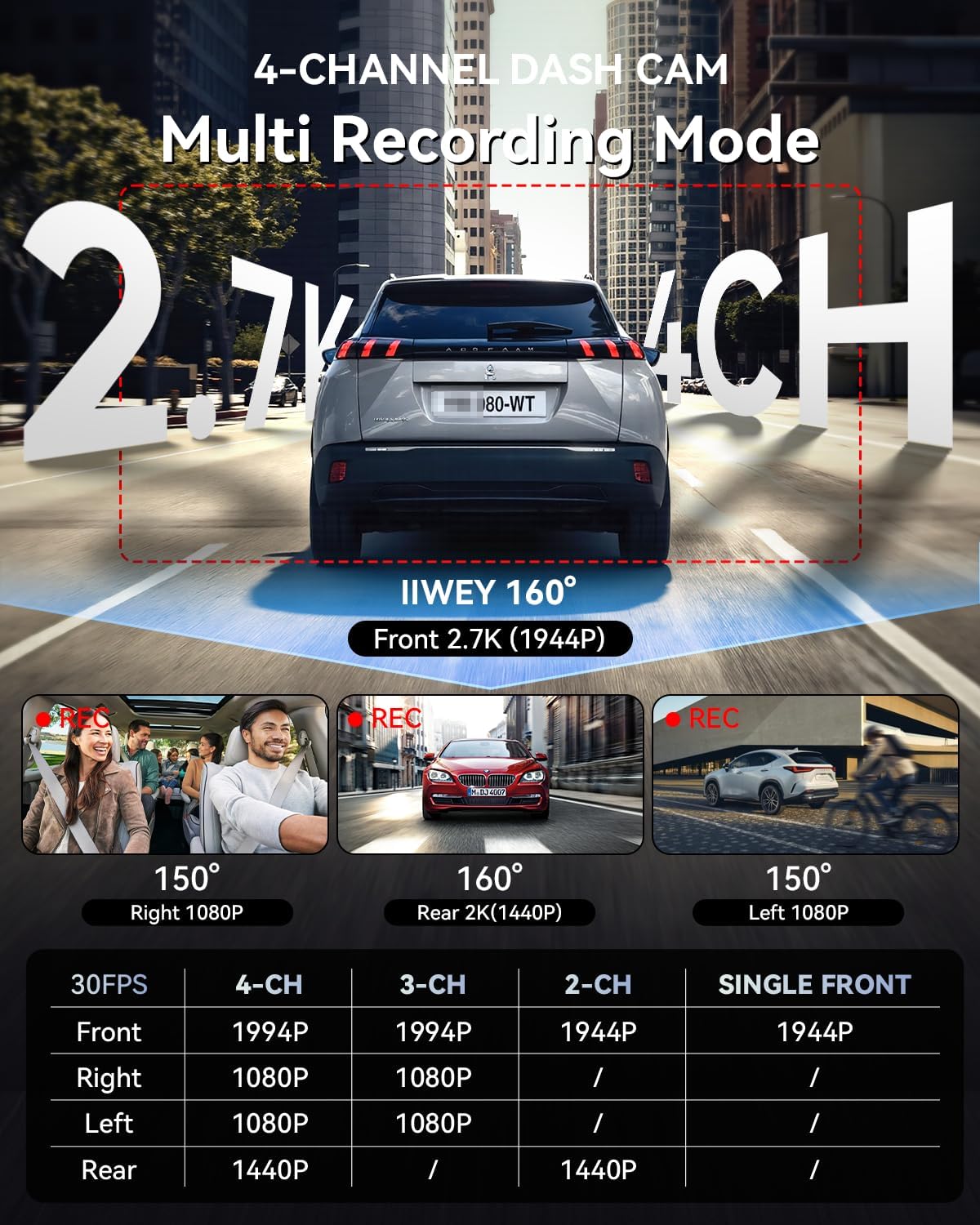
Image: Multi-recording mode options and corresponding resolutions for the C4 PRO dash cam.
4.4 Niski poziom głośnościtage Ochrona
The hardwire kit includes a smart power management chip that monitors your vehicle's battery voltage. Jeśli objętośćtage drops below 11.6V, the kit will automatically cut off power to the dash cam, ensuring sufficient power remains to start your engine.

Image: Illustration of the hardwire kit's low voltage protection mechanism.
5. Konserwacja
- Zarządzanie kartami SD: Regularly format the microSD card (at least once a month) to ensure optimal performance and prevent data corruption. Use a high-quality, high-endurance microSD card.
- Czyszczenie soczewek: Keep camera lenses clean using a soft, lint-free cloth to ensure clear video recordings.
- Aktualizacje oprogramowania układowego: Sprawdź oficjalne IIWEY webOdwiedzaj tę witrynę okresowo, aby uzyskać aktualizacje oprogramowania sprzętowego, które poprawią wydajność i dodadzą nowe funkcje.
6. Rozwiązywanie Problemów
- Kamera samochodowa nie włącza się:
- Check all power connections. Ensure the hardwire kit is correctly installed and receiving power from the fuse box. Verify the vehicle's battery voltage jest powyżej niskiego poziomu głośnościtage protection threshold (11.6V).
- Parking Mode is not working:
- Confirm the hardwire kit is correctly installed with the ACC and BAT wires connected to their respective constant and accessory power sources. Ensure parking mode is enabled in the dash cam's settings.
- Wideotage jest niewyraźne lub niejasne:
- Clean the camera lenses. Ensure the protective film has been removed from the lenses. Check if the dash cam is securely mounted and not vibrating.
- Błąd karty SD:
- Format the microSD card. If the issue persists, try a different high-quality microSD card.
7. Specyfikacje
| Funkcja | Szczegół |
|---|---|
| Marka | IIWEY |
| Nazwa modelu | C4PRO |
| Rozdzielczość przechwytywania wideo | 2.7K 1440P (Front) |
| Szybkość klatek | 30 klatek na sekundę |
| Cechy specjalne | Parking Assistant, Time Lapse, Low Voltage Ochrona |
| Wejście zestawu przewodowego | 12 V-24 V |
| Wyjście zestawu przewodowego | 5V/3A |
| Niska objętośćtage Odcięcie | 11.6 V |
| Zgodny typ pojazdu | Car, Truck, Van |
| Typ wyświetlacza | LCD |
| Kolor | Czarny |
8. Gwarancja i wsparcie
For warranty information, technical support, or any inquiries regarding your IIWEY C4 PRO Dash Cam, please refer to the contact information provided with your purchase or visit the official IIWEY webZachowaj paragon jako dowód zakupu na wypadek reklamacji.
A video guide for installation may be available by scanning a QR code provided in the physical manual or on the product packaging.

Image: Reference to a video guide and manual for wiring the dash cam.