
Baseus E20
Instrukcja obsługi słuchawek dousznych Baseus E20 True Wireless
Modele: E20
1. Wprowadzenie
Thank you for choosing the Baseus E20 True Wireless Earbuds. These earbuds are designed to provide a high-quality audio experience with powerful bass, clear calls, and reliable connectivity. This manual will guide you through the setup, operation, and maintenance of your new earbuds.
2. Co znajduje się w pudełku
- Baseus E20 True Wireless Earbuds (Left and Right)
- Etui ładujące
- Kabel ładujący USB-C
- Instrukcja obsługi

Image: Baseus E20 True Wireless Earbuds shown inside their charging case, highlighting key features like powerful bass, IPX5 water resistance, 33 hours listening time, and environmental noise cancellation.
3. Koniec produktuview
3.1 Elementy słuchawek dousznych
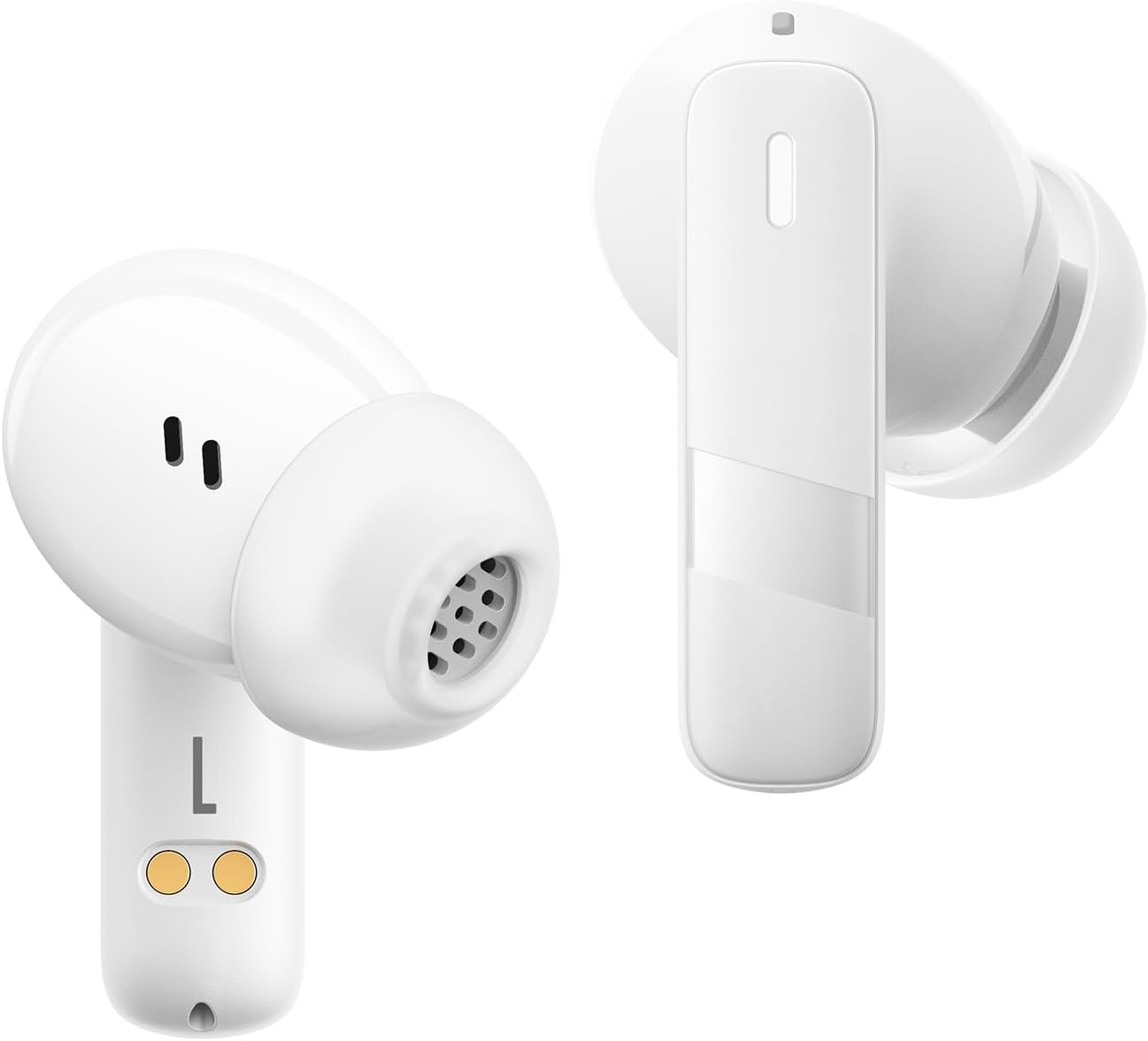
Obraz: Zbliżenie view of the Baseus E20 True Wireless Earbuds, showing the ergonomic design, speaker grille, and charging contacts.
- Obszar sterowania dotykowego: Do zarządzania odtwarzaniem, połączeniami i trybami.
- Mikrofon: For calls and voice commands (2 ENC Mics).
- Głośnik: Delivers audio (12mm drivers).
- Ładowanie styków: For charging the earbuds in the case.
3.2 etui ładujące
- Port ładowania: Port USB-C do ładowania etui.
- Kontrolka: Pokazuje stan ładowania i poziom naładowania baterii.
4. Konfiguracja
4.1 Ładowanie słuchawek dousznych i etui
Przed pierwszym użyciem należy w pełni naładować słuchawki douszne i etui ładujące.
- Umieść słuchawki w etui ładującym. Upewnij się, że styki ładowania są wyrównane.
- Podłącz kabel ładujący USB-C do portu ładowania w obudowie i do źródła zasilania.
- The indicator light on the case will show the charging status. Once fully charged, the light will indicate completion or turn off.

Image: The Baseus E20 charging case is shown connected to a USB-C charging cable, illustrating the charging process and highlighting the 33-hour total listening time.
4.2 parowanie Bluetooth
Pair your Baseus E20 earbuds with your device for the first time.
- Otwórz etui ładujące. Słuchawki automatycznie przejdą w tryb parowania, a ich diody kontrolne zaczną migać.
- Włącz Bluetooth na swoim urządzeniu (smartfonie, tablecie, laptopie).
- Szukaj "Baseus E20" in the list of available Bluetooth devices and select it to connect.
- Once connected, the earbud indicator lights will turn off or show a steady light, and you will hear a confirmation tone.
Notatka: Po pierwszym sparowaniu słuchawki douszne automatycznie połączą się z ostatnio sparowanym urządzeniem po wyjęciu z etui, pod warunkiem że w urządzeniu włączony jest Bluetooth.

Image: A detailed diagram illustrating the Bluetooth 5.3 chip, emphasizing a more stable and efficient connection for the Baseus E20 earbuds.
5. Instrukcja obsługi
The Baseus E20 earbuds feature intuitive touch controls. The following table outlines the common functions:

Image: A visual guide to the touch control areas on the Baseus E20 earbuds, detailing single, double, and triple tap functions for various operations.
| Działanie | Funkcjonować |
|---|---|
| Double Tap (L or R) | Answer/Hang up Call, Play/Pause Music |
| Potrójne dotknięcie (L lub R) | Aktywuj Asystenta Głosowego |
| Long Press (L or R) | Cycle Noise Cancellation Modes (Default > Normal > Transparency) |
| Long Press (L or R) | Cycle Spatial Audio Modes (Music Mode > Theater Mode > Normal) |
Notatka: Specific functions may vary slightly depending on your connected device and operating system.
5.1 Zarządzanie połączeniami
- Odbieranie/kończenie połączeń: Kliknij dwukrotnie dowolną słuchawkę.
- Odrzuć połączenie: Naciśnij i przytrzymaj dowolną słuchawkę przez 2 sekund.

Image: An internal diagram of the Baseus E20 earbud highlighting the dual-mic Environmental Noise Cancellation (ENC) system for clear calls.
5.2 Odtwarzanie muzyki
- Odtwórz/Pauza: Kliknij dwukrotnie dowolną słuchawkę.
5.3 Asystent głosowy
- Aktywuj asystenta głosowego: Trzykrotnie dotknij dowolnej słuchawki.
5.4 Tryby kontroli hałasu
The Baseus E20 earbuds offer different noise control modes:
- Noise Cancellation (Default): Redukuje hałas otoczenia, zapewniając wciągające wrażenia słuchowe.
- Tryb normalny: Standard audio playback without active noise control.
- Tryb przezroczystości: Umożliwia słyszenie otoczenia podczas słuchania dźwięku.
Aby przełączać się między trybami: Naciśnij i przytrzymaj dowolną słuchawkę.
6. Konserwacja
6.1 Czyszczenie
- Regularly clean the earbuds, especially the ear tips and speaker grilles, with a soft, dry, lint-free cloth.
- Aby zapobiec problemom z ładowaniem, upewnij się, że styki ładowania w słuchawkach i etui są czyste i suche.
- Nie należy używać materiałów ściernych, rozpuszczalników ani silnych środków chemicznych.
6.2 Przechowywanie
- Przechowuj słuchawki douszne w etui ładującym, gdy nie są używane, aby je chronić i utrzymywać w stanie naładowania.
- Unikać przechowywania w ekstremalnych temperaturach i przy wysokiej wilgotności.
6.3 Wodoodporność (IPX5)
The Baseus E20 earbuds are IPX5 water-resistant, meaning they can withstand splashes and sweat. They are not designed for submersion in water or exposure to pressurized water jets. Ensure earbuds are dry before placing them back in the charging case to prevent damage.

Image: The Baseus E20 earbuds and charging case are depicted with water splashing around them, illustrating their IPX5 water-resistant capability for reliable performance in various conditions.
7. Rozwiązywanie Problemów
| Problem | Możliwe rozwiązanie |
|---|---|
| Słuchawki douszne nie parują się |
|
| Brak dźwięku z jednej słuchawki |
|
| Etui ładujące nie ładuje się |
|
| Słaba jakość połączeń |
|
8. Specyfikacje
| Funkcja | Szczegół |
|---|---|
| Nazwa modelu | E20 |
| Wersja Bluetooth | 5.3 |
| Rozmiar kierowcy | 12mm |
| Całkowity czas gry | Do 33 godzin (z etui ładującym) |
| Czas odtwarzania słuchawek | Do 6 godzin (po jednym ładowaniu) |
| Odporność na wodę | IPX5 |
| Mikrofony | 2 ENC Mics for Clear Calls |
| Typ sterowania | Sterowanie dotykowe |
| Port ładowania | USB-C |
| Waga przedmiotu | 3.2 uncji |
| Kompatybilne urządzenia | Cellphones, Laptops, Tablets, Devices with Bluetooth Audio Capability (iOS, Android, Windows, Mac OS, Switch) |

Image: A cutaway diagram illustrating the 12mm PU diaphragm driver, emphasizing its role in producing strong and accurate ultra-low frequencies for powerful bass.
9. Koniec produktuview Wideo
Wideo: Oficjalnyview of the Baseus E20 True Wireless Earbuds, demonstrating features such as touch controls, powerful bass, IPX5 water resistance, 33-hour battery life, ENC for clear calls, and Bluetooth 5.3 connectivity. The video shows the earbuds in various usage scenarios, including listening to music, making calls, and being used in different weather conditions.
10. Gwarancja i wsparcie
Baseus products come with a standard manufacturer's warranty. For detailed warranty information, product support, or service inquiries, please refer to the warranty card included in your product packaging or visit the official Baseus webZachowaj paragon jako dowód zakupu na wypadek reklamacji.
Wsparcie online: Aby uzyskać dalszą pomoc, odwiedź stronę Oficjalny sklep Baseus na Amazon lub ich urzędnik webstrona.