
Wstęp
This manual provides detailed instructions for the installation, operation, and maintenance of your AZDOME V600 Dual Dash Cam. Please read this manual thoroughly before using the device to ensure proper functionality and safety. The AZDOME V600 is designed to record both front road views and interior cabin activity simultaneously, offering comprehensive coverage for your vehicle.

Image: The AZDOME V600 Dual Dash Cam, illustrating its compact design and dual-channel recording capability for both front road and interior cabin views.
Zawartość opakowania
Sprawdź, czy w przesyłce znajdują się wszystkie elementy wymienione poniżej:
- Dash camera × 1
- Type-C Car Charger × 1
- Electrostatic Films × 2
- Klej 3M × 1
- Zaciski kablowe × 5
- Pry Tool × 1
- Instrukcja obsługi × 1

Image: A visual representation of all items included in the AZDOME V600 Dash Cam package, such as the camera, charger, mounting accessories, and user manual.
Produkt ponadview
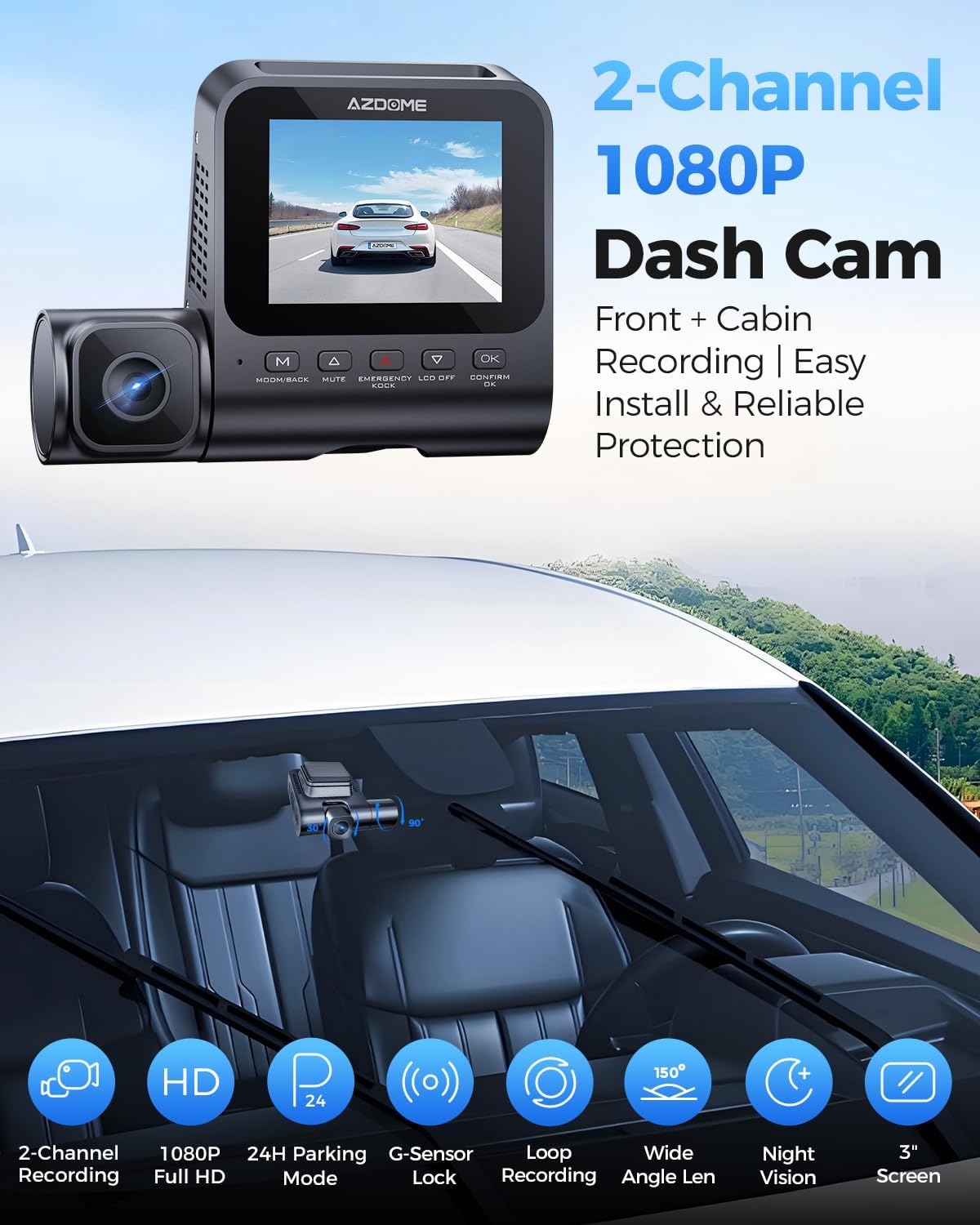
The AZDOME V600 features a compact design with a 3-inch screen, dual lenses for front and cabin recording, and intuitive controls. It is equipped with infrared night vision for clear interior recording in low light conditions.

Obraz: Ilustracja powyżejview of the AZDOME V600 Dash Cam, highlighting its 2-channel 1080P recording, parking mode, G-sensor, loop recording, wide-angle lens, and night vision capabilities.
Nagrywanie dwukanałowe
The V600 records both the road ahead and the vehicle's interior simultaneously. The front lens captures external road details, while the interior lens records cabin activity and audio.
Obraz: Podział view demonstrating the front camera's perspective of the road and the interior camera's view of the cabin, both recording in 1080P Full HD.
Szerokie pole View
The dashcam system provides a wide field of view, with a 121° front lens and a 131° cabin lens, designed to capture more of the road and interior surroundings, reducing blind spots.
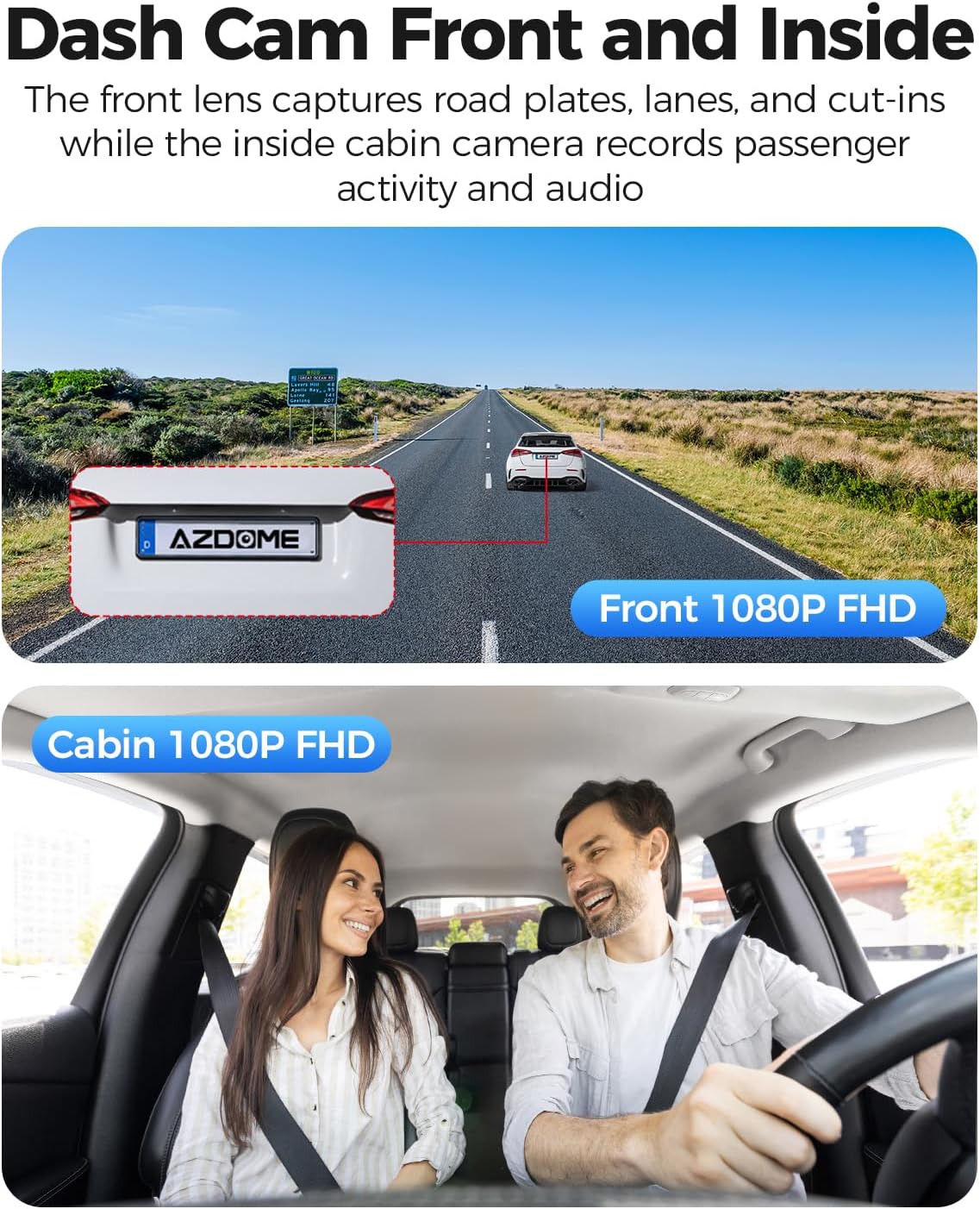
Image: A diagram illustrating the wide-angle coverage of the front (121°) and cabin (131°) cameras, showing how they capture a broad area around the vehicle.
Konfiguracja i instalacja
Follow these steps for quick and secure installation of your dash cam.
- Czysta szyba przednia: Ensure the chosen area on your windshield is clean and dry for optimal adhesion.
- Zastosuj naklejkę statyczną: Place the electrostatic film on the desired spot on the windshield. This helps in easy removal and repositioning without leaving residue.
- Montaż kamery samochodowej: Attach the dash cam to the static sticker using the provided 3M adhesive. Ensure the lenses have a clear view drogi i kabiny.
- Podłącz zasilanie: Plug the Type-C car charger into the dash cam and then into your vehicle's cigarette lighter socket. Route the cable neatly using the provided cable clips and pry tool.
- Włóż kartę MicroSD: Before powering on, insert a compatible MicroSD card (up to 128GB, not included) into the designated slot. Ensure the card is inserted correctly until it clicks into place.
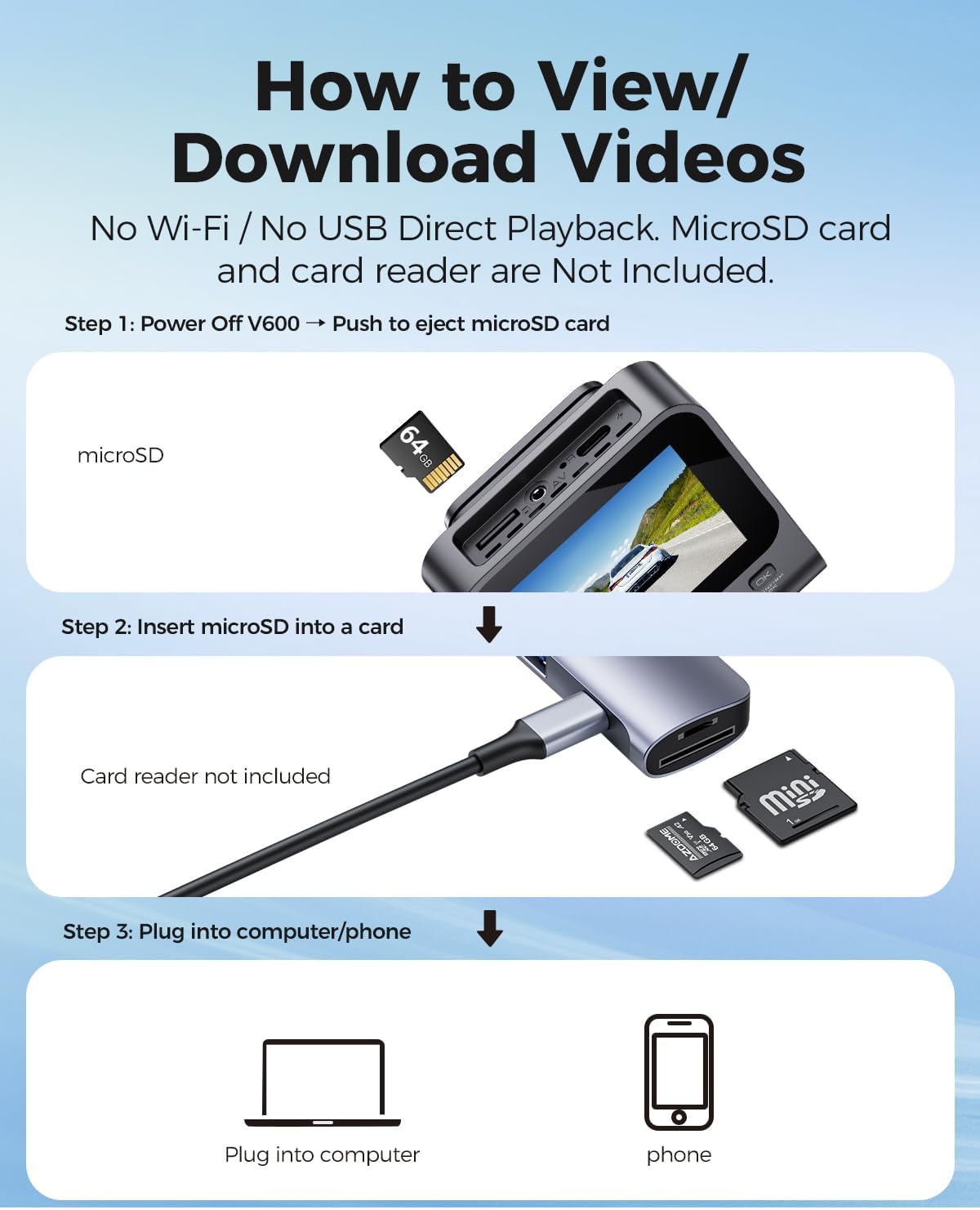
Image: A visual guide demonstrating the quick installation process of the dash cam, including cable routing and camera placement on the windshield.
Instrukcja obsługi
Basic Recording (Loop Recording)
Once powered on, the dash cam will automatically begin recording. The loop recording function continuously records video in segments (e.g., 1, 3, or 5 minutes) and overwrites the oldest unlocked files, gdy karta pamięci jest pełna. Zapewnia to ciągłość nagrywania bez ręcznego usuwania.

Image: A visual representation of the loop recording feature, showing how new footage overwrites older, unlocked files, aby zapewnić ciągłe nagrywanie.
Czujnik G (blokada awaryjna)
Wbudowany czujnik G wykrywa nagłe uderzenia lub kolizje. Po wykryciu zdarzenia bieżący fragment wideo jest automatycznie blokowany i zapisywany, aby zapobiec jego nadpisaniu przez nagrywanie w pętli.tagStanowi kluczowy dowód w razie wypadku.

Image: An illustration depicting the G-Sensor Auto Lock feature, showing how it detects impacts and automatically locks video clips to protect them from being overwritten.
Tryb parkowania 24-godzinnego
To enable continuous 24-hour parking monitoring, a 3-lead hardwire kit (not included, search ASIN: B096G6FKZP) is required. In parking mode, the dash cam can detect impacts (Collision Detection Parking Mode) or record continuously at a low frame rate (Time-Lapse Parking Mode). It also features low voltagOchrona zapobiegająca rozładowaniu akumulatora samochodowego.

Image: A graphic detailing the 24-Hour Parking Mode, including collision detection, time-lapse recording, and low voltage protection, with a note about the required hardwire kit.
Wizja nocna IR
The dash cam is equipped with IR lights to enhance interior cabin clarity in low-light conditions. For optimal night vision, the interior recording may switch to black-and-white mode to capture clearer details.

Image: An illustration highlighting the Clear Night Vision capabilities, showing how it brightens dark roads and reduces glare to capture more details, especially with infrared for the cabin.
Viewing and Downloading Videos
Do view or download recorded videos, follow these steps:
- Wyłączone: Ensure the V600 dash cam is powered off.
- Eject MicroSD Card: Gently push the MicroSD card to eject it from the slot.
- Insert into Card Reader: Insert the MicroSD card into a card reader (not included).
- Połącz z urządzeniem: Plug the card reader into a computer or compatible phone to access the video files.

Image: A step-by-step guide demonstrating how to remove the MicroSD card from the V600, insert it into a card reader, and connect it to a computer or phone to view i pobieraj filmy.
Konserwacja
Właściwa konserwacja gwarantuje długowieczność i optymalną wydajność kamery samochodowej.
- Czyszczenie: Use a soft, dry cloth to clean the camera lenses and screen. Avoid abrasive cleaners or solvents.
- Temperatura: Do not expose the dash cam to extreme temperatures for extended periods.
- Karta MicroSD: Regularly format your MicroSD card (at least once a month) to prevent data corruption and ensure smooth recording. Back up important files przed formatowaniem.
- Aktualizacje oprogramowania układowego: Sprawdź oficjalną stronę AZDOME webokresowo odwiedzaj tę witrynę w celu sprawdzenia dostępności aktualizacji oprogramowania sprzętowego, które poprawią wydajność i dodadzą nowe funkcje.
Rozwiązywanie problemów
Rozwiązania typowych problemów znajdziesz w tej sekcji.
| Problem | Rozwiązanie |
|---|---|
| Kamera samochodowa nie włącza się. | Ensure the car charger is securely connected to both the dash cam and the vehicle's cigarette lighter. Check if the vehicle's power outlet is functioning. |
| Nagrywanie zostaje nieoczekiwanie przerwane. | The MicroSD card may be full or corrupted. Format the card regularly. Ensure you are using a high-speed (Class 10 or U1/U3) MicroSD card. |
| Wideotage jest niewyraźne lub niejasne. | Clean the camera lenses with a soft cloth. Ensure the protective film has been removed from the lenses. Check if the camera is securely mounted and not vibrating. |
| Tryb parkingowy nie działa. | Parking mode requires a dedicated hardwire kit (ASIN: B096G6FKZP) for continuous power. Ensure the hardwire kit is correctly installed and connected. |
| G-Sensor jest zbyt czuły lub za mało czuły. | Dostosuj ustawienia czułości czujnika G w menu kamery samochodowej. |
Specyfikacje
| Funkcja | Szczegół |
|---|---|
| Nazwa modelu | V600 |
| Rozdzielczość przechwytywania wideo | 1080p (Front and Cabin) |
| Front Field Of View | 150 stopni |
| Cechy specjalne | G-Sensor, Loop Recording, IR Night Vision, 24-Hour Parking Mode |
| Wyświetlacz | Ekran 3-calowy |
| Wsparcie magazynowania | Karta MicroSD do 128 GB |
| Typ montażu | Montaż na desce rozdzielczej |
| Źródło zasilania | Charging Cable (Type-C Car Charger) |
| Wymiary produktu | 16 x 14 x 6 cala |
| Waga przedmiotu | 10.2 uncji |
Gwarancja i wsparcie
Aby uzyskać informacje dotyczące gwarancji i pomocy technicznej, zapoznaj się z oficjalną stroną AZDOME website or contact AZDOME customer service directly. Keep your purchase receipt as proof of purchase for warranty claims.
Producent: AZDOME
Webstrona: Odwiedź sklep AZDOME na Amazon (dla ogólnych informacji o marce)


