
1. Koniec produktuview
The Baseus BS1 NC Semi-in-Ear Noise Cancelling Earbuds offer a blend of comfort and advanced audio technology. Featuring Adaptive Hybrid Active Noise Cancellation (ANC), Hi-Res Audio with LDAC support, and a lightweight design, these earbuds are engineered for extended listening and clear communication. They are also equipped with a 6-microphone AI system for clear calls and IP55 water and dust resistance.

Image: Baseus BS1 NC Semi-in-Ear Noise Cancelling Earbuds and their charging case in black.
2. Zawartość opakowania
Sprawdź, czy w przesyłce znajdują się wszystkie elementy:
- Baseus Bass BS1 NC Semi-in-Ear Earbuds (Left and Right)
- Etui ładujące
- Kabel ładujący USB-C
- Szybki przewodnik

Image: The complete retail package for the Baseus BS1 NC Earbuds, showing the earbuds, charging case, USB-C cable, and quick start guide.
3. Ładowanie słuchawek i etui
Aby zapewnić optymalną wydajność, przed pierwszym użyciem należy w pełni naładować słuchawki i etui ładujące.
3.1 Ładowanie słuchawek dousznych
- Umieść słuchawki w etui ładującym. Upewnij się, że są prawidłowo osadzone w odpowiednich gniazdach (L dla lewego, R dla prawego).
- Close the charging case. The earbuds will begin charging automatically.
3.2 Ładowanie etui
- Podłącz dołączony kabel ładujący USB-C do portu ładowania w obudowie.
- Podłącz drugi koniec kabla do zasilacza USB (nie ma go w zestawie) lub do portu USB komputera.
- The LED indicator on the case will show the charging status:
- Zielony: Naładowano w 75% - 100%
- Żółty: Naładowano w 25% - 75%
- Czerwony: Below 25% charged
- A full charge for the case provides up to 40 hours of total playtime for the earbuds (with ANC off). A 10-minute charge can provide up to 2 hours of playback.

Image: The Baseus BS1 NC Earbuds resting in their open charging case, highlighting the 40-hour total playtime and rapid charging capabilities.
4. Parowanie i łączność
4.1 Początkowe parowanie
- Otwórz etui ładujące. Słuchawki automatycznie przejdą w tryb parowania.
- Włącz Bluetooth na swoim urządzeniu (smartfonie, tablecie, komputerze).
- Szukaj "Baseus Bass BS1 NC" in the list of available Bluetooth devices.
- Select "Baseus Bass BS1 NC" to connect. A voice prompt will confirm successful pairing.
4.2 Automatyczne ponowne połączenie
Once paired, the earbuds will automatically reconnect to the last connected device when removed from the charging case and within Bluetooth range.
4.3 Połączenie wielopunktowe
The Baseus BS1 NC supports Baseus Smart-Connect (BSC) technology, allowing simultaneous connection to two devices. This enables seamless switching between audio sources without manual re-pairing.
To use multipoint connection:
- Sparuj słuchawki z pierwszym urządzeniem.
- Odłącz słuchawki od ustawień Bluetooth pierwszego urządzenia (nie rozłączaj ich).
- Sparuj słuchawki z drugim urządzeniem.
- Reconnect the earbuds to the first device from its Bluetooth settings. The earbuds should now be connected to both devices.
Dźwięk zostanie automatycznie przełączony na urządzenie odtwarzające treść lub odbierające połączenie.
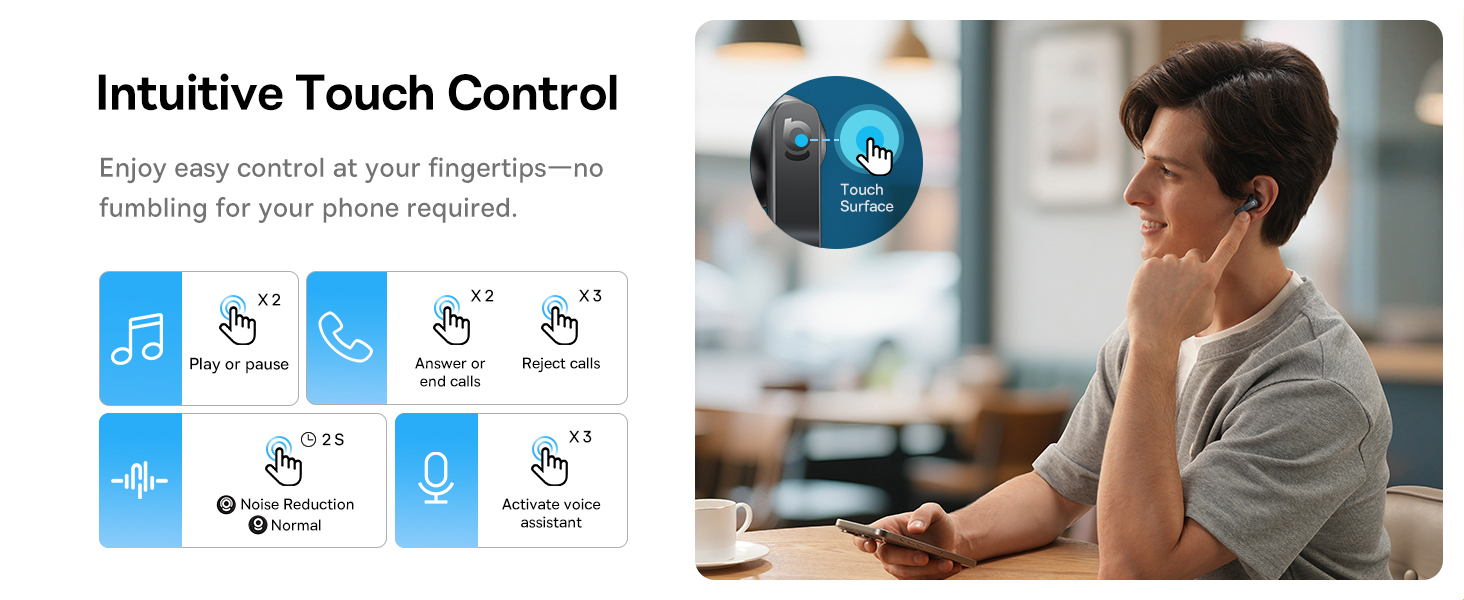
Image: A visual representation of the Baseus BS1 NC Earbuds connected to both a laptop and a smartphone, showcasing the instant multipoint connection feature.
5. Noszenie słuchawek dousznych
The Baseus BS1 NC earbuds feature a semi-in-ear design for comfortable, pressure-free wear. For optimal sound quality and noise cancellation, ensure a proper fit.
- Znajdź lewą (L) i prawą (R) słuchawkę.
- Ostrożnie włóż każdą słuchawkę do kanału słuchowego.
- Adjust the earbud until it feels secure and comfortable. The stem should point slightly forward or downward.

Image: A person wearing the Baseus BS1 NC Earbuds, illustrating their ergonomic and lightweight design for all-day comfort.
6. Instrukcja obsługi
6.1 Sterowanie dotykowe
The earbuds feature intuitive touch controls on their stems. The following are default functions, which may be customizable via the Baseus app:
| Działanie | Funkcjonować |
|---|---|
| Double-tap (Left or Right Earbud) | Odtwarzaj/wstrzymuj muzykę, odbieraj/kończ połączenia |
| Triple-tap (Left or Right Earbud) | Reject call, Activate voice assistant |
| Naciśnij i przytrzymaj (2 sekund) | Switch Noise Control Mode (ANC/Normal/Transparency) |

Image: An illustration detailing the intuitive touch controls on the Baseus BS1 NC Earbuds for various functions like play/pause, call management, noise reduction, and voice assistant activation.
6.2 Tryby kontroli hałasu
The Baseus BS1 NC earbuds offer three noise control modes:
- Adaptive Hybrid ANC (Active Noise Cancellation): Reduces ambient noise for an immersive listening experience. Ideal for noisy environments.
- Tryb przezroczystości: Pozwala słyszeć otoczenie, jednocześnie ciesząc się dźwiękiem. Przydatne do zachowania świadomości w warunkach miejskich lub podczas rozmów.
- Tryb normalny: Standard audio playback without active noise cancellation or transparency features.
Switch between modes by pressing and holding the touch area on either earbud for 2 seconds.

Image: A cutaway diagram of a Baseus BS1 NC earbud in an ear, illustrating the semi-in-ear fit and the availability of Adaptive Noise Cancelling and Transparency Mode.
Dźwięk 6.3 Hi-Res z LDAC
These earbuds support LDAC technology, enabling high-resolution audio transmission for a detailed and rich sound experience. Ensure your device supports LDAC and activate it in your device's Bluetooth settings for the best audio quality.

Image: The Baseus BS1 NC Earbuds surrounded by sound waves, emphasizing features like Hi-Res Audio, SuperBass 2.0, and 13mm dynamic drivers for powerful sound.
6.4 6-Mic AI Clear Calls
The earbuds are equipped with 6 microphones and AI noise isolation technology to ensure your voice is clear during calls, even in noisy environments. Wind noise reduction further enhances call clarity outdoors.
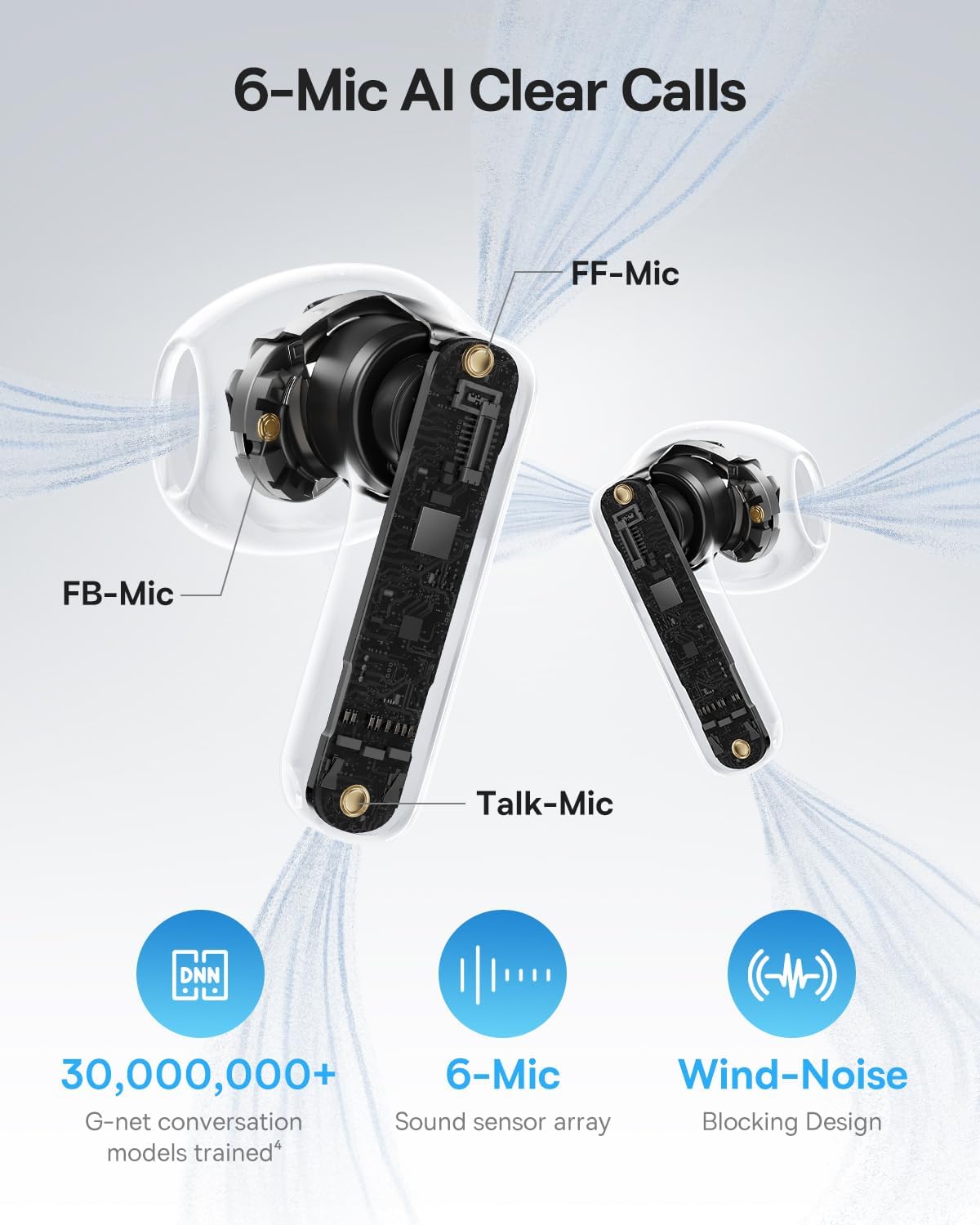
Image: A detailed diagram of the Baseus BS1 NC earbud, highlighting the placement of the FF-Mic, FB-Mic, and Talk-Mic, which contribute to the 6-Mic AI Clear Call technology and wind-noise blocking design.
6.5 Inteligentna kontrola aplikacji
Download the dedicated Baseus app for enhanced control and customization options. The app allows you to:
- Dostosuj poziom wzmocnienia basów.
- Select from various EQ Modes.
- Ustawienia sterowania akustyką przestrzenną.
- Use the "Find Your Earbuds" feature.
Uwaga: w trybie gościa nie jest wymagane tworzenie konta ani uzyskiwanie uprawnień do dostosowywania funkcji, jednak w celu zlokalizowania zgubionych słuchawek wymagany jest dostęp do GPS.

Image: A smartphone displaying the Baseus app interface, which offers various sound control options including Bass Boost, EQ Modes, Spatial Acoustics, and a "Find Your Earbuds" function.
7. Konserwacja i pielęgnacja
7.1 Czyszczenie
- Regularnie czyść słuchawki douszne i etui ładujące miękką, suchą i niepozostawiającą włókien ściereczką.
- Nie używaj ostrych środków chemicznych, rozpuszczalników czyszczących ani silnych detergentów.
- Gently remove any earwax or debris from the earbud mesh and charging contacts using a small, soft brush or cotton swab.
7.2 Odporność na wodę i kurz (IP55)
The earbuds are rated IP55, meaning they are protected against limited dust ingress and low-pressure water jets from any direction. This makes them suitable for workouts and light rain exposure.
- Nie zanurzaj słuchawek w wodzie.
- Przed ponownym włożeniem słuchawek do etui ładującego należy upewnić się, że są suche, aby zapobiec uszkodzeniu styków ładowania.
- Etui ładujące nie jest wodoodporne.

Image: The Baseus BS1 NC Earbuds shown with water droplets, signifying their IP55 rating for dust and water resistance.
7.3 Przechowywanie
Przechowuj słuchawki douszne w etui ładującym, gdy nie są używane, aby je chronić i utrzymywać w stanie naładowania.
8. Rozwiązywanie Problemów
If you encounter issues with your Baseus BS1 NC earbuds, refer to the following common solutions:
- Brak dźwięku/problemy z połączeniem:
- Sprawdź, czy słuchawki są naładowane.
- Verify Bluetooth is enabled on your device and "Baseus Bass BS1 NC" is selected.
- Try placing earbuds back in the case, closing it, and then reopening to reset the connection.
- Zapomnij urządzenie w ustawieniach Bluetooth i sparuj je ponownie.
- Jedna słuchawka douszna nie działa:
- Upewnij się, że obie słuchawki douszne są naładowane.
- Place both earbuds back in the case, close, and reopen.
- Wyczyść styki ładowania na obu słuchawkach i wewnątrz etui.
- Słaba jakość dźwięku:
- Upewnij się, że słuchawki douszne są prawidłowo osadzone w uszach.
- Wyczyść siateczkę słuchawek, aby usunąć wszelkie przeszkody.
- Check your device's audio settings and ensure LDAC is enabled if supported.
- ANC nieskuteczne:
- Ensure ANC mode is activated via touch control or the Baseus app.
- Adjust the earbuds for a better seal in your ears.
9. Specyfikacje
| Funkcja | Szczegół |
|---|---|
| Nazwa modelu | Baseus Bass BS1 NC |
| Kontrola hałasu | Adaptive Noise Cancellation, Environmental Noise Cancellation, Hybrid Noise Cancellation |
| Technologia łączności | Bluetooth 6.0, bezprzewodowy |
| Technologia komunikacji bezprzewodowej | Bluetooth 6.0 |
| Zasięg Bluetooth | 10 metrów |
| Typ sterownika audio | Dynamiczny sterownik |
| Rozmiar sterownika audio | 13 milimetrów |
| Odpowiedź częstotliwościowa | 40 kHz |
| Opóźnienie dźwięku | 60 milisekund |
| Czas pracy baterii (słuchawki douszne) | 7 godzin (ANC wyłączone) |
| Całkowity czas odtwarzania (z etui) | 40 godzin (ANC wyłączone) |
| Charging Time (Rapid Charge) | 10 minut na 2 godzin odtwarzania |
| Poziom wodoodporności | IP55 (tylko słuchawki douszne) |
| Typ sterowania | Sterowanie dotykowe |
| Tworzywo | Akrylonitryl-butadien-styren (ABS), poliwęglan (PC) |
| Waga produktu (słuchawki douszne) | 4 g na słuchawkę |
| Product Dimensions (Earbuds) | 1.2 x 0.7 x 0.7 cala |
| Kompatybilne urządzenia | Devices with Bluetooth Audio Capability, including iOS, Android, Windows, Mac OS and Switch. |
10. Oficjalny film o produkcie
Watch the official product video for a visual guide on the Baseus BS1 NC Earbuds:
Wideo: Oficjalny film prezentujący produkt firmy Baseusasing the features and usage of the Baseus BS1 NC Semi-in-Ear True Wireless Earbuds.
11. Gwarancja i wsparcie
For warranty information, technical support, FAQs, and further assistance, please visit the official Baseus support center.
Refer to the Quick Start Guide included in your package for a direct link or visit the Baseus webstrona.
Note: Protection plans may be available for purchase separately.