
1. Wprowadzenie
This manual provides instructions for the innomaker U30CAM-4K-S1 USB 3.0 UVC Camera Module. This module is designed for high-resolution video capture and is compatible with various operating systems and hardware platforms. Please read this manual thoroughly before using the product to ensure proper operation and to maximize its performance.
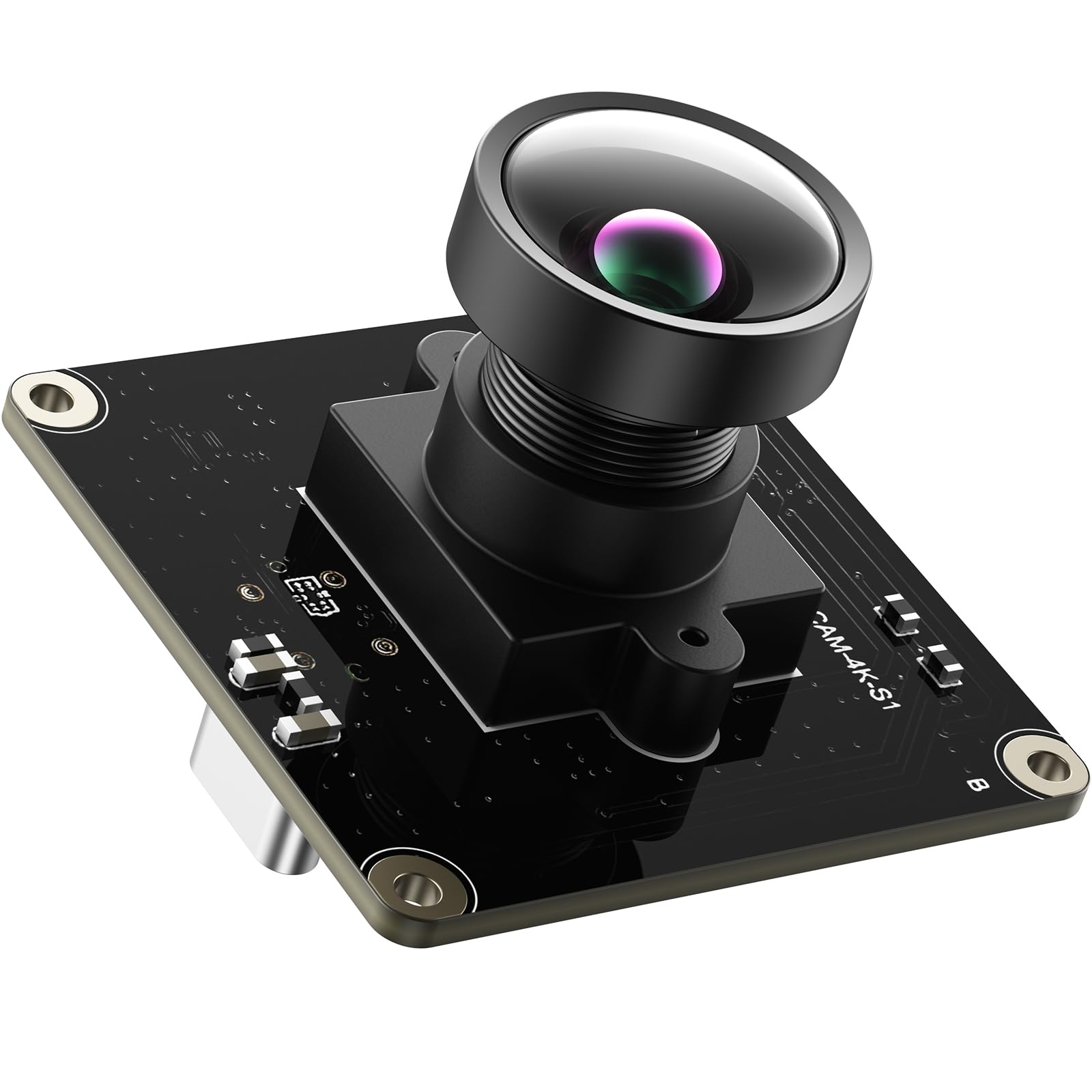
Image: The innomaker U30CAM-4K-S1 USB 3.0 UVC Camera Module, showing its compact design with the lens and USB-C connector.
2. Główne cechy
- High-Speed USB 3.0 & ISP: Equipped with a USB 3.0 high-speed interface and a high-performance ISP (Image Signal Processor), ensuring optimal image enhancement, automatic exposure, and exceptional picture quality for streaming and machine vision applications.
- Szeroka kompatybilność: Fully compatible with Windows 11/10/7, macOS, Linux, Ubuntu, Android, Raspberry Pi 4/5, Jetson Nano, ARM boards, laptops, and desktops. Supports plug & play functionality with native UVC driver support for easy setup.
- High Resolution & Frame Rate: Delivers Ultra HD video at 4K@30fps and smooth 1080P@60fps. Supports YUY2 and MJPEG formats with multiple resolution options for conferencing, live streaming, and industrial applications.
- Obiektyw szerokokątny: Features a wide-angle lens with a diagonal field of view (Fov(D)) of 116 degrees and a horizontal field of view (Fov(H)) of 105 degrees, making it suitable for group meetings and various video projects.
- ESD & EMI Protection: Built-in common mode filter offers ESD (electrostatic discharge) and EMI (electromagnetic interference) protection, ensuring stable performance and clear signal quality in demanding environments.
3. Lista rzeczy do spakowania
Sprawdź, czy w przesyłce znajdują się wszystkie poniższe elementy:
- innomaker U30CAM-4K-S1 USB 3.0 UVC Camera Module
- Kabel USB (typ C do typu A)

Image: The camera module and included USB-C to USB-A cable, representing the contents of the package.
4. Instrukcje konfiguracji
4.1 Connecting the Camera Module
- Locate the USB-C port on the innomaker U30CAM-4K-S1 camera module.
- Connect the USB-C end of the provided USB cable to the camera module.
- Connect the USB-A end of the cable to an available USB 3.0 port on your computer or compatible device (e.g., Raspberry Pi, Jetson Nano, ARM board). For optimal performance, use a USB 3.0 port.
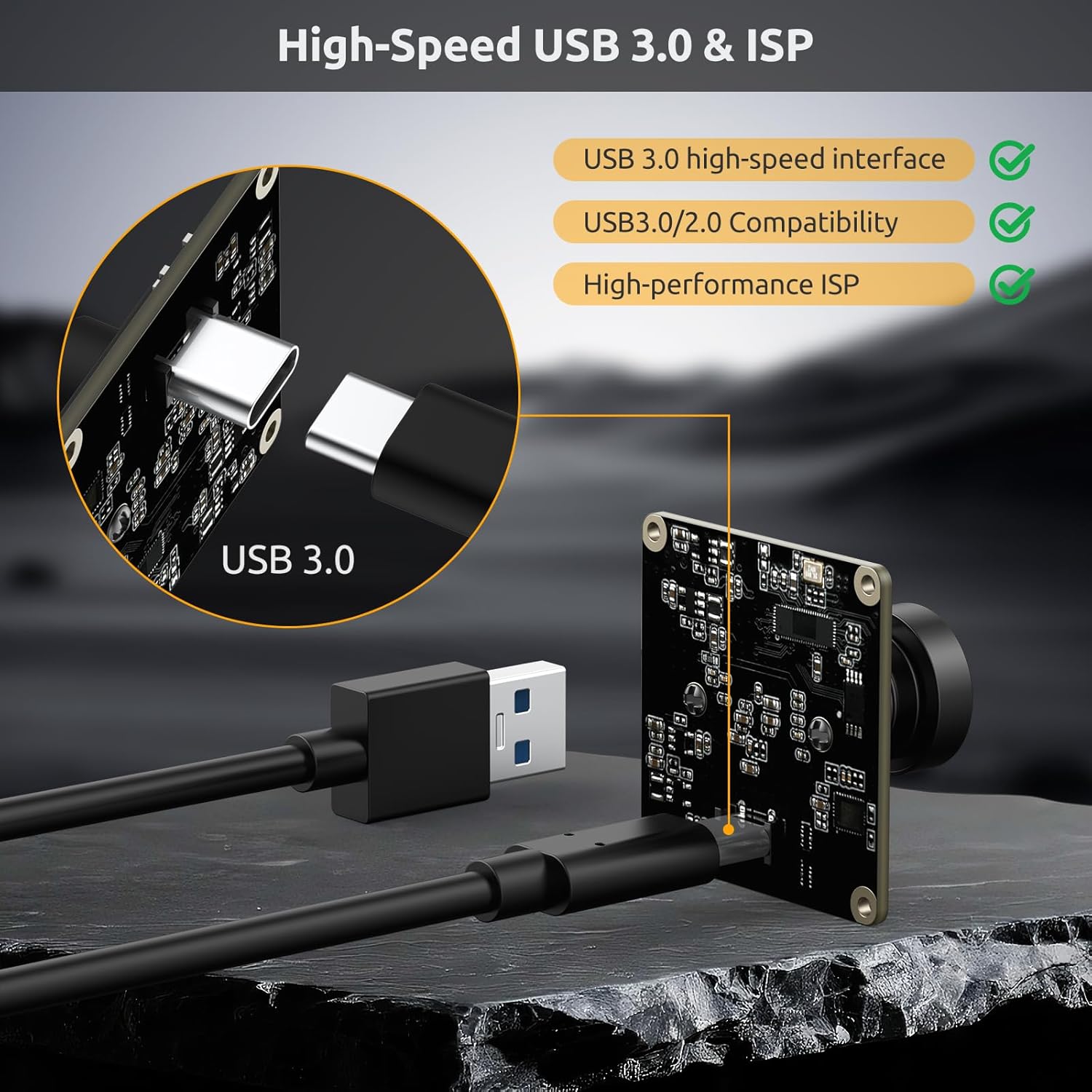
Image: Diagram showing the USB 3.0 camera module connected via a USB-C cable to a host device, illustrating the high-speed interface.
4.2 Driver Installation (Plug & Play)
The innomaker U30CAM-4K-S1 camera module is UVC (USB Video Class) compliant and supports plug & play functionality. This means that for most modern operating systems, no additional driver installation is required. The system will automatically recognize and configure the camera upon connection.
- Windows (11/10/7): The camera will be automatically recognized and the necessary drivers installed by the system.
- MacOS: The camera will be automatically recognized by the operating system.
- Linux/Ubuntu: The camera will be automatically recognized as a UVC device, typically accessible via
/dev/video0lub podobne. - Android/Raspberry Pi/Jetson Nano/ARM Boards: The camera will be automatically recognized and can be used with compatible applications.

Image: Icons representing Windows, macOS, Linux, Ubuntu, and Android, indicating broad operating system compatibility for the camera module.

Image: Icons representing Raspberry Pi, Desktops, Laptops, and ARM boards, illustrating the wide range of hardware platforms compatible with the camera module.
5. Instrukcja obsługi
5.1 Dostęp do obrazu z kamery
Once connected and recognized by your system, the camera can be accessed using standard webcam applications or video capture software.
- Okna: Use the built-in "Camera" application, or third-party software such as OBS Studio, VLC Media Player, or other video conferencing applications.
- MacOS: Use "Photo Booth," QuickTime Player, or other compatible applications.
- Linux: Use applications like Cheese, OBS Studio, or VLC Media Player. Command-line tools such as
fswebcamorffmpegcan also be utilized.
5.2 Regulacja ostrości
The camera features a manual focus lens, allowing you to achieve precise focus for your specific application. To adjust the focus:
- Gently rotate the lens barrel clockwise or counter-clockwise.
- Observe the live video feed on your connected device to achieve the desired sharpness.
- The wide focal length of the lens facilitates easy focusing across various distances.

Image: Close-up of the camera module's lens, illustrating its manual focus capability.
5.3 Video Resolution and Frame Rate
The camera supports various resolutions and frame rates, which can typically be configured within your video capture software or application settings:
- 4K (3840x2160) przy 30 kl./s (MJPEG format)
- 1080P (1920x1080) przy 60 klatkach na sekundę (MJPEG format)
- Other resolutions and frame rates are available, including YUY2 format at lower frame rates, depending on the software used.

Image: Graphic illustrating the camera's support for 4K@30FPS and 1080P@60FPS, and YUY2/MJPEG formats, powered by an IMX415 sensor.
6. Konserwacja
6.1 Czyszczenie obiektywu
To ensure optimal image quality and prevent dust or smudges from affecting performance, keep the lens clean.
- Use a soft, lint-free microfiber cloth specifically designed for cleaning optical surfaces.
- If necessary, apply a small amount of lens cleaning solution to the cloth, not directly to the lens.
- Avoid using abrasive materials, paper towels, or harsh chemical cleaners, as these can scratch or damage the lens coating.
6.2 Przechowywanie
When the camera module is not in use, store it in a clean, dry environment. Protect it from direct sunlight, extreme temperatures, and excessive humidity to prolong its lifespan.
7. Rozwiązywanie Problemów
- Kamera nie została wykryta:
- Ensure the USB cable is securely connected to both the camera module and the host device.
- Try connecting to a different USB port, preferably a USB 3.0 port, on your computer or device.
- Test the camera on a different computer or compatible device to rule out host-specific issues.
- Sprawdź, czy Twój system operacyjny jest aktualny.
- No video feed or black screen:
- Confirm that the correct camera device (e.g., "innomaker U30CAM-4K-S1") is selected in your video capture application's settings.
- Check if any other application is currently using the camera, as some systems only allow one application to access it at a time. Close other applications that might be using the camera.
- Restart the video capture application or your computer.
- Poor image quality or blurriness:
- Adjust the manual focus lens by gently rotating the barrel (refer to Section 5.2).
- Ensure the lens surface is clean and free of dust or smudges (refer to Section 6.1).
- Check lighting conditions; adequate and even lighting is crucial for optimal image quality.
- Verify that the selected resolution and frame rate in your software are appropriate for your application and system capabilities.
- Tearing or artifacts in video:
- Ensure you are using a USB 3.0 port and the provided high-quality USB 3.0 cable.
- Reduce the resolution or frame rate in your video capture software settings.
- Ensure your host device has sufficient processing power and available USB bandwidth to handle the high-resolution video stream.
8. Specyfikacje
| Funkcja | Szczegół |
|---|---|
| Numer modelu | U30CAM-4K-S1 |
| Transduktor | IMX415 CMOS |
| Rozdzielczość przechwytywania wideo | 4K (3840x2160) |
| Liczba klatek na sekundę (maks.) | 4K@30fps, 1080P@60fps |
| Formaty wideo | MJPEG, YUY2 |
| Łączność | USB 3.0 (kompatybilny wstecz z USB 2.0) |
| Typ soczewki | Wide Angle, Manual Focus |
| Pole View (pole widzenia) | Diagonal: 116°, Horizontal: 105° |
| Otwór | F/2.8 |
| Cechy specjalne | High-performance ISP, ESD & EMI Protection, UVC Compliant |
| Zgodność | Windows, macOS, Linux, Ubuntu, Android, Raspberry Pi, Jetson Nano, ARM Boards |
| Waga przedmiotu | 0.2 funtów |
| UPC | 781520761700 |
9. Informacje o gwarancji
The innomaker U30CAM-4K-S1 USB 3.0 UVC Camera Module comes with a Roczna gwarancja producenta od daty zakupu.
This warranty covers defects in materials and workmanship under normal use. It does not cover damage caused by misuse, accident, modification, unauthorized repair, or external causes such as drops, liquid damage, or improper installation.
For warranty claims or service, please retain your proof of purchase and contact innomaker customer support. You may be required to provide the model number (U30CAM-4K-S1) and purchase date.
10. Obsługa klienta
For technical assistance, troubleshooting, or general inquiries regarding your innomaker U30CAM-4K-S1 USB 3.0 UVC Camera Module, please utilize the following resources:
Zasoby internetowe:
- Official innomaker Store on Amazon: innomaker Store
- Strona produktu: Strona produktu Amazon
When contacting support, please have your model number (U30CAM-4K-S1) and purchase date readily available to facilitate faster service.