
CINMOORE CM-C2LU
CINMOORE 2.5K Pet/Dog Camera Instruction Manual
Model: CM-C2LU | Brand: CINMOORE
1. Wprowadzenie
The CINMOORE 2.5K Pet/Dog Camera is an advanced indoor security and monitoring solution designed to keep you connected to your home, pets, and loved ones. This camera features 2.5K Ultra HD video, Pan-Tilt-Zoom (PTZ) functionality, and AI-powered detection for persons, pets, and baby crying, all without monthly subscription fees. It also includes full-duplex two-way audio, color night vision, and flexible storage options to ensure comprehensive coverage and peace of mind.

Image: The CINMOORE 2.5K Pet/Dog Camera, showcasing its sleek design alongside a smartphone displaying live footage of a baby and a dog.
2. Co znajduje się w pudełku
Upon unboxing your CINMOORE 2.5K Pet/Dog Camera, please verify that all the following components are included:
- CINMOORE 2.5K Pet/Dog Camera (x1)
- Mounting Screws (x1 set)
- Krótki przewodnik (x1)
- Kabel zasilający (x1)

Image: All components included in the CINMOORE 2.5K Pet/Dog Camera package, neatly arranged on a wooden surface.
3. Konfiguracja
Follow these steps to set up your CINMOORE 2.5K Pet/Dog Camera:
- Włączanie: Connect the camera to a power source using the provided power cable and adapter. The camera will power on automatically.
- Pobierz aplikację: Download the 'Cinmoore' app from your smartphone's app store (Google Play or Apple App Store).
- Dodaj urządzenie: Open the app, create an account if you don't have one, and click the '+' icon to add a new device.
- Skanowania QR code: Scan the QR code located on the bottom of your camera using the app.
- Reset Camera (if needed): If prompted, reset the camera by pressing the reset button (located under the lens when tilted upwards) for 5 seconds until you hear a prompt, then press it twice.
- Połącz się z Wi-Fi: Follow the in-app instructions to connect the camera to your 2.4GHz Wi-Fi network. (Note: 5GHz Wi-Fi is not supported).
- Nazwij swój aparat: Assign a memorable name to your camera within the app.
- Opcje montażu: The camera can be placed on a tabletop, mounted on a wall, or ceiling. Use the included mounting screws and base if wall or ceiling mounting is desired.
Video: A quick start guide demonstrating the unboxing, power-on, and app connection process for the CINMOORE C2U Indoor Camera, highlighting the 1-minute setup.
4. Funkcje ponadview
The CINMOORE 2.5K Pet/Dog Camera is equipped with a range of features to enhance your home monitoring experience:
- Wideo 2.5K Ultra HD: Zapewnia wyraźny i szczegółowy obraz wideotage, ensuring you don't miss any important moments.
- Funkcjonalność PTZ: Offers 360° horizontal and 109° vertical rotation, allowing you to remotely adjust the camera's view poprzez aplikację.
- AI Detection (No Monthly Fee): Advanced AI for local detection of persons, pets, and baby crying, providing smart alerts without subscription costs.
- Full Duplex 2-Way Audio: Enables real-time, simultaneous two-way communication, allowing you to speak and listen through the camera.
- Color Night Vision 2.0: Ensures clear visibility in low-light conditions without disturbing sleeping babies or pets.
- 2.4GHz WiFi + Bluetooth Connectivity: Offers faster and more stable connection for seamless streaming.
- Elastyczne przechowywanie: Supports local storage via SD card (up to 256GB, not included) with advanced encryption, and optional AWS cloud storage.
- Tryb prywatności: Allows you to physically conceal the camera lens for enhanced privacy when needed.
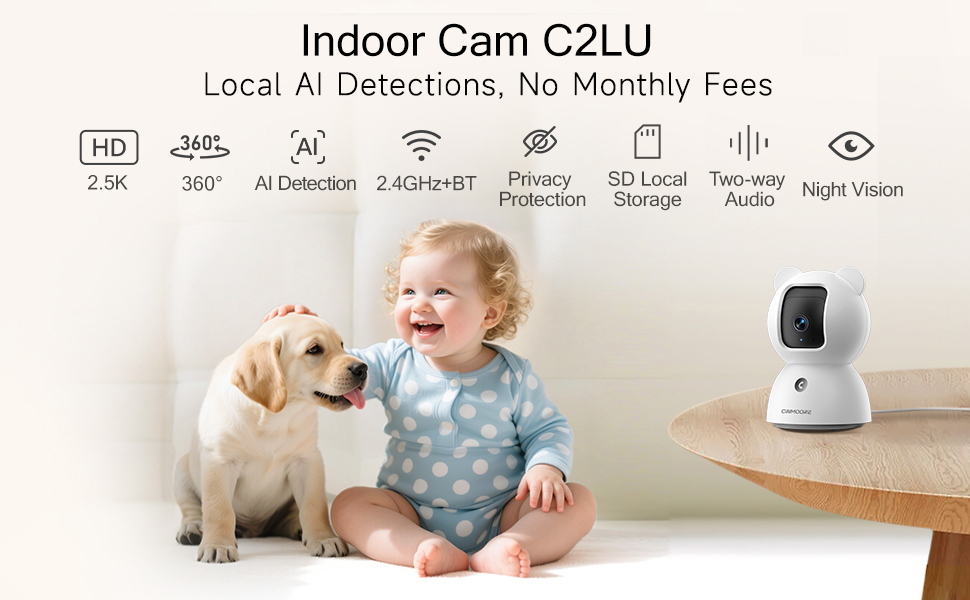
Image: A visual summary of the camera's key features, including its 2.5K resolution, pan-tilt capabilities, and various AI detection modes.
Video: A promotional video highlighting the simplicity and affordability of the CINMOORE camera, emphasizing its features for home monitoring.
5. Instrukcja obsługi
Utilize the 'Cinmoore' app to control and manage your camera:
- Na żywo View: Tap the camera image in the app to access the live video feed.
- Pan & Tilt: Use the directional arrows within the live view interface to remotely adjust the camera's horizontal (pan) and vertical (tilt) angles.
- Rozmowa dwukierunkowa: Press and hold the microphone icon to speak through the camera. Release to listen. The camera also features a one-click call button for quick family alerts.
- Nagranie: Initiate manual recording or set up continuous 24/7 recording to an SD card. Access recorded footage via the 'Record' tab.
- Inteligentne wykrywanie i alerty: Configure Person, Pet, and Baby Cry Detection settings. Customize detection zones and sensitivity levels to receive relevant alerts.
- Tryb prywatności: Activate privacy mode through the app to physically close the camera lens, ensuring your privacy.
- Alarm dźwiękowy: Utilize the siren feature or customize sound alarms for deterrence.

Image: Demonstrates the full duplex two-way talk feature, allowing seamless communication with pets.
6. Konserwacja
To ensure optimal performance and longevity of your CINMOORE 2.5K Pet/Dog Camera, follow these maintenance guidelines:
- Czyszczenie: Delikatnie przetrzyj obiektyw i korpus aparatu miękką, suchą ściereczką. Unikaj stosowania silnych środków chemicznych lub materiałów ściernych, które mogłyby uszkodzić powierzchnię lub obiektyw.
- Aktualizacje oprogramowania: Regularly check the 'Cinmoore' app for available firmware updates. Keeping your camera's software up-to-date ensures access to the latest features, security enhancements, and bug fixes.
- Umieszczenie: Upewnij się, że kamera znajduje się w stabilnym miejscu, z dala od bezpośredniego światła słonecznego, ekstremalnych temperatur i wysokiej wilgotności.
- Zasilanie: Aby uniknąć uszkodzeń, należy używać wyłącznie oryginalnego zasilacza i kabla dołączonego do aparatu.
7. Rozwiązywanie Problemów
If you encounter issues with your CINMOORE 2.5K Pet/Dog Camera, refer to the following common troubleshooting tips:
- Kamera offline:
- Sprawdź swoje połączenie Wi-Fi i upewnij się, że ma ono częstotliwość 2.4 GHz.
- Sprawdź, czy kamera jest włączona i czy kabel zasilający jest prawidłowo podłączony.
- Uruchom ponownie kamerę, odłączając ją i podłączając ponownie.
- Słaba jakość wideo:
- Ensure your Wi-Fi signal is strong where the camera is located.
- Oczyść obiektyw aparatu miękką szmatką.
- Check app settings for video resolution and adjust if necessary.
- Brak alertów:
- Verify that detection settings (Person, Pet, Cry) are enabled in the app.
- Check app notification settings on your phone to ensure they are not blocked.
- Adjust detection sensitivity and zones.
- Problemy z dwukierunkowym dźwiękiem:
- Ensure your phone's microphone and speaker are enabled for the app.
- Check the camera's volume settings in the app.
8. Specyfikacje
| Funkcja | Szczegół |
|---|---|
| Numer modelu | CM-C2LU |
| Rozdzielczość przechwytywania wideo | 2.5 tys. |
| Zastosowanie wewnątrz/na zewnątrz | Wnętrz |
| Protokół łączności | Wi-Fi (tylko 2.4 GHz) |
| Źródło zasilania | Elektryczny przewodowy |
| Typ montażu | Ceiling Mount / Tabletop Mount / Wall Mount |
| Tryb pracy | Person Detection, Pet Detection, Cry Detection |
| Maksymalny obsługiwany rozmiar pamięci Flash | 256 GB (SD card not included) |
| Możliwości nagrywania dźwięku i obrazu | Audio, Video |
| Wymiary produktu | 3 x 3 x 4.5 cala |
| Waga przedmiotu | 11.7 uncji |
9. Gwarancja i wsparcie
The CINMOORE 2.5K Pet/Dog Camera comes with a manufacturer's warranty. For specific warranty details, including coverage period and terms, please refer to the warranty card included in your product packaging or contact CINMOORE customer support directly. For technical assistance, troubleshooting, or any other inquiries, please visit the official CINMOORE webwitryny lub skontaktuj się z zespołem obsługi klienta.
Ask a question about this manual
Ask about setup, troubleshooting, compatibility, parts, safety, or missing instructions. Manuals+ will review the question and use this page’s manual context to help answer it.