
Wstęp
Dziękujemy za zakupasing the AFEXOA DY29Z Night Light Bluetooth Speaker Alarm Clock. This versatile device combines a Bluetooth speaker, night light, alarm clock, sound machine, and MP3 player into one compact unit. This manual provides detailed instructions for setup, operation, and maintenance to ensure optimal performance and user satisfaction.

Figure 1: AFEXOA DY29Z device highlighting its 5-in-1 functionality.
Informacje dotyczące bezpieczeństwa
- Nie wystawiaj urządzenia na działanie wody ani nadmiernej wilgoci.
- Unikaj ekstremalnych temperatur i bezpośredniego światła słonecznego.
- Nie rozmontowuj ani nie próbuj naprawiać urządzenia samodzielnie. Skontaktuj się z obsługą klienta, aby uzyskać pomoc.
- Przechowywać w miejscu niedostępnym dla dzieci i zwierząt domowych.
- Do ładowania należy używać wyłącznie dołączonego kabla ładującego lub certyfikowanego kabla typu C.
Zawartość opakowania
Proszę sprawdzić, czy w paczce znajdują się następujące elementy:
- AFEXOA DY29Z Night Light Bluetooth Speaker Alarm Clock
- Kabel do ładowania USB typu C.
- Instrukcja obsługi
Produkt ponadview
Elementy sterujące na panelu przednim
The front panel features an LED display for time and status, along with several control buttons:
- Przycisk timera: Short press to pause, long press for standby (turns off sound and light).
- Bluetooth On/Off Button: Activates or deactivates Bluetooth mode.
- Poprzedni utwór / Przycisk zmniejszania głośności: Krótkie naciśnięcie powoduje przejście do poprzedniego utworu, długie naciśnięcie powoduje zmniejszenie głośności.
- Następny utwór / Przycisk zwiększania głośności: Krótkie naciśnięcie spowoduje przejście do następnego utworu, długie naciśnięcie zwiększy głośność.
- Natural Sound & Lullaby Button: Cycles through built-in soothing sounds.
Rear Ports and Switches
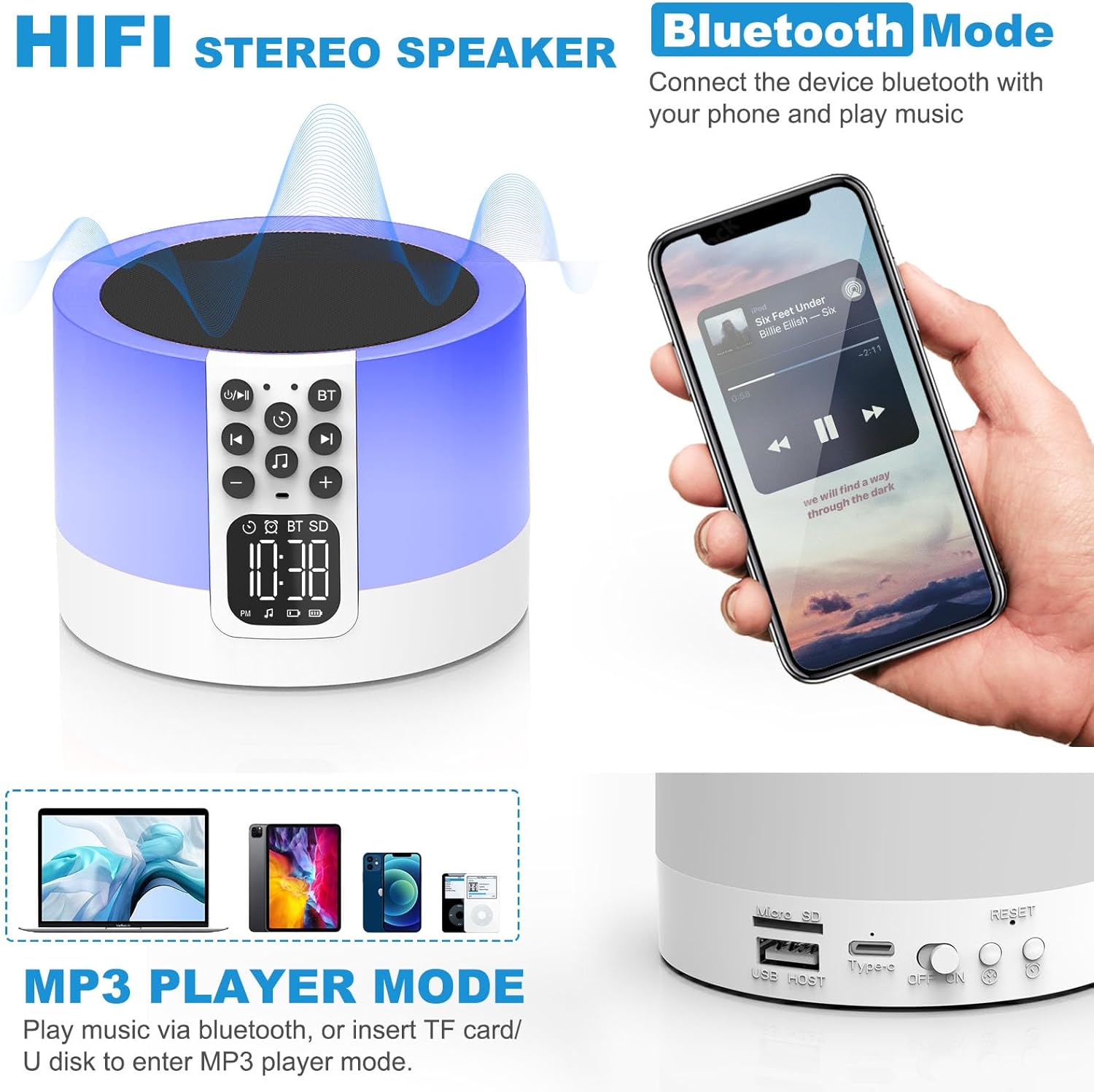
Figure 2: AFEXOA DY29Z showing Bluetooth connectivity and rear ports.
- Gniazdo na kartę Micro SD/TF: Do odtwarzania plików MP3 filez karty pamięci.
- USB HOST Port: Do odtwarzania plików MP3 files z dysku flash USB.
- Port zasilania typu C: Do ładowania urządzenia.
- Przełącznik włączania/wyłączania: Główny wyłącznik zasilania urządzenia.
- Przycisk resetowania: Small button to reset the device (requires a pin).
- Time Setup Button: Short press for 12h/24h mode, long press for time setup.
- Alarm Setup Button: For setting the alarm.
Organizować coś
1. Ładowanie urządzenia
Before first use, fully charge the device. Connect the provided Type-C USB cable to the Type-C power port on the back of the device and plug the other end into a USB power adapter (not included), computer, or power bank.

Figure 3: Charging the device via USB.
2. Ustawianie czasu
- Turn on the device using the On/Off switch on the back.
- Long press the 'Time Setup' button on the back until the hour digits flash.
- Use the 'Previous Track / Volume Down' and 'Next Track / Volume Up' buttons on the front to adjust the hour.
- Press the 'Time Setup' button again to switch to minute adjustment. Adjust minutes using the volume buttons.
- Press the 'Time Setup' button a third time to confirm and exit time setting.
- Short press the 'Time Setup' button to toggle between 12-hour and 24-hour display formats.
Instrukcja obsługi
1. Włączanie/wyłączanie zasilania
Slide the 'On/Off' switch on the back of the device to turn it on or off.
2. Tryb głośnika Bluetooth
- Włącz urządzenie.
- Press the 'Bluetooth On/Off' button on the front panel. The device will enter pairing mode, indicated by a flashing Bluetooth icon on the display.
- On your smartphone or other Bluetooth-enabled device, search for 'DY29Z' in the Bluetooth settings and select it to pair.
- Po sparowaniu możesz odtwarzać dźwięk z urządzenia przez głośnik.
- Use the 'Previous Track / Volume Down' and 'Next Track / Volume Up' buttons to control playback and volume.
3. Funkcja oświetlenia nocnego
The device features a sensitive touch top mesh for light control.

Figure 4: Adjusting warm white light brightness via touch control.
- Ciepłe białe światło: Tap the top mesh to cycle through 3 levels of warm white brightness (low, medium, high). Tap again to turn off.
- Multicolor Light: Long press the top mesh and then release to activate the ambient light mode, which cycles through various colors.
- Fixed Color Light: While in multicolor cycling mode, long press the top mesh again and release to fix the current color. Repeat to cycle through other fixed colors.

Figure 5: Various multicolor night light options.
4. Funkcja budzika
Set and manage alarms with customizable tones.

Figure 6: Digital alarm clock with wake-up light.
- Ustawianie alarmu: Long press the 'Alarm Setup' button on the back until the alarm hour digits flash. Adjust the hour using the volume buttons. Press 'Alarm Setup' again to set minutes, then press again to confirm.
- Custom Alarm Tone: Insert a USB Flash Drive or Micro SD Card with your favorite MP3 music. The device will automatically use this as the alarm tone.
- Funkcja drzemki: When the alarm sounds, tap the top mesh to activate snooze. The alarm will sound again after 9 minutes. This can be repeated indefinitely.
- Zatrzymywanie alarmu: Press any button (except the top mesh for snooze) to stop the alarm for the day.
5. Sound Machine Function
The device offers 30 built-in soothing sounds to aid sleep and relaxation.
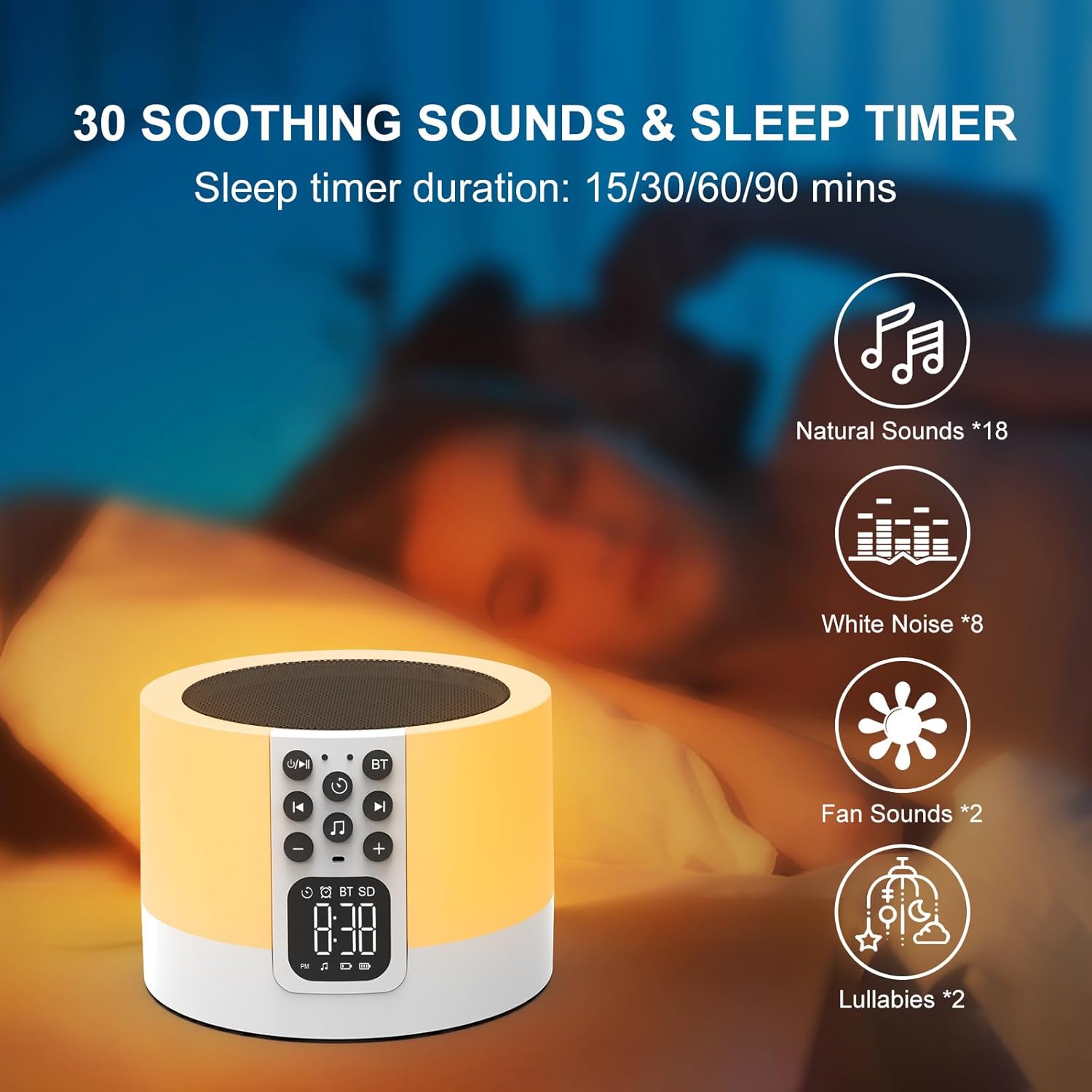
Figure 7: Soothing sounds and sleep timer options.
- Press the 'Natural Sound & Lullaby' button on the front panel to cycle through the 30 available sounds (including white noise, fan noise, pink noise, nature sounds, and lullabies).
- Wyłącznik czasowy: To set a sleep timer, short press the 'Timer' button repeatedly to select 15, 30, 60, or 90 minutes. The device will automatically turn off after the selected duration.
6. Tryb odtwarzacza MP3
Play your own music directly from a USB flash drive or Micro SD card.

Figure 8: Using USB flash drives and Micro SD cards for MP3 playback.
- Insert a USB flash drive into the USB HOST port or a Micro SD card into the Micro SD/TF card slot on the back of the device.
- The device will automatically detect the storage and begin playing MP3 files.
- Use the 'Previous Track / Volume Down' and 'Next Track / Volume Up' buttons to navigate tracks and adjust volume.
7. Dzwonienie bez użycia rąk
When connected via Bluetooth to a smartphone, the device can be used for hands-free calls.
- When a call comes in, the device will ring.
- Press the 'Timer' button (which also functions as Play/Pause) to answer an incoming call.
- Press the 'Timer' button again to end the call.
Konserwacja
- Czyść urządzenie miękką, suchą ściereczką. Nie używaj środków czyszczących o właściwościach ściernych ani rozpuszczalników.
- Upewnij się, że wszystkie porty są wolne od kurzu i zanieczyszczeń.
- Przechowuj urządzenie w chłodnym i suchym miejscu, jeśli nie będziesz go używać przez dłuższy czas.
Rozwiązywanie problemów
| Problem | Możliwa przyczyna | Rozwiązanie |
|---|---|---|
| Urządzenie nie włącza się. | Bateria jest rozładowana. Wyłącznik zasilania jest wyłączony. | Charge the device fully. Ensure the On/Off switch is in the 'On' position. |
| Nie można nawiązać połączenia przez Bluetooth. | Bluetooth not enabled on device or phone. Device is already paired with another unit. | Ensure Bluetooth is active on both devices. Disconnect from other devices. Restart pairing process. |
| Brak dźwięku z głośnika. | Volume is too low. Device is paused. Incorrect mode selected. | Increase volume. Press the 'Timer' button to unpause. Ensure correct mode (Bluetooth, MP3, Sound Machine) is active. |
| Lampka nocna nie działa. | Device is off or in standby. | Ensure the device is powered on. Tap the top mesh to activate the light. |
| Alarm nie włącza się. | Alarm nie jest ustawiony prawidłowo. Głośność jest zbyt niska. | Verify alarm time and activation. Increase device volume. |
Specyfikacje
| Funkcja | Szczegół |
|---|---|
| Marka | AFEXOA |
| Numer modelu | DY29Z |
| Technologia łączności | Bluetooth, USB |
| Tryb wyjścia audio | Stereofoniczny |
| Tworzywo | Akrylonitryl-butadien-styren (ABS) |
| Typ głośnika | Przenośny głośnik Bluetooth |
| Dodatkowe funkcje | Alarm, Illuminated, Mood Light, Noise Machine, Timer |
| Metoda kontroli | Dotykać |
| Źródło zasilania | Zasilany bateryjnie |
| Liczba baterii | 1 litowo-jonowy (w zestawie) |
| Kompatybilne urządzenia | Laptop, odtwarzacz MP3, smartfon, tablet |
Gwarancja i wsparcie
This product comes with a limited warranty. For detailed warranty information or technical support, please refer to the product packaging or contact AFEXOA customer service. Keep your purchase receipt for warranty claims.