
1. Wprowadzenie
This manual provides detailed instructions for the installation, operation, and maintenance of your Soundstream PSA1.4000D Monoblock Waterproof Marine Amplifier. Designed for marine and powersports applications, this amplifier delivers high-power audio performance in challenging environments. Please read this manual thoroughly before installation and use to ensure proper function and safety.
2. Informacje dotyczące bezpieczeństwa
- Połączenia zasilania: Always disconnect the vehicle's battery before making any power connections to prevent electrical shorts and damage.
- Prawidłowe uziemienie: Zapewnij amplifier is properly grounded to the vehicle's chassis. An improper ground connection can cause noise or malfunction.
- Okablowanie: Use appropriate gauge wiring for power, ground, and speaker connections as specified in this manual to prevent overheating and ensure optimal performance.
- Montowanie: Zamontuj amplifier securely in a location that allows for adequate ventilation and is protected from direct exposure to extreme heat or physical damage.
- Wodoodporność: Podczas gdy to amplifier is waterproof (IP66 rated), avoid submerging it or exposing it to high-pressure water jets.
- Profesjonalna instalacja: If you are unsure about any aspect of the installation, consult a qualified professional audio installer.
3. Zawartość opakowania
Przed przystąpieniem do instalacji sprawdź, czy w opakowaniu znajdują się wszystkie elementy:
- Soundstream PSA1.4000D Monoblock Waterproof Marine Ampżywsze
- Sprzęt montażowy (śruby)
- Instrukcja obsługi
- Bass Control Knob (remote)

Image: The instruction manual and mounting hardware included with the ampliyfikator.
4. Konfiguracja i instalacja
Prawidłowa instalacja ma kluczowe znaczenie dla optymalnej wydajności i trwałości Twojego urządzenia. amplifier. Postępuj zgodnie z poniższymi krokami.
4.1. Miejsce montażu
Wybierz miejsce montażu, które jest:
- Bezpieczne i stabilne.
- Protected from excessive heat and direct sunlight.
- Allows for adequate air circulation around the ampliyfikator.
- Dostępny w celu podłączenia okablowania i regulacji.
4.2. Połączenia okablowania
Before making any connections, disconnect the negative terminal of the vehicle's battery.

Obraz: Ponadview of the Soundstream PSA1.4000D amplifier with power and audio cables connected.
4.2.1. Połączenia zasilania i uziemienia
Podłącz przewody zasilania, uziemienia i zdalnego włączania w następujący sposób:
- Masa (GND): Connect a heavy-gauge wire (e.g., 4 AWG) from the ampPodłącz zacisk GND zasilacza do czystej, niemalowanej metalowej powierzchni podwozia pojazdu. Upewnij się, że połączenie jest solidne i ma niską rezystancję.
- Zdalny (REM): Connect a 18 AWG wire from the amplifier's REM terminal to the remote turn-on output of your head unit or a switched 12V source.
- Zasilanie (+12V): Connect a heavy-gauge wire (e.g., 4 AWG) from the amplifier's +12V terminal directly to the positive terminal of the vehicle's battery. Install an appropriate fuse holder (not included) within 18 inches of the battery.
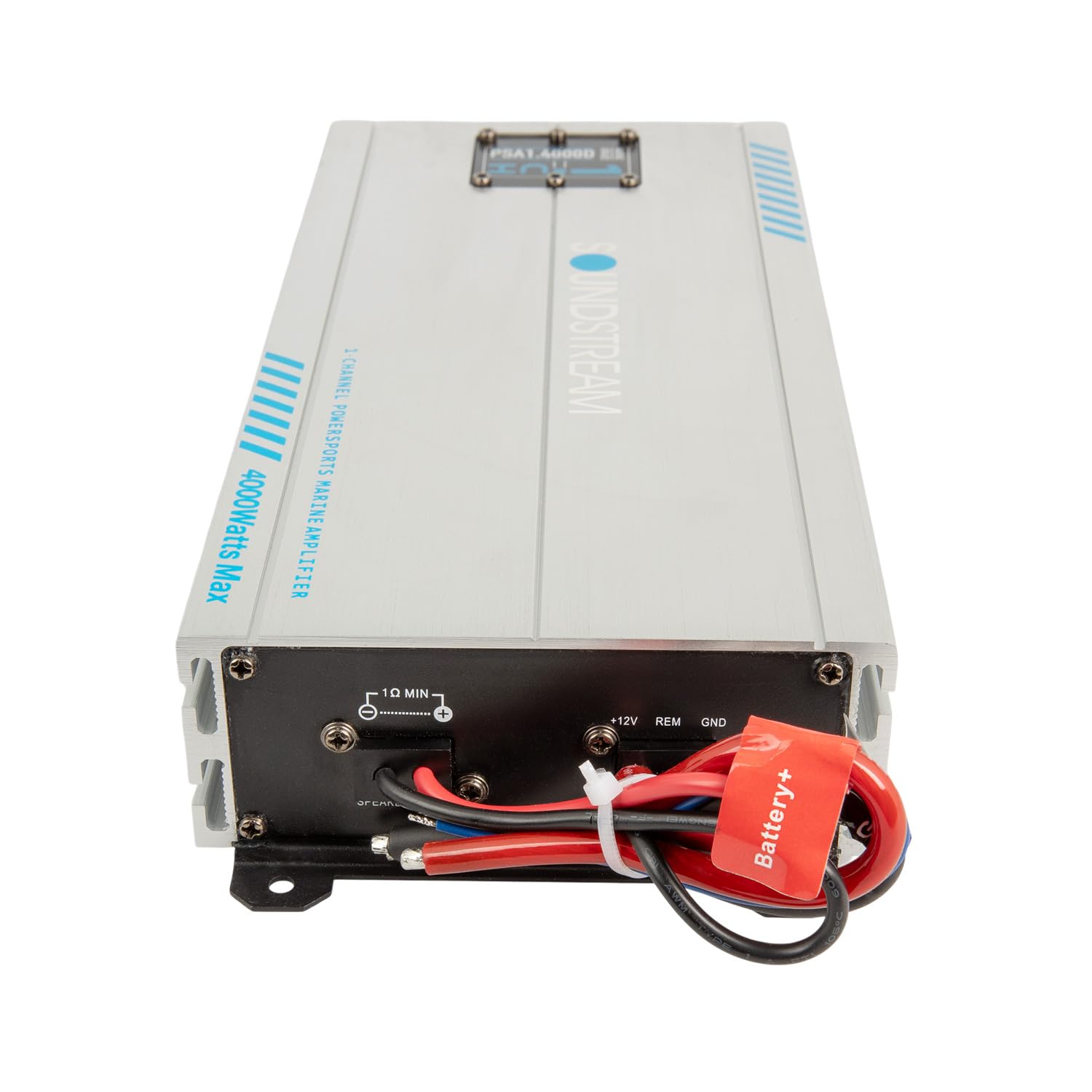
Obraz: Zbliżenie view of the power (+12V, REM, GND) and speaker output terminals on the ampliyfikator.
4.2.2. Połączenia wejściowe audio
Podłącz kable RCA do urządzenia głównego.amp wyjścia do ampgniazda wejściowe RCA firmy lifier.

Obraz: Zbliżenie view of the RCA input and output connections on the ampliyfikator.
4.2.3. Podłączenia wyjściowe głośników
Podłącz subwoofer(y) do amplifier's speaker output terminals. Ensure correct polarity (+ to + and - to -) for optimal sound. This is a monoblock amplifier, designed for a single channel output, typically for subwoofers.
5. Obsługa Ampżywsze
Once all connections are made and verified, reconnect the vehicle's battery. Turn on your head unit, and the amplifier should power on automatically via the remote turn-on wire.
5.1. Regulacja wzmocnienia
Regulacja wzmocnienia jest dopasowana do amplifier's input sensitivity to the output level of your head unit. Start with the gain control at minimum. Play a familiar track at about 75% of your head unit's maximum volume. Slowly increase the ampZwiększ wzmocnienie filtra, aż usłyszysz zniekształcenia, a następnie delikatnie je zmniejsz. To zapewni maksymalną czystość sygnału wyjściowego.
5.2. Ustawienia zwrotnicy
The PSA1.4000D features variable low-pass and subsonic crossovers:
- Filtr dolnoprzepustowy (LPF): This filter allows only frequencies below the set point to pass through to the subwoofer. Adjust this to blend the subwoofer's output with your main speakers. A common starting point is 80-100 Hz.
- Filtr poddźwiękowy: This filter removes extremely low frequencies that are inaudible and can cause damage to your subwoofer. Set this typically 5-10 Hz below your LPF setting, or around 25-30 Hz.
5.3. Wzmocnienie basów
The adjustable bass boost allows you to enhance the low-frequency output. Use this sparingly and adjust to your preference. Excessive bass boost can lead to distortion and potential damage to your subwoofer.
5.4. Remote Bass Control Knob
Connect the included remote bass control knob to the amplifier. This allows for convenient adjustment of the subwoofer level from your listening position.
6. Konserwacja
The Soundstream PSA1.4000D is designed for durability in harsh environments. Regular maintenance will ensure its longevity:
- Czyszczenie: Okresowo wycieraj amplifier's exterior with a damp cloth to remove dirt, salt, or mud. Avoid using harsh chemicals or abrasive cleaners.
- Znajomości: Annually inspect all wiring connections for corrosion, looseness, or damage. Tighten any loose connections and replace corroded terminals.
- Wentylacja: Upewnij się, że ampŻebra chłodzące urządzenia Lifier są pozbawione przeszkód, co pozwala na właściwe odprowadzanie ciepła.
7. Rozwiązywanie Problemów
Jeśli masz problemy ze swoim amplifier, zapoznaj się z poniższym przewodnikiem rozwiązywania problemów:
| Problem | Możliwa przyczyna | Rozwiązanie |
|---|---|---|
| Brak zasilania / Amplifier nie włącza się |
|
|
| Brak wyjścia dźwięku |
|
|
| Zniekształcony dźwięk |
|
|
| Ampprzegrzanie lifiera |
|
|
8. Specyfikacje
Technical specifications for the Soundstream PSA1.4000D Monoblock Waterproof Marine AmpLiyfikator:
| Model | PSA1-4000D |
| Moc wyjściowa (maks.) | 4000 watów |
| Liczba kanałów | 1 (monoblok) |
| Tomtage | 12.2 wolty |
| Pozycja Wymiary (dł. x szer. x wys.) | 14 x 5.75 x 2.75 cala |
| Waga przedmiotu | 6.2 funtów |
| Typ materiału | Aluminium |
| Typ montażu | Montaż powierzchniowy |
| Stopień ochrony IP | IP66 (wodoodporne) |
9. Gwarancja i wsparcie
For warranty information and technical support, please refer to the official Soundstream webOdwiedź witrynę lub skontaktuj się z działem obsługi klienta. Zachowaj paragon jako dowód zakupu na wypadek ewentualnych roszczeń gwarancyjnych.
Producent: Strumień dźwiękowy