
1. Wprowadzenie
Thank you for choosing the Vipdream XPJ01 Automatic Card Shuffler. This device is designed to provide efficient and fair shuffling for 1 to 2 decks of standard playing cards, enhancing your gaming experience. Please read this manual thoroughly before operating the device to ensure proper use, optimal performance, safety, and longevity.
2. Ważne informacje dotyczące bezpieczeństwa
- Keep the device away from water and other liquids. The product is nie wodoodporny.
- Do not operate the card shuffler while it is charging. Disconnect the charging cable before use.
- Należy używać wyłącznie dołączonego lub kompatybilnego kabla ładującego.
- Przechowywać w miejscu niedostępnym dla dzieci i zwierząt domowych.
- Nie próbuj samodzielnie demontować ani naprawiać urządzenia. Skontaktuj się z obsługą klienta, aby uzyskać pomoc.
- Avoid inserting foreign objects into the card slots or mechanism.
- Podczas użytkowania należy upewnić się, że urządzenie jest umieszczone na stabilnej, płaskiej powierzchni.
3. Zawartość opakowania
Proszę sprawdzić, czy w paczce znajdują się następujące elementy:
- Vipdream XPJ01 Automatic Card Shuffler
- Kabel ładujący USB
- Instrukcja obsługi (ten dokument)
4. Koniec produktuview
Familiarize yourself with the components of your Vipdream Automatic Card Shuffler.
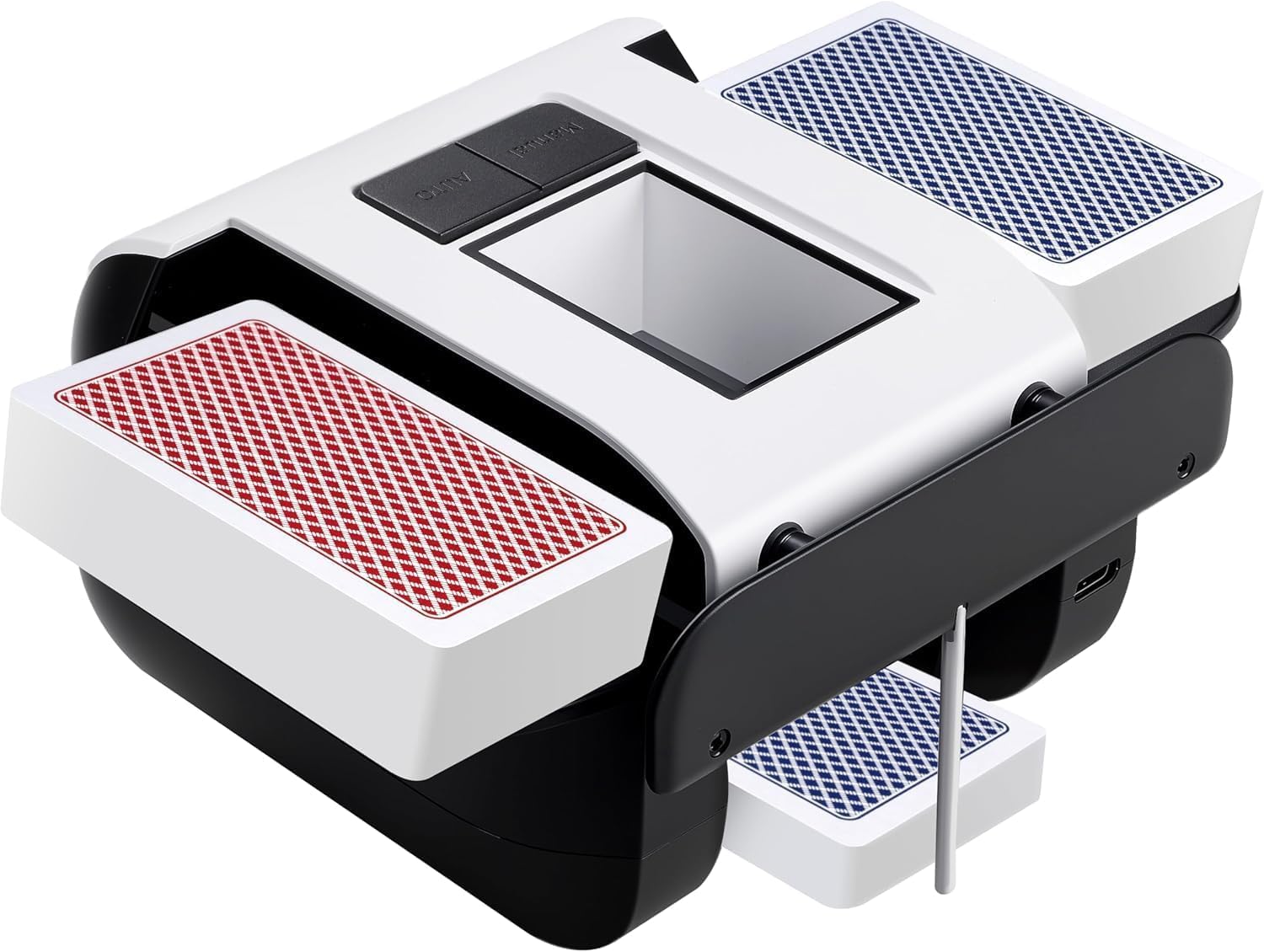
Obraz 1: Przód view of the Vipdream XPJ01 Automatic Card Shuffler. This image displays the main body of the shuffler, including the card input trays at the top and the card output tray at the bottom. A single control button is visible on the front panel.
Kluczowe komponenty:
- Card Input Trays: Where cards are placed for shuffling (typically two slots for 1-2 decks).
- Card Output Tray: Where shuffled cards are collected.
- Przycisk AUTO: Initiates the automatic shuffling process.
- Port ładowania: USB port for recharging the internal battery (usually located on the side or back).
- Kontrolka: Shows charging status or operational status.
5. Konfiguracja
- Rozpakować: Carefully remove the card shuffler and all accessories from the packaging.
- Opłata początkowa: Before first use, fully charge the device. Connect the USB charging cable to the shuffler's charging port and plug the other end into a suitable USB power source (e.g., computer, wall adapter). The indicator light will typically show charging status (e.g., red for charging, green/off for fully charged).
- Umieszczenie: Place the shuffler on a stable, flat, and dry surface.
Notatka: The device is not operational while charging. Ensure it is fully charged and disconnected from the power source before use.
6. Instrukcja obsługi
Follow these steps to shuffle cards:
- Przygotuj karty: Ensure cards are clean, dry, and free from bends or tears. The shuffler supports standard-sized playing cards.
- Włóż karty: Divide your deck(s) into two roughly equal halves. Place one half into each of the two card input trays at the top of the shuffler. Ensure cards are inserted face down or face up consistently, depending on your preference, and are seated properly in the trays.
- Rozpocznij tasowanie: Naciśnij AUTOMATYCZNY button located on the front of the device. The shuffler will begin to automatically mix the cards.
- Automatyczne zatrzymanie: The advanced smart sensor will detect when shuffling is complete and automatically stop the process.
- Retrieve Cards: Once the shuffler stops, carefully remove the shuffled deck from the card output tray at the bottom.
- Repeat (Optional): For a more thorough shuffle, you may repeat the process multiple times.
This shuffler is suitable for various card games including Poker, UNO, Texas Hold 'Em, Blackjack, Omaha, and Baccarat.
7. Instrukcje ładowania
The Vipdream XPJ01 features an integrated rechargeable battery for convenience.
- Connect the provided USB charging cable to the charging port on the shuffler.
- Podłącz drugi koniec kabla USB do standardowego zasilacza USB (nie ma go w zestawie) lub do portu USB komputera.
- The indicator light will illuminate to show that the device is charging.
- Once fully charged, the indicator light will change color or turn off, depending on the model.
- Ważny: Do not use the shuffler while it is connected to a power source and charging. Disconnect the charging cable before operating.
8. Konserwacja
- Czyszczenie: Use a soft, dry cloth to wipe the exterior of the shuffler. Do not use abrasive cleaners or immerse the device in water.
- Opieka nad kartą: Ensure cards are clean and in good condition before shuffling to prevent dust and debris from entering the mechanism.
- Składowanie: Store the shuffler in a cool, dry place when not in use.
9. Rozwiązywanie Problemów
| Problem | Możliwa przyczyna | Rozwiązanie |
|---|---|---|
| Shuffler does not turn on. | Niski poziom naładowania baterii. | Całkowicie naładuj urządzenie. |
| Shuffler stops during operation. | Cards jammed or improperly inserted. | Remove cards, check for obstructions, and reinsert cards correctly. |
| Cards are not shuffling smoothly. | Cards are worn, bent, or dirty. | Use new or clean, undamaged cards. |
| Shuffler is connected but not working. | Urządzenie się ładuje. | Disconnect the charging cable before attempting to use the shuffler. |
10. Specyfikacje
- Nazwa modelu: XPJ01
- Marka: Vipdream
- Wymiary (dł. x szer. x wys.): 7.5 x 5.5 x 3.7 cala (przybliżone wymiary opakowania)
- Waga: 1.08 funta (przybliżona waga paczki)
- Tworzywo: Plastikowy
- Kolor: Biały
- Źródło zasilania: Akumulator (zintegrowany)
- Pojemność karty: 1-2 standard decks
- Wodoodporność: Nie wodoodporny
11. Gwarancja i wsparcie
The Vipdream XPJ01 Automatic Card Shuffler comes with a standard manufacturer's warranty. Please refer to the product packaging or your point of purchase for specific warranty terms and conditions. For technical support, troubleshooting assistance, or warranty claims, please contact Vipdream customer service through the retailer where the product was purchased.
Notatka: The warranty does not cover damage caused by misuse, accident, unauthorized modification, or operation in wet conditions as the product is not waterproof.