
Wstęp
This manual provides detailed instructions for the installation, operation, and maintenance of your ANRAN Q04 Solar 4G LTE Security Camera. Please read this manual thoroughly before using the product to ensure proper functionality and safety. Keep this manual for future reference.

Image: Two ANRAN Q04 white solar security cameras, showcasing the solar panel and antenna design.
Zawartość opakowania
Verify that all components are present in your package. If any items are missing or damaged, please contact customer support.
- ANRAN Q04 Solar 4G LTE Security Camera(s)
- Panel słoneczny (zintegrowany lub oddzielny, w zależności od wersji modelu)
- Wspornik montażowy i śruby
- Kabel ładujący USB
- Instrukcja obsługi (ten dokument)
- SIM Card (pre-installed or included, depending on region/package)
- MicroSD Card (optional, may be included in some packages)
Produkt ponadview
The ANRAN Q04 camera is a wireless outdoor security solution featuring 4G LTE connectivity and solar power. It is designed for continuous surveillance in locations without Wi-Fi access or consistent power supply.

Image: ANRAN Q04 black solar security camera, highlighting the inclusion of a SIM card and a 32GB microSD card.
Główne cechy:
- Łączność 4G LTE: Operates independently without Wi-Fi.
- Zasilane energią słoneczną: Integrated solar panel for continuous charging of the built-in 9600mAh battery.
- 100% bez kabli: Flexible placement without power cables.
- Trzy tryby widzenia nocnego: Smart, Color, and Infrared for clear visibility in low light.
- Odporność na warunki atmosferyczne IP66: Przeznaczony do stosowania na zewnątrz, odporny na kurz i wodę.
- Przechowywanie lokalne i w chmurze: Supports up to 128GB MicroSD card (not included) and offers cloud storage options.
Organizować coś
1. Ładowanie początkowe
Before first use, fully charge the camera's internal battery using the provided USB cable and a 5V/2A power adapter (not included). A full charge ensures optimal performance, especially during initial setup or periods of low sunlight.
2. SIM Card & MicroSD Card Installation
- Locate the SIM card slot and MicroSD card slot on the camera (usually under a rubber seal).
- Insert the 4G LTE SIM card (ensure it is activated and has a data plan) into the SIM slot with the gold contacts facing down.
- Insert a MicroSD card (up to 128GB, Class 10 or higher recommended) into the MicroSD slot if local storage is desired.
- Securely close the rubber seal to maintain waterproofing.

Image: ANRAN Q04 white solar security camera with an arrow pointing to the MicroSD card slot, indicating local storage capability up to 128GB.
3. Pobieranie aplikacji i tworzenie konta
- Download the "ANRAN" app from your smartphone's app store (iOS App Store or Google Play Store).
- Otwórz aplikację i utwórz nowe konto lub zaloguj się, jeśli już je posiadasz.
4. Camera Pairing/Connection
- Power on the camera. Wait for the indicator light to show it's ready for pairing (refer to the camera's LED indicator guide in the app or a separate quick start guide).
- W aplikacji ANRAN dotknij ikony „+”, aby dodać nowe urządzenie.
- Select "4G Camera" or the appropriate camera type.
- Postępuj zgodnie z instrukcjami wyświetlanymi na ekranie, aby zeskanować kod QR aparatu lub ręcznie wprowadzić identyfikator urządzenia.
- Po nawiązaniu połączenia możesz nadać nazwę kamerze i skonfigurować ustawienia początkowe.
5. Instrukcje montażu
Wybierz lokalizację, która odbiera ample direct sunlight for the solar panel and provides the desired viewkąt.
- Zaznacz punkty wiercenia na ścianie lub powierzchni montażowej, korzystając z uchwytu montażowego jako szablonu.
- W razie potrzeby wywierć otwory montażowe i włóż kołki rozporowe.
- Przymocuj uchwyt montażowy do powierzchni za pomocą dołączonych śrub.
- Zabezpiecz kamerę w uchwycie montażowym.
- Adjust the camera angle and solar panel orientation for optimal sunlight exposure and coverage.

Image: A woman installing an ANRAN Q04 white solar security camera on an outdoor wall, demonstrating simple installation.

Image: An ANRAN Q04 black solar security camera mounted on a tree, illustrating its 100% wire-free and 4G capabilities, powered by an integrated solar panel.
Obsługa aparatu
1. Na żywo View
Open the ANRAN app and select your camera from the device list. The live view will display the real-time feed from your camera. You can use on-screen controls for pan/tilt (if supported by your model), zoom, and two-way audio.
2. Nagrywanie i odtwarzanie
The camera records video based on motion detection or continuous recording settings (if configured).
- Pamięć lokalna: Recordings are saved to the installed MicroSD card. Access them via the app's playback section.
- Przechowywanie w chmurze: If subscribed, recordings are uploaded to the cloud. Access them through the app's cloud history.
3. Tryby widzenia nocnego
The ANRAN Q04 supports three night vision modes, which can be configured in the app settings:
- Tryb inteligentny: Automatycznie przełącza się między widzeniem nocnym w podczerwieni a kolorowym widzeniem nocnym na podstawie wykrycia ruchu lub światła otoczenia.
- Tryb koloru: Utilizes built-in spotlights to provide full-color video in low-light conditions.
- Tryb podczerwieni: Wykorzystuje diody LED podczerwone do nagrywania czarno-białego obrazu w całkowitej ciemności.
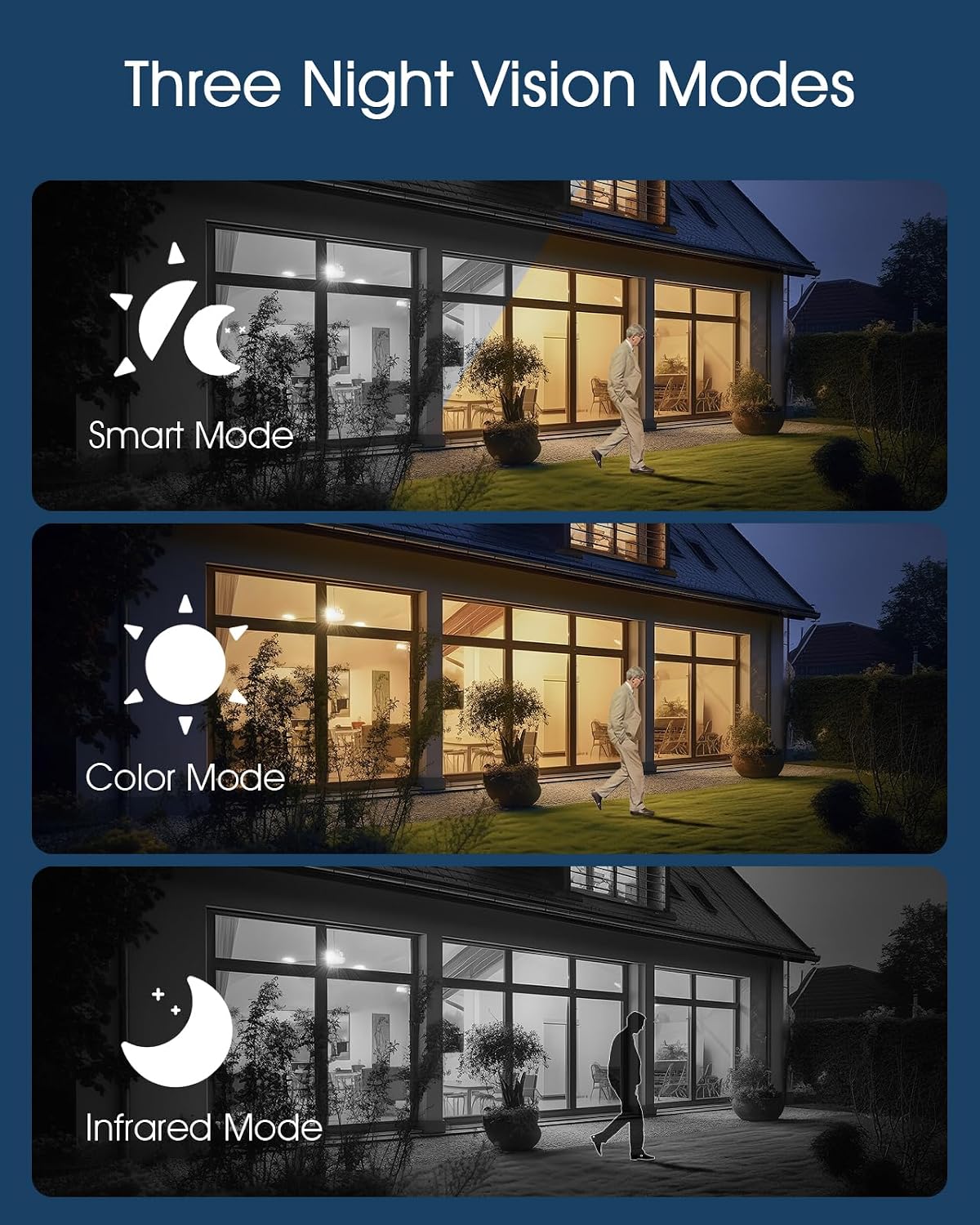
Image: Visual representation of the three night vision modes (Smart, Color, Infrared) available on the ANRAN Q04 camera, showing their distinct appearances.
4. Ustawienia wykrywania ruchu
Configure motion detection sensitivity, detection zones, and notification preferences within the ANRAN app. This allows you to receive alerts only for relevant events.
Konserwacja
1. Czyszczenie
- Regularnie czyść obiektyw aparatu i panel słoneczny miękką, miękką szmatką.amp szmatką, aby usunąć kurz, brud lub zanieczyszczenia.
- Aby zapewnić efektywne ładowanie, upewnij się, że panel słoneczny jest czysty.
- Nie używaj żrących chemikaliów ani ściernych środków czyszczących.
2. Pielęgnacja baterii
- The camera is designed for continuous solar charging. Ensure the solar panel receives adequate direct sunlight daily.
- If the camera is installed in a shaded area or during prolonged periods of low sunlight, occasional manual charging via USB may be required.
- Unikaj ekstremalnych temperatur, które mogą obniżyć wydajność akumulatora.

Image: ANRAN Q04 black solar security camera with its solar panel, illustrating its capability for 365 days of non-stop solar power due to the 9600mAh battery and IP66 waterproof rating.
Rozwiązywanie problemów
| Problem | Możliwe rozwiązanie |
|---|---|
| Kamera się nie włącza. | Ensure the battery is charged. Connect to a USB power source for initial charging. Check the power button. |
| Brak sygnału 4G. | Verify the SIM card is correctly inserted and activated with a data plan. Check network coverage in the installation area. Try restarting the camera. |
| Nie można połączyć się z aplikacją. | Ensure the camera is powered on and the SIM card has an active data connection. Restart the app and the camera. Follow the pairing steps again. |
| Słaba jakość obrazu w nocy. | Check night vision settings in the app (Smart, Color, Infrared). Ensure the camera lens is clean and not obstructed. |
| Akumulator nie ładuje się za pomocą energii słonecznej. | Ensure the solar panel is clean and receives at least 4-6 hours of direct sunlight daily. Reposition the camera or panel if necessary. |
Specyfikacje
- Model: Pytanie 04
- Łączność: 4G LTE (wymagana karta SIM)
- Moc: Solar Panel with 9600mAh Rechargeable Battery
- Składowanie: MicroSD Card (up to 128GB, not included), Cloud Storage (subscription optional)
- Odporność na warunki atmosferyczne: Wodoodporność i pyłoszczelność IP66
- Temperatura pracy: -40°F do 140°F (-40°C do 60°C)
- Widzenie nocne: Smart, Color, Infrared Modes
- Audio: Dwukierunkowy dźwięk

Image: ANRAN Q04 white solar security camera operating outdoors in the rain, demonstrating its IP66 waterproof and dustproof rating and ability to withstand temperatures from -40°F to 140°F.
Gwarancja i wsparcie
Produkty ANRAN zazwyczaj objęte są ograniczoną gwarancją. Prosimy o zapoznanie się z kartą gwarancyjną dołączoną do opakowania lub odwiedzenie oficjalnej strony ANRAN. webSzczegółowe warunki gwarancji można znaleźć na naszej stronie.
For technical support, troubleshooting assistance, or warranty claims, please contact ANRAN customer service through their official webstronę internetową lub dane kontaktowe znajdujące się na opakowaniu produktu.
Webstrona: www.anran-cctv.com (Please verify official webteren)