
1. Wprowadzenie
This manual provides detailed instructions for the proper use and maintenance of your BAOFENG UV-32 10W Ham Radio. The UV-32 is a multi-band two-way radio featuring 10W selectable power, GPS navigation, a 2.0-inch color display, and multiple programming options including wireless app connectivity. Please read this manual thoroughly before operating the device to ensure safe and efficient communication.
2. Informacje dotyczące bezpieczeństwa
Observe the following safety precautions to prevent injury or damage to the radio:
- Nie należy używać radia w atmosferach zagrożonych wybuchem (np. w obecności gazów łatwopalnych, cząstek pyłu, proszków metalicznych).
- Nie nadawać bez podłączonej anteny.
- Keep the antenna at least 2.5 cm (1 inch) away from your body when transmitting.
- Używaj wyłącznie akumulatorów i ładowarek zatwierdzonych przez BAOFENG. Nieautoryzowane akcesoria mogą spowodować uszkodzenia lub pożar.
- Nie rozmontowuj ani nie modyfikuj radia. Naprawy powinny być wykonywane wyłącznie przez wykwalifikowanych techników.
- Unikaj długotrwałego narażenia na bezpośrednie działanie promieni słonecznych i ekstremalnych temperatur.
- Do not operate the radio while driving or performing other activities that require full attention.
3. Zawartość opakowania
Sprawdź, czy w przesyłce znajdują się wszystkie elementy:
- 1 x BAOFENG UV-32 Radio
- 1 x bateria 2500mAh
- 1 x USB-C Charger
- 1 x Desktop Charger Base
- 1 x Standard UV Antenna
- 1 x Long Airband Antenna
- 1 x słuchawki
- 1 x Klips do paska
- 1 x Radio Case Holder

Image: The BAOFENG UV-32 radio shown with its complete set of accessories, including the battery, charger, antennas, headset, belt clip, and case holder.
4. Koniec produktuview
Familiarize yourself with the main components of your UV-32 radio.

Obraz: Przód view of the BAOFENG UV-32 radio, highlighting the 2.0-inch color display, alphanumeric keypad, and function buttons.
Kluczowe komponenty:
- Złącze antenowe: For attaching the standard UV or airband antenna.
- Pokrętło zasilania/głośności: Włącza/wyłącza radio i reguluje głośność.
- Wyświetlacz: 2.0-inch color screen showing frequency, channel, battery status, and other indicators.
- Przycisk NIM: Przycisk „Naciśnij i mów” umożliwiający nadawanie.
- Side Keys (P1, P2): Możliwość dostosowania klawiszy funkcyjnych.
- Klawiatura: Alphanumeric input for frequencies, channels, and menu navigation.
- Port ładowania USB-C: Do bezpośredniego ładowania akumulatora.
- Gniazdo dodatkowe: For connecting the headset or programming cable.
5. Konfiguracja
5.1 Instalacja i ładowanie akumulatora
- Align the 2500mAh Li-ion battery with the grooves on the back of the radio.
- Przesuń baterię do góry, aż zatrzaśnie się na miejscu.
- To charge, connect the USB-C charger directly to the battery's USB-C port or place the radio with the battery attached into the desktop charging base.
- The charging indicator on the desktop base will show red during charging and green when fully charged.

Image: A close-up of the 2500mAh Li-ion battery for the UV-32, highlighting its integrated USB-C charging port.
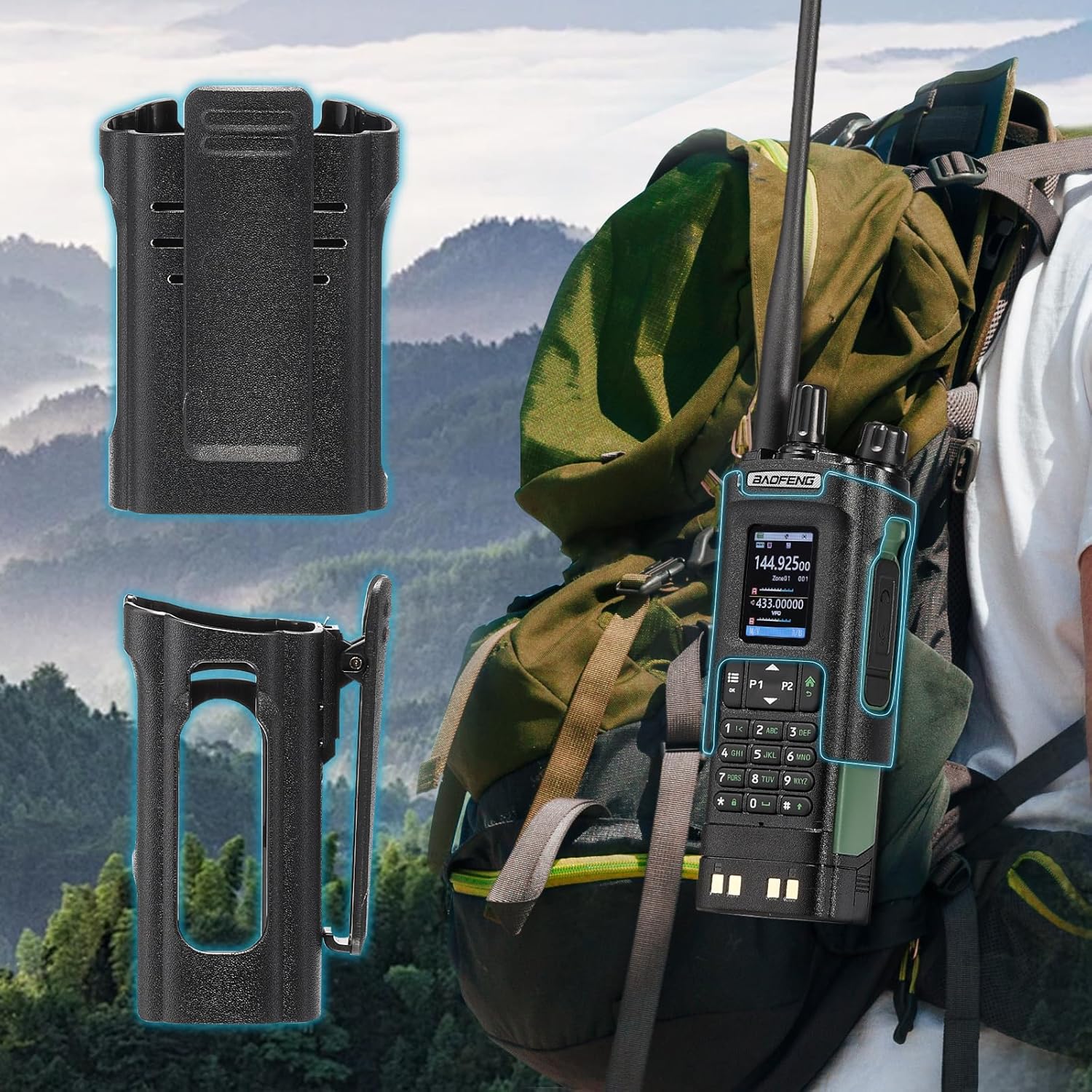
Image: The BAOFENG UV-32 radio demonstrating both direct USB-C charging and charging via its desktop cradle.
5.2 Instalacja anteny
- Select the appropriate antenna: the standard UV antenna for general VHF/UHF use or the long airband antenna for enhanced aviation signal reception.
- Przykręć wybraną antenę zgodnie z ruchem wskazówek zegara do złącza antenowego u góry radia, aż będzie można ją dokręcić palcami. Nie dokręcaj zbyt mocno.

Image: The BAOFENG UV-32 radio illustrating the use of two different antennas: a standard antenna for UHF/VHF and a longer antenna specifically designed for airband reception.
5.3 Montaż klipsa do paska
- Dopasuj klips do paska do otworów na śruby z tyłu radia.
- Zamocuj klips do paska za pomocą dołączonych śrub.
- The radio case holder can be used to attach the radio to a backpack or belt for secure carrying.

Image: The BAOFENG UV-32 radio securely mounted to a backpack strap using its belt clip and an additional case holder, demonstrating portability.
6. Obsługa radia
6.1 Włączanie/wyłączanie zasilania i regulacja głośności
Obróć pokrętło zasilania/głośności zgodnie z ruchem wskazówek zegara, aby włączyć radio i zwiększyć głośność. Obróć pokrętło w kierunku przeciwnym do ruchu wskazówek zegara, aby zmniejszyć głośność i wyłączyć radio.
6.2 Wyświetl ponadview
The 2.0-inch color display provides essential information:
- Częstotliwość/kanał: Displays the current operating frequency or channel number.
- Poziom naładowania baterii: Wskazuje pozostały poziom naładowania baterii.
- Siła sygnału: Shows the strength of received signals.
- Wskaźniki trybu: Icons for various functions like GPS, Bluetooth, power level, etc.

Image: A close-up of the BAOFENG UV-32's 2-inch color display, showing detailed frequency, channel, and status information.
6.3 Tryb kanałowy a tryb częstotliwości
The radio operates in two primary modes:
- Tryb częstotliwości (VFO): Allows direct input of frequencies for scanning or temporary use.
- Tryb kanału (MR): Uses pre-programmed channels for quick access to stored frequencies.
Naciśnij MENU button and navigate to the mode setting to switch between VFO and MR modes.
6.4 Wybór częstotliwości
- Klawiatura: In Frequency Mode, directly enter the desired frequency using the numeric keypad.
- Quick Channel Knob: Rotate the top knob to quickly scroll through frequencies or channels.
- Strzałki w górę/w dół: Use the arrow keys (P1/P2) to fine-tune frequencies or navigate channels.
6.5 Przesyłanie i odbieranie
- Ensure an antenna is properly connected.
- Wybierz żądaną częstotliwość lub kanał.
- Aby przesłać, naciśnij i przytrzymaj PTT przycisk z boku radia. Mów wyraźnie do mikrofonu.
- Uwolnij PTT przycisk, aby zatrzymać nadawanie i powrócić do trybu odbioru.
- Poziomy mocy: The UV-32 offers High (H), Medium (M), and Low (L) power settings. Adjust this in the menu to balance range and battery life.
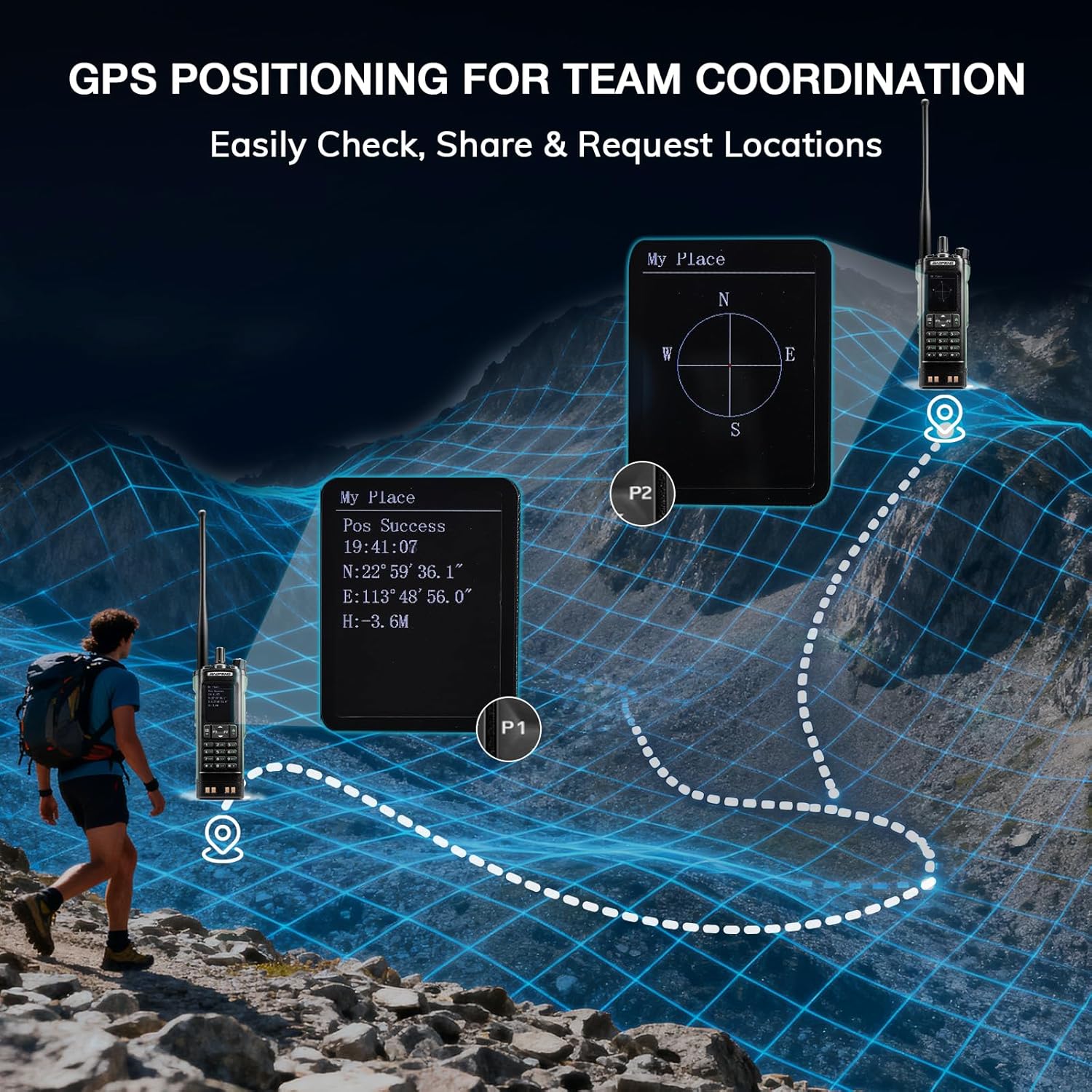
Image: The BAOFENG UV-32 radio's display showing different power output levels (High, Medium, Low) and an external SWR meter for measurement.
6.6 Opcje programowania
The UV-32 offers several methods for programming frequencies and settings:
- Wireless APP Programming: Connect your radio to a smartphone (iOS/Android) via Bluetooth using the dedicated BT app for quick and wireless programming.
- Oprogramowanie CHIRP: For advanced or bulk programming, use CHIRP software on a PC. Select "UV-17ProGPS" as the radio model in CHIRP.
- Programowanie klawiatury: Basic programming can be done directly on the radio using the keypad and menu system.
- Kopiowanie częstotliwości jednym kluczem: This feature allows for easy cloning of frequencies from another radio. Refer to the radio's on-screen prompts or full manual for specific steps.

Image: An illustration depicting the various programming methods available for the BAOFENG UV-32, including mobile app (Bluetooth), CPS software, CHIRP software, and direct keypad input.

Image: Two BAOFENG radios illustrating the one-key frequency copy function, allowing for quick and easy channel cloning between devices.
6.7 Nawigacja GPS
The integrated GPS module provides real-time location data:
- Access the GPS function through the radio's menu.
- View your current latitude, longitude, and altitude.
- The radio supports sharing your location or requesting coordinates from other team members for improved coordination.

Image: A visual representation of the BAOFENG UV-32's GPS functionality, showing how it displays coordinates and facilitates location sharing for team coordination in outdoor environments.
6.8 Enhanced Airband Reception
For clearer reception of aviation signals, utilize the dedicated AM antenna included with your UV-32. This specialized antenna is designed to provide more accurate and stable airband listening compared to standard UV dual-band antennas.
6.9 Radio pogodowe NOAA
The UV-32 can receive NOAA weather alerts. Consult the radio's menu for instructions on how to scan for and select NOAA channels in your area.
6.10 Konfigurowalne klawisze boczne
The radio features four customizable side keys (P1, P2, and two others). These can be programmed via the menu or programming software to quickly access frequently used functions such as scan, monitor, or power level adjustment.

Image: A close-up of the BAOFENG UV-32's side, highlighting the customizable P1 and P2 function keys.
7. Konserwacja
7.1 Czyszczenie radia
Przetrzyj powierzchnię radia miękką,amp Ściereczką. Nie używaj silnych środków chemicznych ani ściernych środków czyszczących. Przed użyciem upewnij się, że wszystkie porty są suche.
7.2 Pielęgnacja baterii
- Całkowicie naładuj baterię przed pierwszym użyciem.
- Unikaj przeładowywania lub całkowitego rozładowania akumulatora.
- Jeśli akumulator nie będzie używany przez dłuższy czas, należy go przechowywać w chłodnym i suchym miejscu.
7.3 Przechowywanie
When storing the radio for a long time, remove the battery and store it separately. Keep the radio in a dry, dust-free environment away from direct sunlight and extreme temperatures.
8. Rozwiązywanie Problemów
| Problem | Możliwa przyczyna | Rozwiązanie |
|---|---|---|
| Radio się nie włącza | Akumulator nie został prawidłowo zainstalowany lub jest rozładowany. | Upewnij się, że akumulator jest bezpiecznie podłączony. Naładuj akumulator do pełna. |
| Nie można transmitować | Antenna not connected. Incorrect frequency/channel. Low power setting. | Attach antenna. Verify frequency/channel. Increase power level. |
| Słaby zasięg odbioru/nadawania | Obstructions. Low power setting. Incorrect antenna. | Move to an open area. Increase power. Ensure correct antenna is used and properly connected. |
| Programming errors with CHIRP/APP | Incorrect radio model selected. Connection issues. Outdated software/firmware. | Ensure "UV-17ProGPS" is selected in CHIRP. Re-establish Bluetooth connection. Update software/firmware if available. |
9. Specyfikacje
| Funkcja | Szczegół |
|---|---|
| Marka | BAOFENG |
| Numer modelu | UV-32 |
| Liczba kanałów | 1000 |
| Zakres częstotliwości | UHF, UKF |
| Moc wyjściowa | Up to 10W (selectable High, Medium, Low) |
| Wyświetlacz | 2.0-calowy kolorowy wyświetlacz |
| Bateria | 2500mAh Li-ion (w zestawie) |
| Ładowanie | USB-C, Desktop Charger Base |
| Cechy specjalne | Digital Display, Dual Band, USB-C Rechargeable, Wireless APP Programming, Wireless Channel Clone, GPS, NOAA Reception |
| Protokół łączności | Bluetooth |
| Wymiary produktu | 1.2" gł. x 2.2" szer. x 4" wys. |
| Poziom wodoodporności | Nie jest wodoodporny |
10. Gwarancja i wsparcie
Your BAOFENG UV-32 radio comes with an 18-miesięczna gwarancja. BAOFENG also provides dożywotnie wsparcie dla tego produktu.
For technical assistance, warranty claims, or further inquiries, please visit the official BAOFENG website or contact their customer support directly. Keep your purchase receipt as proof of purchase for warranty services.