
1. Wprowadzenie
Thank you for choosing the Aigostar 100W RGB Solar LED Floodlight. This manual provides essential information for the safe and efficient use of your new solar floodlight. Please read these instructions carefully before installation and operation, and retain them for future reference.
2. Informacje dotyczące bezpieczeństwa
Aby zapewnić bezpieczną obsługę i zapobiec uszkodzeniom, należy przestrzegać następujących środków ostrożności:
- Always handle the solar panel and floodlight with care.
- Do not attempt to disassemble or modify the product. This will void the warranty and may cause damage or injury.
- Trzymać produkt z dala od otwartego ognia i źródeł ciepła.
- Aby zapewnić optymalne ładowanie, należy zainstalować panel słoneczny w miejscu, w którym będzie on wystawiony na bezpośrednie działanie promieni słonecznych.
- Avoid looking directly into the LED light source when it is active, as it may cause eye strain.
- The product is IP66 waterproof, suitable for outdoor use, but avoid submerging it in water.
- Dzieci powinny znajdować się pod nadzorem, aby mieć pewność, że nie bawią się urządzeniem.
3. Zawartość opakowania
Sprawdź, czy w pakiecie znajdują się wszystkie komponenty:
- Aigostar 100W RGB Solar LED Floodlight (4 units)
- Panel słoneczny (4 jednostki)
- Pilot zdalnego sterowania (1 szt.)
- Mounting Accessories (screws, anchors, brackets)
- Ground Stake (for solar panel, if applicable)

Image: Contents of the Aigostar 100W RGB Solar LED Floodlight package, showing the floodlight, solar panel, remote control, and various mounting accessories.
4. Koniec produktuview
The Aigostar 100W RGB Solar LED Floodlight is designed for versatile outdoor and indoor illumination, featuring a powerful 100W LED, an 8000mAh high-capacity battery, and an efficient monocrystalline silicon solar panel. It offers RGB color options and is controlled via a remote.
Główne cechy:
- Wysokowydajny panel słoneczny: Monocrystalline silicon panel with up to 25% photoelectric conversion efficiency.
- Długa żywotność baterii: 8000mAh battery provides up to 14 hours of continuous operation after 4-6 hours of charging.
- RGBW Multi-purpose LED: 16 static colors and 4 dynamic modes (Flash, Strobe, Fade, Smooth) for various ambiance settings.
- Trwałe i odporne na warunki atmosferyczne: IP66 rating, resistant to cold (-10°C) and heat (50°C), made from ABS and tempered glass.
- Tryb automatyczny: Built-in light sensor for automatic dusk-to-dawn operation.
- Zdalne sterowanie: Convenient control of colors, modes, and brightness.
- Regulowany uchwyt: 180° rotatable steel tube holder for flexible positioning.

Image: The Aigostar Solar LED Floodlight highlighting its large solar panel, 8000mAh battery capacity, and efficient charging/working times.

Image: Illustration of the floodlight's IP66 waterproof rating and its ability to withstand extreme temperatures, from -10°C to 50°C, shown in sunny, snowy, and rainy environments.

Image: The floodlight in an outdoor setting, demonstrating its RGB capabilities with 15 static colors and 4 dynamic modes, suitable for creating festive atmospheres.
5. Konfiguracja i instalacja
The Aigostar solar floodlight is designed for easy installation on walls, ceilings, or floors. It comes with a 5-meter cable for flexible placement of the solar panel.
Ważne uwagi:
- Umiejscowienie panelu słonecznego: Install the solar panel in an area that receives maximum direct sunlight throughout the day. Adjust its angle for optimal sun exposure.
- Opłata początkowa: It is recommended to charge the solar panel for 24 hours before the first use to ensure the battery is fully charged.
- Wysokość instalacji: For optimal light distribution, an installation height of 3-6 meters is recommended.
Installation Steps (Wall Mount):
- Mark the desired drilling points on the wall for the floodlight bracket.
- Drill holes and insert wall anchors. Secure the floodlight bracket using screws.
- Attach the solar panel bracket to the wall in a location with good sunlight.
- Connect the solar panel cable to the floodlight cable, ensuring a secure, waterproof connection.
- Adjust the angle of both the floodlight and the solar panel as needed.
Installation Steps (Floor/Ground Mount):
- Attach the ground stake to the solar panel bracket.
- Insert the ground stake into soft ground in a location with good sunlight.
- Position the floodlight on a stable surface or mount it using its bracket.
- Connect the solar panel cable to the floodlight cable, ensuring a secure, waterproof connection.
- Adjust the angle of both the floodlight and the solar panel as needed.

Image: Visual guide for installing the solar floodlight, illustrating both wall and ground mounting options for the solar panel and floodlight unit.
6. Instrukcja obsługi
The Aigostar Solar LED Floodlight can be operated using the included remote control and features an automatic light sensor.
Funkcje pilota zdalnego sterowania:
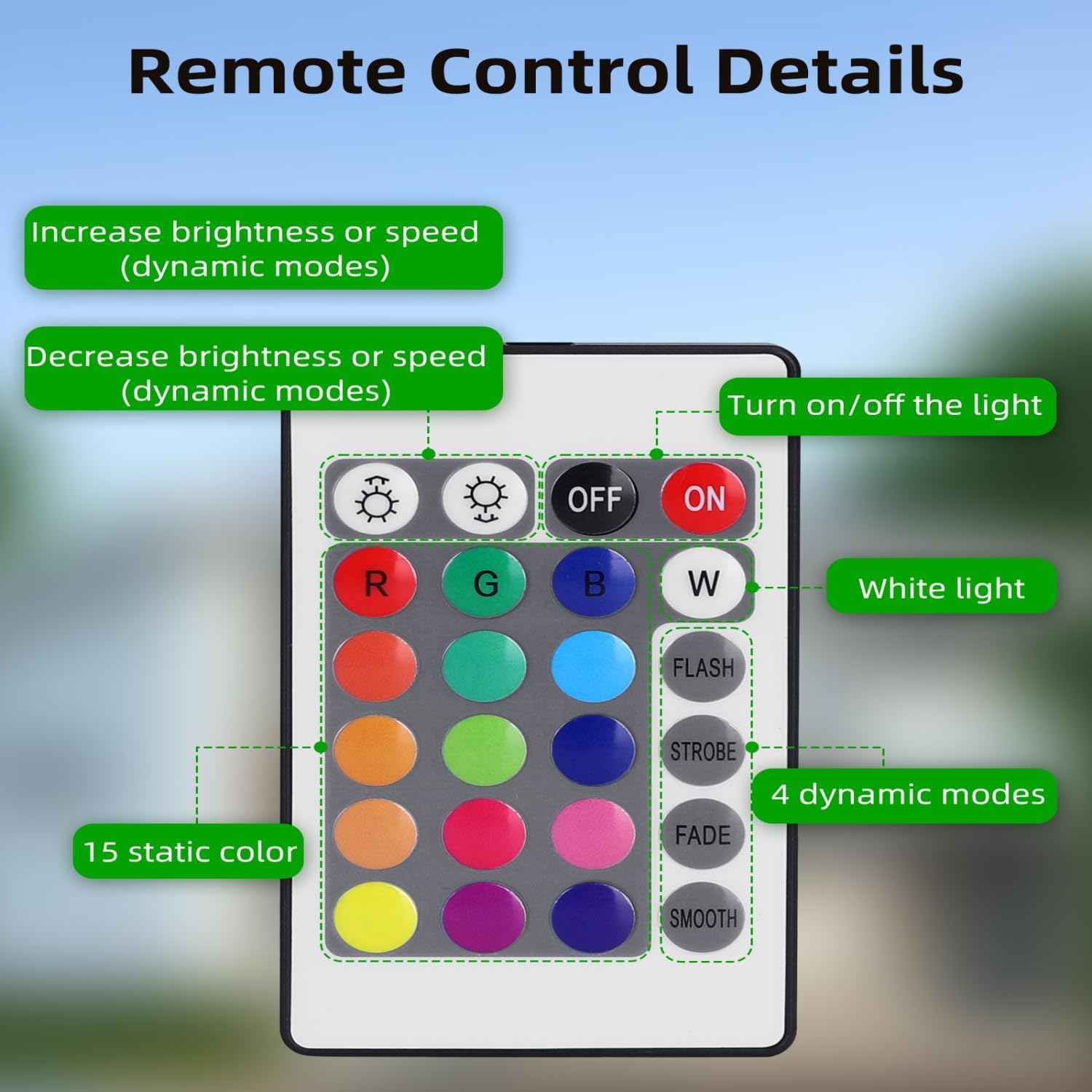
Image: Layout of the remote control, detailing buttons for power, brightness adjustment, 16 static color selections (including White), and 4 dynamic lighting modes.
- Przycisk WŁ./WYŁ.: Naciśnij, aby włączyć lub wyłączyć światło.
- Regulacja jasności/prędkości: Użyj + I - buttons to increase/decrease brightness for static colors or adjust speed for dynamic modes.
- Kolory statyczne: Select from 16 predefined colors, including White (W), Red (R), Green (G), Blue (B), and various shades.
- Tryby dynamiczne:
- LAMPA BŁYSKOWA: Szybkie zmiany kolorów.
- Stroboskop: Miganie pojedynczego koloru.
- ZNIKAĆ: Stopniowe przejście między kolorami.
- GŁADKI: Smooth, continuous color cycling.
Tryb automatyczny:
- The floodlight has a built-in light sensor that automatically turns the light on at dusk and off at dawn.
- To disable Automatic Mode: Press and hold the "OFF" button on the remote control for 3 seconds. The light will flash twice to confirm the mode is deactivated.
- To re-enable Automatic Mode: Press the "ON" button on the remote control.
7. Konserwacja
Regular maintenance ensures the longevity and optimal performance of your solar floodlight.
- Czyszczenie paneli słonecznych: Clean the solar panel regularly (at least once a year, or more frequently in dusty environments) with a soft, damp cloth. This prevents dust accumulation and maintains charging efficiency.
- Ogólne sprzątanie: Wipe the floodlight housing with a soft, damp W razie potrzeby przetrzyj ściereczką. Nie używaj środków czyszczących o działaniu ściernym ani rozpuszczalników.
- Bateria: The integrated battery is designed for long-term use. Do not attempt to replace it yourself.
- Kontrola: Periodically check the cables and connections for any signs of wear or damage. Ensure all mounting hardware remains secure.
8. Rozwiązywanie Problemów
If you encounter issues with your Aigostar Solar LED Floodlight, try the following steps:
- Światło się nie włącza:
- Upewnij się, że panel słoneczny otrzymuje wystarczającą ilość bezpośredniego światła słonecznego, aby umożliwić ładowanie.
- Verify that the cable connection between the solar panel and floodlight is secure.
- Check if the automatic mode is active or if the light was manually turned off via the remote.
- Allow for an initial 24-hour charge before first use.
- Light dim or short working time:
- Clean the solar panel surface to remove any dust or debris that may be obstructing sunlight.
- Upewnij się, że panel słoneczny jest ustawiony tak, aby zapewnić maksymalne nasłonecznienie.
- Cloudy weather or insufficient sunlight will reduce charging efficiency and working time.
- Pilot nie działa:
- Ensure there are no obstructions between the remote and the floodlight.
- Sprawdź baterię pilota zdalnego sterowania i wymień ją, jeśli to konieczne.
If problems persist, please contact Aigostar customer support.
9. Specyfikacje
| Marka | Aigostar |
| Numer modelu | ZQ-JXRGB-100W |
| Moc | 100 W |
| Kolor światła | RGB |
| Pojemność baterii | 8000mAh |
| Wydajność paneli słonecznych | Do 25% |
| Ocena odporności na wodę | IP66 |
| Temperatura pracy | -10°C do 50°C |
| Tworzywo | ABS, szkło hartowane |
| Metoda kontroli | Remote Control (Infrared) |
| Długość kabla (od panelu słonecznego do lampy) | 5 metrów |
| Dimensions (Floodlight) | Approx. 34L x 35.8W x 26.1H cm (based on product dimensions) |
| Liczba świateł | 4 (as per product title, assuming 4-pack) |

Image: Detailed dimensions of the solar panel and floodlight, including the 5-meter connection cable.
10. Gwarancja i wsparcie
Aigostar products are manufactured to high-quality standards. For warranty information, please refer to the specific terms provided at the point of purchase or visit the official Aigostar webstrona.
If you require technical assistance, have questions about your product, or need to report a defect, please contact Aigostar customer support through their official channels. Please have your model number (ZQ-JXRGB-100W) and purchase details ready when contacting support.
Informacje kontaktowe do działu wsparcia można często znaleźć na oficjalnej stronie marki webna stronie internetowej lub za pośrednictwem sprzedawcy, u którego zakupiłeś produkt.