
1. Wprowadzenie
Dziękujemy za zakupasing the VIFLYKOO Bluetooth 5.4 Turntable. This device combines classic vinyl playback with modern connectivity, featuring integrated stereo speakers, Bluetooth 5.4 for both receiving and transmitting audio, USB recording, and multiple audio outputs. This manual provides essential information for safe operation, setup, and maintenance of your turntable.

Image: The VIFLYKOO Bluetooth 5.4 Turntable, showcasing its mahogany finish and classic design.
2. Instrukcje bezpieczeństwa
Please read these safety instructions carefully before using the product and retain them for future reference. Incorrect use may result in electric shock, fire, or other hazards.
- Nie wystawiaj urządzenia na działanie deszczu, wilgoci ani ekstremalnych temperatur.
- Upewnij się, że zasilacz jest kompatybilny z lokalną siecią energetyczną.
- Nie otwierać casing; wszelkie prace serwisowe należy zlecać wykwalifikowanemu personelowi.
- Trzymaj urządzenie z dala od źródeł ciepła, bezpośredniego światła słonecznego i silnych pól magnetycznych.
- Czyścić wyłącznie suchą ściereczką. Nie używać płynów czyszczących ani aerozoli.
- Place the turntable on a stable, level surface to prevent vibrations and ensure proper playback.
3. Zawartość opakowania
Sprawdź, czy w opakowaniu znajdują się wszystkie elementy:
- VIFLYKOO Bluetooth 5.4 Turntable
- Zasilacz
- Instrukcja obsługi
- 45 RPM Adapter (for 7-inch records)
4. Koniec produktuview
Familiarize yourself with the main components and features of your turntable.
4.1 Główne cechy
- Łączność Bluetooth 5.4: Supports both receiving audio from external devices and transmitting audio to Bluetooth speakers or headphones.
- Zintegrowane głośniki stereo: Two 5W speakers provide clear and authentic sound directly from the unit.
- Gramofon 3-biegowy: Plays 33 1/3, 45, and 78 RPM records.
- Funkcjonalność USB: Allows recording vinyl to MP3/WAV files and playing digital audio from a USB drive.
- Multiple Audio Connections: RCA output for external amplifiers, 3.5mm AUX input for external audio sources, and a headphone output for private listening.
- Funkcja automatycznego zatrzymania: Automatically lifts the tonearm at the end of a record to protect the stylus and vinyl.
- Zdejmowana osłona przeciwkurzowa: Protects the platter and stylus from dust accumulation.
- Anti-Resonance Belt Drive: Minimalizuje wibracje, poprawiając jakość dźwięku.
4.2 Składniki
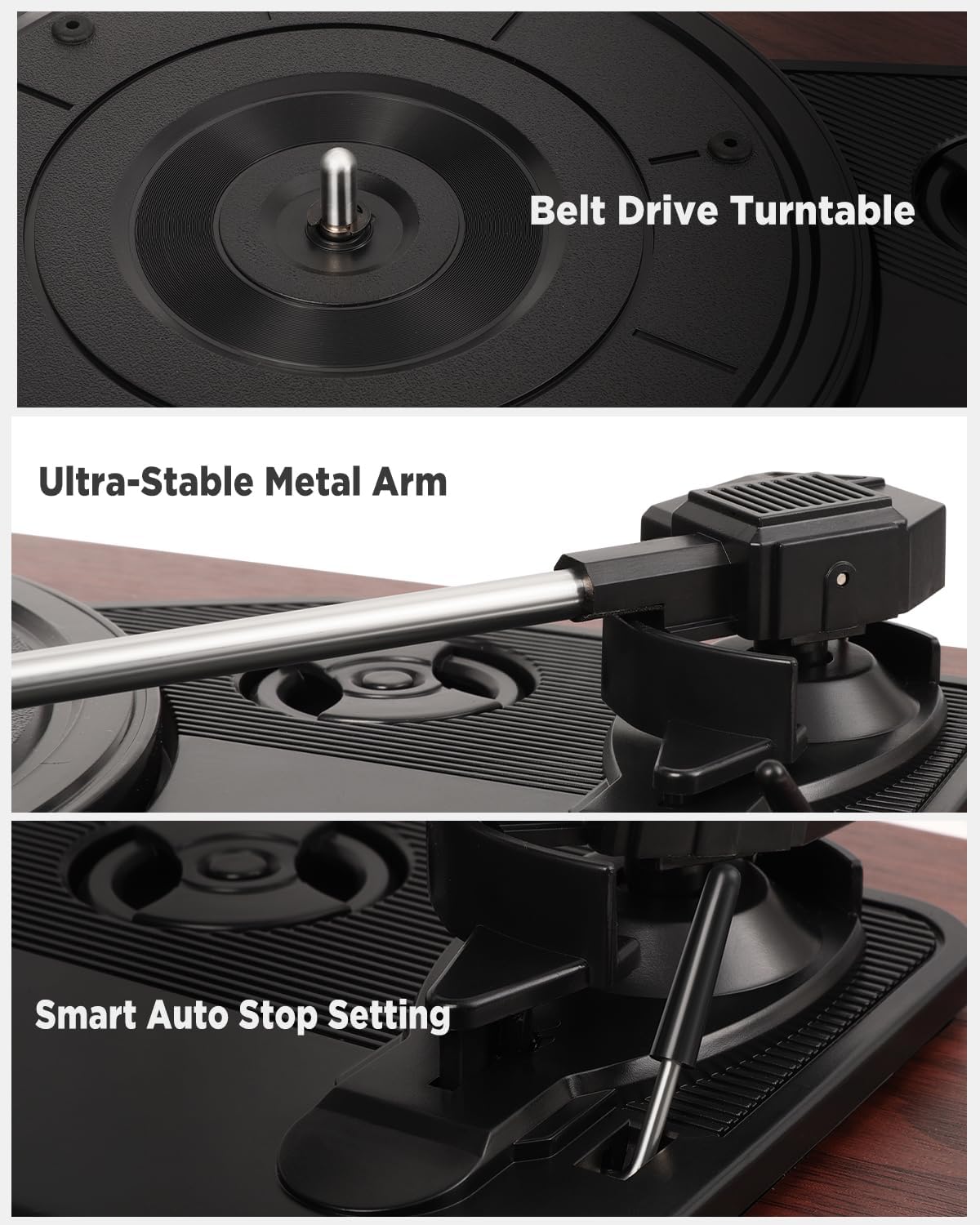
Obraz: Szczegółowy views of the belt drive system, the ultra-stable metal tonearm, and the smart auto-stop setting.

Image: An exploded diagram illustrating the internal structure of the integrated stereo speakers, highlighting the HiFi sound components.

Image: The rear panel of the turntable, showing the RCA output, AUX-in port, USB port, and headphone port, along with their respective functions.
5. Konfiguracja
Follow these steps to set up your turntable for the first time.
- Rozpakowanie gramofonu: Ostrożnie wyjąć wszystkie elementy z opakowania.
- Pozycja stołu obrotowego: Place the unit on a flat, stable, and vibration-free surface. Ensure there is adequate ventilation around the unit.
- Montaż osłony przeciwpyłowej: If not already installed, carefully attach the removable dust cover to the hinges at the back of the unit.
- Usuń osłonę rysika: Gently remove the protective cap from the stylus (needle). Be careful not to touch the stylus itself.
- Podłącz zasilanie: Insert the DC plug of the power adapter into the DC IN port on the back of the turntable, then plug the adapter into a wall outlet.
- Pierwsze włączenie: Turn the volume knob to power on the unit.
6. Instrukcja obsługi
6.1 Odtwarzanie płyt winylowych
- Otwórz osłonę przeciwpyłową.
- Place a vinyl record on the platter. If playing a 7-inch record, use the included 45 RPM adapter.
- Wybierz odpowiednią prędkość (33, 45 lub 78 obr./min) za pomocą przełącznika wyboru prędkości.
- Delikatnie podnieś ramię gramofonu za pomocą dźwigni.
- Przesuń ramię gramofonu nad żądanym rowkiem początkowym płyty.
- Slowly lower the tonearm using the cueing lever. The record will begin to play.
- Wyreguluj głośność za pomocą pokrętła głośności.
- At the end of the record, the auto-stop function will automatically lift the tonearm and stop the platter rotation. Manually return the tonearm to its rest.
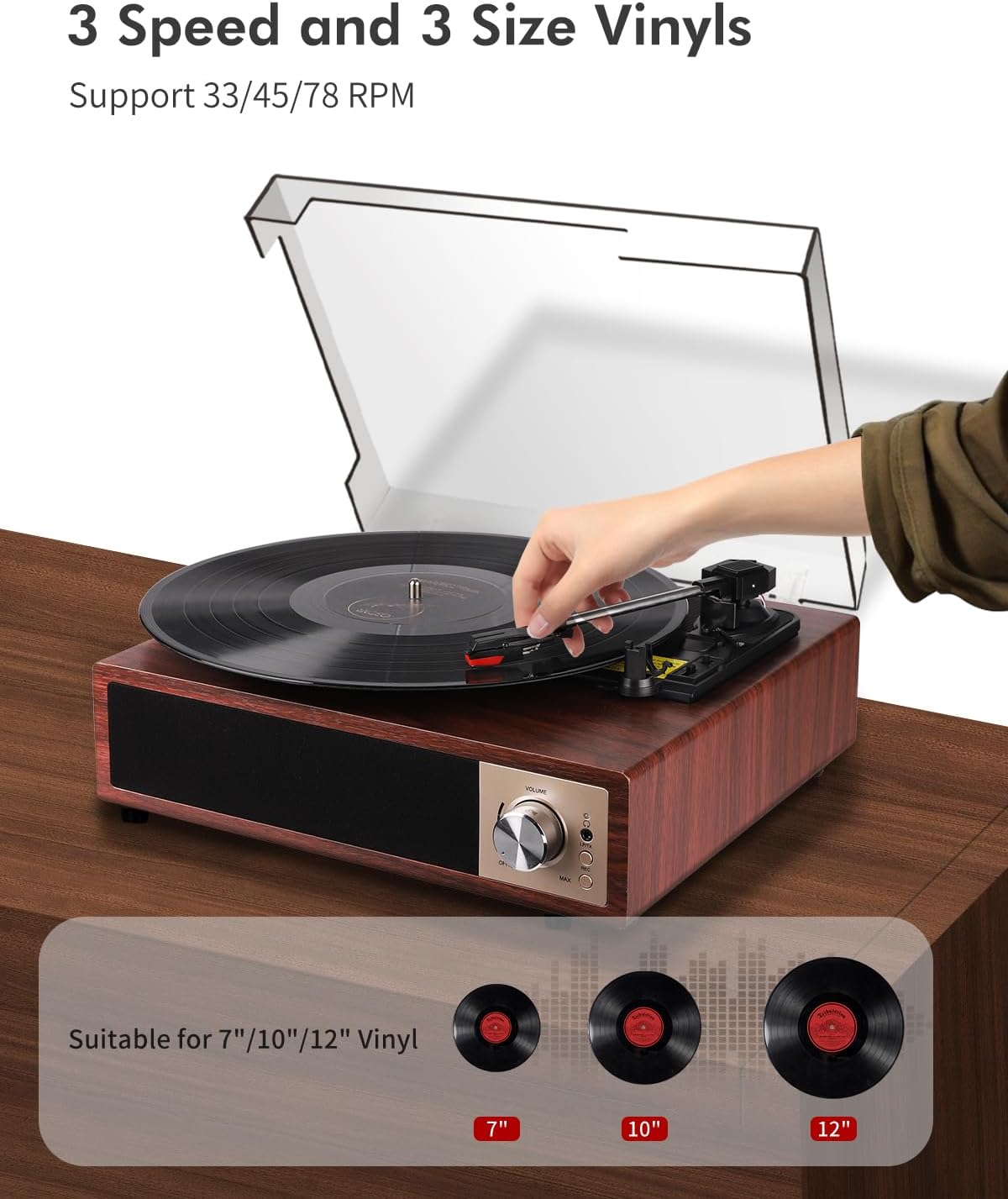
Image: A hand placing a record on the turntable, with visual representations of 7-inch, 10-inch, and 12-inch vinyl records, indicating support for all three sizes and 33/45/78 RPM speeds.
6.2 Obsługa Bluetooth
The turntable supports Bluetooth 5.4 for both receiving and transmitting audio.
6.2.1 Bluetooth Receiving (Playing music from your phone)
- Włącz gramofon.
- Switch the function mode to Bluetooth (BT). The Bluetooth indicator light will flash.
- Enable Bluetooth on your smartphone, tablet, or other Bluetooth device.
- Szukaj "VIFLYKOO" in the list of available devices and select it to pair.
- Once paired, the indicator light will stop flashing. You can now play music from your device through the turntable's speakers.
6.2.2 Bluetooth Transmitting (Playing vinyl through external Bluetooth speakers/headphones)
- Upewnij się, że zewnętrzny głośnik lub słuchawki Bluetooth są w trybie parowania.
- Turn on the turntable and select the desired input source (e.g., Phono for vinyl).
- Press and hold the Bluetooth button on the turntable to activate transmitting mode. The Bluetooth indicator will flash rapidly.
- The turntable will automatically search for and connect to nearby Bluetooth audio devices.
- Once connected, the indicator light will stop flashing, and audio from the turntable will play through your external Bluetooth device.

Image: Two scenarios demonstrating Bluetooth 5.4 functionality: a user receiving music from a smartphone to the turntable, and the turntable transmitting vinyl audio to external Bluetooth speakers and headphones.
6.3 USB Function (Recording & Playback)
The USB port allows you to convert your vinyl records to digital files or play audio files z dysku USB.
6.3.1 Recording Vinyl to USB
- Insert a USB drive into the USB port on the back of the turntable.
- Select the Phono input mode.
- Zacznij odtwarzać swoją płytę winylową.
- Press the 'REC' button (usually near the USB port or control panel) to start recording. The indicator light will confirm recording is active.
- Press the 'REC' button again to stop recording. The recorded audio will be saved as an MP3 or WAV file na dysku USB.
6.3.2 Playing Audio from USB
- Włóż dysk USB zawierający dźwięk w formacie MP3 lub WAV files do portu USB.
- Switch the function mode to USB.
- The turntable will automatically detect and begin playing the audio files. Use the control buttons (if available) to skip tracks or pause playback.

Image: The turntable with a USB drive inserted, illustrating the process of recording vinyl to digital files (MP3 or WAV) and playing music filez dysku USB.
6.4 Wejście AUX
Connect external audio devices like MP3 players or smartphones via the 3.5mm AUX IN port.
- Connect one end of a 3.5mm audio cable (not included) to the AUX IN port on the turntable.
- Podłącz drugi koniec do gniazda słuchawkowego lub wyjścia audio w urządzeniu zewnętrznym.
- Switch the function mode to AUX.
- Play audio from your external device, and it will be output through the turntable's speakers.
6.5 wyjść RCA
Podłącz gramofon do zewnętrznego urządzenia ampwzmacniacz lub głośniki aktywne dla uzyskania lepszego dźwięku.
- Connect an RCA cable (not included) to the RCA OUT ports (Red for Right, White for Left) on the back of the turntable.
- Podłącz drugi koniec kabla RCA do odpowiedniego wejścia audio w swoim urządzeniu. ampgłośniki lub aktywne głośniki.
- Zapewnij ampSprawdź, czy wzmacniacz/głośniki są włączone i ustawione na właściwe wejście.
- Play your vinyl record, and the audio will be routed through the external system.
6.6 Wyjście słuchawkowe
Jeśli chcesz słuchać muzyki w prywatności, podłącz słuchawki do dedykowanego gniazda słuchawkowego.
- Plug your headphones into the 3.5mm headphone jack on the front or side of the turntable.
- The integrated speakers will typically mute when headphones are connected.
- Dostosuj głośność do komfortowego poziomu słuchania.
7. Konserwacja
Proper maintenance ensures the longevity and optimal performance of your turntable.
- Czyszczenie urządzenia: Wipe the turntable's surface with a soft, dry, lint-free cloth. Avoid using abrasive cleaners, waxes, or solvents.
- Czyszczenie rysika: Use a soft brush designed for stylus cleaning, brushing gently from back to front. Avoid touching the stylus with your fingers.
- Pielęgnacja pokrowca przeciwkurzowego: The removable acrylic dust cover can be cleaned with a soft, damp cloth. Avoid harsh chemicals that may scratch or cloud the acrylic.
- Opieka nad dokumentacją: Keep your vinyl records clean and free of dust to prevent damage to both the records and the stylus. Store them vertically in their sleeves.
- Wymiana rysika: The stylus has a limited lifespan. If you notice a decrease in sound quality or increased skipping, consider replacing the stylus. Consult VIFLYKOO support for compatible replacement styli.
8. Rozwiązywanie Problemów
If you encounter any issues, refer to the following troubleshooting guide.
| Problem | Możliwa przyczyna | Rozwiązanie |
|---|---|---|
| Brak zasilania | Zasilacz nie jest podłączony lub gniazdko jest uszkodzone. | Sprawdź, czy zasilacz jest prawidłowo podłączony i czy gniazdko działa. |
| Brak dźwięku z głośników | Volume too low; headphones connected; incorrect input mode. | Increase volume; disconnect headphones; select correct input mode (Phono, BT, AUX, USB). |
| Przeskoki w nagraniach lub zniekształcenia dźwięku | Dirty record; dirty or worn stylus; turntable not level. | Clean record; clean or replace stylus; ensure turntable is on a level surface. |
| Parowanie Bluetooth nie powiodło się | Device too far; incorrect mode; device not in pairing mode. | Ensure devices are close; select correct Bluetooth mode (receiving/transmitting); put external device in pairing mode. |
| Nagrywanie USB nie działa | USB drive full or incompatible format; incorrect recording procedure. | Use a formatted USB drive (FAT32); ensure enough space; follow recording steps carefully. |
9. Specyfikacje
Technical details of the VIFLYKOO Bluetooth 5.4 Turntable.
- Marka: VIFLYKOO
- Numer modelu: 3388651
- ASIN: B0FP57JZHX
- GTIN/UPC: 774882248156
- Prędkości obrotowe: 33 1/3, 45, 78 obr./min
- Typ silnika: Napędzany paskiem
- Technologia łączności: Bluetooth 5.4 (Receive & Transmit), Auxiliary (3.5mm), USB, RCA
- Zintegrowane głośniki: Yes, 2 x 5W Stereo
- Wyjścia audio: RCA, 3.5mm Headphone Jack
- Wejścia audio: 3.5mm AUX-in, Bluetooth
- Funkcja USB: MP3/WAV Recording, MP3/WAV Playback
- Cechy szczególne: Anti-resonance design, Automatic belt drive, Auto-stop function, Removable dust cover
- Tworzywo: Drewno konstrukcyjne, Metal
- Waga przedmiotu: 2.15 kilograma
- Wymiary przedmiotu (dł. x szer. x wys.): Wymiary: 35 cm x 29 cm x 12 cm
- Źródło zasilania: Electric Cable (DC Adapter)
- Format sygnału: Analogowy, Cyfrowy
10. Gwarancja i wsparcie
Your VIFLYKOO Turntable is covered by a manufacturer's warranty and dedicated customer support.
- Gwarancja: Produkt objęty jest roczną gwarancją producenta od daty zakupu. Prosimy zachować dowód zakupu na wypadek roszczeń gwarancyjnych.
- Obsługa klienta: For technical assistance, troubleshooting not covered in this manual, or warranty inquiries, please contact VIFLYKOO customer service through the retailer's platform or the official VIFLYKOO webstrona.