
1. Wprowadzenie
The Chargeworx Smart Location Tag is designed to help you keep track of your personal items. This device utilizes the Apple Find My network, allowing you to locate your belongings using the Find My app on your compatible iOS device. This manual provides instructions for setting up, operating, and maintaining your Smart Location Tag.
2. Koniec produktuview
The Chargeworx Smart Location Tag is a compact, lightweight device that can be attached to various items such as keys, bags, or luggage. It communicates with the Apple Find My network to provide location information.
Główne cechy:
- Apple Find My Network Integration: Locate your items using the Apple Find My app.
- Alerty „Pozostawieni w tyle”: Receive notifications if you leave your tagged item behind.
- Tryb utracony: Mark your item as lost to receive location updates and contact information if found.
- Udostępnianie urządzenia: Share access to your tag's location with trusted friends and family.
- Kompaktowa konstrukcja: Easily attaches to various personal items.

Obraz 2.1: The Chargeworx Smart Location Tag packaging, illustrating the two-pack and key features like 'Left Behind Alerts' and 'Locate items WORLDWIDE'.
3. Instrukcje konfiguracji
Follow these steps to set up your Chargeworx Smart Location Tag with your Apple device.
3.1. Wymagania
- An iPhone, iPad, or iPod touch with iOS 14.5 or later, or iPadOS 14.5 or later.
- The Find My app enabled.
- Włączono Bluetooth.
- A stable internet connection (Wi-Fi or cellular data).
3.2. Pairing Your Smart Location Tag
- Ensure your Chargeworx Smart Location Tag has a working battery installed.
- Bring the Smart Location Tag close to your iOS device.
- Otwórz Znajdź mój aplikację na urządzeniu z systemem iOS.
- Kliknij Rzeczy zakładkę na dole ekranu.
- Uzyskiwać + Dodaj element, następnie wybierz Inny obsługiwany element.
- Postępuj zgodnie z instrukcjami wyświetlanymi na ekranie, aby nadać nazwę przedmiotowi i zarejestrować go na swoim Apple ID.
- Once paired, your Smart Location Tag will appear in the Items list within the Find My app.

Obraz 3.1: An iPhone displaying the Apple Find My app interface, showing a map with various devices and items, including a Smart Location Tag, listed below.
4. Instrukcja obsługi
Once your Chargeworx Smart Location Tag is set up, you can use the Find My app to manage and locate your items.
4.1. Lokalizacja przedmiotu
- Otwórz Znajdź mój aplikacja.
- Kliknij Rzeczy patka.
- Select your Chargeworx Smart Location Tag z listy.
- Aplikacja wyświetla aktualną lub ostatnią znaną lokalizację przedmiotu na mapie.
- If the item is nearby, you can tap Odtwórz dźwięk to help locate it.
- If the item is not nearby, you can tap Wskazówki to get walking or driving directions to its location.
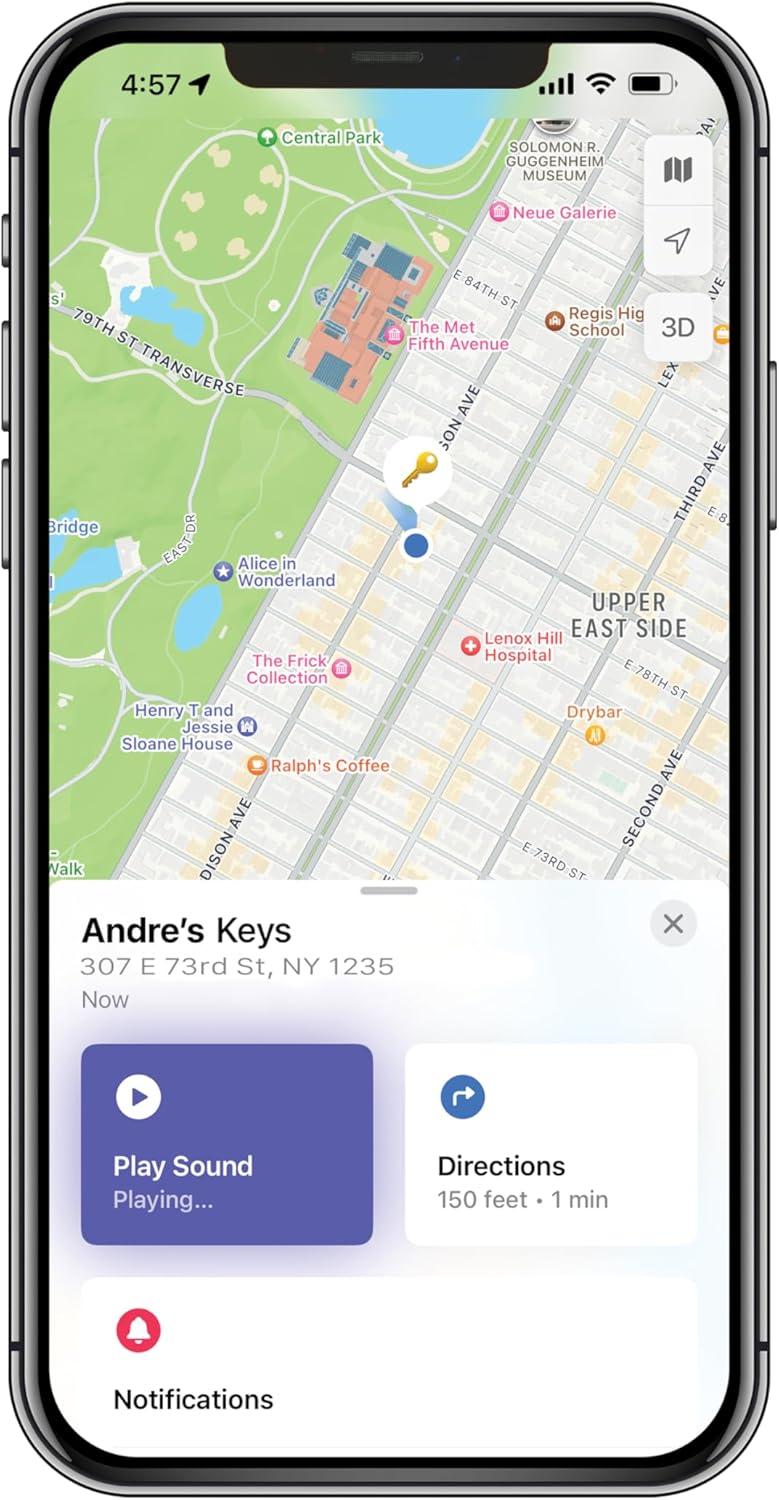
Obraz 4.1: An iPhone screen displaying the Apple Find My app, showing a map with a key icon indicating the item's location, along with 'Play Sound' and 'Directions' buttons.
4.2. Left Behind Alerts
Left Behind Alerts notify you when you leave your item at an unfamiliar location. To manage these alerts:
- W Znajdź mój app, select your Smart Location Tag.
- Przewiń w dół i dotknij Powiadom, gdy zostaniesz w tyle.
- Toggle the feature on or off.
- You can also set specific locations where you don't want to be notified (e.g., your home or office) by tapping Nowa lokalizacja under 'Notify Me, Except At'.
4.3. Tryb zagubienia
If your item is truly lost, you can activate Lost Mode to help recover it.
- W Znajdź mój app, select your Smart Location Tag.
- Przewiń w dół i dotknij Włączać under 'Lost Mode'.
- Follow the prompts to enter a phone number or email address where you can be contacted.
- You can also write a custom message that will be displayed to anyone who finds your item and scans it with an NFC-enabled smartphone.
- Confirm to activate Lost Mode.
When Lost Mode is active, you will receive a notification if your item is detected by another device on the Apple Find My network.

Obraz 4.2: An iPhone screen displaying the 'Lost Mode' setup within the Apple Find My app, prompting for contact information and a message for a lost item.
4.4. Sharing Your Item
You can share access to your Smart Location Tag's location with family and friends who also use the Find My app.
- W Znajdź mój app, select your Smart Location Tag.
- Przewiń w dół i dotknij Dodaj osobę under 'Share This Item'.
- Select the contact you wish to share with and follow the on-screen instructions.
5. Konserwacja
Proper maintenance ensures the longevity and optimal performance of your Chargeworx Smart Location Tag.
5.1. Wymiana baterii
The Chargeworx Smart Location Tag uses a replaceable coin cell battery (e.g., CR2032). When the battery level is low, you will receive a notification in the Find My app.
- Locate the battery compartment on your Smart Location Tag.
- Za pomocą małego narzędzia (np. monety) otwórz pokrywę baterii.
- Wyjmij starą baterię.
- Włóż nową baterię CR2032 biegunem dodatnim (+) skierowanym do góry.
- Załóż pokrywę baterii i przekręć ją, aby ją zabezpieczyć.
5.2. Czyszczenie
To clean your Smart Location Tag, wipe it with a soft, dry, or slightly damp cloth. Avoid using harsh chemicals, abrasive cleaners, or submerging the device in water.
6. Rozwiązywanie Problemów
If you encounter issues with your Chargeworx Smart Location Tag, refer to the following common solutions.
| Problem | Możliwe rozwiązanie |
|---|---|
| Tag not appearing in Find My app |
|
| Inaccurate location or no location updates |
|
| Left Behind Alerts not working |
|
| Cannot hear the sound from the tag |
|
7. Specyfikacje
- Model: B0FP48NM7X
- Wymiary opakowania: 3 x 3 x 1 cala
- Waga przedmiotu: 4 uncji
- Technologia łączności: Bluetooth
- Cechy szczególne: Śledzenie w czasie rzeczywistym
- Zgodne urządzenia: iOS Devices (iPhone, iPad, iPod touch with iOS/iPadOS 14.5 or later)
- Tworzywo: Plastikowy
- Bateria: CR2032 coin cell (not included)
- Producent: Chargeworx
8. Gwarancja i wsparcie
8.1. Informacje o gwarancji
The Chargeworx Smart Location Tag zwykle jest dostarczany z 1-roczna ograniczona gwarancja from the date of purchase. This warranty covers manufacturing defects under normal use. Please retain your proof of purchase for warranty claims. For specific terms and conditions, refer to the warranty card included with your product or visit the official Chargeworx webstrona.
8.2. Obsługa klienta
If you require further assistance or have questions not covered in this manual, please contact Chargeworx customer support. Contact information can usually be found on the product packaging, the official Chargeworx webna stronie internetowej lub u sprzedawcy.
