
1. Wprowadzenie i koniecview
The Pard Bobcat 640 Thermal Monocular is a compact, high-performance thermal imaging optic designed for spotting and ranging in various conditions. It integrates advanced thermal sensing technology with a precise laser rangefinder to provide clear visibility and accurate distance measurements.
Główne cechy obejmują:
- Obiektyw 35 mm: Zapewnia szerokie pole view and excellent light gathering capabilities.
- 2.6x Optical Magnification & 8x Digital Zoom: Oferuje wszechstronne viewing options from wide scans to detailed close-ups.
- 640x512 Thermal Sensor: Features a 12µm pixel pitch and ≤18mk NETD for high-resolution thermal imagery, detecting even subtle temperature differences.
- Integrated 1000m Laser Rangefinder (LRF): Ensures accurate distance measurement up to 1,094 yards.
- 1920x1080 OLED Display: Delivers bright, sharp, and high-contrast images for enhanced viewing.
- Kompaktowa i lekka konstrukcja: Measuring 1.77 x 2.13 x 6.14 inches, it is built for portability and quick deployment.
2. Co znajduje się w pudełku
Upon opening the product packaging, ensure all items are present and in good condition. The standard package contents for the Pard Bobcat 640 Thermal Monocular include:
- Pard Bobcat 640 Thermal Monocular Unit
- Akumulator 18650
- Kabel ładujący USB-C
- Protective Carry Pouch
- Smycz na rękę
- Ściereczka do czyszczenia soczewek
- Instrukcja obsługi
3. Konfiguracja
3.1 Instalacja baterii
The Pard Bobcat 640 uses a single 18650 rechargeable battery. To install or replace the battery:
- Locate the battery compartment cover, typically found on the side or bottom of the monocular.
- Otwórz pokrywę przesuwając ją lub przekręcając zgodnie ze wskaźnikiem.
- Insert the 18650 battery with the positive (+) terminal facing the correct direction as indicated inside the compartment.
- Dokładnie zamknij pokrywę komory baterii.
3.2 Włączanie/wyłączanie zasilania
To power on the device, press and hold the Power button (usually an orange or prominent button) for approximately 3 seconds until the display activates. To power off, press and hold the Power button again for 3 seconds.
3.3 Focus and Diopter Adjustment
For a clear image, adjust the focus and diopter:
- Pierścień ostrości: Rotate the objective lens focus ring (at the front of the device) until the target image appears sharp.
- Regulacja dioptrii: Rotate the diopter adjustment ring (around the eyepiece) to fine-tune the clarity of the display for your individual eyesight.
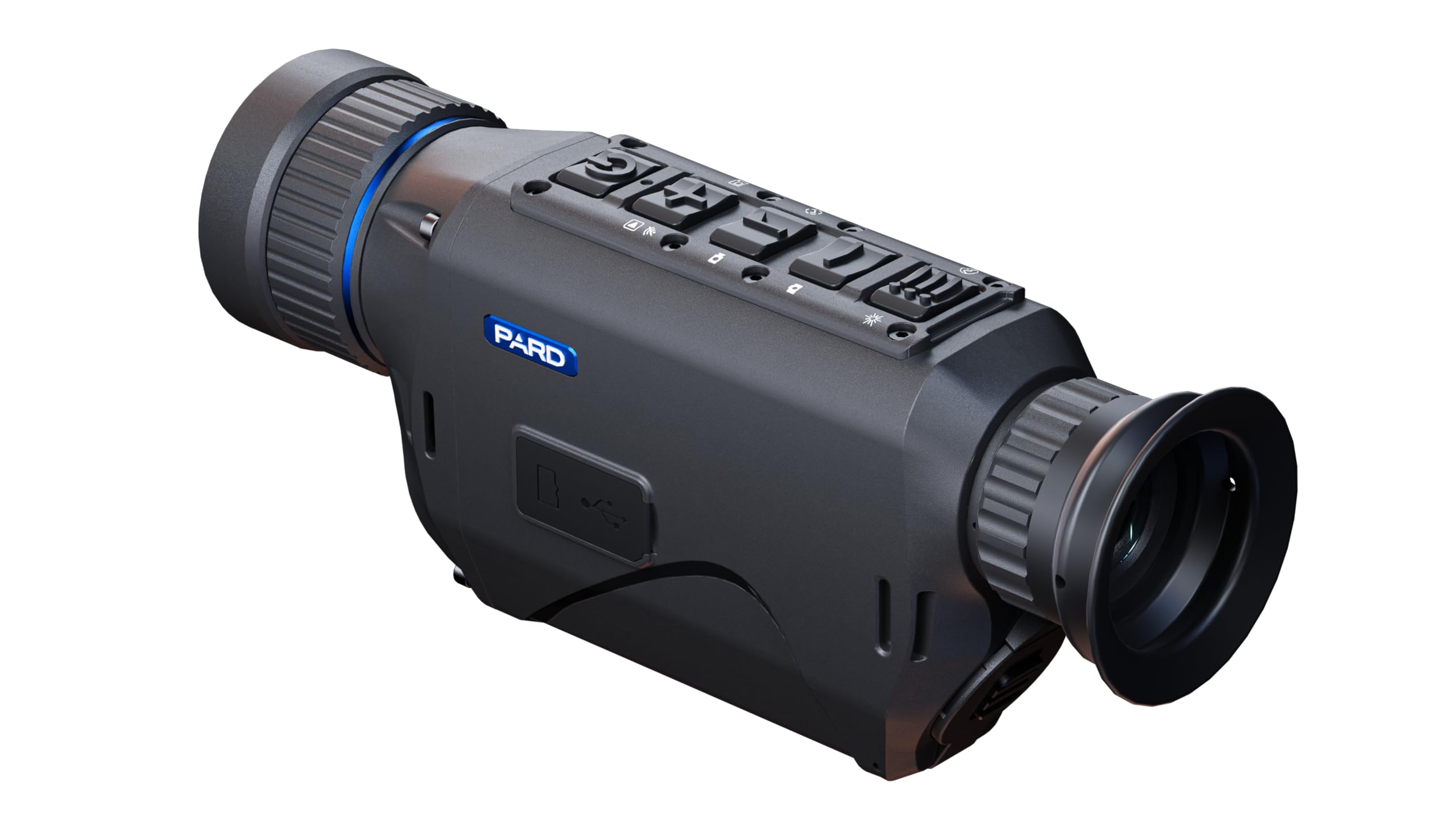
Figure 1: The Pard Bobcat 640 Thermal Monocular, showcasing its compact design and ergonomic controls.

Rysunek 2: Góra view of the monocular, highlighting the power, zoom, rangefinder, and menu buttons.
4. Instrukcja obsługi
4.1 Podstawowe sterowanie
- Przycisk zasilania: Press and hold to turn on/off. Short press may activate standby mode or other functions depending on context.
- Przyciski powiększania: Use the designated buttons (often marked with '+' and '-') to adjust the digital zoom level.
- Przycisk LRF: Short press to activate the laser rangefinder and measure distance to a target.
- Przycisk menu: Press to access the main menu for settings adjustments.
- Przycisk palety: Cycle through different thermal color palettes (e.g., White Hot, Black Hot, Red Hot, Color, Green Monochrome) to optimize viewing for various scenarios.
4.2 Palety termiczne
The Bobcat 640 offers multiple thermal palettes to enhance target detection and identification:
- Biała gorąca: Hot objects appear white, colder objects appear black.
- Czarny gorący: Hot objects appear black, colder objects appear white.
- Czerwony gorący: Displays heat signatures in shades of red for easy identification.
- Kolor: Posługuje się spektrum kolorów w celu przedstawienia różnic temperatur.
- Green Monochrome: Provides a green-tinted image, often preferred for reduced eye strain during prolonged use.
4.3 Rejestrowanie zdjęć i filmów
The monocular is capable of capturing still images and recording video footage. Refer to the on-screen menu for specific recording options and storage management.

Rycina 3: Przód view of the monocular, showing the 35mm objective lens and integrated laser rangefinder emitters.

Rysunek 4: Tył view of the monocular, illustrating the eyepiece and diopter adjustment ring.
5. Konserwacja
Proper maintenance ensures the longevity and optimal performance of your Pard Bobcat 640.
- Czyszczenie soczewek: Use the provided lens cleaning cloth or a soft, lint-free cloth specifically designed for optics. Gently wipe the objective lens and eyepiece. Avoid using abrasive materials or harsh chemicals.
- Pielęgnacja baterii: Always use the recommended 18650 rechargeable batteries. Charge batteries fully before use and store them in a cool, dry place when not in use. Do not expose batteries to extreme temperatures.
- Składowanie: Store the monocular in its protective carry pouch in a dry, dust-free environment. Avoid direct sunlight and extreme temperatures.
- Ogólne sprzątanie: Przetrzyj obudowę urządzenia miękką, damp płótno. Nie używaj rozpuszczalników ani ściernych środków czyszczących.
6. Rozwiązywanie Problemów
If you encounter issues with your Pard Bobcat 640, refer to the following common troubleshooting steps:
- Urządzenie nie włącza się: Ensure the battery is correctly installed and fully charged. Try using a different charged battery if available.
- Niewyraźny obraz: Adjust the objective lens focus ring and the eyepiece diopter adjustment ring. Ensure lenses are clean and free from smudges or debris.
- Rangefinder Not Working: Ensure there are no obstructions between the device and the target. Check that the LRF function is enabled in the settings menu.
- Krótki czas pracy baterii: Ensure the battery is fully charged. Reduce screen brightness or disable unnecessary features to conserve power. Consider replacing old batteries.
- Urządzenie zawiesza się/nie odpowiada: Power off the device by holding the power button. If unresponsive, remove and reinsert the battery to perform a hard reset.
For persistent issues, please contact Pard customer support.
7. Specyfikacje
| Funkcja | Specyfikacja |
|---|---|
| Nazwa modelu | Ryś 640 |
| Numer modelu przedmiotu | BO6-35/LRF |
| Średnica obiektywu | 35 milimetrów |
| Powiększenie optyczne | 2.6x |
| Zoom cyfrowy | 8x |
| Rozdzielczość czujnika termicznego | 640x512 |
| Rozstaw pikseli | 12 µm |
| Czułość NETD | ≤18mk |
| Integrated Rangefinder | 1000m (1,094 yards) |
| Typ wyświetlacza | OLED |
| Rozdzielczość wyświetlacza | 1920x1080 |
| Horizontal FOV (at 100m) | 16.5m |
| Przekątna pola widzenia | 10° |
| Wymiary produktu (Gł. x Szer. x Wys.) | 1.77" x 1.77" x 6.14" |
| Waga przedmiotu | 2 funtów |
| Źródło zasilania | Akumulator 18650 |
8. Gwarancja i wsparcie
Pard products are designed for durability and reliable performance. For specific warranty details, please refer to the official Pard website or contact your authorized dealer. Typically, thermal devices come with a manufacturer's warranty covering defects in materials and workmanship.
For customer support, technical assistance, or warranty claims, please visit the official Pard Store lub skontaktuj się bezpośrednio z ich obsługą klienta.