
Laxasfit LF-01
Instrukcja obsługi inteligentnego zegarka Laxasfit LF-01
Model: LF-01
1. Wprowadzenie
Welcome to the user manual for your Laxasfit LF-01 Smart Watch. This guide provides essential information on setting up, operating, and maintaining your device to ensure optimal performance and a seamless user experience. Please read this manual thoroughly before using your smart watch.
1.1 Zawartość pudełka
- Smartwatch
- Kabel ładujący
- Instrukcja obsługi
2. Konfiguracja
2.1 Ładowanie urządzenia
Before initial use, fully charge your Laxasfit LF-01 Smart Watch. Connect the provided charging cable to the charging port on the back of the watch and plug the USB end into a standard USB power adapter (not included) or a computer's USB port. The watch display will indicate charging status. A full charge typically takes approximately 2 hours.
2.2 Instalacja aplikacji
To unlock the full potential of your smart watch, download and install the companion application on your smartphone. The application allows for data synchronization, notification management, and watch face customization.
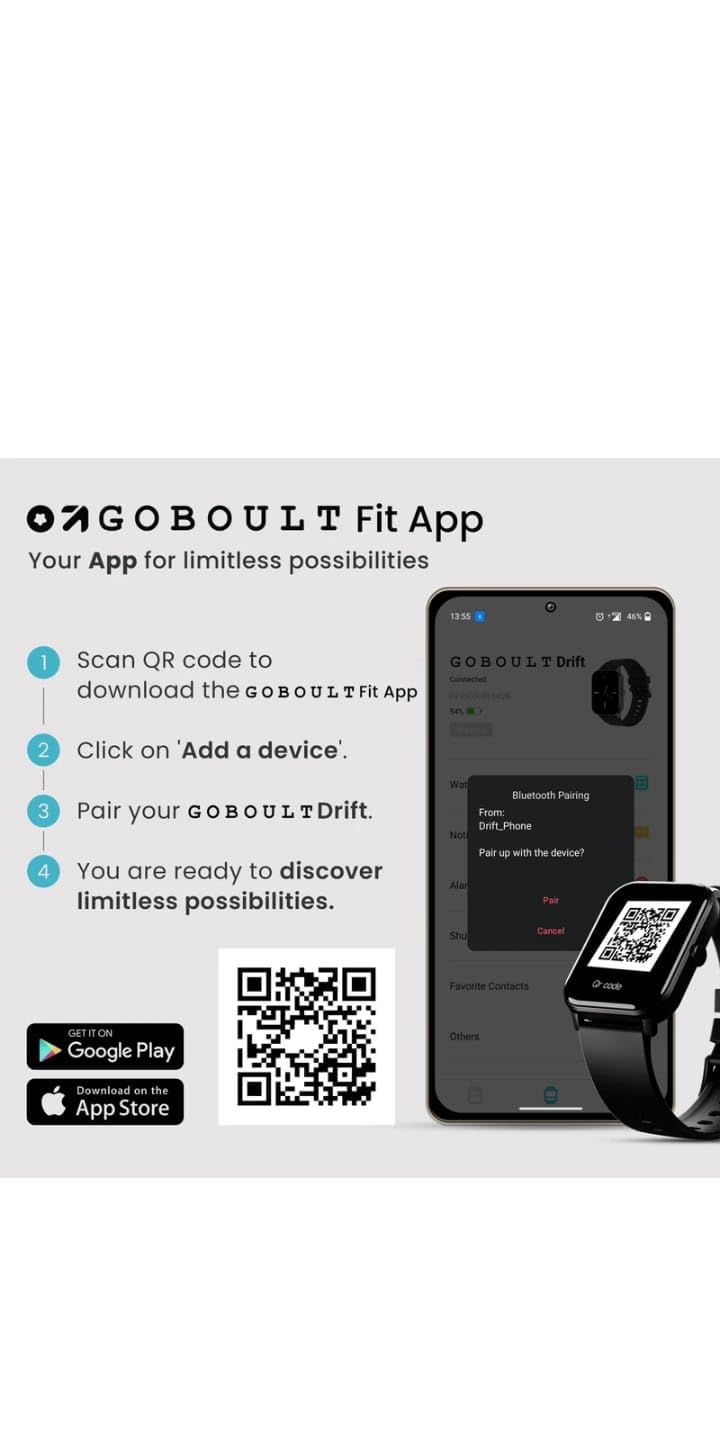
- Scan the QR code provided in the image below or search for "Boult Fit App" in your smartphone's app store (Google Play Store for Android, Apple App Store for iOS).
- Zainstaluj aplikację.
- Otwórz aplikację i postępuj zgodnie z instrukcjami wyświetlanymi na ekranie, aby utworzyć konto lub się zalogować.

Opis obrazu: This image displays a smartphone screen with instructions for downloading and pairing the companion app. It shows four steps: "Scan QR code to download the Boult Fit App", "Click on 'Add a device'", "Pair your Boult Drift", and "You are ready to discover limitless possibilities." Below these steps are QR codes for both Google Play and the App Store, along with their respective logos. The right side of the image shows a smartwatch display and a phone screen demonstrating the Bluetooth pairing process within the app.
Download the Boult Fit App: https://app.moyoung.com/app-download/BoultFit
2.3 Parowanie ze smartfonem
After installing the app, follow these steps to pair your smart watch:
- Upewnij się, że Bluetooth jest włączony w Twoim smartfonie.
- Open the companion app and navigate to the "Add Device" or "Pair Device" section.
- The app will search for available devices. Select "Laxasfit LF-01" or a similar device name from the list.
- Jeśli pojawi się taki monit, potwierdź prośbę o sparowanie zarówno na smartfonie, jak i na smartwatchu.
- Po sparowaniu zegarek będzie synchronizował dane z telefonem.
3. Główne cechy
The Laxasfit LF-01 Smart Watch offers a range of features designed to enhance your daily life and fitness tracking.
3.1 Monitorowanie stanu zdrowia
Monitor your vital health parameters directly from your wrist.
- Monitor pracy serca: Monitoruje tętno przez cały dzień.
- Monitorowanie snu: Analizuje wzorce snu, w tym fazę snu głębokiego, płytkiego i porę wybudzenia.
- Śledzenie aktywności: Rejestruje kroki, dystans i spalone kalorie.

Opis obrazu: This image shows a collage of smartwatch features. Prominently featured is a smartwatch display showing a heart rate monitor with a graph and current heart rate (108 bpm). Other elements include icons for 7-day battery life, IP68 water resistance, 60 sports modes, mini games, 1.69" HD display, Bluetooth calling, and multiple watch faces.
3.2 trybów sportowych
The watch supports over 60 workout modes to accurately track various physical activities.
- Track specific metrics for activities like running, cycling, walking, and more.
- View real-time data such as duration, calories burned, and heart rate during workouts.

Opis obrazu: A man is shown performing an exercise with a battle rope, wearing a smartwatch on his wrist. The image highlights the watch's capability to track over 60 workout modes. An overlay shows a smartwatch display with fitness metrics: "Steps 25969", "Distance 10.56 km", and "Calories 2982 Kcal".
Połączenia Bluetooth 3.3
With its built-in speaker and microphone, the Laxasfit LF-01 allows you to manage calls directly from your wrist when connected to your smartphone via Bluetooth.
- Receive incoming call notifications.
- Answer or reject calls.
- Make calls using the watch's interface (requires phone connection).
Opis obrazu: This image shows a smartwatch worn on a wrist, displaying an incoming call notification. The screen shows "Mom" as the caller, along with green (answer) and red (decline) call icons. Text above the watch states "Manage calls, the smart way." and "Bluetooth calling" with "Dedicated Speaker & Microphone" below.
3.4 Wyświetlacz i tarcze zegarka
- Typ wyświetlacza: LCD touchscreen for clear visibility and easy interaction.
- Możliwość personalizacji tarcz zegarka: Choose from over 140 watch faces via the companion app to personalize your device.
4. Działanie
4.1 Podstawowa nawigacja
- Ekran dotykowy: Przesuwaj w lewo/prawo, w górę/w dół, aby poruszać się po menu i funkcjach. Dotknij, aby wybrać.
- Przycisk boczny: Typically used to wake the screen, return to the home screen, or access the app menu. Refer to the on-screen prompts for specific functions.
4.2 Korzystanie z funkcji śledzenia aktywności fizycznej
Aby rozpocząć trening:
- Swipe on the watch face to find the "Workout" or "Sports Modes" icon.
- Tap to select your desired activity (e.g., Running, Cycling).
- Tap "Start" to begin tracking.
- During the workout, you can view dane w czasie rzeczywistym.
- Tap "Pause" or "End" to stop the workout. Data will sync with the app.
4.3 Zarządzanie powiadomieniami
Once paired with your smartphone, the watch will display notifications for calls, messages, and other app alerts.
- Przesuń palcem w dół od tarczy zegarka, aby view ostatnie powiadomienia.
- Tap on a notification to read the full message (if supported).
- Notifications can be managed and filtered through the companion app settings.
5. Konserwacja
5.1 Czyszczenie inteligentnego zegarka
- Regularnie przecieraj ekran zegarka i pasek miękką ściereczką.amp płótno.
- Unikaj stosowania silnych środków chemicznych i materiałów ściernych, gdyż mogą one uszkodzić urządzenie.
- Przed ładowaniem sprawdź, czy styki ładowania są czyste i suche.
5.2 Pielęgnacja baterii
- Unikaj wystawiania zegarka na działanie ekstremalnych temperatur.
- Nie należy pozostawiać zegarka całkowicie rozładowanego przez dłuższy czas.
- For optimal battery life, charge the device before it completely runs out of power.
6. Rozwiązywanie Problemów
If you encounter issues with your Laxasfit LF-01 Smart Watch, refer to the following common solutions:
- Zegarek się nie włącza: Upewnij się, że zegarek jest w pełni naładowany. Podłącz go do ładowarki na co najmniej 30 minut.
- Nie można sparować ze smartfonem:
- Upewnij się, że Bluetooth jest włączony w Twoim telefonie.
- Upewnij się, że zegarek znajduje się w zasięgu telefonu.
- Uruchom ponownie telefon i smartwatch.
- Spróbuj rozparować i ponownie sparować urządzenie za pomocą aplikacji.
- Niedokładne dane dotyczące kondycji fizycznej:
- Upewnij się, że zegarek ściśle przylega do nadgarstka, mniej więcej na szerokość jednego palca nad kością nadgarstka.
- Calibrate the device through the app if an option is available.
- Powiadomienia się nie wyświetlają:
- Sprawdź ustawienia powiadomień aplikacji na swoim telefonie i w aplikacji towarzyszącej.
- Sprawdź, czy zegarek jest prawidłowo podłączony przez Bluetooth.
- Ekran nie reaguje: Restart the watch by pressing and holding the side button (if applicable) or by connecting it to the charger.
If problems persist, consult the companion app's help section or contact customer support.
7. Specyfikacje techniczne
| Funkcja | Specyfikacja |
|---|---|
| Model | LF-01 |
| Typ wyświetlacza | LCD |
| Łączność | Bluetooth |
| System operacyjny | Własnościowy system operacyjny |
| Pojemność pamięci masowej | 32 GB |
| Cechy specjalne | Fitness Tracking, Heart Rate Monitor, Notifications, Sleep Tracking |
| Kompatybilne urządzenia | Smartfon, Tablet |
| Czas ładowania | 2 godzin |
| Tworzywo | Plastik, Silikon |
| Waga przedmiotu | 200 gramów |
| Kraj pochodzenia | Chiny |
8. Gwarancja i wsparcie
8.1 Informacje o gwarancji
Your Laxasfit LF-01 Smart Watch typically comes with a standard warranty. Please refer to your purchase documentation for specific warranty terms and conditions. A 10-day replacement policy may apply, and extended warranty options might be available for purchase.
8.2 Obsługa klienta
For further assistance, technical support, or warranty claims, please refer to the contact information provided with your product packaging or visit the official Laxasfit website (if available). You may also contact the seller directly for support.
Ask a question about this manual
Ask about setup, troubleshooting, compatibility, parts, safety, or missing instructions. Manuals+ will review the question and use this page’s manual context to help answer it.