
1. Wprowadzenie
This manual provides detailed instructions for the installation, operation, and maintenance of your VIKVIZ 5MP PoE IP Bullet Camera (Model: PG2T56IRC-ZS). Please read this manual thoroughly before using the product to ensure proper setup and functionality. Keep this manual for future reference.
2. Koniec produktuview
2.1 Główne cechy
- Rozdzielczość Ultra HD 5MP: Nagrywa wideo w rozdzielczości 2592 x 1944 przy 30 klatkach na sekundę.
- 5-krotny zoom optyczny: Features a 2.7-13.5mm varifocal lens with a 105° ultra-wide viewkąt.
- Pełnokolorowa wizja nocna: Dual illuminated system with 4 warm LEDs and 4 IR LEDs for clear color night vision up to 98 feet.
- Inteligentne wykrywanie ruchu: Advanced human and vehicle detection to reduce false alarms.
- Dwukierunkowy dźwięk: Wbudowany mikrofon i głośnik umożliwiające komunikację w czasie rzeczywistym.
- Kompresja wideo H.265+: Efficiently saves storage space and provides smoother video.
- Zasilanie przez Ethernet (PoE): Pojedynczy kabel Ethernet do przesyłu zasilania i danych.
- Odporna na warunki atmosferyczne konstrukcja: IP66 rated metal casing for outdoor use in various weather conditions.
- Elastyczne przechowywanie: Supports NFS, NVR, APP Cloud Storage, or SD cards (up to 256GB, purchased separately).
2.2 Zawartość opakowania
Sprawdź, czy w przesyłce znajdują się wszystkie elementy:
- VIKVIZ 5MP PoE IP Bullet Camera
- Instrukcja obsługi
- Śruby montażowe

Image: Contents of the VIKVIZ 5MP PoE IP Bullet Camera package, including the camera, instruction manual, and mounting screws.
3. Konfiguracja
3.1 Miejsce instalacji
Wybierz lokalizację na zewnątrz, która zapewnia pożądane viewing angle and is within reach of an Ethernet cable. The camera is IP66 weatherproof, suitable for various environmental conditions.

Image: A VIKVIZ bullet camera mounted on an exterior wall, shown operating in rainy conditions, highlighting its IP66 weatherproof rating.
3.2 Montaż kamery
- Zaznacz punkty wiercenia na ścianie lub suficie, korzystając z podstawy montażowej kamery jako szablonu.
- Wywierć otwory pilotujące w zaznaczonych miejscach.
- Insert the provided wall anchors (if necessary for your surface).
- Secure the camera's mounting base to the surface using the mounting screws.
- W razie potrzeby dostosuj kąt kamery.
3.3 Zasilanie i połączenie sieciowe (PoE)
The camera supports Power over Ethernet (PoE), simplifying installation by using a single Ethernet cable for both power and data.
- Podłącz jeden koniec kabla Ethernet do portu PoE kamery.
- Connect the other end of the Ethernet cable to a PoE-enabled NVR, PoE switch, or PoE injector.
- Ensure the NVR/switch/injector is powered on. The camera will power up automatically.
Notatka: A PoE NVR/switch/injector and DC power adapter are not included. If PoE is not available, a 12V DC power adapter (not included) can be used with a standard Ethernet connection.

Image: A VIKVIZ PoE camera connected to a Network Video Recorder (NVR) using a single Ethernet cable, illustrating the Power over Ethernet setup for data, sound, and power.
3.4 Konfiguracja początkowa
For initial setup and configuration, use the recommended software:
- For Windows and MAC: Use AjDevTools software.
- For professional playback and recording: Blue Iris software is recommended.
- Dostęp mobilny: Download the "videolink" app for smartphone access.
The camera works with most major web browsers including Google Chrome, Microsoft Edge, and Safari.
4. Działanie
4.1 Remote Access via Mobile App
The "videolink" app allows you to view żyćtage, receive motion alerts, and manage camera settings from your smartphone.
- Download and install the "videolink" app from your device's app store.
- Postępuj zgodnie z instrukcjami w aplikacji, aby dodać kamerę. Zazwyczaj polega to na zeskanowaniu kodu QR na kamerze lub ręcznym wprowadzeniu jej danych.
- Once added, you can access live view, playback recordings, and configure settings.
4.2 Smart Motion Detection (Human/Vehicle)
The camera features advanced recognition technology to accurately identify human and vehicle movement, minimizing false alarms.
- Configure detection zones and sensitivity settings within the camera's software or mobile app.
- When a person or vehicle is detected, the camera can trigger an event, sending notifications via email, FTP, or push alerts to your smartphone.
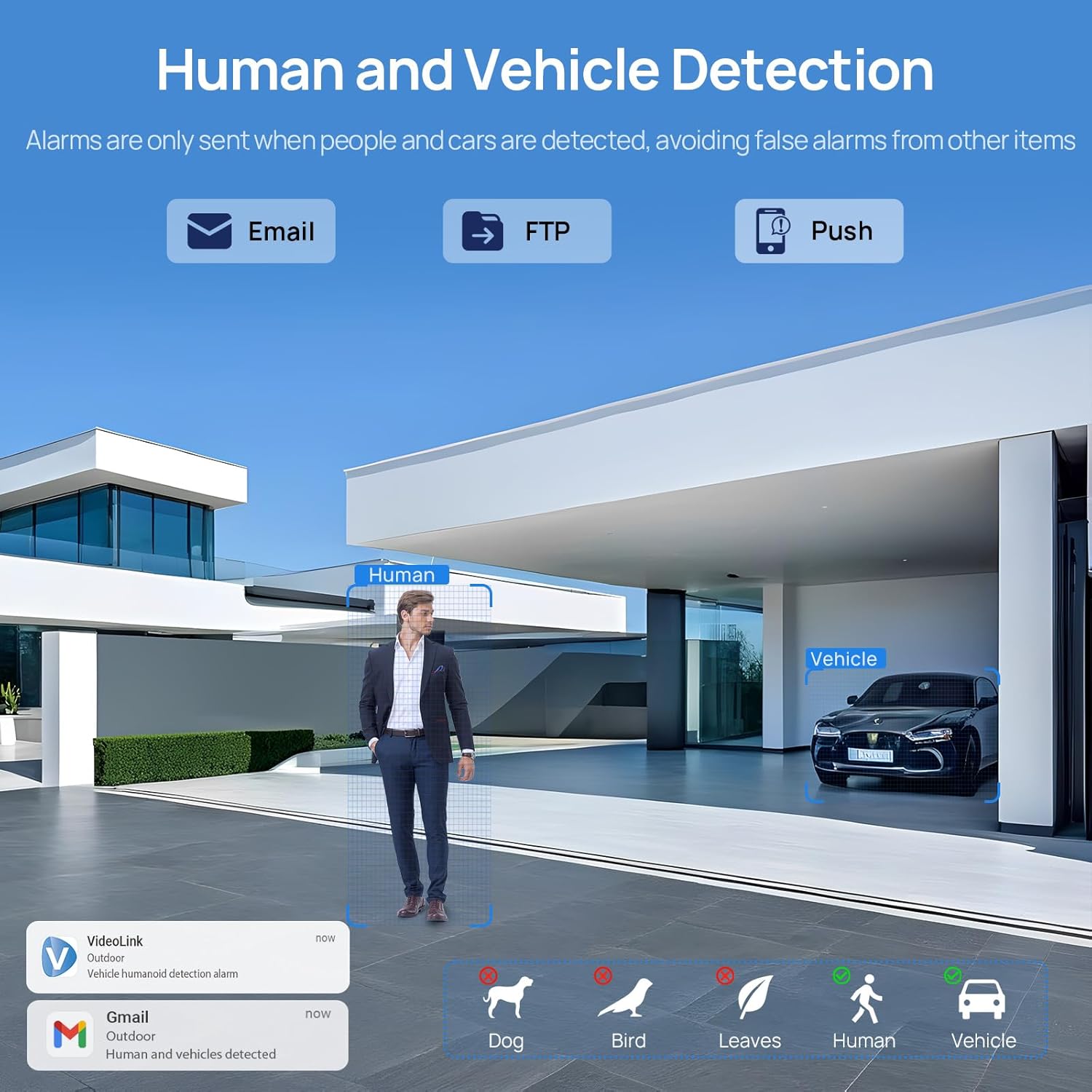
Image: A scene demonstrating the camera's human and vehicle detection capabilities, showing alerts for detected individuals and cars while ignoring animals or environmental factors.
4.3 Tryby widzenia nocnego
Kamera oferuje wszechstronne możliwości widzenia w nocy:
- IR Night Vision: By default, the IR illuminator is active at night for black and white surveillance.
- Pełnokolorowa wizja nocna: When a target is detected, the spotlight activates to record in full color. The spotlight will warn the target in the area.
- Inteligentne podwójne oświetlenie: The camera intelligently switches between IR light and warm light (spotlight) depending on the situation, providing color details when needed.

Image: A split image showing a scene at night with the spotlight off (black and white IR vision) and with the spotlight on (full-color night vision), demonstrating the camera's dual illumination feature.
4.4 5-krotny zoom optyczny
The 2.7-13.5mm varifocal lens allows for 5X optical zoom, enabling you to adjust the viewing angle from 32° to 100° and focus on specific details without losing image quality.
- Adjust the zoom level through the camera's software or mobile application.
- The optical zoom maintains clarity even at maximum magnification.

Image: A series of images demonstrating the 5X optical zoom capability of the camera, showing a wide view and then progressively zoomed-in views of a specific area, highlighting the detail retention.
4.5 Dźwięk dwukierunkowy
The integrated microphone and speaker enable two-way communication, allowing you to listen to the environment and speak through the camera.
- Access the two-way audio function via the mobile app.
- Use it to greet visitors or deter unwanted individuals.

Image: A scenario depicting a delivery person at a door, with a VIKVIZ camera facilitating a two-way audio conversation between the homeowner (via smartphone app) and the delivery person.
5. Konserwacja
- Regularne czyszczenie: Okresowo czyść obiektyw aparatu miękką,amp ściereczką, aby zapewnić wysoką jakość obrazu. Unikaj środków czyszczących o działaniu ściernym.
- Aktualizacje oprogramowania układowego: Sprawdź producenta webodwiedź witrynę lub aplikację, aby sprawdzić dostępne aktualizacje oprogramowania sprzętowego i zapewnić optymalną wydajność i bezpieczeństwo.
- Kontrola kabla: Regularnie sprawdzaj, czy kabel Ethernet nie nosi śladów zużycia lub uszkodzeń, zwłaszcza w przypadku instalacji na zewnątrz.
- Ochrona środowiska: While the camera is weatherproof (IP66), ensure it is not submerged in water or exposed to extreme conditions beyond its operating temperature range (-10°C to 50°C).
6. Rozwiązywanie Problemów
- Brak zasilania: Ensure the PoE NVR/switch/injector is powered on and the Ethernet cable is securely connected. If using a DC adapter, verify the power source and connection.
- Brak transmisji wideo: Check network connectivity. Ensure the camera is properly configured in your NVR or app. Verify the IP address and network settings.
- Słaba jakość obrazu: Wyczyść obiektyw aparatu. Sprawdź, czy w polu widzenia nie ma przeszkód. view. Ensure sufficient lighting for night vision modes. Adjust focus if applicable.
- Alerty o fałszywym ruchu: Adjust the sensitivity settings for human/vehicle detection in the camera's software or app. Refine detection zones to exclude irrelevant areas.
- Problemy z dwukierunkowym dźwiękiem: Check microphone and speaker settings in the app. Ensure network bandwidth is sufficient for real-time audio.
- Nie można uzyskać zdalnego dostępu do kamery: Verify your internet connection. Ensure port forwarding (if required by your network setup) is correctly configured on your router. Check firewall settings.
7. Specyfikacje
| Funkcja | Specyfikacja |
|---|---|
| Nazwa modelu | PG2T56IRC-ZS |
| Rezolucja | 5MP (2592 x 1944) @ 30fps |
| Zoom optyczny | 5X (2.7-13.5mm varifocal lens) |
| Viewing kąt | 105° (wide) to 32° (telephoto) |
| Zakres noktowizora | Do 98 stóp (30 metrów) |
| Typ noktowizora | Full Color, IR, Smart Hybrid Light |
| Audio | Dwukierunkowa transmisja dźwięku (wbudowany mikrofon i głośnik) |
| Kompresja wideo | H.265+, H.265, H.264 |
| Łączność | Ethernet (PoE), ONVIF |
| Opcje przechowywania | NFS, NVR, APP Cloud Storage, Micro SD Card (up to 256GB) |
| Ocena odporności na warunki atmosferyczne | IP66 |
| Temperatura pracy | -10°C do 50°C (14°F do 122°F) |
| Źródło zasilania | PoE (Power over Ethernet) lub 12 V DC (adapter nie jest dołączony) |
| Tworzywo | Metal |
| Wymiary | 12.7 x 5.11 x 4.72 cala |
| Waga | 2.2 funta |
8. Gwarancja i wsparcie
8.1 Polityka zwrotów
This product is eligible for a return within 30 days of purchase for a refund or replacement, subject to the retailer's terms and conditions.
8.2 Wsparcie techniczne
For technical assistance, troubleshooting, or warranty inquiries, please contact VIKVIZ customer support through their official website or the retailer where the product was purchased. Refer to your purchase documentation for specific contact details.