
1. Wprowadzenie
The WOLFBOX MegaVolt10 Air is a versatile, all-in-one portable device designed for automotive emergencies and convenience. It integrates a powerful 2000A jump starter, a 150PSI air compressor, a 10000mAh power bank, and a 200-lumen LED flashlight into a compact unit. This manual provides essential instructions for safe and effective operation.

Figure 1: WOLFBOX MegaVolt10 Air with included accessories.
2. Co znajduje się w pudełku
- Jump Starter Host (WOLFBOX MegaVolt10 Air)
- Instrukcja obsługi
- Torba do przechowywania
- Inteligentna bateria Clamps
- USB A to USB C Charger Cable
- 20" Inflatable Hose
- Air Nozzle (3 pieces)
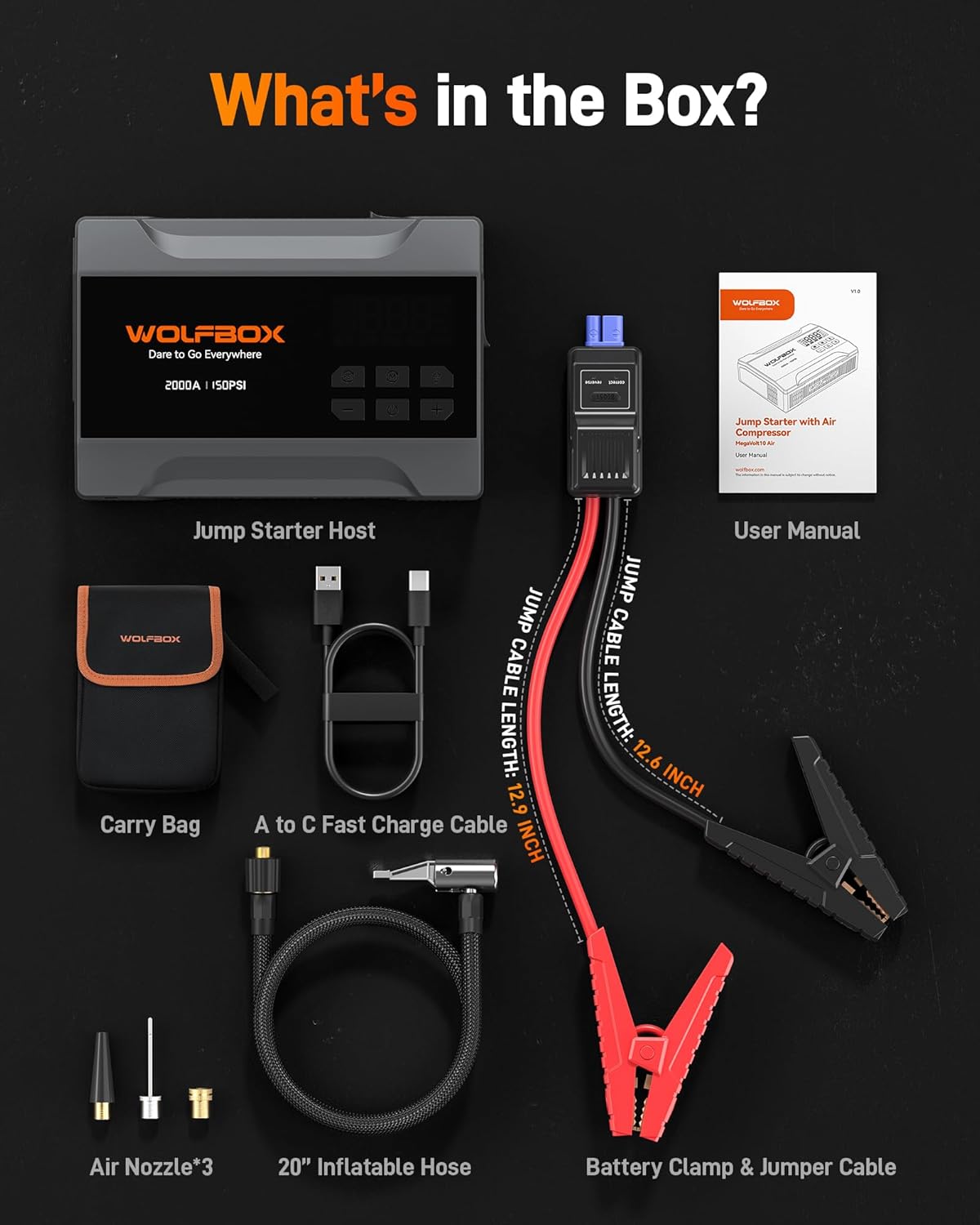
Figure 2: All components included in the WOLFBOX MegaVolt10 Air package.
3. Konfiguracja
3.1 Ładowanie urządzenia
Before first use, fully charge the WOLFBOX MegaVolt10 Air. Connect the provided USB A to USB C Charger Cable to the USB-C input port on the device and to a compatible USB power adapter (not included). The LED display will indicate the charging progress. A full charge typically takes 1.5-2 hours with a 15W USB-C input.
3.2 Podłączanie przewodów rozruchowych
To prepare for jump starting, lift the dust cover on the side of the device labeled "JUMPER CABLE". Insert the smart battery clamps connector into this port. The connector is designed to fit only in the correct orientation to prevent incorrect connection.
3.3 Connecting Air Hose
For tire inflation, screw the 20" inflatable hose into the designated port on the device until it is fully seated. Attach the quick-release end of the hose to the tire valve stem.
4. Instrukcja obsługi
4.1 Skokowe uruchamianie pojazdu
The WOLFBOX MegaVolt10 Air can jump-start 12V car batteries (up to 5L gasoline engines).
- Upewnij się, że urządzenie rozruchowe jest odpowiednio naładowane.
- Podłącz inteligentną baterię clamps to the device (as per Section 3.2).
- Dołącz czerwony clamp do dodatniego (+) bieguna akumulatora pojazdu.
- Dołącz czarny clamp do ujemnego (-) zacisku akumulatora pojazdu.
- Zwróć uwagę na lampkę kontrolną na inteligentnej baterii.amps.A zielony light indicates a correct connection. A czerwony light indicates an incorrect or reverse connection.
- Once the indicator is green, start the vehicle normally.
- If the vehicle does not start, or if the battery is extremely low, press and hold the ZWIĘKSZYĆ button on the smart clamps for 3 seconds until the indicator turns green. Then, start the vehicle within 30 seconds.
- Po uruchomieniu pojazdu natychmiast odłącz przewód zapłonowy.amps from the vehicle battery within 30 seconds, then disconnect from the jump starter.

Figure 3: Normal and Boost jump starting procedures.
4.2 Korzystanie ze sprężarki powietrza
The built-in air compressor offers a maximum pressure of 150 PSI and features automatic stop inflation.
- Connect the air hose to the device and the tire valve stem (as per Section 3.3).
- Power on the device. The large LED display will show the current tire pressure and the preset target pressure.
- Naciśnij Tryb (M) button to cycle through different inflation modes: Car, Motorcycle, Bicycle, Ball, and Manual. Each mode has a default preset pressure.
- Użyj + I - buttons to adjust the target pressure to your desired PSI.
- Naciśnij Moc button to begin inflation. The compressor will automatically stop once the target pressure is reached.
- Odłączyć wąż powietrza od zaworu opony i urządzenia.

Figure 4: Using the air compressor to inflate a car tire.
4.3 Używanie jako powerbanku
The WOLFBOX MegaVolt10 Air features a 10000mAh battery and can function as a compact power bank.
- It has a 15W USB-C input port and a 12W USB-A output port.
- Connect your electronic devices (phones, laptops, iPads) to the appropriate USB output port using their charging cables.
- Urządzenie automatycznie rozpocznie ładowanie podłączonego urządzenia.
4.4 Korzystanie z latarki LED
Zintegrowana latarka LED o mocy 200 lumenów zapewnia oświetlenie w różnych sytuacjach.
- Naciśnij Flesz button once for constant illumination (Lighting mode).
- Press the button again to activate Strobe (Red) mode for signaling.
- Press the button a third time for SOS mode.
- Press the button a fourth time to turn the flashlight off.

Figure 5: LED flashlight modes for roadside emergencies.
5. Bezpieczeństwo i ochrona
The WOLFBOX MegaVolt10 Air is designed with multiple safety features and is rated IP64 for protection against dust and water splashes. It has passed UL, FCC, CE, and CA65 safety tests.
5.1 Środowisko operacyjne
The device is engineered to perform reliably in extreme conditions, with an operating temperature range of -4°F to 140°F (-20°C to 60°C).
5.2 Wbudowane zabezpieczenia
- Ochrona przed odwrotnym ładowaniem
- Ochrona przed odwrotną polaryzacją
- Zabezpieczenie nadprądowe
- Ochrona przed niską temperaturą
- Zabezpieczenie przed przeciążeniem
- Przepełnienietage Ochrona
- Ochrona przed przeładowaniem
- Zabezpieczenie przed zwarciem
- Ochrona przed wysoką temperaturą

Figure 6: Cold-resistant operation and 10 safety protections.
6. Rozwiązywanie Problemów
Jeśli napotkasz problemy, zapoznaj się z poniższymi typowymi problemami i rozwiązaniami:
6.1 Jump Starter Issues
- Brak zasilania: Ensure the device is charged. If the battery is completely drained, it may not power on immediately.
- Inteligentne Clamps Indicator is Red: This indicates incorrect connection. Recheck the clamps on the battery terminals (red to positive, black to negative).
- Vehicle Does Not Start After Normal Attempt: Użyj ZWIĘKSZYĆ function for severely discharged batteries.
- Low/High Temperature Alarm: The device may be operating outside its safe temperature range. Allow it to return to normal operating temperature before use.
6.2 Air Compressor Issues
- No Inflation: Ensure the air hose is securely screwed into the device and the quick-release connector is properly attached to the tire valve. Check if the device is powered on and a target pressure is set.
- Niedokładny odczyt ciśnienia: Ensure the air hose connection is tight. The display shows real-time pressure.
- Compressor Stops Prematurely: The device automatically stops when the preset target pressure is reached. Adjust the target pressure if needed.
7. Konserwacja
- Ładowanie: Aby zapewnić optymalną żywotność baterii, należy w pełni ładować urządzenie co 3–6 miesięcy, nawet jeśli nie jest używane.
- Składowanie: Store the WOLFBOX MegaVolt10 Air in its provided storage bag in a cool, dry place away from direct sunlight and extreme temperatures.
- Czyszczenie: Przetrzyj urządzenie miękką, suchą ściereczką. Nie używaj silnych środków chemicznych ani materiałów ściernych.
8. Specyfikacje
| Funkcja | Specyfikacja |
|---|---|
| Marka | WOLFBOX |
| Model | MegaVolt10 Air |
| Wymiary produktu | 7.09" gł. x 4.92" szer. x 2.05" wys. |
| Waga przedmiotu | 1.8 funtów |
| Szczytowy prąd wyjściowy | 2000 Amps |
| Pojemność baterii | 10000 mAh |
| Maksymalne ciśnienie powietrza | 150 PSI |
| Wejście USB-C | 15 W |
| Wyjście USB-A | 12 W |
| Latarka LED | 200 Lumens (Lighting, Strobe, SOS modes) |
| Temperatura pracy | -4°F do 140°F (-20°C do 60°C) |
| Stopień ochrony IP | IP64 |
9. Gwarancja i obsługa klienta
The WOLFBOX MegaVolt10 Air comes with a 24-miesięczna gwarancja. WOLFBOX is committed to resolving any issues related to the product, installation, or usage.
- Zasady zwrotu: 7 Days Return Policy, Returns on Defects.
- Obsługa klienta: Dostępne wsparcie 24/7.
- E-mail: serwis@wolfbox.com
- Telefon: +1 888 296 8399