
1. Wprowadzenie
The Raddy SH-908 is a versatile and robust emergency radio designed to keep you informed and connected in various situations, from power outages to outdoor adventures. It features multiple power sources, including a 10,000mAh internal battery, solar panel, hand crank, and USB-C charging, along with AM/FM/SW radio reception, an LED flashlight, a reading lamp, an SOS alarm, and a built-in compass. This manual provides detailed instructions for its proper use and maintenance.
2. Instrukcje bezpieczeństwa
- Nie wystawiaj urządzenia na działanie ekstremalnych temperatur ani bezpośredniego światła słonecznego przez dłuższy czas.
- Trzymaj urządzenie z dala od silnych pól magnetycznych.
- Nie rozmontowuj ani nie próbuj samodzielnie naprawiać urządzenia. Skontaktuj się z wykwalifikowanym personelem serwisowym.
- Ensure all ports are dry before charging to prevent damage.
- When using the hand crank, apply steady, moderate force. Excessive force may cause damage.
- Zutylizuj baterie zgodnie z lokalnymi przepisami.
3. Zawartość opakowania
Sprawdź, czy w opakowaniu znajdują się wszystkie elementy:
- Raddy SH-908 Emergency Radio
- Kabel ładujący USB-C
- Pasek na nadgarstek
- Mały śrubokręt
- Szczotka do czyszczenia
- Instrukcja obsługi (ten dokument)

Image: Raddy SH-908 radio and its accessories, including a USB-C cable, wrist strap, small screwdriver, and cleaning brush.
4. Koniec produktuview
Familiarize yourself with the main components and controls of the Raddy SH-908 radio.
- Ekran wyświetlacza: Shows frequency, battery level, and time.
- Tuning Knob (TUN): Dostosowuje częstotliwość radiową.
- Pokrętło głośności (VOL): Dostosowuje poziom wyjściowy dźwięku.
- Przycisk pasma/skanowania: Switches between AM/FM/SW bands and initiates auto-scan.
- Przycisk wyciszenia: Wycisza/włącza dźwięk.
- Przycisk czasu: Sets time.
- Przyciski M-/M+: Navigate through preset stations or fine-tune frequency.
- Przycisk SOS: Activates emergency alarm and light.
- Flesz: Integrated LED light on one end.
- Czytanie Lamp: Fold-out lamp do oświetlenia otoczenia.
- Panel słoneczny: Top-mounted panel for solar charging.
- Korba ręczna: Foldable crank for manual power generation.
- Port wejściowy USB-C: Do ładowania wewnętrznego akumulatora radia.
- Port wyjściowy USB-A: Do ładowania urządzeń zewnętrznych.
- Komora baterii AAA: For optional backup power.
- Antena teleskopowa: Dla lepszego odbioru radia.
- Kompas: Built-in for navigation.
5. Konfiguracja i pierwsze użycie
5.1 Pierwsze ładowanie
Before first use, fully charge the internal 10,000mAh battery using the USB-C port.
- Connect the provided USB-C cable to the radio's USB-C input port.
- Podłącz drugi koniec kabla do standardowego zasilacza USB (nie ma go w zestawie) lub do portu USB komputera.
- The battery indicator on the display will show charging status. Charging is complete when the indicator shows full.
5.2 Installing AAA Batteries (Optional)
For additional backup power, you can install 3 AAA batteries (not included).
- Locate the AAA battery compartment cover, usually on the side or back of the radio.
- Use the provided screwdriver to open the compartment.
- Włóż 3 baterie AAA, zwracając uwagę na prawidłową biegunowość (+/-).
- Zamknij dokładnie pokrywę komory.
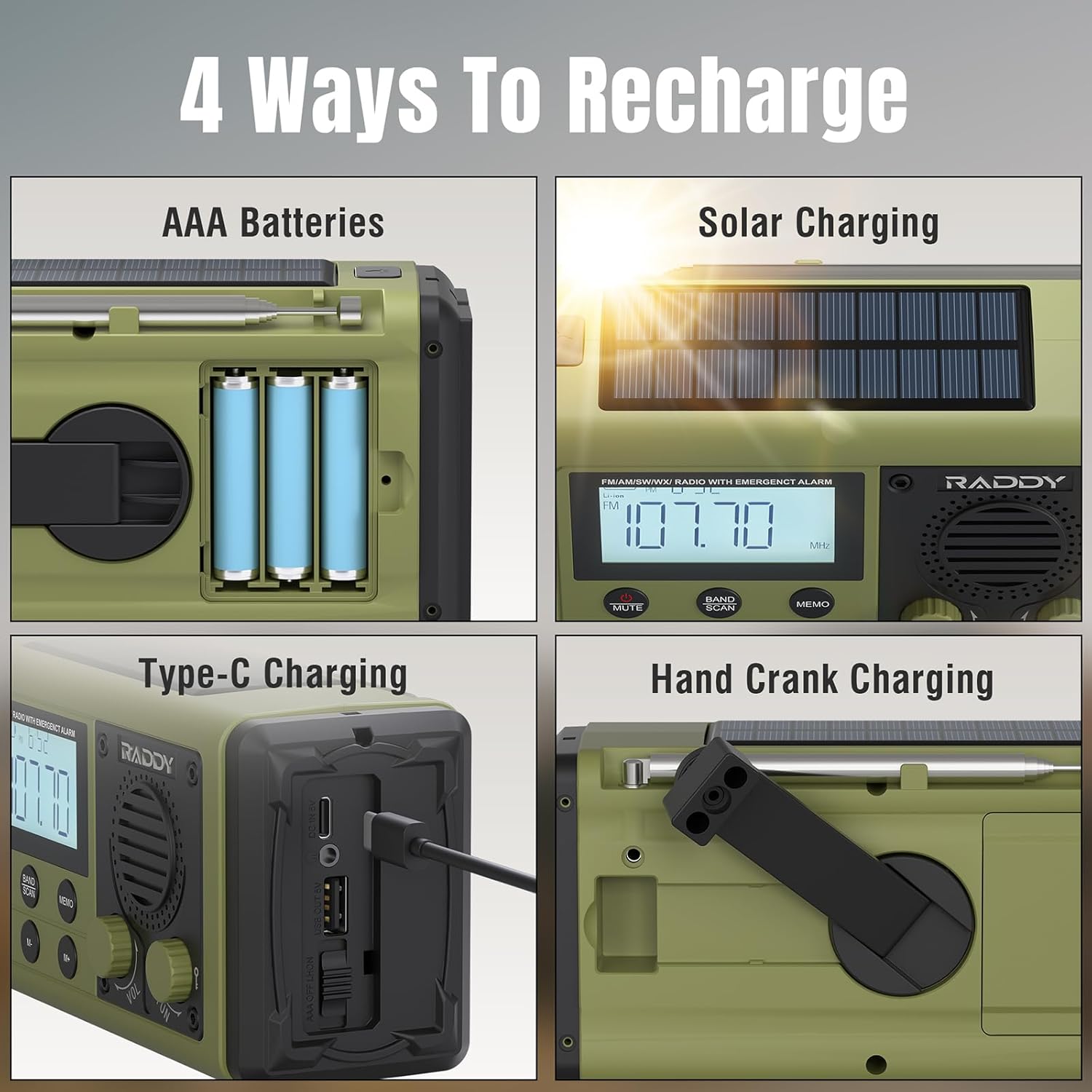
Image: The Raddy SH-908 radio demonstrating its four charging methods: AAA battery installation, solar panel charging, USB-C port charging, and hand crank operation.
6. Instrukcja obsługi
6.1 Włączanie/wyłączanie
Naciśnij i przytrzymaj MOC button (if available, otherwise assume a dedicated button or a long press on a multi-function button) to turn the radio on or off. The display will illuminate.
6.2 Obsługa radia (AM/FM/SW)
- Extend the Antenna: Aby uzyskać optymalny odbiór, całkowicie rozłóż antenę teleskopową.
- Wybierz zespół: Naciśnij PASMO/SKAN button to cycle through FM, AM, and SW bands.
- Stacje dostrajające:
- Strojenie ręczne: Obróć KADŹ pokrętło do ręcznej regulacji częstotliwości.
- Automatyczne skanowanie: Naciśnij i przytrzymaj PASMO/SKAN button to automatically scan for and save available stations.
- Wstępnie ustawiona nawigacja: Użyj M- I M+ przyciski umożliwiające przełączanie się pomiędzy zapisanymi stacjami.
- Dostosuj głośność: Obróć TOM pokrętło, aby zwiększyć lub zmniejszyć głośność.

Image: The Raddy SH-908 radio with its telescopic antenna extended, illustrating its AM/FM/SW radio capabilities.
6.3 Latarka i czytanie Lamp
- Flesz: Naciśnij dedykowany ŚWIATŁO button (or similar) once to turn on the flashlight. Press again to turn off.
- Czytanie Lamp: Lift the reading lamp panel to activate the lamp. Close the panel to turn it off.
6.4 Alarm SOS
W nagłych wypadkach należy aktywować alarm SOS:
- Naciśnij SOS button. The radio will emit a loud siren and flash its lights.
- Naciśnij SOS Naciśnij przycisk ponownie, aby dezaktywować alarm.
6.5 Używanie jako powerbanku
The 10,000mAh internal battery can charge external devices.
- Connect your device's charging cable to the radio's Port wyjściowy USB-A.
- The radio will begin charging your device. Monitor your device's charging status.

Image: The Raddy SH-908 radio charging a smartphone, demonstrating its 10,000mAh power bank functionality.
6.6 Ładowanie radia
The Raddy SH-908 offers four ways to recharge its internal battery:
- Ładowanie przez USB-C: (Refer to Section 5.1 Initial Charging).
- Ładowanie korbą ręczną: Rotate the hand crank clockwise or counter-clockwise at a steady pace (approximately 120-150 RPM) for 3-5 minutes to generate power for short-term use.
- Ładowanie słoneczne: Place the radio with the solar panel facing direct sunlight. This method is primarily for maintaining battery charge or for slow charging in emergencies.
- Baterie AAA: If installed, the radio can draw power from the AAA batteries when the internal rechargeable battery is depleted.
6.7 Korzystanie z kompasu
The integrated compass can assist with basic navigation. Hold the radio level and away from metallic objects to get an accurate reading.
7. Konserwacja
7.1 Czyszczenie
Wytrzyj radio miękką ściereczką.amp cloth. Do not use harsh chemicals or abrasive cleaners. Use the provided cleaning brush to remove dust from crevices.
7.2 Wodoodporność (IPX6)
The Raddy SH-908 is IPX6 waterproof, meaning it is protected against powerful water jets. It is not designed for submersion. Ensure all port covers are securely closed to maintain water resistance.

Image: The Raddy SH-908 radio being splashed with water, illustrating its IPX6 water resistance.
7.3 Pielęgnacja baterii
- For optimal battery life, fully charge the internal battery at least once every three months if not in regular use.
- Remove AAA batteries if the radio will not be used for an extended period to prevent leakage.
8. Rozwiązywanie Problemów
| Problem | Możliwa przyczyna | Rozwiązanie |
|---|---|---|
| Radio się nie włącza. | Bateria jest rozładowana. | Naładuj radio przez USB-C, korbkę ręczną lub panel słoneczny. Sprawdź baterie AAA, jeśli są zainstalowane. |
| Słaby odbiór radia. | Antena nie jest wysunięta; sygnał jest słaby; zakłócenia. | Całkowicie rozłóż antenę teleskopową. Spróbuj zmienić położenie radia. |
| Nie można naładować urządzenia zewnętrznego. | Niski poziom baterii w radiu; niewłaściwy kabel; urządzenie niekompatybilne. | Upewnij się, że wewnętrzny akumulator radia jest wystarczająco naładowany. Użyj kompatybilnego kabla USB. |
| Korba ręczna jest sztywna lub nie ładuje się. | Crank mechanism obstructed or damaged. | Ensure no debris is obstructing the crank. Apply steady, moderate force. If persistent, contact support. |
9. Specyfikacje
| Funkcja | Szczegół |
|---|---|
| Model | SH-908 |
| Pasma radiowe | AM, FM, SW |
| Wewnętrzna bateria | 10,000mAh (ładowalny) |
| Zasilanie awaryjne | 3 baterie AAA (brak w zestawie) |
| Metody ładowania | USB-C, korba ręczna, panel słoneczny |
| Port wyjściowy | USB-A (do ładowania urządzeń zewnętrznych) |
| Odporność na wodę | IPX6 |
| Oświetlenie | LED Flashlight, Reading Lamp |
| Dodatkowe funkcje | SOS Alarm, Built-in Compass |
| Wymiary (w przybliżeniu) | 16.7 cm (dł.) x 8.5 cm (szer.) x 6.7 cm (wys.) |
| Waga (w przybliżeniu) | 680 gramów |
10. Gwarancja i wsparcie
Raddy products are designed for reliability and performance. For warranty information, please refer to the warranty card included with your purchase or visit the official Raddy website. For technical support or inquiries, please contact Raddy customer service through the contact information provided on the product packaging or webstrona.
Proszę zachować dowód zakupu na wypadek ewentualnych roszczeń gwarancyjnych.