
Wstęp
Dziękujemy za zakupasing the Anker Soundcore P31i True Wireless Earbuds. This manual provides detailed instructions on how to set up, operate, and maintain your earbuds to ensure optimal performance and longevity. Please read this manual carefully before use and retain it for future reference.
Co jest zawarte
Your Soundcore P31i package includes the following items:
- Soundcore P31i Earbuds (Left and Right)
- Etui ładujące
- Ear Tips (XS, S, M, L - M size pre-installed)
- Kabel do ładowania z USB-C na USB-A
- Szybki przewodnik
- Instrukcja bezpieczeństwa
Produkt ponadview
The Soundcore P31i earbuds are designed for comfort and high-quality audio. Each earbud features a touch control area and an indicator light. The charging case protects the earbuds and provides additional battery life.
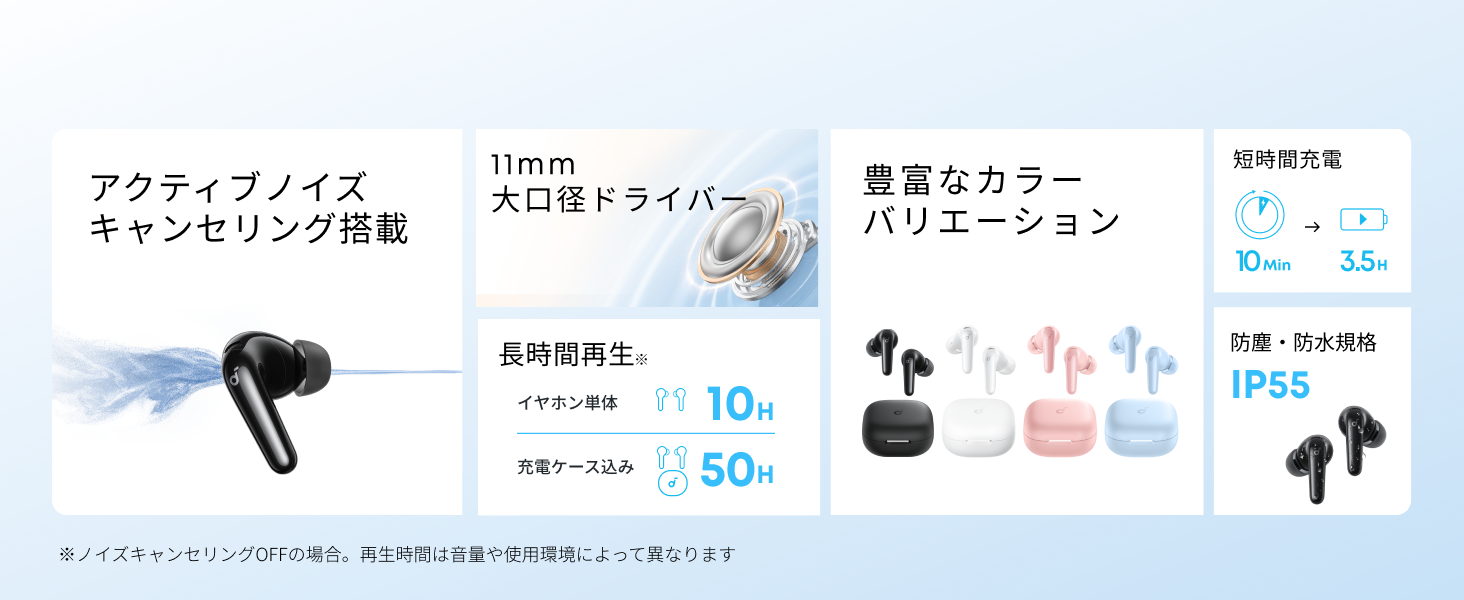
Diagram showing the Soundcore P31i earbuds and charging case with key components labeled.
Earbuds: Each earbud is equipped with an 11mm dynamic driver for powerful bass and clear sound. They feature active noise cancellation and AI noise reduction for calls. The ergonomic design ensures a secure and comfortable fit.
Etui ładujące: The compact charging case not only stores and protects your earbuds but also recharges them on the go. It has a USB-C charging port and a strap hole for portability.
Ładowanie słuchawek i etui
Przed pierwszym użyciem należy w pełni naładować słuchawki douszne i etui ładujące.
- Ładowanie słuchawek: Place the earbuds into the charging case. The indicator lights on the earbuds will show charging status.
- Ładowanie obudowy: Connect the charging case to a power source using the provided USB-C to USB-A cable. A full charge for the case and earbuds takes approximately 3 hours.
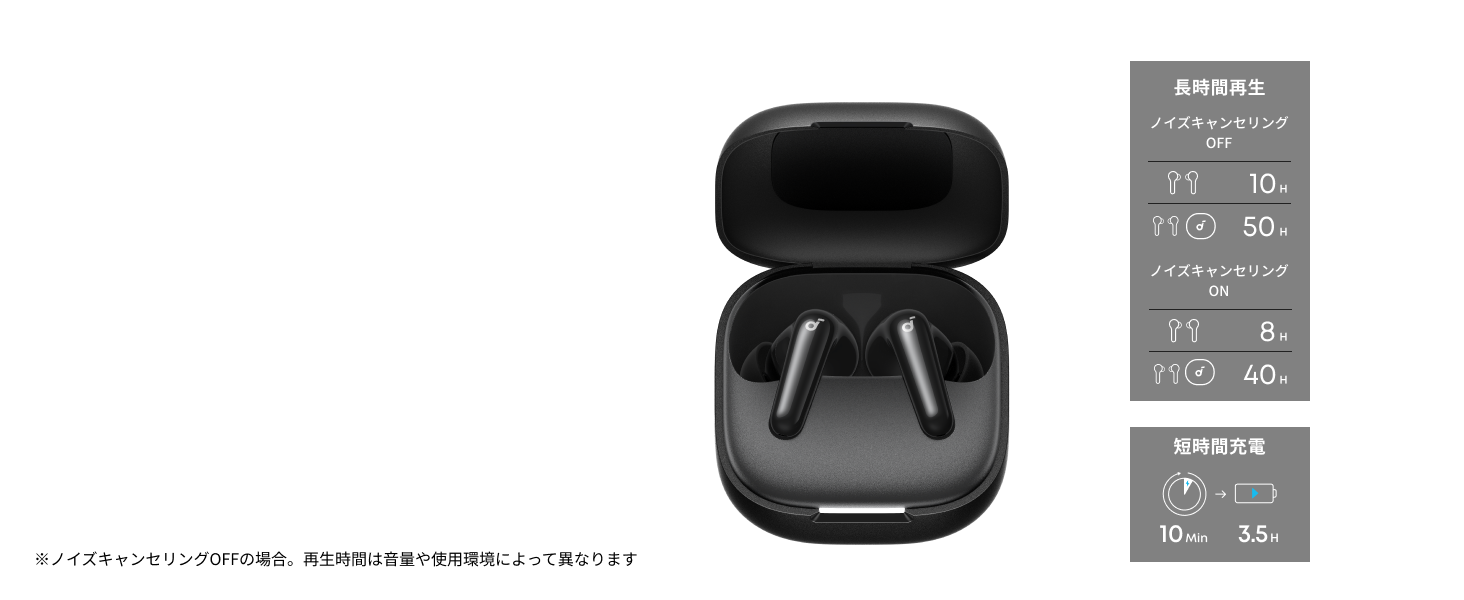
Diagram illustrating charging times and playback duration for Soundcore P31i earbuds.
Czas pracy baterii:
- Up to 10 hours of playback on a single charge (earbuds only).
- Do 50 godzin odtwarzania z etui ładującym.
- A quick 10-minute charge provides up to 3.5 hours of listening time.
Note: Playback time varies depending on volume level and audio content.
Noszenie słuchawek dousznych
For optimal sound quality and comfort, it is important to wear your earbuds correctly.
- Wybierz odpowiednie końcówki douszne: Select the ear tips that provide the best seal and comfort for your ears. Experiment with different sizes (XS, S, M, L) to find the perfect fit.
- Włóż słuchawki douszne: Ostrożnie włóż słuchawki douszne do kanałów słuchowych.
- Przekręć, aby zabezpieczyć: Twist the earbuds slightly until they fit snugly and securely in your ears.

Image showing a person wearing the Soundcore P31i earbuds correctly.
Parowanie Bluetooth
Follow these steps to pair your Soundcore P31i earbuds with your device:
- Parowanie po raz pierwszy:
- Open the charging case. The earbuds will automatically enter Bluetooth pairing mode. The indicator lights on the earbuds will flash white.
- Na swoim urządzeniu (smartfonie, tablecie itp.) przejdź do ustawień Bluetooth.
- Select "Soundcore P31i" from the list of available devices.
- Once connected, the indicator lights on the earbuds will turn solid white for 1 second and then turn off.
- Parowanie z innym urządzeniem:
- Umieść słuchawki w etui ładującym i pozostaw pokrywę otwartą.
- Press and hold the button on the charging case for 3 seconds until the earbud indicator lights flash white rapidly.
- Repeat steps 2 and 3 from "First-Time Pairing" on your new device.
Sterownica
The Soundcore P31i earbuds feature touch controls for managing playback, calls, and other functions. Specific control configurations can often be customized via the Soundcore app.
General Touch Controls (Default):
- Odtwórz/Pauza: Stuknij raz w dowolną słuchawkę.
- Następny utwór: Kliknij dwukrotnie prawą słuchawkę.
- Poprzedni utwór: Kliknij dwukrotnie lewą słuchawkę.
- Odbieranie/kończenie połączeń: Stuknij raz w dowolną słuchawkę.
- Odrzuć połączenie: Naciśnij i przytrzymaj dowolną słuchawkę przez 2 sekund.
- Aktywuj asystenta głosowego: Triple-tap either earbud (may vary).
- Przełącz tryb ANC/przezroczystości: Press and hold the right earbud for 2 seconds (may vary).
For detailed and customizable controls, please refer to the Soundcore app or the included Quick Start Guide.
Aktywna redukcja szumów (ANC)
The Soundcore P31i earbuds feature Active Noise Cancelling technology to minimize ambient noise, allowing for an immersive listening experience.

Illustration demonstrating the active noise cancelling feature of the Soundcore P31i earbuds.
ANC detects and reduces various types of noise, such as engine hum on trains or buses, and chatter in cafes. This allows you to enjoy your music or podcasts with greater clarity and fewer distractions.
To switch between ANC, Normal, and Transparency modes, use the touch controls on the earbuds or adjust settings within the Soundcore app.
Jakość dźwięku
The Soundcore P31i earbuds are engineered to deliver a rich audio experience.

Diagram illustrating the 11mm dynamic driver responsible for the audio output.
- Przetworniki dynamiczne 11 mm: Equipped with large 11mm drivers, these earbuds produce a wide frequency range and detailed sound.
- BassUp™ Technology: Anker's proprietary BassUp™ technology enhances low frequencies, delivering powerful and impactful bass.
You can further customize the sound profile using the equalizer settings within the Soundcore app.
Jakość połączeń
The Soundcore P31i earbuds ensure clear voice calls and web konferencje.

Illustration depicting AI noise reduction technology for clear voice calls.
Redukcja szumów AI: Integrated AI noise reduction technology effectively filters out background noise, ensuring your voice is transmitted clearly to the person on the other end of the call, even in noisy environments.
Połączenie wielopunktowe
The Soundcore P31i supports multi-point connection, allowing you to connect to two Bluetooth devices simultaneously.

Illustration showing the Soundcore P31i connected to multiple devices simultaneously.
This feature enables seamless switching between devices. For example, you can listen to music on your laptop and instantly switch to answer a call on your phone without manually re-pairing.
To enable multi-point connection, ensure both devices are paired with your earbuds. The earbuds will automatically connect to the last two paired devices when powered on.
Aplikacja Soundcore
Download the Soundcore app to enhance your experience with the P31i earbuds. The app offers various features and customization options.

Screenshots of the Soundcore app interface, highlighting customization features.
App Features include:
- Elementy sterujące, które można dostosować: Personalize touch controls for playback, calls, and voice assistant.
- Ustawienia korektora: Dostosuj dźwięk profesjonalnyfiles to your preference or choose from preset EQs.
- ANC/Transparency Mode Switching: Easily toggle between noise cancelling and transparency modes.
- Aktualizacje oprogramowania układowego: Aktualizuj swoje słuchawki, dodając najnowsze funkcje i udoskonalenia.
- Funkcja tłumaczenia AI: (Available from Spring 2026, requires Soundcore app ver 4.0.0 or higher).
The Soundcore app is available for download on both iOS and Android devices.
Produkt ponadview Wideo
Oficjalny film prezentujący produktasing the key features and design of the Soundcore P31i True Wireless Earbuds, including active noise cancellation, powerful bass, long battery life, and multi-point connectivity.
Konserwacja i pielęgnacja
Proper maintenance ensures the longevity and performance of your Soundcore P31i earbuds.
- Czyszczenie: Regularnie czyść słuchawki douszne i etui ładujące miękką, suchą i niepozostawiającą włókien ściereczką. Nie używaj silnych środków chemicznych ani materiałów ściernych.
- Końcówki douszne: Zdejmij nakładki douszne i w razie potrzeby umyj je wodą z delikatnym mydłem. Przed ponownym założeniem upewnij się, że są całkowicie suche.
- Ładowanie styków: Aby zagwarantować prawidłowe ładowanie, utrzymuj styki ładowania zarówno w słuchawkach, jak i w etui, w czystości i suchości.
- Składowanie: Gdy nie używasz słuchawek, przechowuj je w etui ładującym, aby chronić je przed kurzem i uszkodzeniami.
- Wodoodporność: The earbuds are rated IP55 for dust and water resistance. This means they can withstand sweat and light rain, but are not designed for submersion in water. Ensure the earbuds are dry before placing them back in the charging case.

Image showing Soundcore P31i earbuds with water droplets, highlighting their IP55 water resistance.
Rozwiązywanie problemów
If you encounter any issues with your Soundcore P31i earbuds, refer to the following common solutions:
- Słuchawki douszne nie parują się:
- Sprawdź, czy obie słuchawki są w pełni naładowane.
- Umieść słuchawki w etui, zamknij pokrywę, a następnie otwórz ją ponownie, aby ponownie wejść w tryb parowania.
- Forget "Soundcore P31i" from your device's Bluetooth list and try pairing again.
- Zresetuj słuchawki douszne (szczegółowe instrukcje dotyczące resetowania znajdziesz w skróconej instrukcji obsługi).
- Only One Earbud Playing Audio:
- Place both earbuds back into the charging case and close the lid for 5 seconds, then open it again.
- Sprawdź, czy w obu słuchawkach jest wystarczająca ilość baterii.
- Zresetuj słuchawki.
- Słaba jakość dźwięku:
- Upewnij się, że końcówki douszne dobrze przylegają do kanału słuchowego. Wypróbuj różne rozmiary.
- Wyczyść dysze słuchawek dousznych z wszelkich zanieczyszczeń.
- Zbliż się do podłączonego urządzenia, aby uniknąć zakłóceń.
- Problemy z ładowaniem:
- Sprawdź, czy kabel ładujący i adapter nie są uszkodzone.
- Sprawdź, czy styki ładowania w słuchawkach i etui są czyste.
- Wypróbuj inny kabel ładujący lub źródło zasilania.
Specyfikacje
| Funkcja | Szczegół |
|---|---|
| Marka | Dźwiękowy rdzeń |
| Nazwa modelu | P31i |
| Numer modelu | D1202 |
| Kolor | Black (This specific variant) |
| Współczynnik kształtu | Douszne |
| Technologia łączności | Bezprzewodowa (Bluetooth 6.1) |
| Kontrola hałasu | Aktywna redukcja szumów |
| Rozmiar kierowcy | 11mm przetworniki dynamiczne |
| Czas odtwarzania (słuchawki douszne) | Do 10 godzin |
| Całkowity czas odtwarzania (z etui) | Do 50 godzin |
| Szybkie ładowanie | 10 minut ładowania wystarcza na 3.5 godziny odtwarzania |
| Charging Time (Full) | Około 3 godzin |
| Odporność na wodę | IP55 |
| Połączenie wielopunktowe | Utrzymany |
| UPC | 194644251543 |
| Kraj pochodzenia | Chiny |
Gwarancja i obsługa klienta
Soundcore provides a comprehensive warranty for your P31i earbuds.

Image detailing the warranty period and extension for Soundcore P31i.
- Gwarancja standardowa: An 18-month warranty is provided for products purchased from authorized retailer AnkerDirect.
- Rozszerzona gwarancja: Anker members can extend their warranty up to a maximum of 24 months.
- Ważna uwaga: Purchases from unauthorized sellers may not be covered under warranty.
For product inquiries, delivery questions, or technical support, please contact Soundcore customer support. Contact details can typically be found on the official Soundcore webstronie lub w Przewodniku szybkiego startu.
Informacje dotyczące bezpieczeństwa
Przeczytaj i stosuj się do poniższych wskazówek bezpieczeństwa, aby zapobiec uszkodzeniu urządzenia lub obrażeniom ciała:
- Nie rozmontowuj ani nie modyfikuj słuchawek ani etui ładującego.
- Trzymaj urządzenie z dala od ekstremalnych temperatur, bezpośredniego światła słonecznego i otwartego ognia.
- Avoid exposing the device to excessive moisture or liquids, beyond its IP55 rating.
- Do not use the device at high volume levels for extended periods to prevent hearing damage.
- Przechowywać w miejscu niedostępnym dla dzieci i zwierząt domowych.
- Produkt należy utylizować w sposób odpowiedzialny, zgodnie z lokalnymi przepisami.


