
SUVCON M02
SUVCON M02 Dash Cam User Manual
Front and Rear 4K/1080P Full HD Dash Camera
1. Wprowadzenie
Thank you for choosing the SUVCON M02 Dash Cam. This device is designed to provide reliable front and rear video recording for your vehicle, enhancing driving safety and providing crucial evidence in case of incidents. Featuring 4K front and 1080P rear recording, Wi-Fi connectivity, G-Sensor, loop recording, and parking monitoring, this manual will guide you through the installation, operation, and maintenance of your new dash cam.

Image 1.1: The SUVCON M02 Dash Cam system, showing the main unit, rear camera, and a smartphone displaying the app interface.
2. Zawartość opakowania
Proszę sprawdzić, czy w paczce znajdują się następujące elementy:
- Kamera przednia (jednostka główna)
- Kamera tylna
- Regulowany uchwyt z przyssawką
- Kabel zasilający typu C
- Kabel kamery tylnej
- Karta pamięci 32 GB
- Car Reader
- Zaciski kablowe (4 sztuk)
- Cable Hiding Clips (4 pieces)
- Narzędzie instalacyjne
- Naklejka dwustronna
- Instrukcja obsługi
- Wykwintne pudełko (opakowanie)

Image 2.1: Visual representation of all items included in the SUVCON M02 Dash Cam package.
3. Koniec produktuview i funkcje
The SUVCON M02 Dash Cam offers a range of features designed for comprehensive vehicle surveillance:
- Nagrywanie 4K z przodu i 1080P z tyłu: Captures ultra-sharp 4K video from the front and Full HD 1080P from the rear, ensuring clear details.
- Ultra-Wide Angle Lenses: A 170° front lens and 150° waterproof rear camera minimize blind spots.
- Technologia WDR: Wide Dynamic Range technology provides exceptional clarity in various lighting conditions, improving visibility of license plates and road signs day and night.
- Wbudowane Wi-Fi i sterowanie aplikacją: Connects to your smartphone via the Viidure app for real-time viewing, playback, download, and management of recordings.
- Czujnik G: Automatically detects collisions and sudden impacts, locking and preserving critical footage przed nadpisaniem.
- Całodobowy monitoring parkingu: Provides continuous protection for your vehicle when parked (requires hardwiring kit, sold separately).
- Nagrywanie w pętli: Automatically overwrites the oldest videos when the storage space is full, managing storage efficiently.
- Ekran IPS 3.94": Provides a clear display for settings and video playback.
- Included 32GB Memory Card: Gotowe do użycia zaraz po wyjęciu z pudełka.

Obraz 3.1: Koniecview of the SUVCON M02 Dash Cam's main features, including 4K HD video, 32GB card, F2.0 aperture, G-Sensor, wide view angle, loop cycle, Wi-Fi & app control, 24-hour parking mode, WDR, and screen saver.
4. Konfiguracja i instalacja
Aby prawidłowo zainstalować kamerę samochodową, wykonaj poniższe czynności:
- Włóż kartę pamięci: Insert the provided 32GB memory card into the dash cam's TF card slot. Ensure it is inserted correctly until it clicks into place.
- Montaż przedniej kamery: Attach the adjustable suction mount to the front camera. Clean the windshield area where you intend to mount the camera. Press the suction cup firmly against the glass and lock it into position. Position the camera to ensure a clear view drogi, nie ograniczając widoczności podczas jazdy.
- Zainstaluj tylną kamerę: Mount the rear camera on the rear windshield, typically at the top center, using the double-sided sticker. Ensure the lens has a clear view z tyłu.
- Podłącz kabel kamery tylnej: Route the rear camera cable from the rear camera to the front camera. Use the provided cable clips and installation tool to neatly tuck the cable along the vehicle's headliner and A-pillars to conceal it. Connect the rear camera cable to the designated port on the front camera.
- Podłącz kabel zasilający: Connect the Type-C power cable to the front camera and plug the car charger adapter into your vehicle's cigarette lighter socket. For continuous parking monitoring, a hardwiring kit (sold separately) is required.
- Dostosuj kąt kamery: Once powered on, adjust the front and rear camera angles to capture the desired field of view. The front camera mount allows for 360° rotation for optimal positioning.
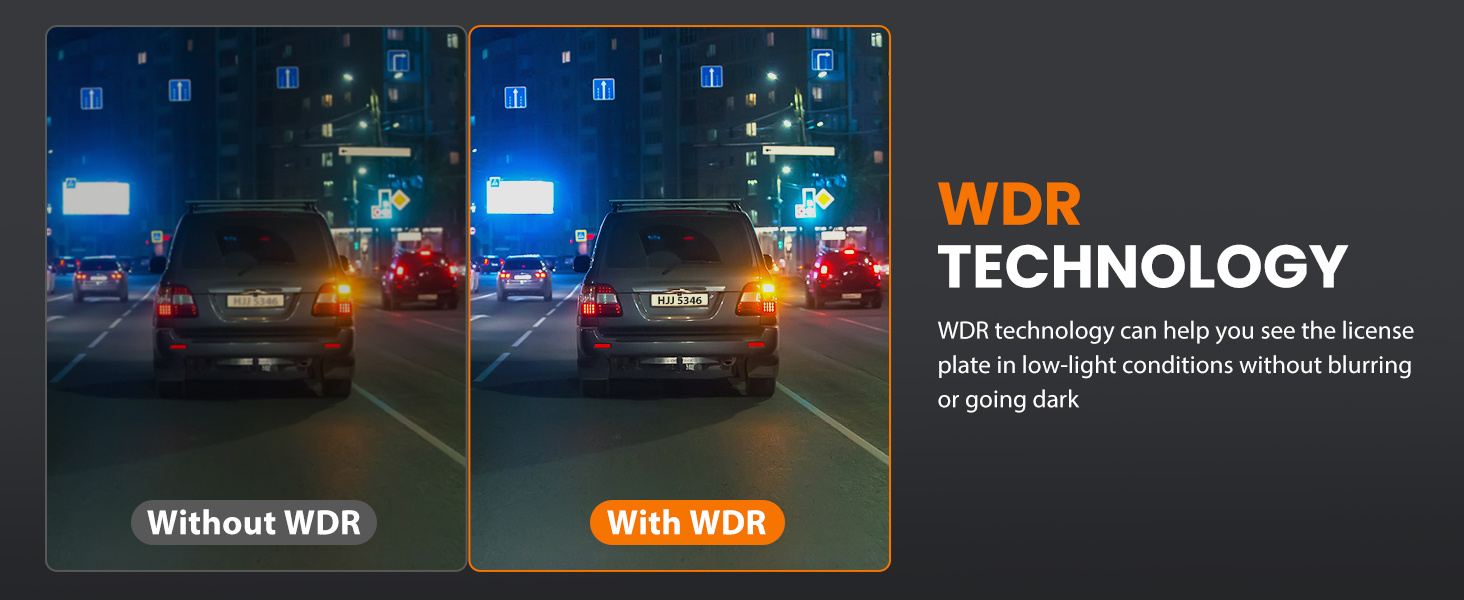
Image 4.1: Installation diagram showing how to connect the front and rear cameras, route cables, and the 360-degree rotation capability of the main unit.
5. Instrukcja obsługi
5.1 Włączanie/wyłączanie zasilania
- Automatyczny: The dash cam will automatically power on and begin recording when your vehicle's ignition is turned on (and power is supplied to the cigarette lighter socket).
- Manual: Naciśnij i przytrzymaj przycisk zasilania na kamerze samochodowej, aby ją ręcznie włączyć lub wyłączyć.
5.2 Podstawowe nagrywanie
Once powered on, the dash cam will automatically start recording. The front camera records in 4K, and the rear camera records in 1080P simultaneously.

Image 5.1: Depiction of the dash cam's dual recording feature, capturing 4K video from the front and 1080P from the rear.
5.3 Nawigacja po menu
Use the physical buttons on the dash cam to navigate through the menu options on the 3.94" IPS screen. Common settings include video resolution, loop recording duration, G-Sensor sensitivity, and parking mode settings.
6. Kontrola Wi-Fi i aplikacji
The SUVCON M02 Dash Cam features built-in Wi-Fi for seamless connection to your smartphone via the Viidure app.
- Pobierz aplikację: Szukaj "Viidure" in the Apple App Store (for iOS) or Google Play Store (for Android) and install the application.
- Włącz Wi-Fi w kamerze samochodowej: Access the dash cam's menu and enable the Wi-Fi function. The screen will display the Wi-Fi network name (SSID) and password.
- Podłącz swój telefon: On your smartphone, go to Wi-Fi settings, find the dash cam's SSID, and enter the password to connect.
- Użyj aplikacji: Open the Viidure app. You can now:
- View żyćtage z obu kamer.
- Odtwórz nagrane filmy.
- Pobieraj filmy bezpośrednio na telefon.
- Dostosuj ustawienia kamery samochodowej.
- Udostępnij footage do platform mediów społecznościowych.

Image 6.1: The dash cam's Wi-Fi and app control feature, showing a smartphone connected to the dash cam via the Viidure app, enabling viewing, playback, and sharing of footage.
7. G-Sensor and Parking Mode
7.1 G-Sensor Emergency Lock
The built-in G-Sensor automatically detects sudden movements or impacts, such as a collision. When triggered, it locks the current video segment, preventing it from being overwritten by loop recording. This ensures critical incident footage is safely preserved.

Image 7.1: The G-Sensor feature automatically locks video footage during a collision to prevent overwriting.
7.2 Całodobowy monitoring parkingu
With the 24-hour parking monitoring feature, your dash cam can continue to protect your vehicle even when it's parked. If an impact or motion is detected while the vehicle is off, the dash cam will automatically start recording. This feature requires a hardwiring kit (not included) to provide continuous power to the dash cam when the vehicle is off.

Image 7.2: The 24-hour parking monitor provides continuous surveillance against collisions and theft when the vehicle is parked.
8. Nagrywanie w pętli
The loop recording function ensures that your dash cam never stops recording due to a full memory card. When the storage space on the 32GB memory card is full, the system will automatically overwrite the oldest unlocked video files with new recordings. You can customize the loop recording duration to 1, 2, or 3-minute segments through the dash cam's settings.
9. Konserwacja
- Czyste soczewki: Aby zapewnić doskonałą jakość nagrań wideo, regularnie czyść obiektywy przedniej i tylnej kamery miękką, niepozostawiającą włókien ściereczką.
- Pielęgnacja karty pamięci: Format the memory card periodically (e.g., once a month) using the dash cam's menu to maintain optimal performance and prevent data corruption.
- Temperatura: Unikaj wystawiania kamery samochodowej na działanie ekstremalnych temperatur przez dłuższy czas, ponieważ może to wpłynąć na żywotność baterii i wydajność urządzenia.
- Aktualizacje oprogramowania układowego: Sprawdź producenta website or the Viidure app for any available firmware updates to ensure your dash cam has the latest features and bug fixes.
10. Rozwiązywanie Problemów
If you encounter issues with your SUVCON M02 Dash Cam, please refer to the following common problems and solutions:
| Problem | Możliwe rozwiązanie |
|---|---|
| Kamera samochodowa nie włącza się. |
|
| Nagrywanie zostaje zatrzymane lub zawieszone. |
|
| Słaba jakość wideo. |
|
| Problemy z połączeniem Wi-Fi. |
|
| G-Sensor jest zbyt czuły/niewystarczająco czuły. |
|
11. Specyfikacje
| Funkcja | Szczegół |
|---|---|
| Nazwa modelu | M02 |
| Rozdzielczość przedniej kamery | 4K |
| Rozdzielczość tylnej kamery | 1080P |
| Przednie pole View | 170 stopni |
| Tylne pole View | 150 stopni |
| Ekran wyświetlacza | Ekran IPS 3.94" |
| Technologia łączności | Wi-Fi (bezprzewodowy) |
| Cechy specjalne | App Control, Loop Recording, Parking Monitor, G-Sensor, WDR |
| Dołączona karta pamięci | 32 GB |
| Typ montażu | Uchwyt na deskę rozdzielczą (przyssawka) |
| Wymiary produktu | 4 x 1.57 x 1.97 cala |
| Waga przedmiotu | 14.9 uncji |
| Baterie | 1 bateria litowo-jonowa (w zestawie) |
12. Gwarancja i wsparcie
The SUVCON M02 Dash Cam comes with a comprehensive 2-letnia gwarancja. For any issues, concerns, or technical support, please contact our professional support team. Contact information can typically be found on the product packaging or the official SUVCON webstrona.
Ask a question about this manual
Ask about setup, troubleshooting, compatibility, parts, safety, or missing instructions. Manuals+ will review the question and use this page’s manual context to help answer it.