
Wstęp
This manual provides comprehensive instructions for the ALLIMITY RC933A FMB1 Voice Remote Control. Designed for ease of use, this remote offers full functionality for compatible TCL Mini LED Smart TV models without requiring complex programming or setup. Its ergonomic design ensures comfortable handling and reliable performance.
Kompatybilne modele telewizorów:
- TCL Q8CX7
- TCL 85Q8CX7
- TCL 98Q8CX7
- TCL 75Q8CX7
- TCL 65C8K
- TCL 75C89K
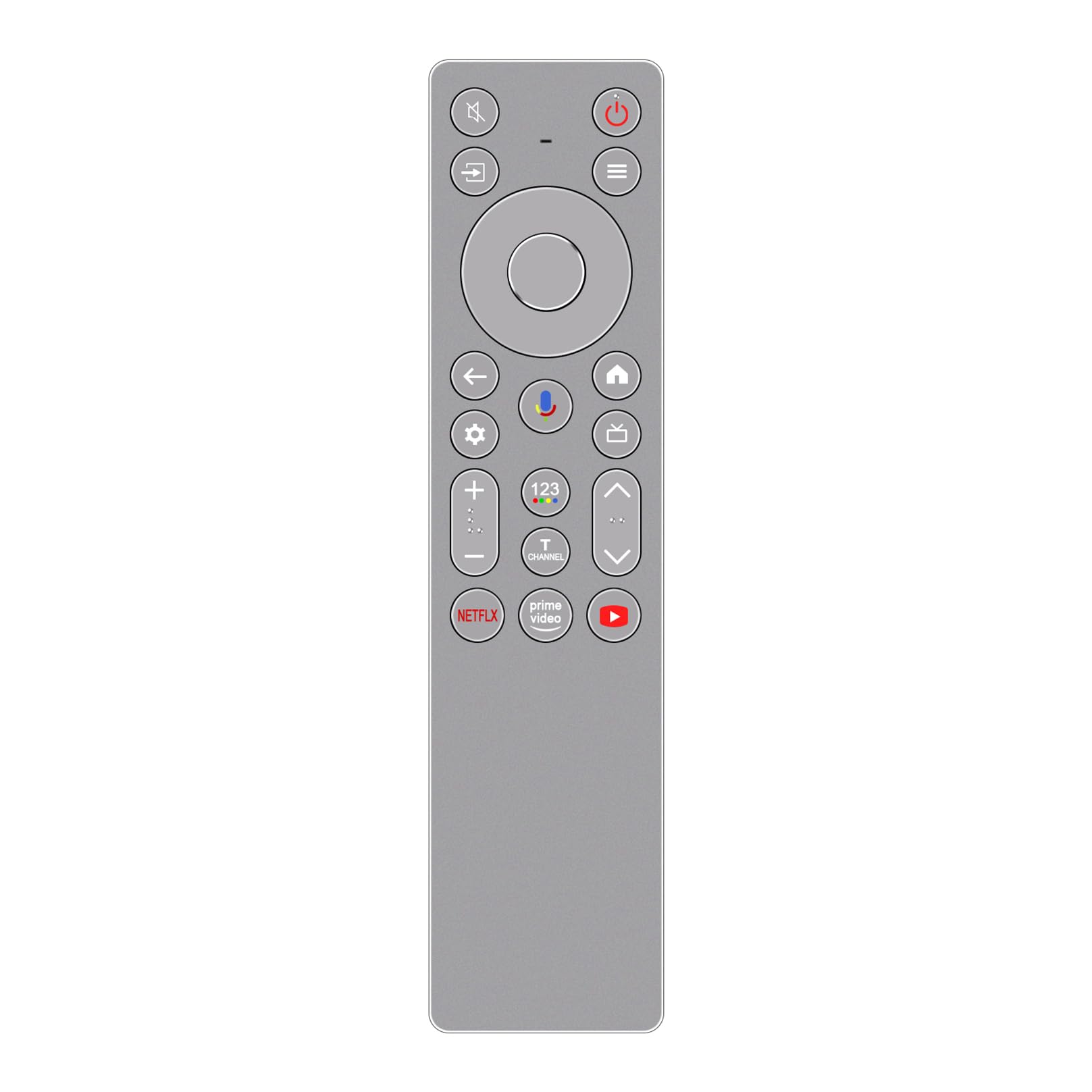
Obraz: Przód view of the ALLIMITY RC933A FMB1 Voice Remote Control, showcasing its button layout and sleek silver-grey finish.
Organizować coś
The ALLIMITY RC933A FMB1 remote control is designed for immediate use with compatible TCL Smart TVs. No programming or complex setup is required. Simply install the batteries to begin operation.
Instalacja baterii
- Znajdź komorę baterii z tyłu pilota.
- Odsuń pokrywę komory baterii.
- Włóż dwie baterie AA, upewniając się, że bieguny dodatni (+) i ujemny (-) są prawidłowo ustawione względem wskaźników wewnątrz komory.
- Dokładnie zamknij pokrywę komory baterii.
The remote is now ready for use. Point it towards your TCL Smart TV and press any button to confirm functionality.
Instrukcja obsługi
The ALLIMITY RC933A FMB1 remote control provides intuitive access to your TV's functions, including voice commands and dedicated app buttons.
Funkcje przycisków Koniecview
- Przycisk zasilania: Włącza lub wyłącza telewizor.
- Directional Pad (D-Pad) and OK Button: Poruszaj się po menu i potwierdzaj wybory.
- Przycisk Wstecz: Powrót do poprzedniego ekranu lub menu.
- Przycisk Home: Accesses the TV's home screen.
- Przycisk ustawień: Otwiera menu ustawień telewizora.
- Zwiększanie/zmniejszanie głośności: Regulacja głośności telewizora.
- Kanał w górę/w dół: Zmienia kanały telewizyjne.
- Przycisk wyciszenia: Wycisza lub wyłącza wyciszenie dźwięku telewizora.
- Przycisk wejścia/źródła: Wybiera źródła wejściowe (HDMI, AV itp.).
- Dedykowane przyciski aplikacji: Szybki dostęp do serwisów Netflix, Prime Video i YouTube.
Funkcjonalność sterowania głosowego
The remote features a voice command button for convenient control of your TV. This allows you to search for content, change settings, or launch apps using your voice.
- Naciśnij Przycisk sterowania głosowego (typically indicated by a microphone icon).
- Hold the remote approximately 10-30 cm (4-12 inches) from your mouth.
- Wydaj polecenie wyraźnie do mikrofonu pilota.
- Release the button once you have finished speaking.

Obraz: szczegółowy view of the ALLIMITY RC933A FMB1 remote control, with a magnified inset showing the multi-colored microphone icon for voice control.
Konserwacja
Proper care and maintenance will ensure the longevity and optimal performance of your remote control.
Czyszczenie
- Przetrzyj pilota miękką, suchą ściereczką.
- W przypadku uporczywych zabrudzeń, delikatnieampPrzetrzyj szmatkę wodą lub delikatnym, nieściernym środkiem czyszczącym. Unikaj nadmiernej wilgoci.
- Do not use harsh chemicals, solvents, or abrasive cleaning pads, as these can damage the remote's surface or internal components.
Wymiana baterii
- Wymień baterie, gdy pilot zdalnego sterowania reaguje wolniej lub przestaje działać.
- Zawsze wymieniaj obie baterie jednocześnie na nowe baterie AA.
- Nie mieszaj starych i nowych baterii ani różnych typów baterii.
- Jeżeli pilot nie będzie używany przez dłuższy czas, wyjmij baterie, aby zapobiec wyciekowi.
Składowanie
Przechowuj pilota w chłodnym i suchym miejscu, z dala od bezpośredniego światła słonecznego, ekstremalnych temperatur i wysokiej wilgotności.
Rozwiązywanie problemów
If you encounter issues with your ALLIMITY RC933A FMB1 remote control, refer to the following common solutions:
- Pilot nie odpowiada:
- Sprawdź, czy baterie zostały włożone prawidłowo, z zachowaniem właściwej polaryzacji.
- Wymień baterie na nowe baterie AA.
- Upewnij się, że między pilotem zdalnego sterowania a odbiornikiem podczerwieni telewizora nie ma żadnych przeszkód.
- Upewnij się, że znajdujesz się w zasięgu efektywnego działania (do 10 metrów).
- Sterowanie głosowe nie działa:
- Sprawdź, czy w pilocie są nowe baterie.
- Press and hold the voice control button while speaking.
- Mów wyraźnie i bezpośrednio do mikrofonu.
- Check your TV's settings to ensure voice control is enabled and properly configured.
- Krótki zasięg transmisji:
- Replace batteries with new ones. Low battery power can reduce range.
- Upewnij się, że żadne silne źródła światła (takie jak bezpośrednie światło słoneczne lub jasne lampy fluorescencyjne) nie zakłócają sygnału podczerwieni.
- Remove any physical obstructions between the remote and the TV.
Specyfikacje
| Marka | WSZECHSTRONNOŚĆ |
| Nazwa modelu | MM-RC933A-FMB1 |
| Kolor | Silver/Grey (as pictured) |
| Technologia łączności | Podczerwieni (IR) |
| Typ sterowania | Polecenie głosowe |
| Maksymalny zasięg | 10 metrów (33 stóp) |
| Liczba przycisków | 25 |
| Opis baterii | AA (wymagane 2) |
| Waga produktu | 59 gram |
| Wymiary (długość x szerokość) | 18.5 cm (7.28 cali) x 4.8 cm (1.89 cal) |
| Maksymalna liczba obsługiwanych urządzeń | 1 (for direct control, though it can be compatible with multiple models) |

Obraz: obok siebie view of the ALLIMITY RC933A FMB1 remote control, illustrating its length (18.5 cm / 7.28 in) and width (4.8 cm / 1.89 in).
Gwarancja i wsparcie
For specific warranty information or technical support regarding your ALLIMITY RC933A FMB1 Voice Remote Control, please refer to the documentation provided with your purchase or contact the retailer/manufacturer directly. Keep your purchase receipt as proof of purchase for any warranty claims.