
Wstęp
This manual provides essential instructions for setting up, operating, maintaining, and troubleshooting your OPPO K13 Turbo 5G smartphone. Please read this guide thoroughly to ensure proper use and to maximize the device's performance and longevity.
1. Konfiguracja
1.1 Zawartość pudełka
Sprawdź, czy w pudełku znajdują się wszystkie elementy:
- Handset (OPPO K13 Turbo 5G)
- Rumak
- Kabel danych USB
- Narzędzie do wyjmowania karty SIM
- Etui ochronne
- Szybka porada
- Fan Cleaning Brush
1.2 Instalacja karty SIM
- Znajdź tackę na kartę SIM znajdującą się z boku urządzenia.
- Włóż narzędzie do wyjmowania karty SIM do małego otworu obok tacki i delikatnie naciśnij, aż tacka wyskoczy.
- Place your Nano SIM card(s) into the tray with the gold contacts facing down. Ensure proper orientation.
- Ostrożnie włóż tackę karty SIM z powrotem do telefonu.
1.3 Ładowanie akumulatora
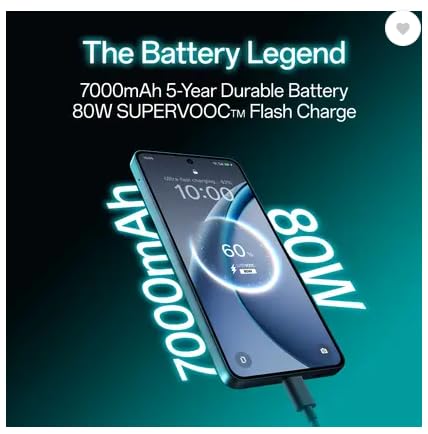
Before first use, fully charge the device. Connect the USB data cable to the phone's USB Type-C port and the charger. Plug the charger into a power outlet. The device supports 80W SUPERVOOC Flash Charge.
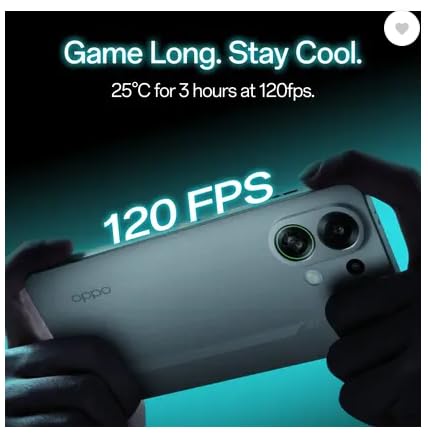
Image: The OPPO K13 Turbo 5G connected to a charger, illustrating the 7000mAh battery and 80W SUPERVOOC Flash Charge capability.
1.4 Kreator pierwszego uruchomienia i konfiguracji
Press and hold the Power button until the OPPO logo appears. Follow the on-screen instructions to select your language, connect to Wi-Fi, set up your Google account, and configure other initial settings.
2. Obsługa urządzenia
Obraz: przód i tył view of the OPPO K13 Turbo 5G smartphone, showcasing jego projektu.
2.1 Podstawowa nawigacja
- Uzyskiwać: Wybierz element lub aktywuj funkcję.
- Trzepnąć: Przechodź między ekranami lub przewijaj zawartość.
- Szczypta: Powiększaj lub pomniejszaj obrazy i web stron.
- Długie naciśnięcie: Uzyskaj dostęp do menu kontekstowych i przenieś ikony.
2.2 Calls and Messages
Użyj aplikacji Telefon do wykonywania i odbierania połączeń. Aplikacja Wiadomości umożliwia wysyłanie i odbieranie wiadomości SMS/MMS. Upewnij się, że karta SIM jest aktywna i ma zasięg sieci.
2.3 Łączność
- Wi-Fi: Przejdź do Ustawienia > Wi-Fi, aby połączyć się z dostępnymi sieciami.
- Dane mobilne: Enable or disable mobile data in Settings > Mobile Network.
- Bluetooth: Pair with other devices via Settings > Bluetooth.
- USB typu C: Connect to a computer for data transfer or use with compatible accessories.
2.4 Funkcje aparatu
The OPPO K13 Turbo 5G features a 50MP main rear camera and a 16MP front camera. Open the Camera app to capture photos and videos. Explore various modes like Portrait, Night, and Pro for enhanced photography.
2.5 Cooling System Management
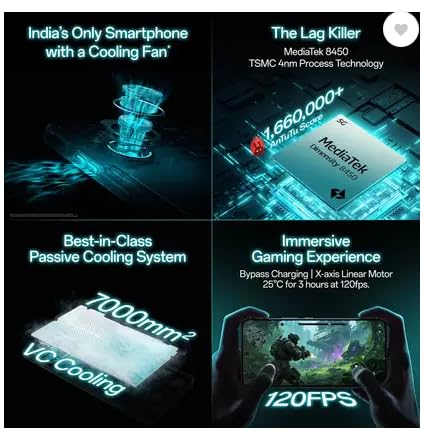
Your device is equipped with an advanced cooling system, including a built-in fan and a 7000mm² VC Cooling system, designed to maintain optimal performance during intensive tasks like gaming. The system automatically activates when needed to prevent overheating.
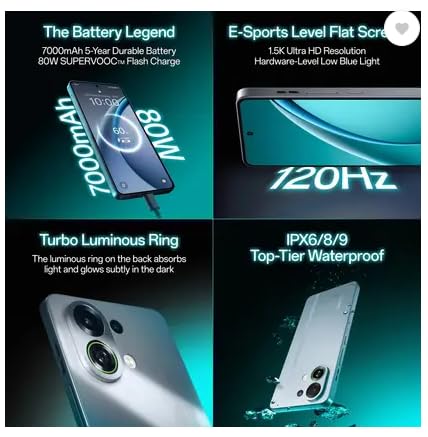
Image: An illustration of the OPPO K13 Turbo 5G's internal cooling fan mechanism.
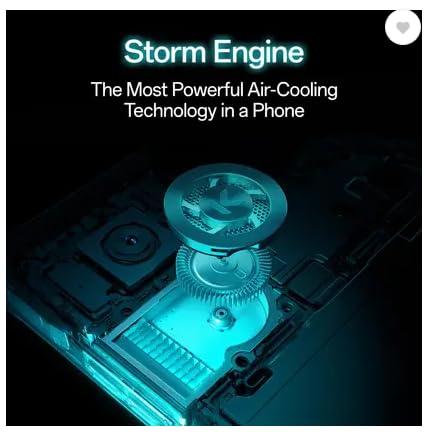
Image: Diagram showing the 7000mm² VC Cooling system for passive heat dissipation.
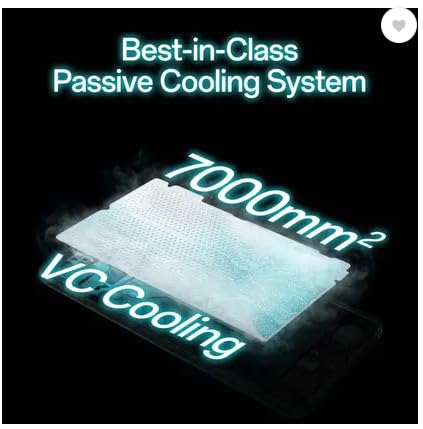
Image: A user holding the OPPO K13 Turbo 5G while gaming, indicating stable performance at 120 FPS due to cooling.
2.6 Zarządzanie baterią i energią
The 7000 mAh battery provides extended usage. Utilize power-saving modes in Settings > Battery to optimize battery life. The device also supports bypass charging for gaming, which powers the phone directly from the charger, reducing battery strain.
Obraz: Wnętrze view of the OPPO K13 Turbo 5G illustrating the bypass charging mechanism, allowing direct power delivery during gaming.
3. Konserwacja
3.1 Czyszczenie urządzenia
Use a soft, lint-free cloth to clean the screen and body. For the cooling fan vents, use the provided fan cleaning brush to gently remove dust and debris. Avoid using harsh chemicals or abrasive materials.
3.2 Aktualizacje oprogramowania
Regularly check for and install software updates to ensure optimal performance, security, and access to new features. Go to Settings > About device > Software update.
3.3 Kopia zapasowa danych
Periodically back up your important data to a cloud service (e.g., Google Drive) or a computer to prevent data loss.
3.4 Pielęgnacja baterii
To prolong battery life, avoid extreme temperatures and do not leave the device fully charged or fully discharged for extended periods. Use the original charger and cable.
3.5 Wodoodporność
The device is water resistant. However, this is not a permanent condition and resistance might decrease as a result of normal wear. Avoid intentional submersion and exposure to high-pressure water or liquids other than fresh water.
4. Rozwiązywanie Problemów
4.1 Typowe problemy
- Urządzenie się nie włącza: Upewnij się, że bateria jest naładowana. Naciśnij i przytrzymaj przycisk zasilania przez co najmniej 10 sekund.
- Aplikacje ulegają awarii lub zawieszają się: Close and reopen the app. Clear the app's cache (Settings > Apps > [App Name] > Storage > Clear cache). Restart the device.
- Problemy z łącznością sieciową: Check SIM card installation. Toggle Airplane Mode on and off. Restart the device. Verify network settings.
- Niska wydajność: Close unused apps. Clear cache. Check for available storage.
4.2 Przywracanie ustawień fabrycznych
Jeśli problemy będą się powtarzać, konieczne może być przywrócenie ustawień fabrycznych. Spowoduje to usunięcie wszystkich danych z urządzenia. Przed kontynuacją wykonaj kopię zapasową danych. Przejdź do Ustawienia > System > Opcje resetowania > Wymaż wszystkie dane (przywróć ustawienia fabryczne).
5. Specyfikacje
| Marka | OPPO |
| Model | K13 Turbo 5G |
| System operacyjny | Android 15 |
| Edytor | Dimensity 8450 Processor |
| BARAN | 8 GB |
| Składowanie | 128 GB |
| Wyświetlacz | 17.27 cm (6.8 inch) Full HD+ 1.5K AMOLED Flexible Screen (1280 x 2800 resolution, 453 PPI) |
| Kamera tylna | 50MP + 2MP (Dual Camera) |
| Przednia kamera | 16MP |
| Pojemność baterii | 7000 mAh |
| Ładowanie | 80W SUPERVOOC Flash Charge, Bypass Charging |
| Układ chłodzenia | Built-in Cooling Fan, 7000mm² VC Cooling |
| Typ karty SIM | Podwójna karta Nano SIM |
| Łączność | 5G, USB typu C |
| Bezpieczeństwo biometryczne | Rozpoznawanie odcisków palców |
| Odporność na wodę | Wodoodporny |
| Wymiary | 15 x 10 x 8 centymetrów |
| Waga | 230 gram |
6. Gwarancja i wsparcie
6.1 Informacje o gwarancji
Your OPPO K13 Turbo 5G comes with a 1-Year Manufacturer Warranty for the device i 6-Month Manufacturer Warranty for in-box accessories. Please retain your proof of purchase for warranty claims. The warranty covers manufacturing defects but does not cover damage caused by misuse, accidents, or unauthorized modifications.
6.2 Obsługa klienta
For technical assistance, service, or warranty inquiries, please contact OPPO customer support. Refer to the official OPPO website or the Quick Guide included in your box for the most current contact information and support resources.
Producent: OPPO Mobiles India Private Limited
Adres: Plot No.1, Sector Ecotech: VII, Greater Noida, Uttar Pradesh 201306