
1. Wprowadzenie
The ATK Blazing Sky X1 Ultimate is an ultra-lightweight wireless gaming mouse designed for esports performance. It features a lightweight construction, advanced sensor technology, and versatile connectivity options to provide precise control and comfort for competitive play. This manual provides essential information for setting up, operating, and maintaining your ATK Blazing Sky X1 Ultimate mouse.

Figure 1: ATK Blazing Sky X1 Ultimate Wireless Gaming Mouse.
2. Zawartość opakowania
Sprawdź, czy w przesyłce znajdują się wszystkie elementy:
- ATK Blazing Sky X1 Ultimate Wireless Gaming Mouse
- Kabel ładujący USB-C
- ATK 8K Dongle (for 8K wireless polling)
- Instrukcja obsługi
3. Konfiguracja
3.1 Ładowanie myszy
Connect the supplied USB-C cable to the mouse's charging port and the other end to a USB-A port on your computer or a compatible USB charger. The mouse will indicate charging status (e.g., LED indicator).
3.2 Podłączanie myszy
The ATK Blazing Sky X1 Ultimate supports quad-mode connectivity:
- Tryb bezprzewodowy 2.4G: Insert the ATK 8K dongle into an available USB port on your computer. Turn on the mouse and select the 2.4G mode using the switch on the bottom of the mouse. The mouse should automatically connect.
- Tryb Bluetooth: Turn on the mouse and select Bluetooth mode using the switch on the bottom. On your computer, go to Bluetooth settings and pair with the "ATK Blazing Sky X1" device.
- Tryb przewodowy: Connect the mouse directly to your computer using the supplied USB-C cable. The mouse will function as a wired device and charge simultaneously.
3.3 Instalacja oprogramowania
For full customization of DPI, polling rate, button assignments, and macros, download and install the ATK HUB/Web Driver software from the official ATK website. This software allows you to personalize your mouse settings to match your preferences.

Figure 2: ATK HUB/Web Driver software interface and Nordic 52840 MCU.
4. Instrukcja obsługi
4.1 Regulacja DPI
The ATK Blazing Sky X1 Ultimate features a PixArt PAW3950 Ultra sensor, offering up to 36,000 DPI (Dots Per Inch) via software. You can cycle through preset DPI stages using the dedicated DPI button on the mouse, or customize and fine-tune your DPI settings using the ATK HUB/Web Oprogramowanie sterownika.

Figure 3: PixArt PAW3950 Ultra Sensor specifications.
4.2 Częstotliwość odpytywania
The mouse supports adjustable polling rates from 125 Hz to 8000 Hz. For optimal performance and ultra-low latency, utilize the 8K wireless polling rate with the included ATK 8K dongle. Polling rate settings can be configured via the ATK HUB/Web Oprogramowanie sterownika.
4.3 programowalne przyciski
The X1 Ultimate is equipped with durable optical switches rated for 70 million clicks, providing crisp and reliable actuation. All buttons are programmable via the ATK HUB/Web Driver software, allowing you to assign macros, keybinds, or multimedia functions.
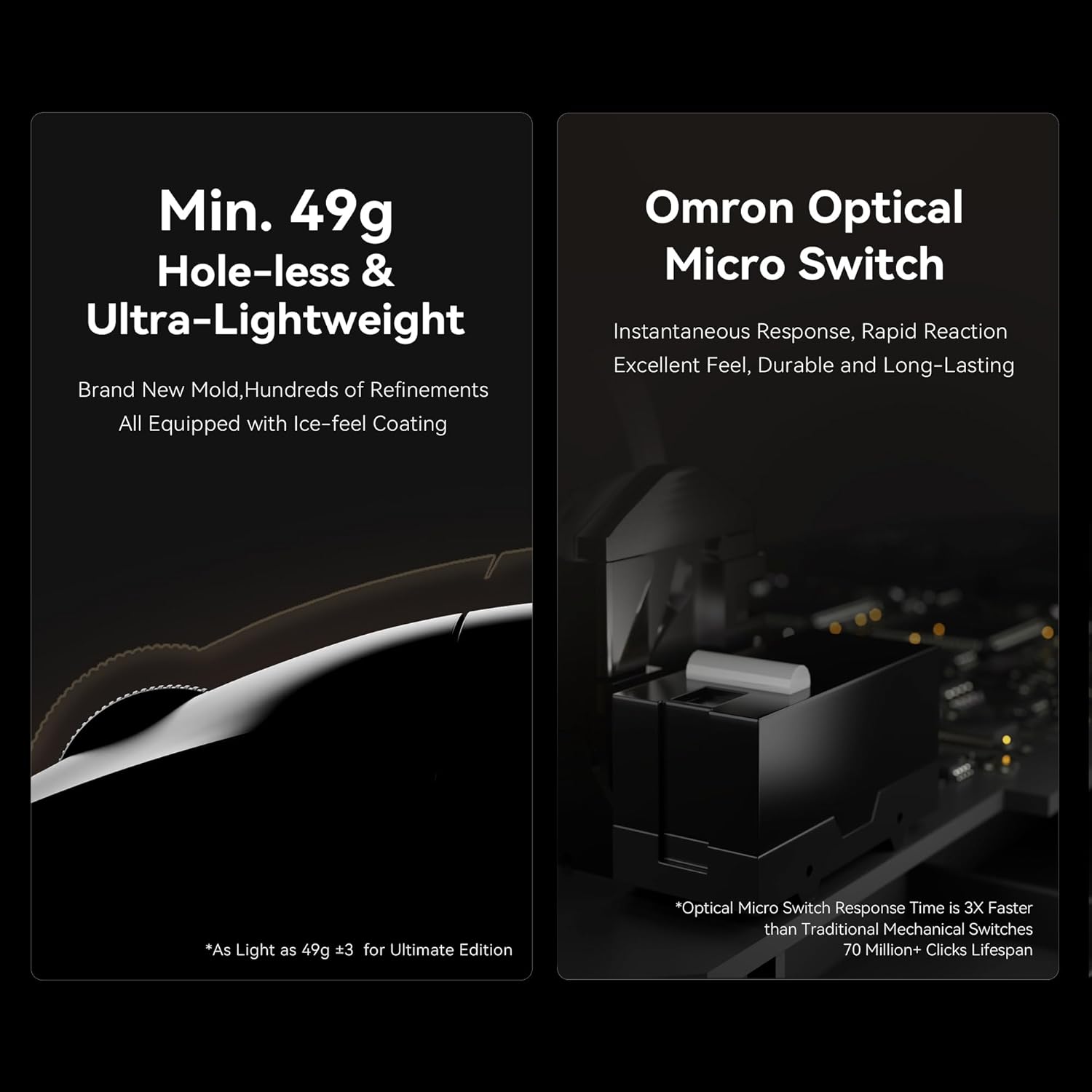
Figure 4: Ultra-lightweight design and Omron Optical Micro Switches.
4.4 Żywotność baterii
The X1 Ultimate edition features a 500 mAh battery, providing approximately 75–150 hours of usage depending on the polling rate and usage intensity. Monitor battery status through the ATK HUB/Web Driver software or the mouse's LED indicator.
5. Konserwacja
To ensure the longevity and optimal performance of your ATK Blazing Sky X1 Ultimate mouse, follow these maintenance guidelines:
- Czyszczenie: Use a soft, dry cloth to wipe the surface of the mouse. For stubborn dirt, lightly dampPrzetrzyj ściereczkę wodą lub delikatnym środkiem czyszczącym. Unikaj stosowania silnych środków chemicznych i materiałów ściernych.
- Pielęgnacja czujnika: Keep the optical sensor on the bottom of the mouse clean and free from dust or debris. Use a cotton swab lightly dampW razie konieczności spłukać alkoholem izopropylowym.
- Składowanie: Przechowuj mysz w chłodnym, suchym miejscu, z dala od bezpośredniego światła słonecznego i ekstremalnych temperatur, gdy nie używasz myszy.
6. Rozwiązywanie Problemów
If you encounter issues with your ATK Blazing Sky X1 Ultimate mouse, refer to the following common solutions:
- Mysz nie odpowiada: Ensure the mouse is charged and powered on. Check the connectivity mode (2.4G, Bluetooth, or wired) and ensure it matches your computer's connection. Re-insert the USB dongle or re-pair via Bluetooth.
- Problemy ze śledzeniem: Clean the optical sensor on the bottom of the mouse. Ensure you are using the mouse on a suitable surface (a mouse pad is recommended). Update the mouse firmware via the ATK HUB/Web Oprogramowanie sterownika.
- Bateria nie ładuje się: Verify the USB-C cable is securely connected to both the mouse and the power source. Try a different USB port or charging cable.
- Oprogramowanie nie wykrywa myszy: Ensure the mouse is connected to your computer. Reinstall the ATK HUB/Web Oprogramowanie sterownika.
7. Specyfikacje
| Funkcja | Szczegół |
|---|---|
| Numer modelu | ATK Blazing Sky X1 Ultimate |
| Waga przedmiotu | 1.8 ounces (approx. 51g for X1 Ultimate) |
| Marka | ATK |
| Kolor | Biały |
| Technologia łączności | NearLink, 2.4G Wireless, Bluetooth, Wired USB-C |
| Funkcja specjalna | Ultra-Lightweight, Programmable Buttons, Rechargeable |
| Technologia wykrywania ruchu | Optyczny |
| Transduktor | PixArt PAW3950 Ultra (up to 36,000 DPI via software) |
| Przełączniki | Optical Switches (70M clicks) |
| MCU | Nordic 52840 with Smartspeed 2.0 |
| Współczynnik sondowania | 125 Hz - 8000 Hz (8K with ATK 8K Dongle) |
| Bateria | 500 mAh (75-150 hours depending on usage) |
| Wymiary | Wymiary: 127 × 64 × 40 mm |
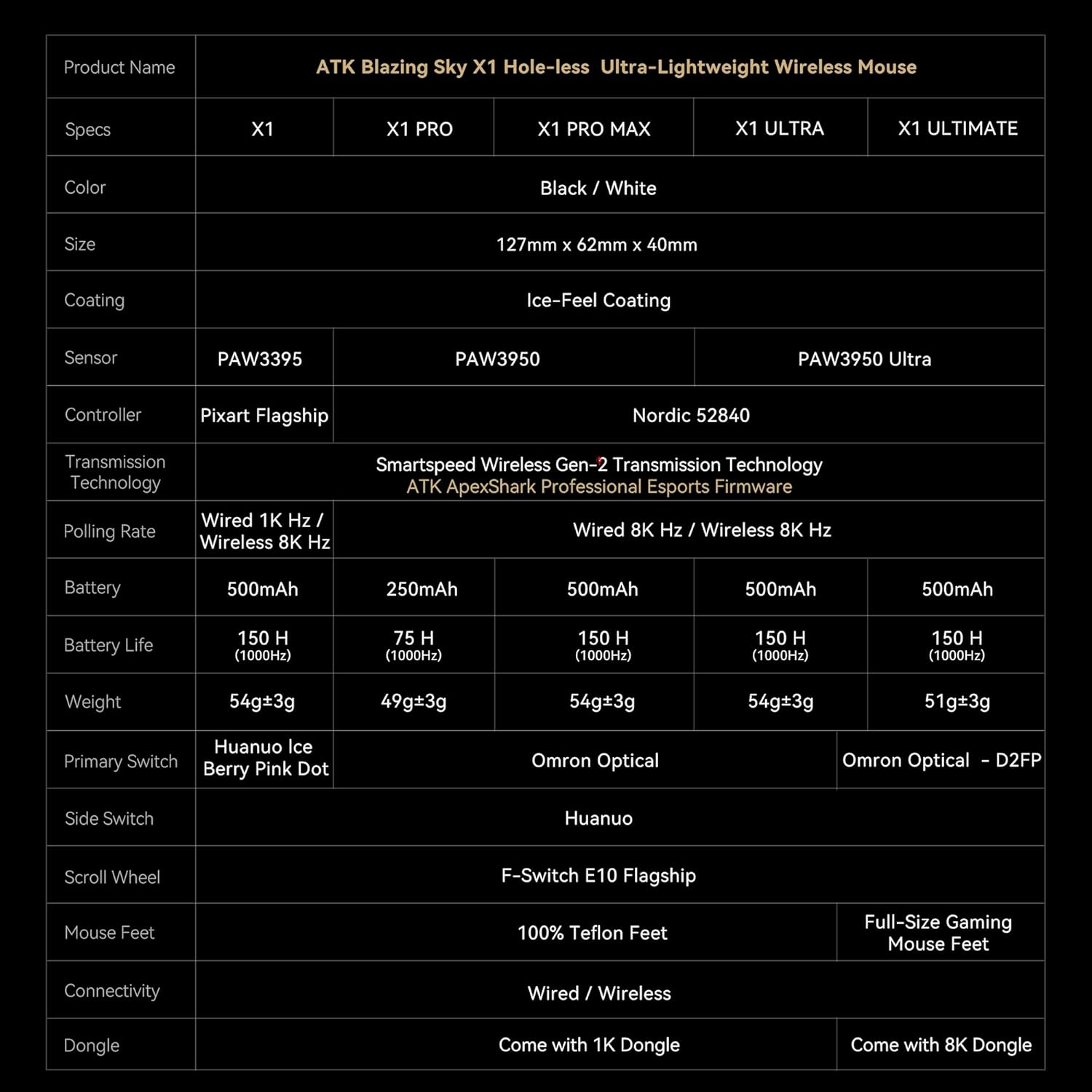
Figure 5: ATK Blazing Sky X1 Series Specification Table.
8. Gwarancja i pomoc techniczna
For detailed warranty information, product registration, and technical support, please visit the official ATK website or contact ATK customer service. Keep your proof of purchase for warranty claims.
- Wsparcie online: Odwiedź Sklep ATK na Amazonie Aby uzyskać odpowiedzi na często zadawane pytania i informacje o produktach.
- Kontakt: Refer to your product packaging or the ATK website for direct customer service contact details.