
Bikevee SF20250929B0FN818NDK
Bikevee GPS Bike Computer Wireless Instruction Manual
Model: SF20250929B0FN818NDK
1. Wprowadzenie
This manual provides detailed instructions for the Bikevee GPS Bike Computer. This device is designed to track various cycling data, including speed, distance, time, and altitude, with features like auto start/stop, auto backlight, and IPX7 waterproofing. Please read this manual thoroughly before using the product to ensure proper operation and maintenance.
2. Co jest zawarte
Sprawdź, czy w pakiecie znajdują się wszystkie komponenty:
- Bike Computer (Main Unit)
- Kabel ładujący (USB-C)
- Out Front Extended Mount
- Śruba z łbem sześciokątnym
- Klucz sześciokątny
- Gąbka
- Instrukcja obsługi

Image: All components included in the Bikevee GPS Bike Computer package.
3. Konfiguracja i instalacja
3.1 Montaż komputera rowerowego
The Bikevee GPS Bike Computer uses a wireless design for easy installation. Follow these steps to mount the device:
- Attach the Out Front Extended Mount to your bicycle's handlebar. Use the provided Hexagon Socket Screw and Hexagon Wrench to secure it firmly.
- Slide the Bike Computer onto the mount until it clicks securely into place.

Image: Simple installation of the wireless GPS bike computer on the handlebar mount.
3.2 Początkowe włączenie zasilania i nawiązanie połączenia GPS
After mounting, press the power button to turn on the device. The computer will automatically search for GPS signals. It utilizes a 5-satellite system (GPS, BDS, Glonass, Galileo, QZSS) for accurate and stable positioning. The initial connection time may be longer, but subsequent connections will be faster.

Image: The bike computer's 5-satellite positioning system for enhanced accuracy.
3.3 Ustawienia językowe
The device supports 9 languages. Refer to the user manual for specific instructions on how to navigate to the language settings and select your preferred language.

Image: The bike computer displaying data in multiple languages.
4. Instrukcja obsługi
4.1 Display Pages and Data Types
The Bikevee GPS Bike Computer features a 2.4" LCD screen that displays various cycling data across 6 functional pages. You can cycle through these pages using the device's buttons. The data types include:
- Wysokość GPS
- Zegar
- Speed (MPH and KM/H)
- Czas podróży
- Dystans podróży
- Całkowity czas
- Całkowity dystans
- Średnia prędkość
- Maksymalna prędkość
- Stan podświetlenia

Obraz: Byłyamples of the 6 functional data display pages.
4.2 Auto Start/Stop Function
The device automatically starts recording data when you begin cycling and pauses when you stop, conserving battery life and ensuring accurate trip data.
4.3 Automatyczne podświetlenie
To turn the backlight on or off, press both the left and right buttons simultaneously. Once activated, the backlight remains on throughout your ride. You can turn off the backlight during the day to save battery power, or keep it on for clear visibility at night.
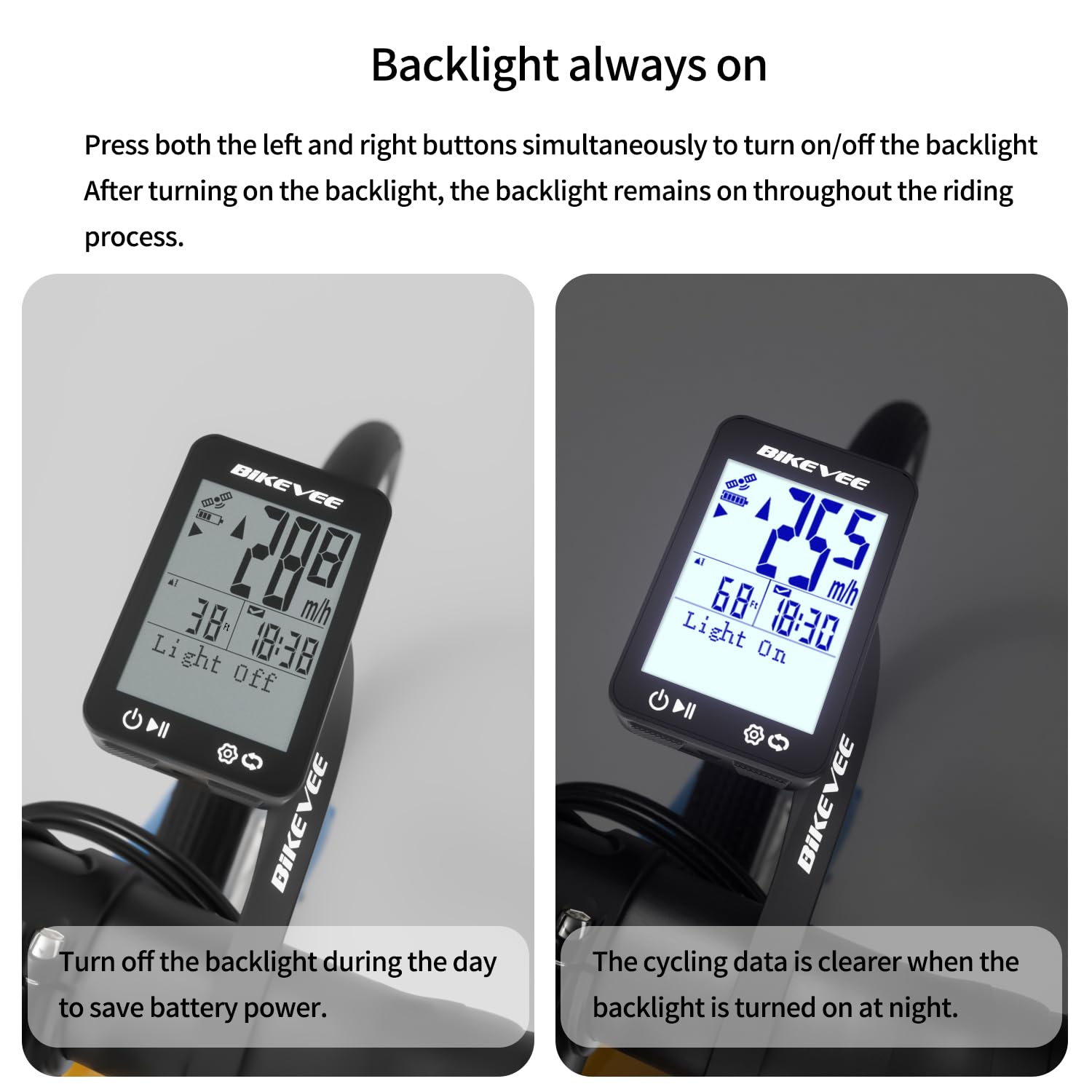
Image: Backlight functionality, showing display with backlight off and on.
5. Konserwacja i pielęgnacja
5.1 Czyszczenie
Przetrzyj urządzenie miękką, damp ściereczką. Nie używaj środków czyszczących ani rozpuszczalników o działaniu ściernym, ponieważ mogą one uszkodzić ekran lubasing.
5.2 Wodoodporność
The Bikevee GPS Bike Computer has an IPX7 waterproof rating, meaning it can withstand immersion in water up to 1 meter for 30 minutes. This protects it from rain and splashes during your rides. However, avoid prolonged submersion or high-pressure water jets.
5.3 Ładowanie akumulatora
The device is equipped with a 650mAh Lithium Ion battery, providing up to 28 hours of continuous use. Charge the device using the provided USB-C charging cable when the battery indicator is low.
6. Rozwiązywanie Problemów
If you encounter issues with your Bikevee GPS Bike Computer, consider the following:
- Urządzenie się nie włącza: Ensure the battery is charged. Connect the device to the charging cable and allow it to charge for at least 30 minutes before attempting to power it on again.
- Nie odebrano sygnału GPS: Upewnij się, że znajdujesz się na otwartej przestrzeni z czystym powietrzem. view of the sky. Initial GPS acquisition can take longer. If indoors or under heavy tree cover, signal acquisition may be difficult.
- Niedokładne dane: Ensure the device is securely mounted and has a clear GPS signal. Verify that the correct units (MPH/KM/H) are selected in the settings.
- Ekran nie jest widoczny: Check the backlight setting. If the backlight is off, press both left and right buttons simultaneously to activate it.
Aby uzyskać dalszą pomoc, zapoznaj się z danymi kontaktowymi podanymi w części Gwarancja i wsparcie.
7. Specyfikacje
| Funkcja | Specyfikacja |
|---|---|
| Marka | Rowerzysta |
| Numer modelu | SF20250929B0FN818NDK |
| Kolor | Czarny |
| Wymiary produktu | 45L x 16W x 70H Millimeters |
| Waga przedmiotu | 50 gram |
| Rozmiar ekranu | 2.4 cali |
| Typ wyświetlacza | LCD |
| Żywotność baterii | 28 godzin |
| Skład ogniw baterii | Litowo-jonowy |
| Międzynarodowa Ocena Ochrony | IPX7 |
| Typ montażu | Uchwyt na kierownicę |
| Wejście interfejsu ludzkiego | Pikolak |
| Kraj pochodzenia | Chiny |

Image: Summary of key product features and specifications.
8. Gwarancja i wsparcie
8.1 Zapewnienie jakości
Bikevee is committed to providing dependable products. This GPS Bike Computer is designed for lasting satisfaction.
8.2 Obsługa klienta
For any questions, technical support, or warranty claims, please contact Bikevee customer service through the retailer where you purchased the product or visit the official Bikevee webwitryna do informacji kontaktowych.
Ask a question about this manual
Ask about setup, troubleshooting, compatibility, parts, safety, or missing instructions. Manuals+ will review the question and use this page’s manual context to help answer it.