
1. Wprowadzenie
This manual provides detailed instructions for the setup, operation, and maintenance of your POLONO PM220S Label Maker Machine. Please read this manual thoroughly before using the device to ensure proper function and longevity.
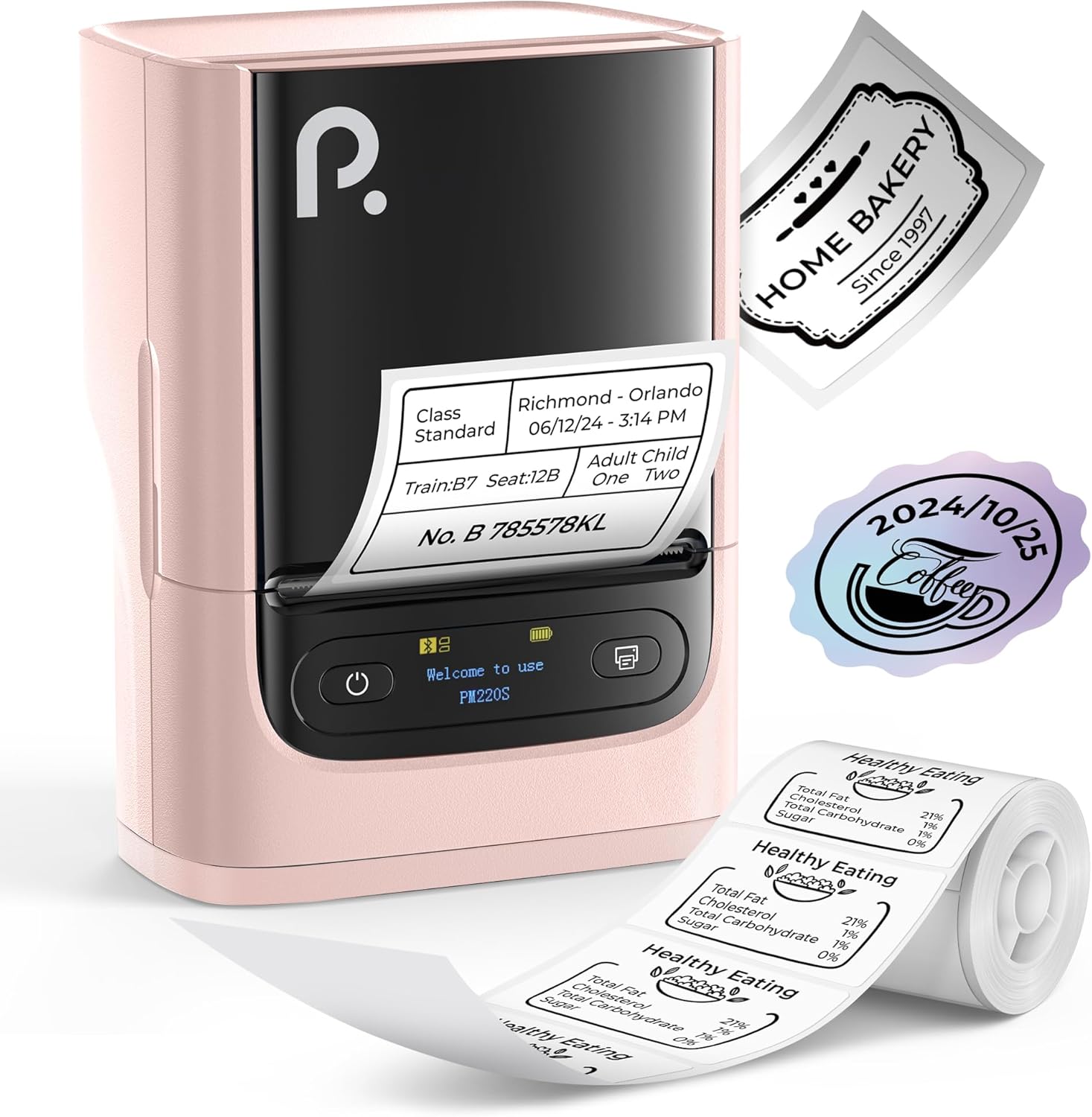
Figure 1: POLONO PM220S Label Maker Machine with sampetykiety.
2. Koniec produktuview
2.1 Zawarte komponenty
- POLONO PM220S Label Maker Machine
- Label Tape (50x30mm, pre-installed or included)
- Kabel ładujący USB
- Instrukcja obsługi (ten dokument)
2.2 Główne cechy
- Łączność Bluetooth: Seamless connection with iOS, Android, and PC devices.
- Intuitive LED Screen: Displays battery level, Bluetooth connection status, and alerts for paper shortages or timed shutdowns.
- Feature-Rich "Labelnize" App: Offers label templates, supports QR codes, barcodes, tables, text, icons, 90+ fonts, 14+ languages, and 450+ material presets.
- Premium Thermal Printing: BPA-Free Direct Thermal Technology with 203 DPI for high-definition, inkless printing.
- Kompatybilność z szeroką gamą etykiet: Supports label widths from 23-54mm (0.91"-2.12").
- Przenośna konstrukcja: Compact and lightweight for easy transport and use in various environments.
3. Instrukcje konfiguracji
3.1 Ładowanie urządzenia
Before first use, fully charge the label maker using the provided USB cable. The LED screen will indicate charging status.
3.2 App Installation and Driver Download
For mobile devices (iOS/Android), download the "Labelnize" app from your respective app store. For PC users, visit polono.pl to download the necessary driver and application.

Figure 2: Universal compatibility with smartphones and laptops for app and driver installation.
3.3 Łączenie przez Bluetooth
- Ensure the PM220S is powered on.
- On your mobile device, open the "Labelnize" app.
- Within the app, search for and connect to the PM220S via Bluetooth. Do not connect directly via your device's Bluetooth settings for mobile devices.
- For PC, ensure the driver is installed, then connect through the downloaded application.
3.4 Ładowanie taśmy etykietowej
- Otwórz pokrywę komory na etykiety.
- Włóż rolkę z etykietami stroną do zadrukowania skierowaną do góry.
- Adjust the paper slot guides to secure the tape according to its width (23-54mm) for precise alignment.
- Zamknij pokrywę.

Figure 3: Proper loading of label tape into the PM220S.
4. Instrukcja obsługi
4.1 Using the "Labelnize" App
- Open the "Labelnize" app on your connected device.
- Select from various pre-designed templates or create your own custom labels.
- The app allows you to add text, barcodes, QR codes, tables, icons, and more.
- Customize labels using a selection of over 90 fonts and 14 languages.
- Utilize the 450+ material presets for different label applications.
- Ważny: For optimal results, use specialized POLONO labels. Avoid tearing the green back sticker to prevent printing issues.
4.2 Understanding the LED Screen Display
The integrated LED screen provides real-time feedback on the printer's status:
- Poziom naładowania baterii: Indicates the current charge of the device.
- Połączenie Bluetooth: Shows if the device is successfully connected via Bluetooth.
- Papier krótkitage Powiadomienie: Notifies when the label roll is low or empty.
- Wyłączenie czasowe: Displays countdown for automatic power-off to conserve battery.

Figure 4: LED screen display functions for real-time status monitoring.
4.3 Drukowanie etykiety
- Design your label within the "Labelnize" app.
- Review etykieta przedview aby zapewnić dokładność.
- Kliknij przycisk „Drukuj” w aplikacji.
- The label maker will print the label using thermal technology.
- Carefully tear off the printed label.
5. Konserwacja
5.1 Ogólna opieka
- Utrzymuj urządzenie w czystości i wolne od kurzu i zanieczyszczeń.
- Unikaj wystawiania urządzenia na działanie ekstremalnych temperatur lub bezpośredniego światła słonecznego.
- Przechowuj urządzenie w suchym miejscu, gdy nie jest używane.
5.2 Czyszczenie głowicy drukującej
If print quality degrades, the thermal print head may need cleaning:
- Turn off the label maker and disconnect it from any power source.
- Otwórz komorę na etykiety.
- Gently wipe the thermal print head with a cotton swab lightly dampnasączone alkoholem izopropylowym.
- Przed zamknięciem pokrywy i wznowieniem użytkowania należy odczekać, aż głowica drukująca całkowicie wyschnie.
6. Rozwiązywanie Problemów
| Problem | Możliwa przyczyna | Rozwiązanie |
|---|---|---|
| Urządzenie nie włącza się | Niski poziom baterii lub problem z zasilaniem. | Charge the device fully. Ensure the power button is pressed correctly. |
| Nie można połączyć się przez Bluetooth | Incorrect connection method or app issue. | Ensure you are connecting through the "Labelnize" app, not directly via phone settings. Restart both the device and the app. For PC, verify driver installation. |
| Poor print quality / Faint printing | Dirty print head, incorrect label type, or low battery. | Clean the print head (see Section 5.2). Ensure you are using thermal labels. Charge the device. |
| Etykiety są nieprawidłowo wyrównane lub zacięte | Improper label loading or paper slot adjustment. | Open the cover, remove any jammed labels, and reload the tape ensuring the paper slot guides are adjusted correctly for the label width. Avoid tearing the green back sticker. |
| "Paper Shortage" alert | Label roll is empty or incorrectly loaded. | Replace the label roll or re-seat it correctly. |
7. Specyfikacje
| Marka | POLONO |
| Nazwa modelu | PM220S |
| Technologia łączności | Bluetooth |
| Technologia druku | Termiczny |
| Maksymalna rozdzielczość druku | 203 DPI |
| Maksymalna prędkość drukowania (monochromatyczna) | 45.0 mm/s |
| Obsługiwane rozmiary nośników | 23-54mm (0.91"-2.12") width, 50x30mm included |
| Wymiary produktu | 3.3" gł. x 4.4" szer. x 2.5" wys. (8.4 x 11.2 x 6.4 cm) |
| Waga przedmiotu | 13.4 uncji (380 g) |
| Funkcja specjalna | Portable, Inkless Printing, LED Display |
8. Gwarancja i wsparcie
For warranty information, technical support, or to purchase accessories and replacement labels, please visit the official POLONO webmiejsce na polono.pl or contact POLONO customer service directly.
Proszę zachować dowód zakupu na potrzeby roszczeń gwarancyjnych.