
1. Wprowadzenie
Welcome to your new Baseus BC1 Open Ear Earbuds. This manual provides detailed instructions for setup, operation, and maintenance to ensure you get the best experience from your device. The Baseus BC1 earbuds feature a comfortable open-ear design, secure tri-curve clip, rich sound with powerful bass, clear calls with 4-mic AI noise reduction, IP55 water resistance, and precise button control.
2. Zawartość opakowania
Sprawdź zawartość paczki, aby upewnić się, że znajdują się w niej wszystkie elementy:
- Baseus BC1 Open Ear Earbuds (Left & Right)
- Etui ładujące
- Instrukcja obsługi
- Kabel ładujący typu C.

3. Koniec produktuview
The Baseus BC1 Open Ear Earbuds are designed for comfort and high-quality audio, allowing you to stay aware of your surroundings. The compact charging case provides extended battery life and convenient storage.

4. Konfiguracja
4.1. Ładowanie
Przed pierwszym użyciem należy w pełni naładować słuchawki i etui ładujące.
- Podłącz dołączony kabel ładujący typu C do portu ładowania w obudowie i źródła zasilania.
- Pełne naładowanie etui zajmuje około 1.5 godziny.
- The earbuds offer up to 7.5 hours of listening on a single charge, and up to 38 hours total with the fully charged case.

4.2. Włączanie/wyłączanie zasilania
- Włączanie: Otwórz etui z funkcją ładowania, a słuchawki włączą się automatycznie.
- Wyłączone: Umieść słuchawki z powrotem w etui ładującym i zamknij pokrywę. Słuchawki wyłączą się automatycznie.
4.3. Parowanie Bluetooth
- Otwórz etui ładujące. Słuchawki automatycznie przejdą w tryb parowania, co zasygnalizuje migająca dioda LED.
- Na swoim urządzeniu (smartfonie, tablecie itp.) przejdź do ustawień Bluetooth i włącz Bluetooth.
- Szukaj "Baseus BC1" in the list of available devices and select it to connect.
- Once connected, you will hear a confirmation tone, and the LED indicator on the earbuds will turn off.
4.4. Noszenie słuchawek dousznych
For optimal comfort and sound quality, follow these steps to wear your earbuds:
- Gently clip each earbud onto your ear, ensuring the main body rests comfortably behind your earlobe.
- Adjust the earbud to find the most comfortable and secure position. The tri-curve ergonomic clip is designed to adapt to various ear shapes.
- Ensure the sound outlet is aligned with your ear canal to experience the best sound quality.


5. Instrukcja obsługi
5.1. Sterowanie przyciskami
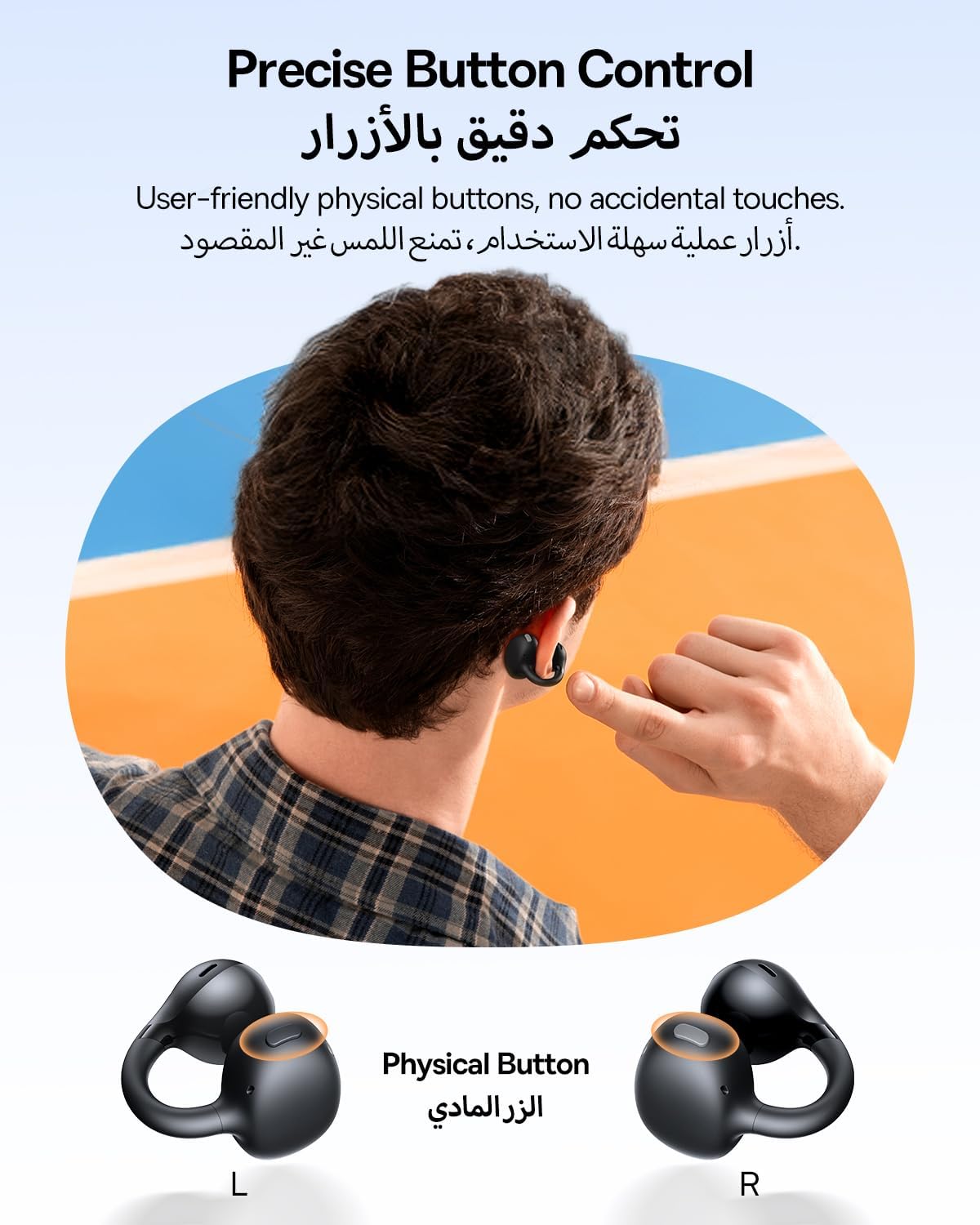
The Baseus BC1 earbuds feature physical buttons for precise control, minimizing accidental touches. The functions are as follows:
- Odtwórz/Pauza: Naciśnij raz przycisk na dowolnej słuchawce.
- Zwiększenie głośności: Naciśnij raz przycisk na prawej słuchawce.
- Ściszanie: Single press the button on the left earbud.
- Następny utwór: Long press the button on the right earbud for 1.5 seconds.
- Poprzedni utwór: Long press the button on the left earbud for 1.5 seconds.
- Odbieranie/kończenie połączeń: Double press the button on either earbud.
- Odrzuć połączenie: Long press the button on either earbud for 1.5 seconds during an incoming call.
- Asystent głosowy: Naciśnij trzykrotnie przycisk na prawej słuchawce.
- Cycle Modes (Game/Movie/Normal): Naciśnij trzykrotnie przycisk na lewej słuchawce.
5.2. Personalizacja aplikacji
Download the official Baseus app from your device's app store to unlock advanced features and personalize your listening experience:
- Konfigurowalny korektor: Adjust the equalizer settings to fine-tune the audio to your preference.
- Dźwięk Profiles: Wybierz spośród różnych predefiniowanych ustawień dźwiękufiles for different music genres or listening scenarios.
- Touch Control Personalization: Reassign touch control functions to suit your needs.

5.3. Połączenie wielopunktowe
The Baseus BC1 earbuds support simultaneous connection to two devices, allowing seamless switching between them:
- Sparuj słuchawki z pierwszym urządzeniem (np. smartfonem).
- Disconnect the earbuds from the first device's Bluetooth settings. The earbuds will re-enter pairing mode.
- Pair the earbuds with your second device (e.g., tablet or laptop).
- Manually reconnect the earbuds to the first device from its Bluetooth settings.
- The earbuds will now be connected to both devices simultaneously, allowing you to switch audio sources without re-pairing.

6. Konserwacja
6.1. Czyszczenie
To ensure optimal performance and longevity of your earbuds:
- Regularly clean the earbuds and the charging contacts inside the case using a clean, dry cotton swab.
- W razie potrzeby lekkoampen the cotton swab with alcohol for disinfection.
- Avoid issues such as the earbuds being unable to charge or power on due to prolonged lack of cleaning.
6.2. Przechowywanie
- Gdy nie używasz słuchawek, zawsze przechowuj je w etui ładującym, aby chronić je przed kurzem i uszkodzeniami.
- If the earbuds will not be used for an extended period, charge the case at least once every three months to maintain battery health.
7. Rozwiązywanie Problemów
If you encounter any issues with your Baseus BC1 earbuds, please refer to the following common problems and solutions:
- Słuchawki nie łączą się: Ensure Bluetooth is enabled on your device and the earbuds are in pairing mode. Try forgetting previous pairings on your device and re-pairing.
- Działa tylko jedna słuchawka: Place both earbuds back in the charging case, close the lid for 10 seconds, then open it again. If the issue persists, perform a factory reset.
- Słaba jakość dźwięku: Ensure the earbuds are worn correctly and the sound outlet is aligned with your ear canal. Check the EQ settings in the Baseus app.
- Słuchawki się nie ładują: Clean the charging contacts on both the earbuds and the case. Ensure the charging cable is properly connected to a working power source.
7.1. Przywracanie ustawień fabrycznych
If the earbuds are not functioning correctly, a factory reset may resolve the issue:
- Remove the pairing information of the earbuds from your device's Bluetooth settings (e.g., "Forget This Device").
- Place both earbuds into the charging case, ensuring they are securely in place.
- Close the charging case for 3 seconds, then reopen it.
- With the charging case open, long press the button on the charging case for 10 seconds until the indicator light flashes white twice. This indicates that the reset is complete.
- After the factory reset, use the initial Bluetooth pairing method (Section 4.3) to reconnect and resume normal use.
8. Specyfikacje
| Funkcja | Szczegół |
|---|---|
| Nazwa modelu | BC1 |
| Numer modelu przedmiotu | PM153 |
| Marka | Baza |
| Kolor | Czarny |
| Umieszczenie ucha | Otwarte ucho |
| Współczynnik kształtu słuchawek | Otwarte ucho |
| Technologia łączności | Bezprzewodowy |
| Technologia komunikacji bezprzewodowej | Bluetooth |
| Impedancja | 16 omy |
| Kontrola hałasu | Nic |
| Gniazdo słuchawkowe | Bez Jacka |
| Metoda kontroli | Naciśnij przycisk |
| Poziom wodoodporności | Wodoodporność (IP55) |
| Czas ładowania | 1.5 godziny |
| Waga przedmiotu | 111 gramów |
| Wymiary opakowania | Wymiary 13.4 x 8.5 x 4.2 cm |
| Zawarte komponenty | Instrukcja obsługi |
| Tworzywo | Plastikowy |
| Kompatybilne urządzenia | Phones, tablets, desktop computers, laptops, mobile phones, smart speakers, TVs, digital video game players |
9. Informacje dotyczące bezpieczeństwa
- Avoid prolonged listening at high volume levels to prevent potential hearing damage.
- Nie należy używać słuchawek dousznych w sytuacjach, w których niemożność usłyszenia dźwięków otoczenia mogłaby być niebezpieczna (np. podczas prowadzenia samochodu, jazdy na rowerze, chodzenia w ruchu ulicznym).
- Trzymaj słuchawki douszne i etui ładujące z dala od ekstremalnych temperatur, bezpośredniego światła słonecznego i wilgoci.
- Do not attempt to disassemble, repair, or modify the product. This may void the warranty and cause damage.
- Keep out of reach of children and pets to prevent accidental ingestion or misuse.
- Produkt i baterię należy utylizować zgodnie z lokalnymi przepisami.
10. Gwarancja i pomoc techniczna
Aby uzyskać informacje dotyczące gwarancji, pomocy technicznej lub zadać pytania dotyczące produktu, zapoznaj się z oficjalną stroną firmy Baseus webodwiedź witrynę lub skontaktuj się z lokalnym dystrybutorem.
You can also visit the official Baseus Store for more information: Sklep Baseus


