
1. Wprowadzenie
This manual provides comprehensive instructions for the safe and effective use of your KKnoon E24848 Electric Wood Trimmer Router. This versatile power tool is designed for various woodworking tasks, including trimming, grooving, carving, and drilling in wood and other materials. Please read this manual thoroughly before operation and retain it for future reference.
2. Instrukcje bezpieczeństwa
Zawsze przestrzegaj podstawowych środków ostrożności, aby zmniejszyć ryzyko pożaru, porażenia prądem i obrażeń ciała.
- Bezpieczeństwo w miejscu pracy: Utrzymuj swoje miejsce pracy w czystości i dobrym oświetleniu. Zagracone lub ciemne pomieszczenia sprzyjają wypadkom. Nie używaj elektronarzędzi w atmosferach wybuchowych, takich jak łatwopalne ciecze, gazy lub pyły.
- Bezpieczeństwo elektryczne: Wtyczki elektronarzędzi muszą pasować do gniazdka. Nigdy nie modyfikuj wtyczki w żaden sposób. Unikaj kontaktu ciała z powierzchniami uziemionymi. Nie wystawiaj elektronarzędzi na działanie deszczu ani wilgoci.
- Bezpieczeństwo osobiste: Always wear eye protection, dust mask, non-skid safety shoes, hard hat, or hearing protection as appropriate. Do not overreach. Keep proper footing and balance at all times. Dress properly; avoid loose clothing or jewelry.
- Używanie i konserwacja narzędzia: Nie używaj elektronarzędzia na siłę. Używaj elektronarzędzia odpowiedniego do danego zastosowania. Odłącz wtyczkę od źródła zasilania przed dokonywaniem jakichkolwiek regulacji, wymianą akcesoriów lub przechowywaniem elektronarzędzia.
- Konserwacja: Utrzymuj elektronarzędzia. Sprawdź, czy nie ma niewspółosiowości lub zakleszczenia ruchomych części, uszkodzeń części i innych stanów, które mogą mieć wpływ na działanie elektronarzędzia.
3. Zawartość opakowania
Sprawdź, czy po rozpakowaniu znajdują się wszystkie elementy:
- Electric Trimmer (with transparent base) x 1
- Router Bit Set (15 pieces) x 1
- Trim Guide Base x 1
- Straight Trim Guide Ruler x 1
- Śruba x 1
- Carbon Brush x 2
- Klucz x 2
- Guide Line x 1
4. Cechy i komponenty produktu
Familiarize yourself with the main parts of your electric trimmer:
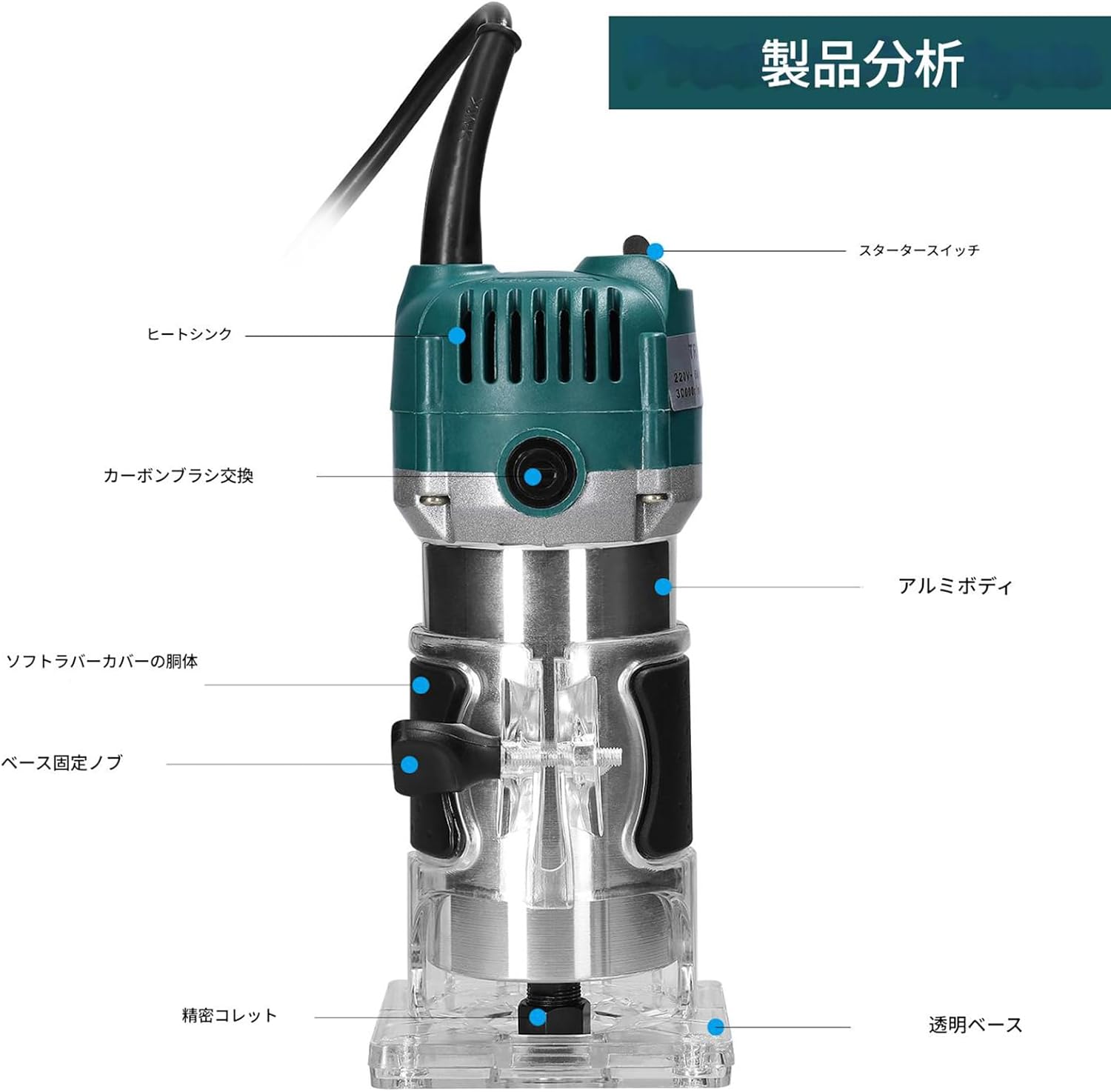
Obraz: Product analysis diagram highlighting key components such as the starter switch, heat sink, carbon brush access, aluminum body, soft rubber cover, base fixing knob, precision collet, and transparent base.
- Trwała konstrukcja: The main body is constructed from aluminum and plastic, with an internal aluminum heat dissipation fan for efficient cooling and extended tool life. The exterior is waterproof, dustproof, and durable.
- Przezroczysta podstawa: Allows for clear observation of the cutting process, ensuring precision and control.
- Tightening Adjustment Knob: Enables precise adjustment of the transparent cover's tightness.
- External Carbon Brush Design: Facilitates easy replacement of carbon brushes, enhancing safety and convenience.
- Rozszerzony przewód zasilający: Provides a wider working range.
- Uchwyt antypoślizgowy: High-quality rubber handle with non-slip pads ensures a comfortable grip and precise control, reducing fatigue during prolonged use.
5. Konfiguracja
Follow these steps to prepare your trimmer for operation:

Obraz: Szczegółowy view of the guide bracket, transparent base, tightening adjustment knob, and the included 15-piece router bit set.
- Montaż frezu:
- Upewnij się, że narzędzie jest odłączone od zasilania.
- Odkręć nakrętkę zaciskową za pomocą dołączonego klucza.
- Insert the desired router bit into the collet, ensuring it is fully seated.
- Mocno dokręć nakrętkę zaciskową za pomocą klucza.
- Regulacja głębokości cięcia:
- Place the trimmer on the workpiece.
- Loosen the base fixing knob.
- Adjust the trimmer body up or down until the router bit reaches the desired cutting depth.
- Tighten the base fixing knob securely.
- Attaching Guide Bases:
- For straight cuts, attach the straight trim guide ruler to the transparent base using the provided screw.
- For curved or edge trimming, attach the trim guide base.
6. Instrukcja obsługi
Zawsze upewnij się, że przedmiot obrabiany jest bezpiecznie zamocowany.amped before starting. Wear appropriate personal protective equipment.

Obraz: The electric trimmer being used in a workshop setting for woodworking tasks.
- Włączanie/wyłączanie: Plug the tool into a suitable power outlet. Use the starter switch to turn the trimmer ON and OFF.
- Rozpoczęcie cięcia: Hold the trimmer firmly with both hands. Allow the motor to reach full speed before contacting the workpiece.
- Dokonywanie cięcia: Guide the trimmer smoothly and steadily along the desired cutting line. Apply consistent pressure. Avoid forcing the tool, as this can lead to poor cut quality and motor strain.
- Types of Operations:
- Lamówka: Use appropriate bits for edge profiling or flush trimming.
- Grooving: Use straight bits and the straight guide ruler for creating grooves.
- Rzeźbienie/Grawerowanie: Select specialized bits for detailed work.
- Wiercenie otworów: For specific applications, use appropriate bits and ensure stable positioning.
- Wykończeniowy: Once the cut is complete, lift the trimmer from the workpiece before turning it off.
7. Konserwacja
Regularna konserwacja zapewnia optymalną wydajność i wydłuża żywotność narzędzia.
- Czyszczenie: After each use, unplug the tool and clean dust and debris from the motor vents and transparent base using a soft brush or compressed air. Do not use solvents or abrasive cleaners.
- Wymiana szczotek węglowych: The carbon brushes are external for easy access. When the motor performance decreases or sparks become excessive, the carbon brushes may need replacement. Unscrew the brush caps, remove the old brushes, and insert new ones. Ensure the new brushes are seated correctly before replacing the caps.
- Konserwacja tulei zaciskowej: Utrzymuj tuleję zaciskową i nakrętkę tulei zaciskowej w czystości i bez zanieczyszczeń, aby zapewnić prawidłowe mocowanie wiertła.
- Składowanie: Przechowuj maszynkę w suchym i bezpiecznym miejscu, poza zasięgiem dzieci.
8. Rozwiązywanie Problemów
W tej sekcji znajdziesz informacje o typowych problemach i ich rozwiązaniach.
| Problem | Możliwa przyczyna | Rozwiązanie |
|---|---|---|
| Silnik nie uruchamia się | Brak zasilania; Wadliwy przełącznik; Zużyte szczotki węglowe | Sprawdź połączenie zasilania; Przetestuj przełącznik; Wymień szczotki węglowe |
| Nadmierne iskrzenie silnika | Zużyte szczotki węglowe; Brudny komutator | Replace carbon brushes; Clean commutator (professional service recommended) |
| Poor cut quality or vibration | Dull or damaged router bit; Loose bit in collet; Incorrect feed rate | Replace bit; Tighten collet nut; Adjust feed rate |
| Przegrzanie | Zablokowana wentylacja; Przeciążenie narzędzia | Clean vents; Reduce load or cutting depth |
Jeśli problemy będą się powtarzać, skontaktuj się z obsługą klienta.
9. Specyfikacje

Obraz: Diagram illustrating the dimensions of the electric trimmer: 206mm (8.11in) height, 90mm (3.54in) width, and 87mm (3.43in) depth.
| Funkcja | Specyfikacja |
|---|---|
| Nazwa produktu | Electric Trimmer Router |
| Numer modelu | E24848 |
| Tworzywo | Plastic + Metal (Aluminum Housing) |
| Pobór mocy | 800 W |
| Prędkość bez obciążenia | 30,000 obr./min |
| Collet Chuck Diameter | 6.35 mm (1/4 cala) |
| Rozmiar ciała | 206 x 87 x 90 mm / 8.11 x 3.43 x 3.54 cala |
| Masa ciała | 1891g / 4.17 lbs (approx. 2 kg) |
| Źródło zasilania | Corded Electric (Single phase 110V, 50/60Hz) |
| Długość przewodu zasilającego | Około. 1.3m |
10. Gwarancja i wsparcie
Aby uzyskać informacje dotyczące gwarancji lub pomocy technicznej, należy skontaktować się z oficjalnym sprzedawcą lub producentem webZachowaj paragon jako dowód zakupu.