
1. Wprowadzenie
This manual provides detailed instructions for the installation, operation, and maintenance of your UNITOPSCI 8 Core 4G+64G Android 15 Car Stereo. Please read this manual thoroughly before using the product to ensure proper function and safety. Keep this manual for future reference.
2. Informacje dotyczące bezpieczeństwa
- Zalecana profesjonalna instalacja: Installation of this car stereo requires technical knowledge and experience. It is highly recommended to have it installed by a qualified professional.
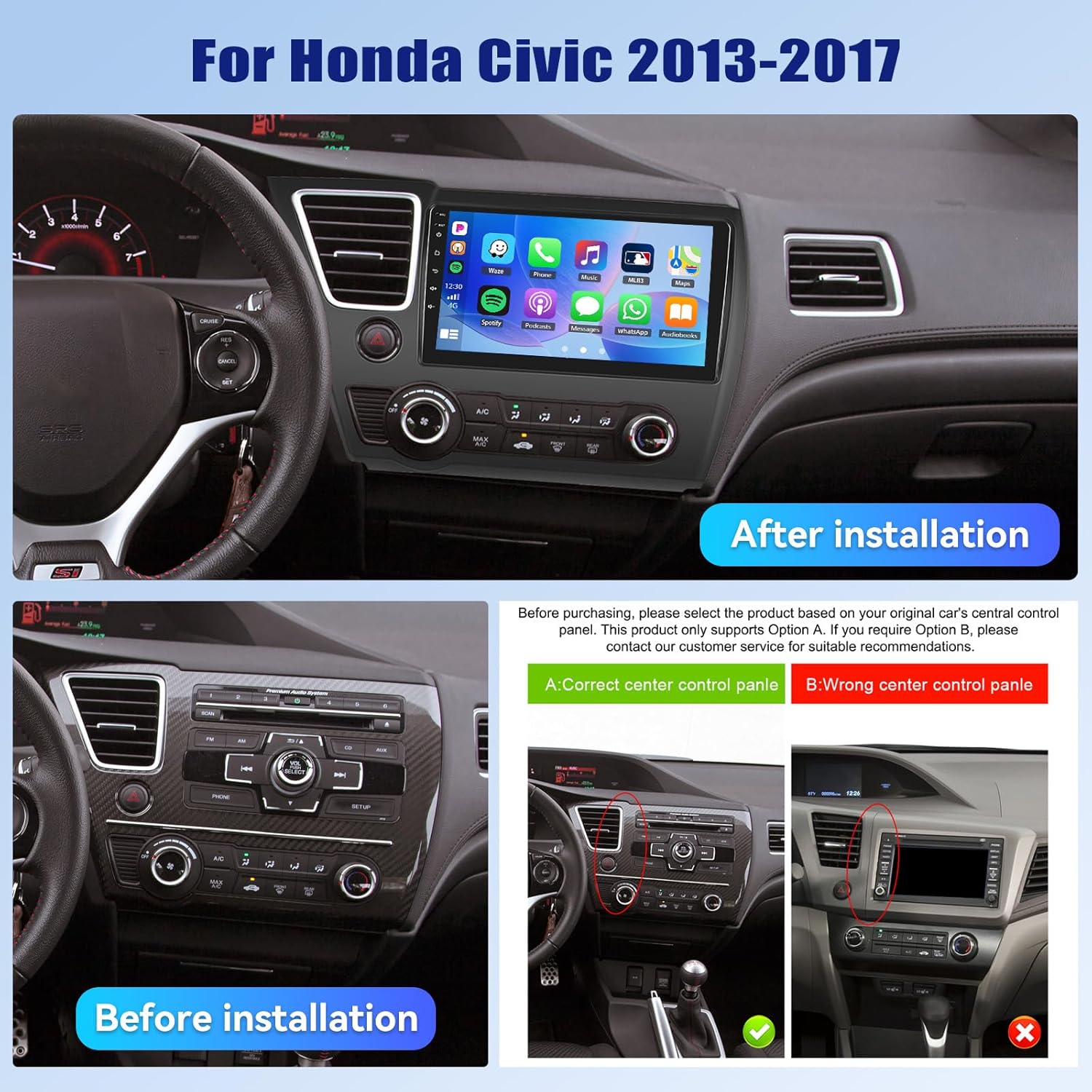
- Zgodność pojazdu: This unit is designed specifically for Honda Civic models from 2013 to 2017. Verify compatibility with your vehicle's center console before installation.
- Zasilanie: Ensure the vehicle's power supply is disconnected before beginning installation to prevent electrical shock or damage.
- Okablowanie: Follow the provided wiring diagram carefully. Incorrect wiring can cause damage to the unit or vehicle.
- Obsługa podczas jazdy: Nie używaj urządzenia w sposób rozpraszający Cię podczas jazdy. Zawsze priorytetem jest bezpieczeństwo na drodze.
- Temperatura: Unikaj wystawiania urządzenia na działanie ekstremalnych temperatur lub bezpośredniego światła słonecznego przez dłuższy czas.
3. Zawartość opakowania
Sprawdź, czy w opakowaniu znajdują się wszystkie elementy:
- 1 x radio samochodowe
- 1 x kabel zasilający
- 1 x tył samochodu View Kamera
- 1 x zestaw narzędzi instalacyjnych
- 1 x antena GPS
- 1 x kabel wejściowy kamery tylnej
- Kabel 1 x RCA
- 2 x kabel USB
- 1 x Instrukcja obsługi
- 1 x Mikrofon
- 1 x Original Car USB & Radio Adapter Cable
- 1 x dekoder Canbus

4. Koniec produktuview
4.1 Główne cechy
- System operacyjny: Android 15
- Edytor: Qualcomm 8-Core Chip
- Pamięć: 4 GB pamięci RAM + 64 GB pamięci ROM
- Wyświetlacz: 9-inch 1280x720P IPS Capacitive Touchscreen
- Łączność: Bluetooth 5.1, Dual-Band WiFi (2.4GHz & 5GHz)
- Integracja ze smartfonem: Wireless/Wired Apple CarPlay, Wireless/Wired Android Auto, Mirror Link
- Audio: Wbudowany DSP (cyfrowy procesor dźwięku)
- Nawigacja: GPS Navigation (supports online and offline maps)
- Radio: Radio FM/RDS
- Obsługa kamery: Kamera cofania AHD (w zestawie)
- Dodatkowe funkcje: Steering Wheel Control (SWC), Built-in Cooling Fan, Picture-in-Picture, Customizable UI.


5. Instrukcja instalacji
5.1 Kontrola przed instalacją
Before proceeding with installation, ensure your Honda Civic's center console matches the compatible design. Refer to the image below for guidance.
5.2 Schemat okablowania
A detailed wiring diagram is typically included with your product. Connect the power cable, speaker wires, GPS antenna, USB cables, rear camera input, and other accessories according to the diagram. Ensure all connections are secure to prevent malfunctions.
5.3 Fizyczna instalacja
- Ostrożnie zdejmij oryginalne radio samochodowe i panele wykończeniowe.
- Connect the new car stereo's wiring harness to the vehicle's existing harness, matching colors and connectors.
- Zainstaluj antenę GPS w miejscu z wolnym dostępem do światła. view nieba.
- Route the rear camera cable and install the camera (if applicable).
- Zamontuj nowe radio samochodowe solidnie w otworze deski rozdzielczej.
- Zamontuj ponownie wszystkie panele wykończeniowe.
- Reconnect the vehicle's power supply.
6. Konfiguracja początkowa
Po pierwszym uruchomieniu system może przeprowadzić Cię przez proces konfiguracji początkowej. Zazwyczaj obejmuje on:
- Wybór języka: Wybierz preferowany język.
- Czas i data: Ustaw prawidłową strefę czasową, datę i godzinę.
- Połączenie WiFi: Connect to a stable Wi-Fi network to enable online features and app downloads.
- Kalibracja GPS: Allow the GPS system to acquire satellite signals for accurate positioning.
7. Instrukcja obsługi
7.1 Dostosowywanie interfejsu użytkownika
The car stereo offers various customization options for its user interface.
- Shaderlab Topics: Adjust the UI color and font color to your preference.
- Projekt okna: Select from different themes (Card, SplitView, Wallpaper) and layouts for easy operation.
- 3D Car Dynamic Effects: Customize the displayed 3D car model, including its color and type (Car, MPV, SUV).


7.2 Bluetooth 5.1
Connect your smartphone via Bluetooth for hands-free calling, music playback, and access to your phone's contacts and call history. Bluetooth 5.1 offers improved range and stability.

Radio 7.3 FM/RDS
Tune into your favorite radio stations. The RDS (Radio Data System) feature provides additional information such as station name, song title, and traffic updates where available.

7.4 Bezprzewodowy CarPlay i Android Auto
Connect your iPhone or Android smartphone wirelessly or via USB to access CarPlay or Android Auto. This allows for hands-free calls, navigation, music streaming, and voice commands (Siri or Google Assistant).

Video 7.1: Wireless CarPlay Radio Operation Guide with Qualcomm Chips. This video demonstrates the setup and usage of the Wireless CarPlay feature on the UNITOPSCI car stereo, highlighting its responsiveness and ease of use.
7.5 Łącze lustrzane
Mirror Link allows you to display your smartphone screen directly onto the car stereo. Android users can also control their phone applications directly from the car's touchscreen.
7.6 Nawigacja GPS
The unit supports both online and offline navigation. Connect to Wi-Fi for real-time traffic updates and precise route guidance. Pre-installed maps or downloadable map applications can be used.

7.7 Przetwarzanie dźwięku DSP
The built-in Digital Sound Processor (DSP) allows for advanced audio tuning. Adjust equalization, sound field modes, and speaker settings to achieve strong bass, soft midrange, and clear treble for a personalized audio experience.

7.8 Ustawienia wentylatora chłodzącego
The integrated cooling fan system helps maintain optimal operating temperature for the radio. You can monitor the temperature and adjust fan settings (e.g., Auto/On) to ensure stable performance.
7.9 Obraz w obrazie (PIP)
The Picture-in-Picture feature allows you to view video content simultaneously while performing other operations, such as navigation or music playback.
7.10 Kamera cofania AHD
The included AHD wide-angle backup camera provides clear night vision and is waterproof. It assists with parking by displaying a real-time view of the area behind your vehicle with parking guidelines. Note: Does not support original car camera.

7.11 Sterowanie z kierownicy (SWC)
Utilize your vehicle's existing steering wheel buttons to control various functions of the car stereo, such as adjusting volume, changing tracks, and answering calls. This enhances convenience and safety while driving.

7.12 Podział ekranu
The split-screen function allows for simultaneous display of two applications, such as navigation and music, for convenient multitasking.
8. Rozwiązywanie Problemów
| Problem | Możliwa przyczyna | Rozwiązanie |
|---|---|---|
| Urządzenie nie włącza się | Nieprawidłowe okablowanie; Przepalony bezpiecznik; Niewystarczające zasilanie. | Check power connections and fuses. Ensure proper voltage. Consult a professional if unsure. |
| Brak dźwięku | Przewody głośnikowe odłączone; Głośność zbyt niska; Funkcja wyciszenia aktywna. | Verify speaker connections. Increase volume. Deactivate mute. Check DSP settings. |
| Bluetooth nie łączy się | Bluetooth wyłączony w telefonie/urządzeniu; Urządzenie nie jest w trybie parowania; Zakłócenia. | Ensure Bluetooth is enabled on both devices. Put unit in pairing mode. Try pairing in a different location. |
| Utracono/niedokładny sygnał GPS | GPS antenna obstructed; Antenna faulty; Software issue. | Relocate GPS antenna to a clear area. Check antenna connection. Update navigation software. |
| Ekran dotykowy nie reaguje | System frozen; Screen calibration needed. | Uruchom ponownie urządzenie. Jeśli problem nadal występuje, przywróć ustawienia fabryczne (patrz menu ustawień). |
| Tylna kamera nie wyświetla obrazu | Camera cable disconnected; Camera faulty; Incorrect settings. | Check camera input cable connection. Verify camera power. Ensure reverse gear signal is connected. |
9. Specyfikacje
- Waga przedmiotu: 4.36 funta
- Wymiary opakowania: 15.35 x 9.65 x 3.35 cala
- Rozmiar wyświetlacza: 9 cali
- Rozmiar ekranu: 9 cali
- System operacyjny: Android
- Pojemność pamięci: 64 GB
- Typ ekranu dotykowego: Pojemnościowy
- Technologia łączności: Bluetooth, WiFi
- Typ mapy: North America, Worldwide
- Tryb wyjścia audio: Stereofoniczny
10. Gwarancja i wsparcie
UNITOPSCI offers the following support for this product:
- Gwarancja: 1-Year Manufacturer's Warranty.
- Gwarancja zwrotu pieniędzy: 30-day money-back service.
- Usługa wymiany: 12-month replacement service.
- Wsparcie posprzedażowe: Dedicated 24/7 professional after-sales team available to assist with installation or usage inquiries.
For online support, please contact: UNITOPSCI@126.com


