
Wstęp
Thank you for choosing the SuperRC M23 Mini RC Drone. This manual provides essential information for the safe operation, setup, maintenance, and troubleshooting of your drone. Please read this manual thoroughly before operating the drone to ensure proper function and to avoid damage or injury. This drone is designed for adult beginners and features a lightweight, portable design with an HD camera and intelligent flight functions.
Co jest w pudełku
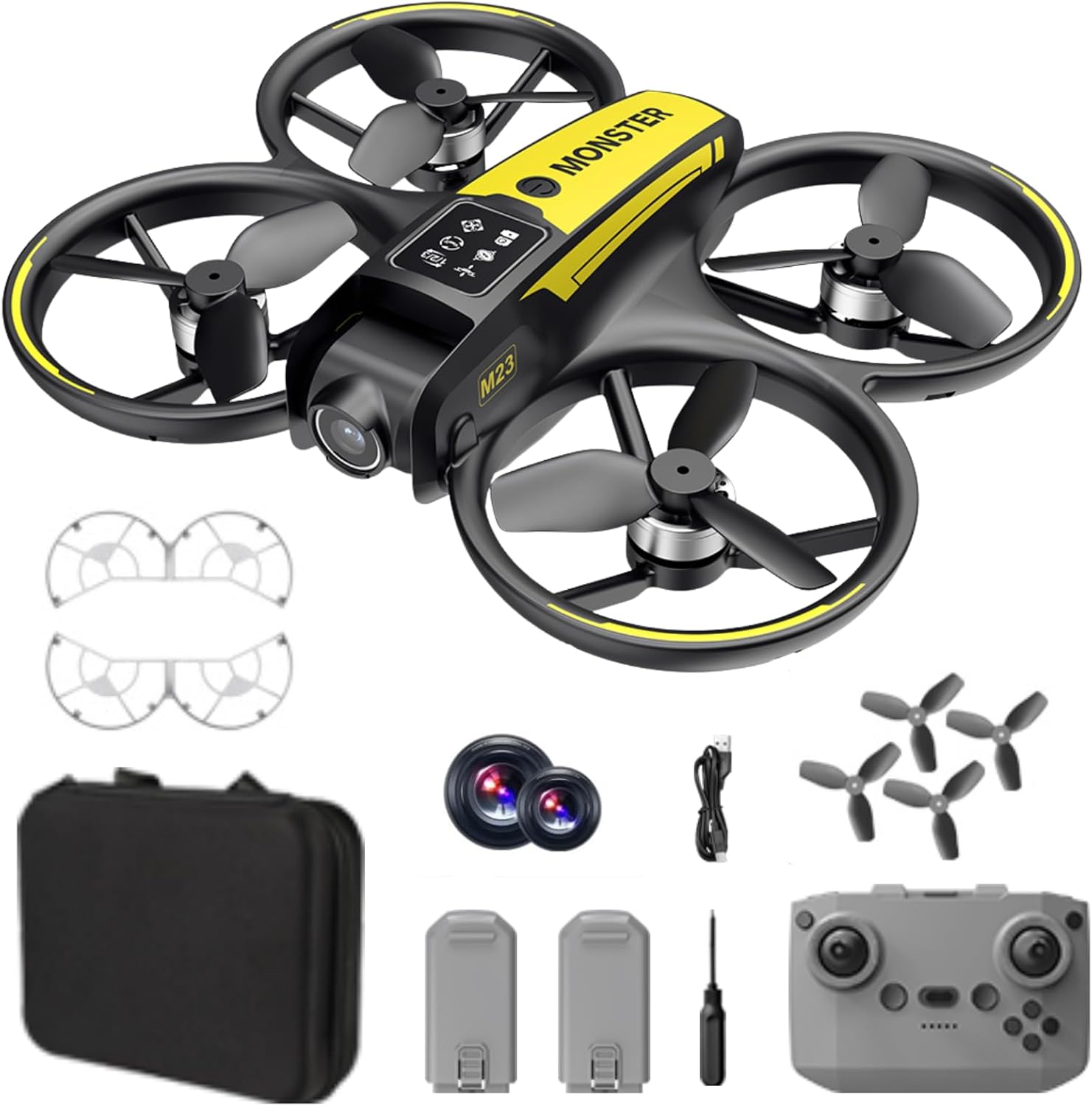
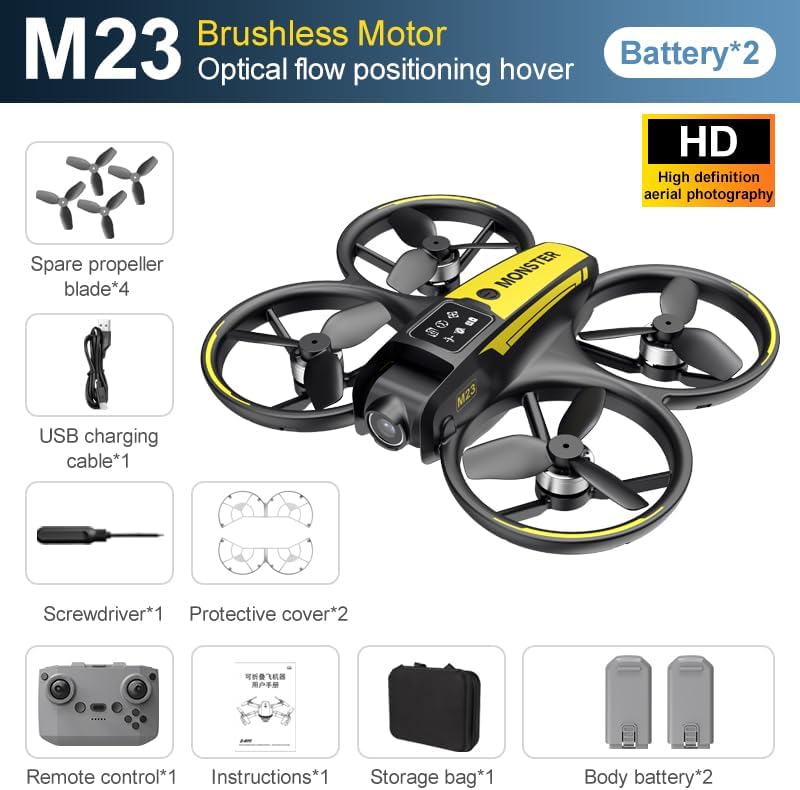
The SuperRC M23 drone package includes the following components:
- Dron M23
- Pilot zdalnego sterowania
- 2 akumulatory 3.7 V 1050 mAh
- 4 x zapasowe śmigła
- 2 x Osłony śmigieł
- Karta pamięci
- Czytnik kart
- Śrubokręt
- Kabel ładujący USB
- Torba do przechowywania
- Instrukcja obsługi (ten dokument)

Produkt ponadview
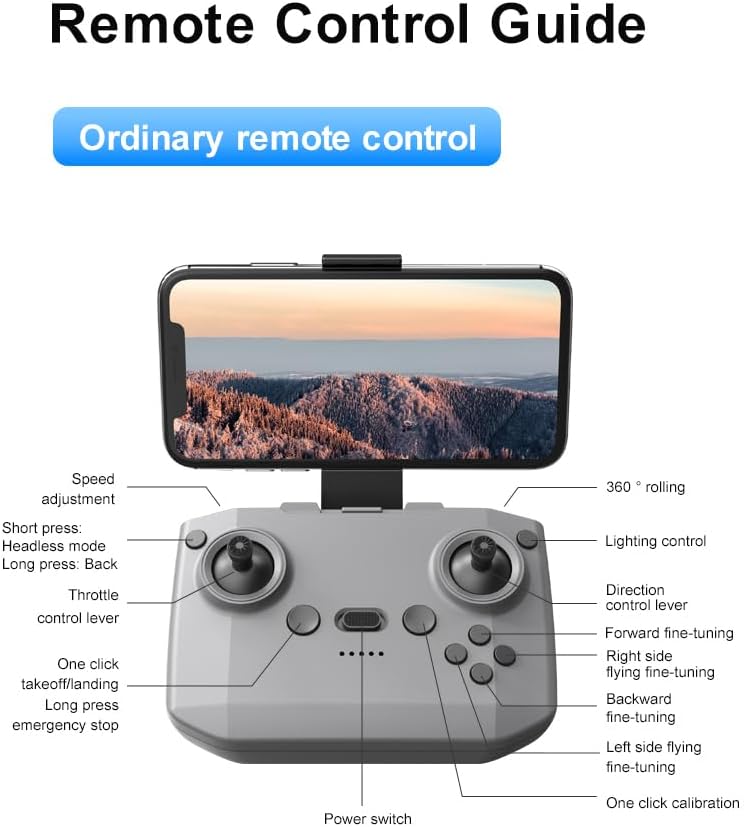
Układ pilota zdalnego sterowania
Familiarize yourself with the remote control buttons and their functions before flight.
Organizować coś
1. Instalacja baterii
- Upewnij się, że dron i pilot są wyłączone.
- Znajdź komorę baterii w dronie.
- Insert a charged 3.7V 1050mAh battery into the compartment until it clicks securely into place.
- For the remote control, open the battery cover and insert the required batteries (not specified in product data, assume standard AA/AAA, user should refer to physical manual for exact type).
2. Montaż śmigła
The drone comes with propellers pre-installed. If replacement is needed:
- Zidentyfikuj oznaczenia „A” i „B” na śmigłach i odpowiadających im ramionach silnika.
- Attach 'A' propellers to 'A' motor shafts and 'B' propellers to 'B' motor shafts. Ensure they are firmly secured.
3. Montaż osłony śmigła
For added safety, attach the propeller guards:
- Align each propeller guard with the designated slots on the drone's motor arms.
- Gently push until they snap into place.
4. Ładowanie
Charge the drone batteries using the provided USB charging cable.
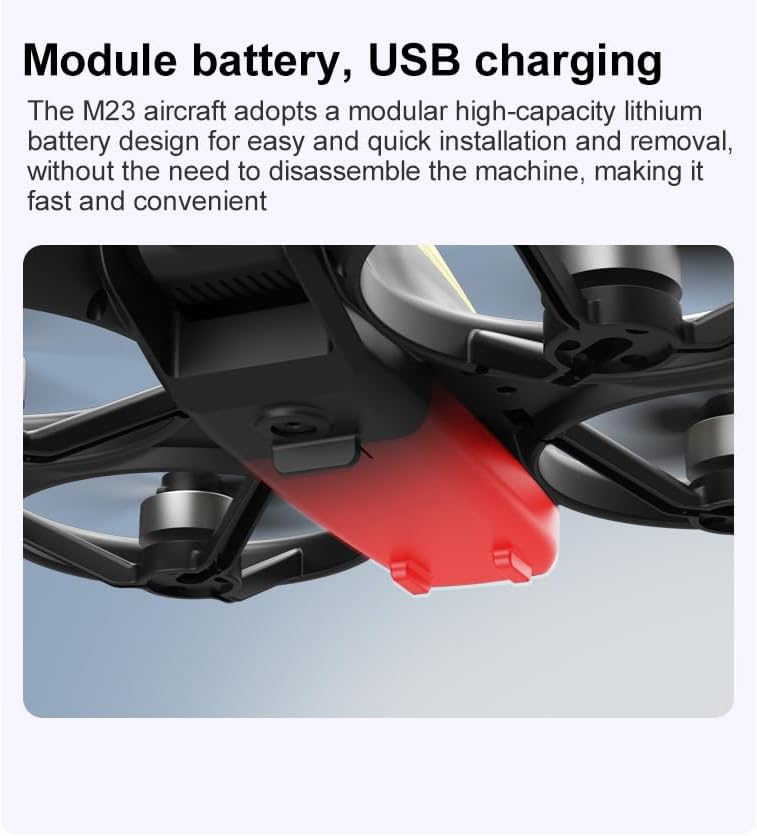
- Podłącz kabel ładujący USB do akumulatora drona.
- Plug the other end into a USB power source (e.g., computer, USB wall adapter).
- The indicator light on the cable will show charging status (refer to physical manual for specific light indications).
- Charging time is approximately 60-90 minutes for a full charge.
Instrukcja obsługi
Lista kontrolna przed lotem
- Sprawdź, czy baterie drona i pilota są w pełni naładowane.
- Śmigła są prawidłowo zamontowane i zabezpieczone.
- Propeller guards are attached (recommended for beginners).
- Wybierz otwartą, wolną od przeszkód, ludzi i zwierząt przestrzeń.
- Przed lotem dronami sprawdź lokalne przepisy.
Podstawowe operacje lotnicze
The following video demonstrates key flight features including one-key takeoff, optical flow positioning, 360-degree roll, and speed switching.
Start i lądowanie jednym klawiszem
- Startować: Place the drone on a flat surface. Press the One-Key Takeoff button on the remote control. The drone will automatically ascend and hover at a stable altitude.
- Lądowanie: Press the One-Key Landing button. The drone will slowly descend and land automatically.
Tryby i funkcje lotu
- Tryb bezgłowy: Press the Headless Mode button. In this mode, the drone's orientation is relative to the pilot, making it easier to control without worrying about the drone's front direction.
- Regulacja prędkości: Use the speed adjustment button (or switch) on the remote control to cycle through low, medium, and high speeds. This allows for adaptable flight control based on skill level and environment.
- Rolka 360°: Press the 360° Roll button and then move the right joystick in any direction to perform an aerial flip. Ensure sufficient altitude before attempting.
- Pozycjonowanie przepływu optycznego: The drone utilizes a bottom camera for optical flow positioning, which helps maintain stable hovering, especially indoors or in areas with good ground texture. This feature assists in precise altitude hold.
- Trajektoria lotu: Through the mobile application, you can draw a desired flight path on your screen. The drone will then follow this trajectory automatically.

Obsługa kamery
The M23 drone is equipped with an HD camera with a 90-degree adjustable lens for capturing photos and videos.

- Nagrywanie zdjęć/wideo: Use the dedicated buttons on the remote control or the mobile app to start/stop video recording or take photos.
- Transmisja obrazu w czasie rzeczywistym: Podłącz swój smartfon do sieci Wi-Fi drona, aby view foo w czasie rzeczywistymtage from the drone's camera on your device.
Konserwacja
Czyszczenie
- Regularly clean the drone body with a soft, dry cloth.
- Ensure propellers are free from dust, dirt, or debris.
- Clean the camera lens gently with a microfiber cloth to maintain image quality.
Składowanie
- Store the drone and its components in the provided storage bag to protect them from dust and physical damage.
- Keep the drone in a cool, dry place, away from direct sunlight and extreme temperatures.
Pielęgnacja baterii
- Nie należy przeładowywać ani nadmiernie rozładowywać baterii.
- Jeśli akumulatory będą przechowywane przez dłuższy okres, należy je naładować do około 50–60% ich pojemności.
- Avoid exposing batteries to high temperatures or direct sunlight.
Rozwiązywanie problemów
If you encounter issues with your SuperRC M23 drone, refer to the following common problems and solutions:
| Problem | Możliwa przyczyna | Rozwiązanie |
|---|---|---|
| Dron nie reaguje na zdalne sterowanie | Low battery on drone or remote; Not paired correctly; Interference | Charge batteries; Re-pair drone and remote (refer to physical manual for pairing steps); Move to an area with less interference |
| Dron dryfuje podczas lotu | Nie skalibrowano; Zakłócenia wiatru; Uszkodzone śmigło | Perform calibration (refer to physical manual); Fly in calm conditions; Replace damaged propellers |
| Słaba jakość obrazu z aparatu | Dirty lens; Low light conditions; Wi-Fi interference | Clean camera lens; Fly in well-lit areas; Ensure strong Wi-Fi connection |
| Krótki czas lotu | Akumulator nie jest w pełni naładowany; Stary akumulator; Agresywne latanie | Ensure battery is fully charged; Consider replacing old batteries; Practice smoother flight maneuvers |
Specyfikacje
Key technical specifications for the SuperRC M23 Mini RC Drone:
| Funkcja | Szczegół |
|---|---|
| Nazwa modelu | M23-Drone |
| Marka | SuperRC |
| Waga przedmiotu | 0.2 Kilograms (Under 250g) |
| Pozycja Wymiary (dł. x szer. x wys.) | 7" dł. x 6" szer. x 2" wys. (ok. 18 x 15 x 5 cm) |
| Tworzywo | Plastikowy |
| Poziom umiejętności | Początkujący |
| Zakres wiekowy (opis) | Dorosły |
| Kamera | HD Camera with 90° Adjustable Lens |
| Rozdzielczość przechwytywania wideo | 720p |
| Rozdzielczość wyjściowa wideo | 720 XNUMX pikseli |
| Format przechwytywania wideo | MP4 |
| Obsługiwany format obrazu | Plik JPEG |
| Technologia czujnika optycznego | CMOS |
| Technologia łączności | Wi-Fi, RF |
| Typ sterowania | Zdalne sterowanie |
| Pojemność baterii | 1050 mAh (na baterię) |
| Skład ogniw baterii | Litowo-jonowy |
| Cechy specjalne | Adjustable, One Button Return, One Key Rotation, Rechargeable, Speed Adjustment, Headless Mode, Optical Flow Positioning |
Gwarancja i wsparcie
SuperRC provides a standard warranty for the M23 Mini RC Drone against manufacturing defects. Please retain your proof of purchase for warranty claims.
Informacje o gwarancji
- The warranty period typically covers defects in materials and workmanship under normal use.
- Damage resulting from misuse, accidents, unauthorized modifications, or improper maintenance is not covered.
- For specific warranty terms and conditions, please refer to the warranty card included in your product packaging or contact SuperRC customer service.
Obsługa klienta
If you require further assistance, have questions, or need to report an issue, please contact SuperRC customer support through the following channels:
- Wsparcie online: Visit the official SuperRC webwitryna z odpowiedziami na często zadawane pytania, zasobami pomocy i formularzami kontaktowymi.
- Wsparcie e-mailowe: Refer to your product packaging or the SuperRC webstrona internetowa zawierająca adres e-mail działu obsługi klienta.
- Wsparcie dla sprzedawców detalicznych: If purchased from a retailer, you may also contact their customer service for assistance.
When contacting support, please provide your product model (M23) and a detailed description of the issue.