
Wstęp
This manual provides detailed instructions for the installation, operation, and maintenance of your Hieasy X24 4MP 2.5K Window Security Camera. Please read this manual thoroughly before using the product to ensure proper functionality and safety. The Hieasy X24 camera offers 2.5K Ultra HD resolution, color night vision, motion detection, and 24/7 recording without subscription fees, utilizing both 2.4G and 5G Wi-Fi connectivity for seamless integration into your home security system.
Co jest w pudełku
Sprawdź, czy w pakiecie znajdują się wszystkie komponenty:
- Korpus aparatu
- 6.6-stopowy kabel ładujący
- Instrukcja obsługi
- Zasilacz
- Karta Micro SD 32 GB (wstępnie zainstalowana lub dołączona osobno)
- Velcro adhesive pads (2)
- Wire holders (2)

Konfiguracja i instalacja
The Hieasy X24 camera features a 3M adhesive mounting design for quick and easy installation without drilling. It supports both Bluetooth and Wi-Fi connectivity for seamless pairing with your mobile phone.
Instalacja krok po kroku
- Clean the Window Surface: Ensure both sides of the window glass where the camera will be mounted are clean and dry. Use a soft cloth to wipe away any dust or smudges.
- Attach Adhesive Pad to Camera: Peel off the protective backing from one of the Velcro adhesive pads. Carefully align and attach the adhesive side to the front of the camera, ensuring the camera lens is centered within the pad's opening.
- Mount Camera to Window: Peel off the remaining protective paper from the adhesive pad attached to the camera. Press the camera firmly onto the desired spot on the window glass from the inside, ensuring a secure bond.
- Podłącz zasilanie: Plug the charging cable into the camera's power port and connect the other end to the power adapter. Plug the power adapter into a wall socket.
- Bezpieczne kable: Use the provided cable fixers to neatly secure the charging cable along the window frame or wall, preventing it from dangling or interfering with window operation.

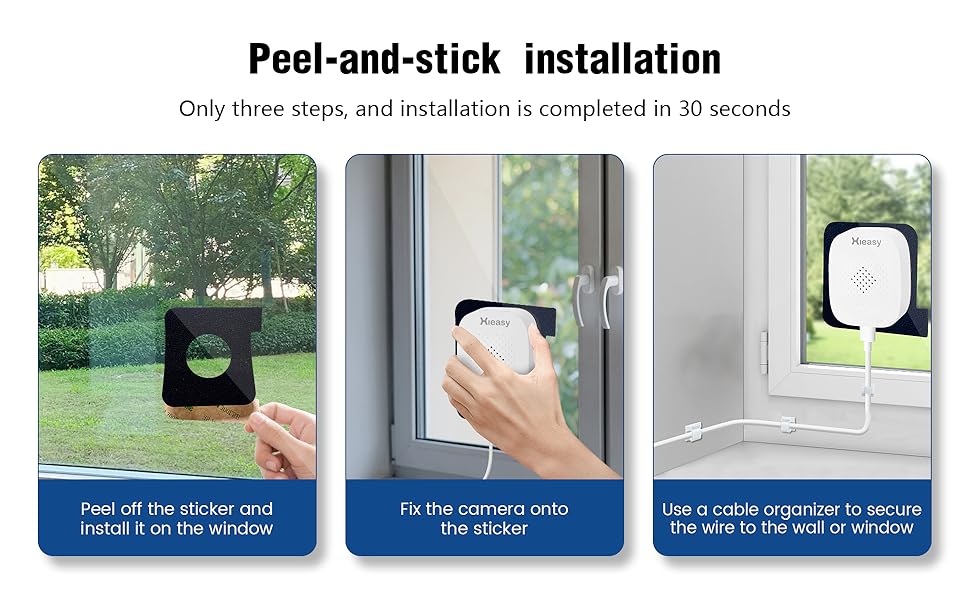
Initial Setup and App Connection
Once powered on, the camera's blue indicator light will illuminate, signifying that the product has started. You will hear an audible prompt stating "Waiting for connection." At this point, you can proceed to link the camera with your smartphone via the dedicated Hieasy app.
Obsługa aparatu
Na żywo View i nagrywanie
Access the live monitoring feed anytime, anywhere via your smartphone. The camera provides 2.5K (2560×1440) ultra-high-definition resolution for clear video performance. It supports 24/7 continuous recording to capture all moments.
Wizja nocna
Equipped with a 4-megapixel lens and advanced low-light algorithms, the camera delivers full-color images even in low-light environments, ensuring critical details are not missed during nighttime surveillance.


Wykrywanie ruchu i alerty
The camera supports customizable motion detection zones. Upon detecting movement, the device will send push notifications to your phone, sound an alarm, and automatically record video to deter intruders effectively.


Składowanie
The device supports local storage via an SD card up to 512GB. A 32GB memory card is included to allow immediate use. Your data's security and privacy are protected.

Zdalny dostęp i udostępnianie
The Hieasy X24 camera allows you to easily access the live monitoring feed from your smartphone, no matter your location. The device supports sharing with up to 16 users, enabling family and friends to view the camera feed for enhanced peace of mind.


Rozwiązywanie problemów
If you encounter issues with your Hieasy X24 camera, please refer to the following common problems and solutions:
- Nie można połączyć się z Wi-Fi:
- Ensure your Wi-Fi network is 2.4G or 5G compatible.
- Sprawdź, czy kamera znajduje się w zasięgu routera Wi-Fi.
- Sprawdź poprawność swojego hasła Wi-Fi.
- Uruchom ponownie router i kamerę, a następnie spróbuj ponownie nawiązać połączenie.
- Nie na żywo View lub nagrywanie:
- Confirm the camera is powered on and the blue indicator light is active.
- Sprawdź połączenie internetowe na swoim smartfonie.
- Ensure the Micro SD card is properly inserted and not full.
- If the SD card is full, consider formatting it (this will erase all data).
- Słaba jakość obrazu:
- Clean the camera lens and the window surface.
- Upewnij się, że w polu widzenia kamery nie ma żadnych przeszkód. view.
- Check your app settings for resolution options.
- Brak nagrywania dźwięku:
- Verify that audio recording is enabled in the camera's app settings.
- Upewnij się, że mikrofon nie jest zasłonięty.
Specyfikacje
| Nazwa modelu | 4MP 2.5K Window Camera |
| Numer modelu przedmiotu | X24 |
| Efektywna rozdzielczość obrazu nieruchomego | 4 MP |
| Rozdzielczość przechwytywania wideo | 1440p (2.5K) |
| Technologia łączności | Przewodowy (zasilanie), Wi-Fi (dane) |
| Technologia komunikacji bezprzewodowej | 2.4G & 5G Wi-Fi (Dual-Band) |
| Źródło zasilania | Elektryczny przewodowy (5 V) |
| Typ montażu | Window Mount (Self Adhesive) |
| Zastosowanie wewnątrz/na zewnątrz | Wewnątrz, Na zewnątrz |
| Zakres noktowizora | 33 stóp |
| Technologia słabego oświetlenia | Kolor nocy |
| Viewing kąt | 120 stopni |
| Szybkość klatek | 25 klatek na sekundę |
| Rozmiar zainstalowanej pamięci Flash | 32 GB (Micro SD) |
| Maksymalny obsługiwany rozmiar pamięci Flash | 512 GB |
| Możliwości nagrywania dźwięku i obrazu | Audio |
| Tryb pracy | Dźwięk i ruch |
| Metoda kontroli | Aplikacja |
| Wymiary produktu | 3.2 x 2 x 1.2 cala |
| Waga przedmiotu | 5.9 uncji (0.17 kilograma) |