
Wstęp
This manual provides essential instructions for the proper setup, operation, and maintenance of your Invicta Activa Recon X Digital Watch, Model ACW423-012. Please read this guide thoroughly to ensure optimal performance and longevity of your timepiece.
Organizować coś
1. Wstępna inspekcja
Upon unboxing, carefully inspect the watch for any visible damage. Remove any protective films from the display and case back.
2. Activating the Watch
Your watch may be in a power-saving mode. Press any button to activate the display. If the display remains blank, the battery may need to be checked or replaced.
3. Ustawianie czasu i daty
Refer to the 'Operating Instructions' section for detailed steps on how to set the current time and date accurately.
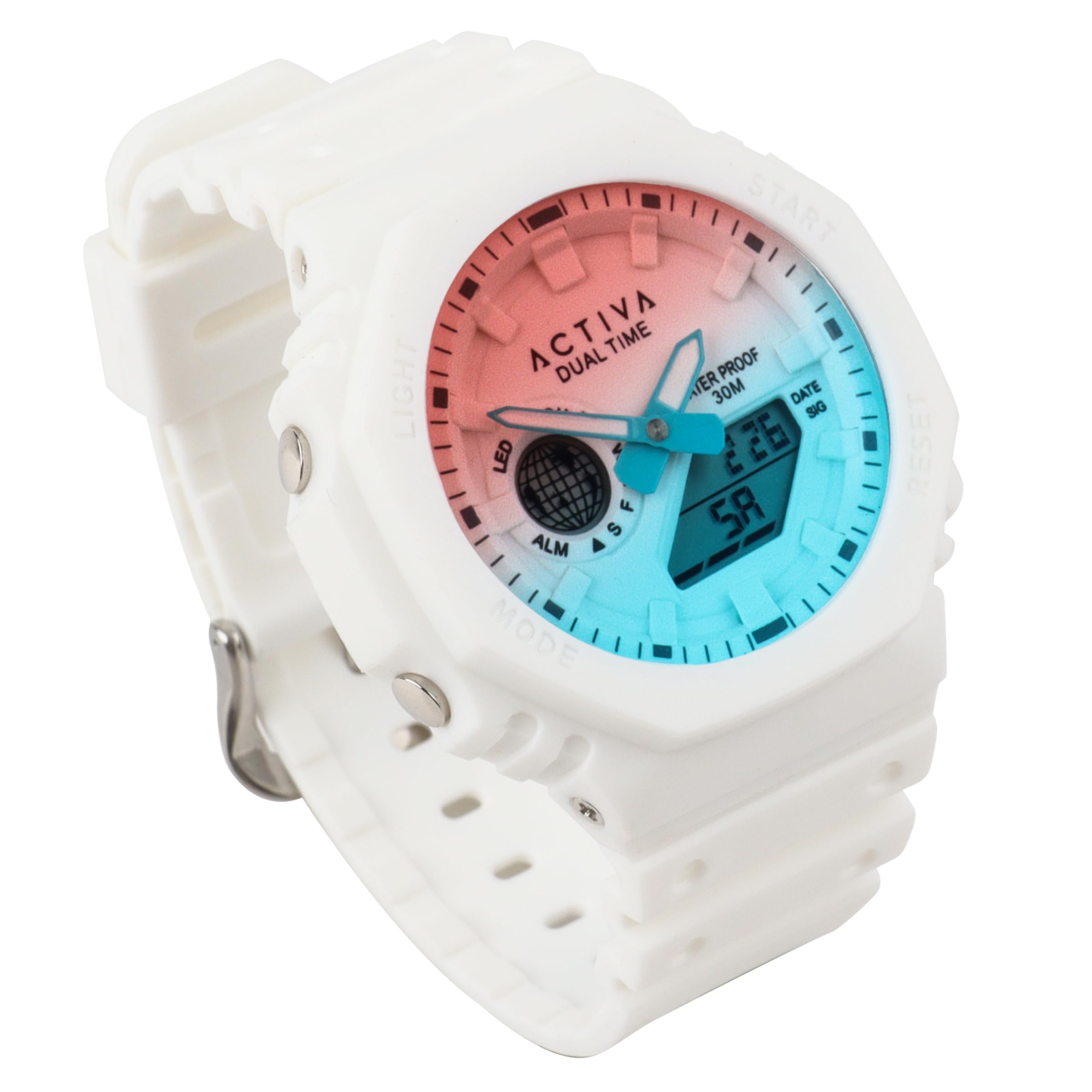
Obraz: Przód view of the Invicta Activa Recon X Digital Watch. The watch features a round case, a digital display, and a white thermoplastic polyurethane (TPU) strap with a buckle clasp. The watch face shows the time and other digital indicators.
Instrukcja obsługi
Funkcje przycisków
The Invicta Activa Recon X Digital Watch typically features multiple buttons for navigation and setting. While specific button labels may vary, common functions are:
- Przycisk TRYB: Cycles through different display modes (e.g., Time, Date, Alarm, Stopwatch).
- Przycisk USTAW/DOSTOSUJ: Służy do wejścia w tryb ustawień i potwierdzania wyborów.
- Przycisk START/STOP: Activates and deactivates functions like the stopwatch or alarm.
- Przycisk ŚWIATŁA: Illuminates the display for visibility in low light conditions.
Ustawianie czasu i daty
- Naciśnij TRYB Naciskaj przycisk, aż na wyświetlaczu pojawi się czas.
- Naciśnij i przytrzymaj USTAW/DOSTOSUJ Naciskaj przycisk, aż sekundy zaczną migać.
- Użyj TRYB button to cycle through the setting options (seconds, hours, minutes, year, month, day).
- Użyj START/STOP przycisk, aby dostosować migającą wartość.
- Po wprowadzeniu wszystkich prawidłowych ustawień naciśnij przycisk USTAW/DOSTOSUJ ponownie, aby wyjść z trybu ustawień.
Korzystanie z funkcji alarmu
- Naciśnij TRYB button until the alarm time is displayed (often indicated by 'AL').
- Naciśnij i przytrzymaj USTAW/DOSTOSUJ Naciskaj przycisk, aż zaczną migać godziny alarmu.
- Użyj START/STOP przycisk, aby ustawić żądaną godzinę alarmu.
- Naciśnij TRYB button to move to the minutes setting, then use START/STOP dostosować.
- Naciskać USTAW/DOSTOSUJ aby potwierdzić i wyjść.
- Aby włączyć/wyłączyć alarm, naciśnij przycisk START/STOP Naciśnij przycisk w trybie alarmu. Ikona alarmu pojawi się/zniknie.
Korzystanie z funkcji stopera
- Naciśnij TRYB button until the stopwatch display is shown (often indicated by 'ST' or 'CH').
- Naciśnij START/STOP przycisk, aby rozpocząć odliczanie czasu.
- Naciskać START/STOP ponownie, aby wstrzymać odliczanie czasu.
- Aby wznowić, naciśnij START/STOP. To reset, press the USTAW/DOSTOSUJ przycisk, gdy stoper jest wstrzymany.
Konserwacja
Czyszczenie zegarka
To maintain the appearance of your watch, regularly wipe the case and strap with a soft, dry cloth. For stubborn dirt, a slightly damp Można użyć ściereczki, a następnie natychmiast wysuszyć. Unikać stosowania silnych środków chemicznych i ściernych środków czyszczących.
Odporność na wodę
This watch is rated for 30 meters (3 ATM) water resistance. This means it is suitable for everyday use and can withstand splashes or brief immersion in water. It is nie suitable for swimming, showering, or diving. Do not operate buttons while the watch is wet or submerged.
Wymiana baterii
The watch is powered by a battery. When the display becomes dim or functions become erratic, it may be time for a battery replacement. It is recommended to have the battery replaced by a qualified watch technician to ensure proper sealing and maintain water resistance.
Rozwiązywanie problemów
| Problem | Możliwa przyczyna | Rozwiązanie |
|---|---|---|
| Wyświetlacz jest pusty lub przyciemniony. | Niski poziom naładowania baterii lub jej rozładowanie. | Wymień baterię. |
| Czas jest nieprawidłowy. | Czas nie został ustawiony prawidłowo lub został zresetowany. | Refer to 'Setting Time and Date' in the Operating Instructions. |
| Przyciski nie reagują. | Zegarek może być zablokowany lub bateria może być słaba. | Try pressing the LIGHT button. If still unresponsive, check battery or consult support. |
| Kondensacja wewnątrz zegarka. | Narażenie na ekstremalne zmiany temperatur lub obniżoną wodoodporność. | Aby zapobiec uszkodzeniom, należy natychmiast zwrócić się o pomoc do specjalisty. |
Specyfikacje
- Numer modelu: ACW423-012
- Marka: Invicta
- Typ ruchu: Cyfrowy
- Średnica koperty: 45.5 mm
- Materiał paska: Poliuretan termoplastyczny (TPU)
- Kolor paska: Biały
- Wodoodporność: 30 metrów (3 ATM)
- Źródło zasilania: Bateria
- Rodzaj zapięcia: Klamra
- Szerokość paska: 18.5 mm
- Długość paska: 200 mm
- Przybliżona waga: 353.8 g (wraz z opakowaniem)
- Kod UPC: 886678650545
Gwarancja i wsparcie
Invicta watches are manufactured to high-quality standards. For specific warranty details, please refer to the warranty card included with your purchase or visit the official Invicta webZachowaj dowód zakupu na wypadek roszczeń gwarancyjnych.
For further assistance or technical support, please contact Invicta customer service or visit their official brand store: