
CINMOORE CM-C2LU
Instrukcja obsługi kamery atrapowej CINMOORE
Model: CM-C2LU
Marka: CINMOORE
1. Wprowadzenie
Thank you for choosing the CINMOORE Dummy Camera. This indoor security camera is designed to provide reliable surveillance and peace of mind for your home or office. Featuring advanced AI detection, two-way audio, and clear night vision, it offers comprehensive monitoring capabilities. This manual will guide you through the setup, operation, and maintenance of your device.

Obraz: Przód view of the CINMOORE Dummy Camera, a white, spherical camera with a dark lens and a blue indicator light, featuring the CINMOORE logo at its base.
2. Co jest zawarte
Sprawdź zawartość paczki, aby upewnić się, że znajdują się w niej wszystkie elementy:
- CINMOORE Security Camera × 1
- Mounting Bracket Base × 1
- Zasilacz × 1
- Data Cable × 1
- Screw Anchors × 1
- Instrukcja obsługi × 1
3. Konfiguracja
The CINMOORE Dummy Camera offers flexible installation options for various indoor environments.
3.1 Opcje montażu
The camera can be installed using the following methods:
- Montaż sufitowy: Ideal for wide-angle coverage from above.
- Montaż na blacie: Simple placement on any flat surface.
- Mocowanie ścienne: Secure installation on a vertical surface.
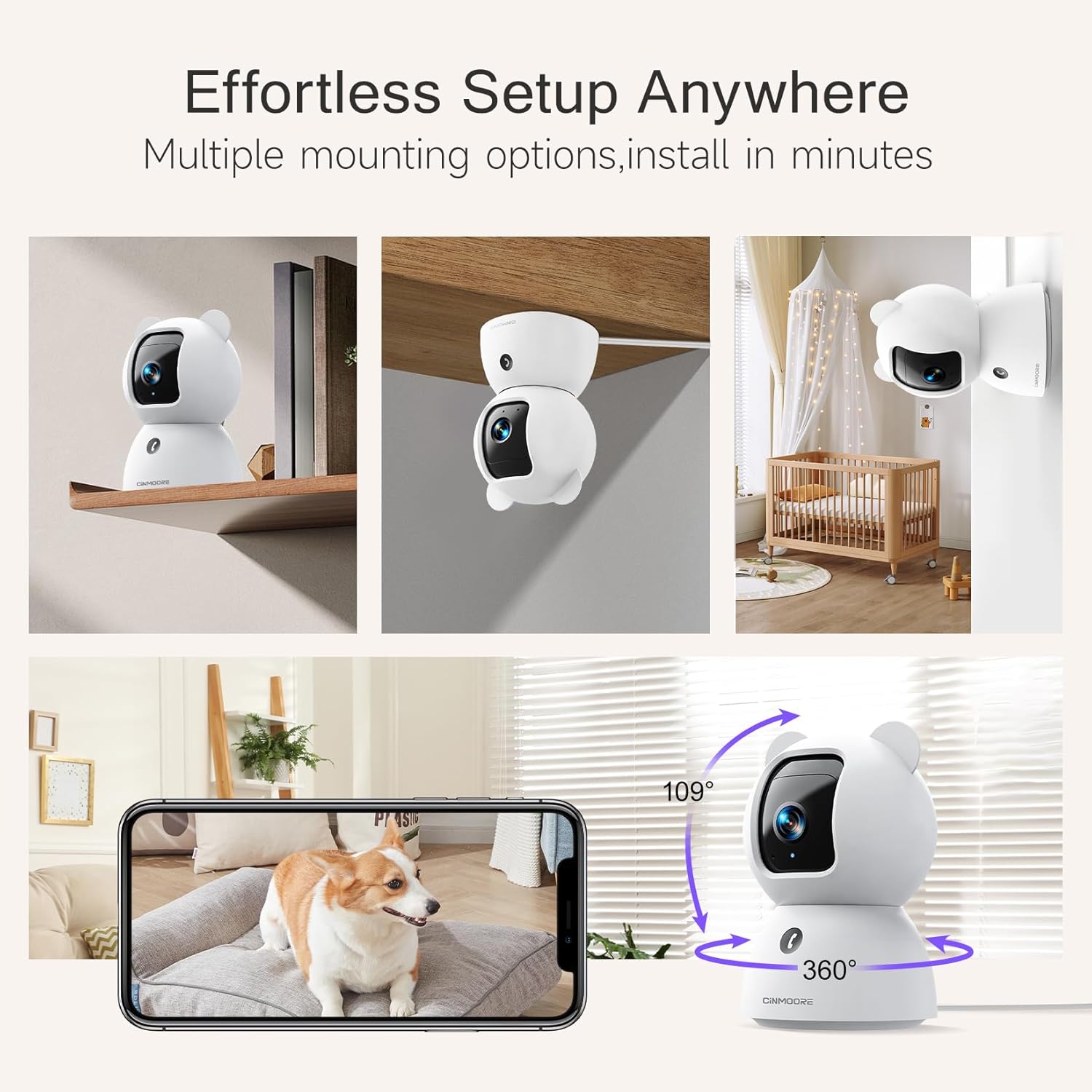
Image: A collage showing the CINMOORE Dummy Camera mounted in various positions: on a shelf, inverted on a ceiling, and on a wall, demonstrating its versatile installation options.
3.2 Początkowe kroki konfiguracji
- Włączanie: Connect the camera to the power adapter using the provided data cable and plug it into a power outlet.
- Pobierz aplikację: Download the official CINMOORE app from your smartphone's app store (iOS/Android).
- Rejestracja konta: Otwórz aplikację i zarejestruj nowe konto lub zaloguj się, jeśli już je posiadasz.
- Dodaj urządzenie: Postępuj zgodnie z instrukcjami w aplikacji, aby dodać nową kamerę. Zazwyczaj polega to na zeskanowaniu kodu QR na kamerze lub połączeniu się z tymczasowym punktem dostępu Wi-Fi.
- Połączenie Wi-Fi: Connect the camera to your home Wi-Fi network (2.4GHz recommended).
- Umieszczenie: Umieść kamerę w wybranym miejscu, upewniając się, że ma ona zapewniony czysty widok. view obszaru, który chcesz monitorować.
4. Instrukcja obsługi
4.1 Video Quality and Viewwchodzenie
The camera captures video in 2.5K resolution, providing clear and detailed images. You can view the live feed and recorded footage through the CINMOORE app.

Image: A side-by-side comparison demonstrating the superior clarity of 2.5K resolution (left, showing a baby) versus 2K resolution (right, showing a puppy).
4.2 Pan & Tilt (PTZ) Functionality
The camera features PTZ (Pan, Tilt, Zoom) technology, allowing for 360-degree coverage. You can remotely control the camera's viewing angle through the app to monitor different areas of a room.

Image: The CINMOORE Dummy Camera surrounded by icons representing its features: Ultra HD 2.5K, Sound/Crying Alerts, Smart Night Vision, Encrypted Local Storage (up to 256GB), Secure Cloud Storage, Full Duplex Audio, Human/Pet Tracking, One-Touch Call, and Pan & Tilt, emphasizing its 360-degree protection.
4.3 Dźwięk dwukierunkowy
Utilize the full-duplex two-way audio feature to communicate with people or pets in the camera's vicinity. This allows for natural, real-time conversations.

Image: A scene depicting a person speaking through a smartphone to a dog via the CINMOORE Dummy Camera, illustrating the two-way audio feature with speech bubbles.
4.4 Widzenie nocne
The camera is equipped with clear IR night vision, providing 2.5K clarity even in low-light or complete darkness, with a range of up to 33 feet.

Obraz: Osoba viewing a black-and-white night vision feed from the CINMOORE Dummy Camera on their smartphone, showing a baby and a dog in a crib, demonstrating clear IR night vision in a dark room.
4.5 AI Alerts and Detection
The camera supports various AI-powered detection features without monthly fees, including:
- Detekcja ruchu: Alerts you to general movement.
- Wykrywanie osób: Specifically identifies human figures.
- Wykrywanie zwierząt domowych: Recognizes pet activity.
- Wykrywanie płaczu: Notifies you of baby crying sounds.

Image: Two children playing near the CINMOORE Dummy Camera, with icons below representing its AI detection capabilities: Person, Pet, Motion, and Crying, highlighting its no-monthly-fee AI alerts.
4.6 Opcje przechowywania
The camera offers flexible and secure storage solutions:
- Pamięć karty SD: Supports local storage via an SD card (not included), expandable up to 512GB. Ensure "SD Card Encryption" is enabled in the app for secure viewing.
- Przechowywanie w chmurze: Offers AWS Cloud Storage with a 30-day free trial, providing bank-level encrypted storage for your recordings.

Image: A diagram showing the CINMOORE Dummy Camera with callouts for its storage features: SD card slot (expandable up to 512GB), Reset Button, and AWS Cloud Storage (30-day free trial), emphasizing encrypted and secure flexible storage.
5. Konserwacja
To ensure optimal performance and longevity of your CINMOORE Dummy Camera, follow these maintenance guidelines:
- Czyszczenie: Delikatnie przetrzyj obiektyw i korpus aparatu miękką, suchą ściereczką. Unikaj stosowania silnych środków chemicznych i materiałów ściernych.
- Umieszczenie: Upewnij się, że kamera znajduje się w stabilnym miejscu, z dala od bezpośredniego światła słonecznego, ekstremalnych temperatur i wysokiej wilgotności.
- Aktualizacje oprogramowania układowego: Regularly check for and install firmware updates through the CINMOORE app to ensure your camera has the latest features and security enhancements.
- Zasilanie: Należy używać wyłącznie oryginalnego zasilacza dołączonego do aparatu.
6. Rozwiązywanie Problemów
If you encounter issues with your CINMOORE Dummy Camera, refer to the following common troubleshooting steps:
- Kamera offline: Check your Wi-Fi connection and ensure the camera is within range of your router. Restart the camera by unplugging and re-plugging the power adapter.
- Słaba jakość wideo: Ensure the lens is clean and free from dust. Check your internet speed; a stable connection is crucial for high-resolution streaming.
- Brak dźwięku: Verify that the microphone and speaker settings are enabled in the app. Ensure there are no obstructions blocking the microphone or speaker on the camera.
- Wykrywanie nie działa: Check the detection sensitivity settings in the app. Ensure the camera's view jest przejrzysty i niezakłócony.
- Nie można połączyć się z aplikacją: Ensure you have the latest version of the CINMOORE app. Try resetting the camera (using the reset button, if available) and re-adding it to the app.
For further assistance, please contact CINMOORE customer support.
7. Specyfikacje
| Nazwa modelu | Kamera wewnętrzna bezpieczeństwa |
| Numer modelu przedmiotu | CM-C2LU |
| Marka | CINMOORE |
| Technologia łączności | Przewodowy, Wi-Fi |
| Rozdzielczość przechwytywania wideo | 2.5 tys. |
| Zastosowanie wewnątrz/na zewnątrz | Wnętrz |
| Cechy specjalne | 2 Way Audio, Cry Detection, HD Resolution, PTZ Technology |
| Zakres noktowizora | 33 stóp |
| Typ montażu | Ceiling Mount / Tabletop Mount / Wall Mount |
| Tworzywo | Akrylonitryl-butadien-styren (ABS) |
| Wymiary przedmiotu Dł. x Szer. x Wys. | 7.6 x 7.6 x 11.4 centymetrów |
| Waga przedmiotu | 340 gramów |
| Poziom wodoodporności | Wodoodporny |
| Zalecane zastosowania | Baby Monitoring, Pet Monitoring, Indoor Home Security, Office Surveillance |
8. Gwarancja i wsparcie
Gwarancja: The CINMOORE Dummy Camera comes with a 1-year warranty from the date of purchase. Please retain your proof of purchase for warranty claims.
Wsparcie: For technical support, troubleshooting assistance, or warranty inquiries, please visit the official CINMOORE website or contact their customer service team. Refer to the product packaging or the CINMOORE app for specific contact details.
Ask a question about this manual
Ask about setup, troubleshooting, compatibility, parts, safety, or missing instructions. Manuals+ will review the question and use this page’s manual context to help answer it.