
ARCADE1UP MSP-A-405629
Instrukcja obsługi automatu Arcade1Up Ms. Pac-Man Classic SE
Marka: ARCADE1UP | Model: MSP-A-405629
1. Wprowadzenie
This manual provides essential instructions for the assembly, operation, and maintenance of your Arcade1Up Ms. Pac-Man Classic SE Arcade Machine. Please read this manual thoroughly before use to ensure proper function and safety.

Image 1: The Arcade1Up Ms. Pac-Man Classic SE Arcade Machine, featuring vibrant blue and pink artwork with Ms. Pac-Man characters.
2. Informacje dotyczące bezpieczeństwa
Należy przestrzegać następujących środków ostrożności:
- Keep the arcade machine away from water or excessive moisture.
- Upewnij się, że przewód zasilający nie jest uszkodzony ani postrzępiony.
- Do not attempt to open or modify the machine. Refer all servicing to qualified personnel.
- Ustaw maszynę na stabilnej i równej powierzchni, aby zapobiec jej przewróceniu.
- Nadzoruj dzieci podczas użytkowania.
3. Zawartość opakowania
Your Arcade1Up Ms. Pac-Man Classic SE Arcade Machine package includes:
- Arcade Machine Cabinet
- Zasilacz
- Instrukcja obsługi (ten dokument)
Note: An optional riser may be sold separately.
4. Konfiguracja
4.1 Montaż
The Arcade1Up Ms. Pac-Man Classic SE Arcade Machine requires some assembly. Follow the detailed instructions provided in the separate assembly guide included with your product. Ensure all screws and fasteners are securely tightened before use.

Image 2: Dimensions of the Arcade1Up Ms. Pac-Man Classic SE Arcade Machine, showing its height of 45.4 inches without a riser and indicating an optional riser is sold separately.
4.2 Połączenie zasilania
- Locate the power input port on the back of the arcade machine.
- Connect the provided power adapter to the machine.
- Podłącz zasilacz do standardowego gniazdka elektrycznego.
- Przed podłączeniem urządzenia do sieci należy upewnić się, że wyłącznik zasilania (jeśli występuje) jest w pozycji „WYŁĄCZONY”.
Wideo 1: Overview of the Arcade1Up Ms. Pac-Man Classic SE Arcade Machine, demonstrating its features and setup in a home environment. This video is provided by the seller.
5. Instrukcja obsługi
5.1 Włączanie/wyłączanie
Locate the power switch on the control panel. Flip the switch to 'ON' to power on the machine. Flip to 'OFF' to power off.
5.2 Wybór gry
Upon powering on, you will see a game selection menu. Use the joystick to navigate through the available games. Press the 'Start Game' button to select and launch your desired game.
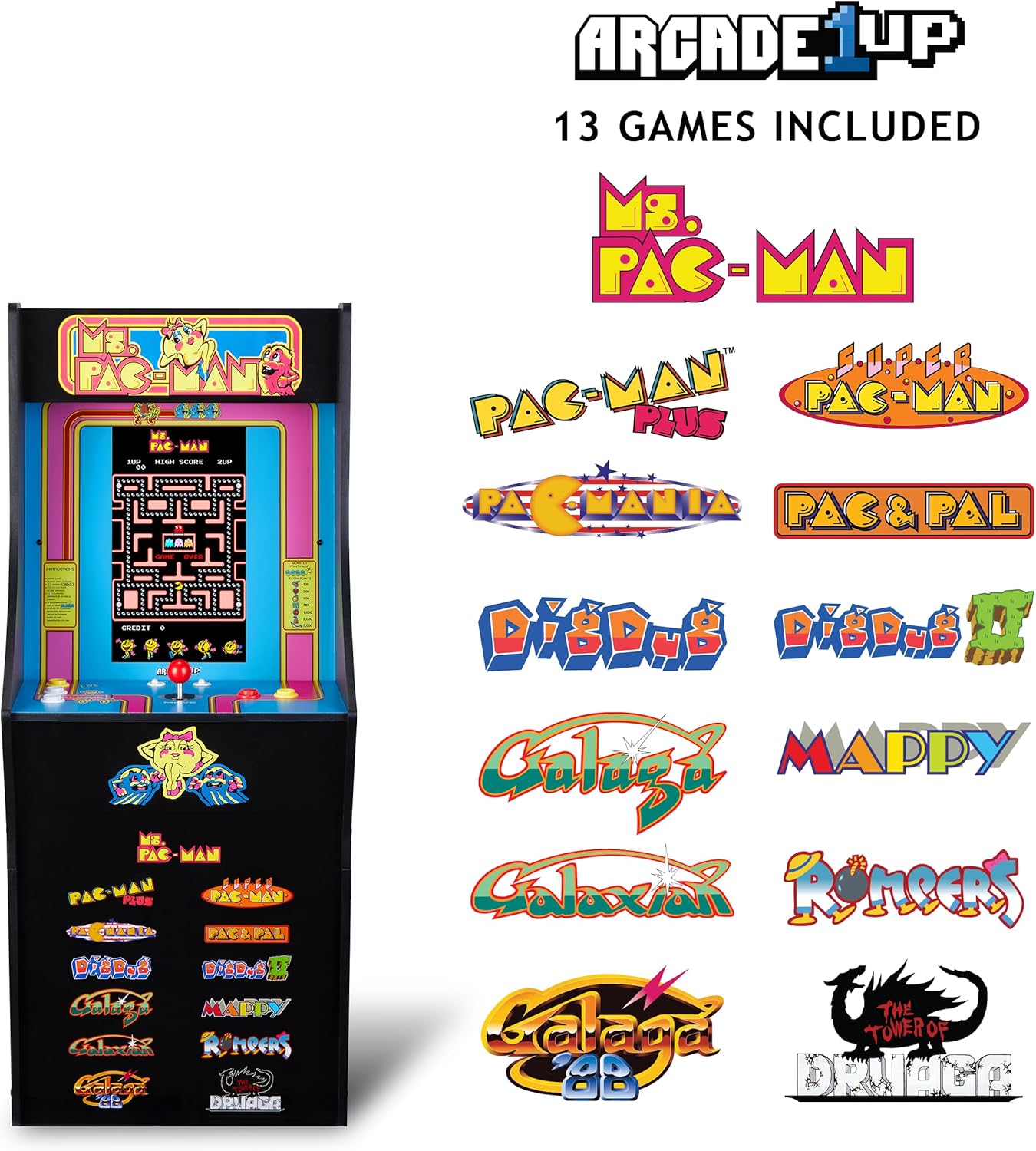
Image 3: The Arcade1Up Ms. Pac-Man Classic SE Arcade Machine displaying the list of 13 included games, such as Ms. Pac-Man, Dig Dug, and Galaga.
5.3 Sterowanie
- Drążek sterowy: Używany do poruszania postaciami w grach.
- Start Game Button: Initiates a game or confirms selection.
- Przyciski akcji: Used for specific in-game actions (e.g., firing, jumping).
- Regulacja głośności: Adjust the game sound level using the dedicated volume buttons.
- To return to the game selection menu or save a high score, hold the 'Start Game' button for 5 seconds.
- To reset a game, hold the 'Start Game' button for 5 seconds.

Rysunek 4: Szczegółowy view of the control panel, highlighting the joystick, start game button, and other action buttons for gameplay.
5.4 Included Games
Your Arcade1Up Ms. Pac-Man Classic SE Arcade Machine includes 13 classic games:
- Pani PAC-MAN
- PAC-MAN PLUS
- SUPER PAC-MAN
- PAC & PAL
- PACMANIA
- KOP KOP
- DIG DUG 2
- GALAGA
- GALAKTYCZNY
- GALAGA 88
- MAPPY
- KOMBINEZON DZIECIĘCY
- THE TOWER OF DRUAGA
5.5 Tabele wyników WiFi
Connect your arcade machine to WiFi to access online leaderboards and compete for high scores globally. Refer to the on-screen prompts for WiFi setup and leaderboard access.
Wideo 2: Rozgrywka footage of the Arcade1Up Ms. Pac-Man Classic SE Arcade Machine, showcasing the classic arcade experience and the online leaderboard feature. This video is provided by the seller.
6. Konserwacja
- Czyszczenie: Use a soft, dry cloth to wipe down the cabinet and screen. Avoid abrasive cleaners or excessive moisture.
- Składowanie: Przechowuj urządzenie w chłodnym i suchym miejscu, z dala od bezpośredniego światła słonecznego i ekstremalnych temperatur.
- Przewód zasilający: Regularnie sprawdzaj przewód zasilający pod kątem oznak uszkodzeń.
7. Rozwiązywanie Problemów
| Problem | Możliwa przyczyna | Rozwiązanie |
|---|---|---|
| Maszyna nie włącza się. | Przewód zasilający nie jest podłączony; gniazdko nie działa. | Sprawdź, czy przewód zasilający jest prawidłowo podłączony. Sprawdź gniazdko, podłączając do niego inne urządzenie. |
| Brak dźwięku. | Volume turned down; speaker issue. | Check volume settings on the control panel. If problem persists, contact support. |
| Gra zawiesza się lub ulega awarii. | Błąd oprogramowania; błąd tymczasowy. | Power off the machine, wait 10 seconds, then power back on. |
8. Specyfikacje
| Funkcja | Szczegół |
|---|---|
| Numer modelu | MSP-A-405629 |
| Wymiary (wys. x szer. x gł.) | 45.4" x 17.35" x 45.4" (without riser) |
| Rozmiar ekranu | 15.6 Inches IPS Color Monitor |
| Liczba gier | 13 |
| Typ kontrolera | Drążek sterowy |
| Źródło zasilania | Elektryczny przewodowy |
| Tworzywo | Tworzywo sztuczne, akrylonitryl-butadien-styren (ABS) |
| Waga przedmiotu | 47 funta |
| Zalecany wiek producenta | 10 lata i więcej |
| Łączność | WiFi Leaderboards |
9. Gwarancja i wsparcie
For warranty information, technical support, or service inquiries, please refer to the official Arcade1Up webOdwiedź witrynę lub skontaktuj się z działem obsługi klienta. Zachowaj dowód zakupu na wypadek reklamacji.
Wsparcie online: www.arcade1up.com
Ask a question about this manual
Ask about setup, troubleshooting, compatibility, parts, safety, or missing instructions. Manuals+ will review the question and use this page’s manual context to help answer it.