
Wstęp
The ZOMBIES CAT MGALL X22 Clip On Wireless Headphones offer a unique open-ear listening experience combined with a fashionable design. These headphones feature Bluetooth 6.0 connectivity, an LED HD display for battery status, and a comfortable clip-on fit. This manual provides essential information for setting up, operating, and maintaining your headphones.
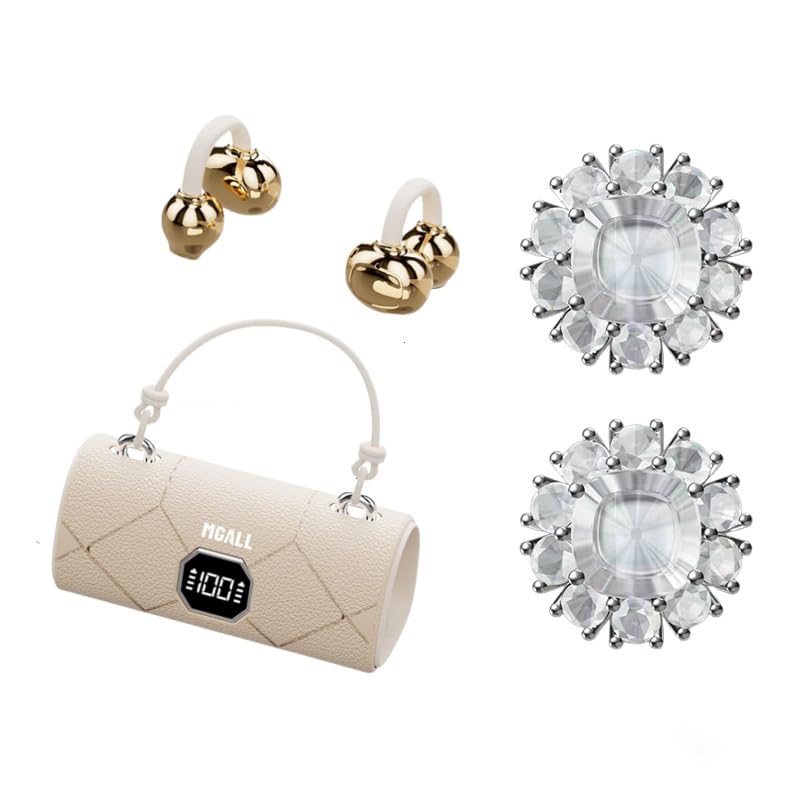
MGALL X22 Clip On Wireless Headphones in their charging case, showcasing the unique handbag-style design and open-ear earbuds.
Główne cechy
- Konstrukcja otwarta na uszy: Provides a comfortable and pleasant listening experience without blocking the ear canal.
- Bluetooth 6.0: Ensures fast pairing, seamless audio, and ultra-low latency.
- Dual AI Noise-Canceling Mics: Enhances voice clarity by suppressing ambient noise during calls.
- Wciągający dźwięk stereo: Delivers crisp highs, rich bass, and a wider soundstage with advanced directional audio.
- Dłuższa żywotność baterii: Up to 6 hours of listening per charge, with a total of 40 hours using the charging case.
- LED HD Display: Shows real-time battery levels for both the charging case and earbuds.
- Modny design: Features a unique handbag-style charging case with a smooth leather finish and graceful handle.

Diagram illustrating the open listening experience and key features of the MGALL X22 headphones, including comfort, battery display, lossless HiFi sound, luxury leather texture, Dual-mode Bluetooth 6.0, and open ear clip design.
Organizować coś
Ładowanie słuchawek
Przed pierwszym użyciem należy w pełni naładować słuchawki i etui ładujące.
- Connect the provided USB-C cable to the charging port on the back of the charging case.
- Plug the other end of the USB-C cable into a compatible USB power source.
- The LED HD display on the case will show the charging progress. A green indicator light on the case signifies it is charging or fully charged.
- Place the earbuds into their respective slots inside the charging case. They will begin charging automatically.

Close-up of the MGALL X22 charging case with earbuds inside, showing the green indicator light, indicating charging or readiness.

Image showing the LED dynamic power HD digital display on the charging case, indicating the battery level of the charging case and earphones.
Parowanie z urządzeniem
- Sprawdź, czy słuchawki są naładowane i znajdują się w etui ładującym.
- Otwórz etui ładujące. Słuchawki automatycznie przejdą w tryb parowania.
- Włącz Bluetooth na swoim urządzeniu (smartfonie, tablecie itp.).
- Szukaj available Bluetooth devices and select "MGALL X22" from the list.
- Po nawiązaniu połączenia usłyszysz komunikat dźwiękowy i słuchawki będą gotowe do użycia.
Official product video demonstrating the charging case and earbuds, highlighting the handbag-style design and LED display.
Obsługa słuchawek
Noszenie słuchawek
The MGALL X22 headphones feature an open-ear clip-on design for comfort and awareness of your surroundings.
- Znajdź lewą (L) i prawą (R) słuchawkę.
- Gently clip each earbud onto your ear, ensuring the speaker portion is positioned just outside your ear canal.
- Adjust for a secure and comfortable fit. The flexible design allows for slight adjustments.

Image showing a person wearing the MGALL X22 clip-on headphones, demonstrating the secure and comfortable fit.
Sterowanie dotykowe
The earbuds feature touch-sensitive controls for easy management of audio and calls.
- Odtwórz/Pauza: Pojedyncze dotknięcie dowolnej słuchawki.
- Następny utwór: Kliknij dwukrotnie prawą słuchawkę.
- Poprzedni utwór: Kliknij dwukrotnie lewą słuchawkę.
- Odbieranie/kończenie połączeń: Pojedyncze dotknięcie dowolnej słuchawki podczas połączenia przychodzącego.
- Odrzuć połączenie: Naciśnij i przytrzymaj dowolną słuchawkę podczas połączenia przychodzącego.
- Aktywuj asystenta głosowego: Naciśnij trzykrotnie dowolną słuchawkę.
Removable Earring Charms
The headphones come with optional removable earring charms for customization.
- To attach a charm, open the clasp on the charm.
- Carefully attach the clasp to the designated loop on the earbud.
- Close the clasp securely.
- To remove, simply open the clasp and detach.
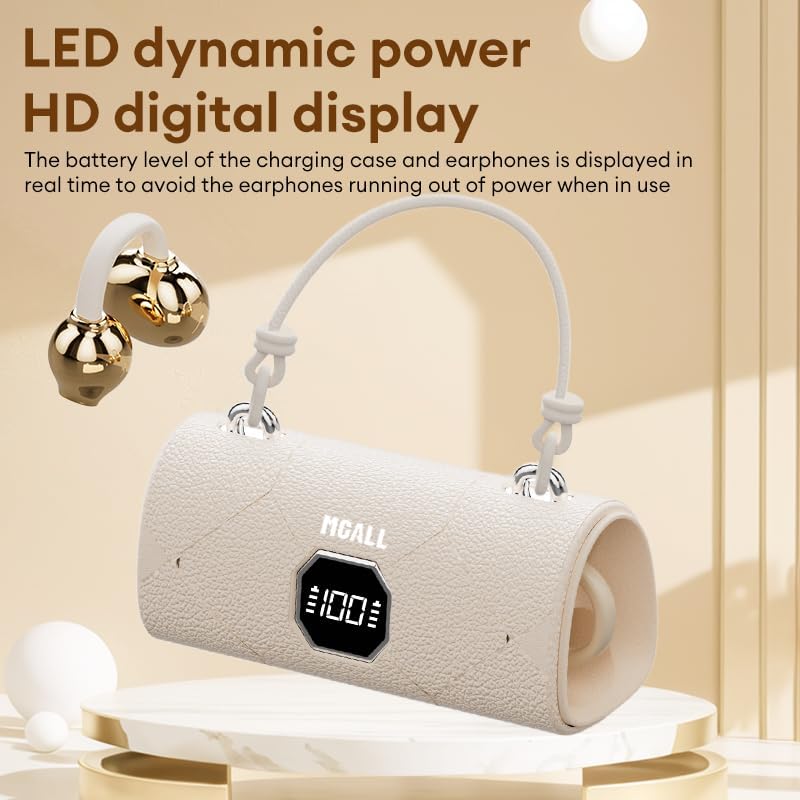
Image showing the removable earring charms that can be attached to the headphones for a personalized look.
Oficjalny film prezentujący produktasing the MGALL X22 clip-on earbuds, demonstrating how they are worn and the optional earring attachments.
Konserwacja
Czyszczenie
- Wytrzyj słuchawki douszne i etui ładujące miękką, suchą i niepozostawiającą włókien ściereczką.
- Nie należy używać środków czyszczących o działaniu ściernym, rozpuszczalników ani aerozoli.
- Unikaj dostania się wilgoci do otworów.
Składowanie
- Gdy nie używasz słuchawek, przechowuj je w etui ładującym, aby je chronić i utrzymać naładowanie.
- Keep the device in a cool, dry place away from extreme temperatures and direct sunlight.
Rozwiązywanie problemów
Typowe problemy i rozwiązania
- Brak dźwięku:
- Sprawdź, czy słuchawki są prawidłowo sparowane z urządzeniem.
- Sprawdź poziom głośności zarówno w urządzeniu, jak i w słuchawkach.
- Sprawdź, czy słuchawki są naładowane.
- Problemy z parowaniem:
- Wyłącz funkcję Bluetooth w urządzeniu, a następnie włącz ją ponownie.
- Umieść słuchawki z powrotem w etui, zamknij je, a następnie otwórz ponownie, aby ponownie wejść w tryb parowania.
- Forget/delete "MGALL X22" from your device's Bluetooth list and try pairing again.
- Problemy z ładowaniem:
- Upewnij się, że kabel ładujący jest pewnie podłączony do obudowy i źródła zasilania.
- Sprawdź, czy port ładowania jest czysty i wolny od zanieczyszczeń.
- Wypróbuj inny kabel USB-C lub zasilacz.
Specyfikacje
| Funkcja | Szczegół |
|---|---|
| Nazwa modelu | X2202+TYEJPS06 |
| Marka | ZOMBIES CAT |
| Technologia łączności | Bezprzewodowa, Bluetooth 6.0 |
| Zasięg Bluetooth | 10 metrów |
| Kontrola hałasu | Hybrid Noise Cancellation (for mics) |
| Kształt słuchawki | Otwarte ucho |
| Metoda kontroli | Dotykać |
| Impedancja | 32 omy |
| Tworzywo | Plastikowy |
| Czas pracy baterii (słuchawki douszne) | Do 6 godzin |
| Całkowity czas pracy baterii (z etui) | Do 40 godzin |
Co jest w pudełku
- MGALL X22 Clip On Wireless Headphones
- Etui ładujące
- Kabel ładujący USB-C
- Instrukcja obsługi
- Removable Earring Charms
Gwarancja i wsparcie
Your ZOMBIES CAT MGALL X22 Clip On Wireless Headphones are covered by a standard manufacturer's warranty against defects in materials and workmanship. Please refer to the product packaging or contact customer support for specific warranty details and duration.
For technical support, troubleshooting assistance, or warranty claims, please contact ZOMBIES CAT customer service through the retailer where the product was purchased or visit the official ZOMBIES CAT webwitryna do informacji kontaktowych.


