
1. Wprowadzenie
Thank you for choosing the iPazzPort Mini Wireless Keyboard. This compact device offers dual-mode connectivity (2.4G wireless and Bluetooth), a precision touchpad, 3-color backlighting, and an IR learning remote function. It is designed for versatile use with Smart TVs, Android TV Boxes, PCs, Laptops, Projectors, PS5, Xbox, and other compatible devices. This manual provides detailed instructions for setup, operation, maintenance, and troubleshooting to ensure optimal performance.
2. Zawartość opakowania
Proszę sprawdzić, czy w paczce znajdują się następujące elementy:
- 1 x iPazzPort Mini Wireless Keyboard
- 1 x USB Dongle (2.4G receiver)
- 1 x kabel ładujący USB
- 1 x Instrukcja obsługi
- 1 x Lithium Polymer Battery (pre-installed or separate)
3. Koniec produktuview
The iPazzPort Mini Wireless Keyboard combines multiple functionalities into a single, portable unit. Key features include:
- Łączność w dwóch trybach: Seamlessly switch between 2.4G wireless (via USB dongle) and Bluetooth connections.
- Precyzyjny panel dotykowy: High-sensitivity multi-touch trackpad with gesture support for easy navigation.
- IR Learning Remote: 8 programmable keys to learn functions from your existing TV or projector remote.
- Podświetlenie 3-kolorowe: Adjustable red, green, and blue backlighting for visibility in low-light conditions.
- Akumulator: Built-in lithium battery, rechargeable via USB.
- Kompaktowa konstrukcja: Pocket-sized for portability and convenience.

Image: The iPazzPort Mini Wireless Keyboard, showcasing its compact design and layout.
4. Konfiguracja
4.1 Ładowanie klawiatury
- Podłącz dołączony kabel ładujący USB do portu ładowania klawiatury.
- Podłącz drugi koniec kabla do źródła zasilania USB (np. portu USB komputera, zasilacza ściennego USB).
- The charging indicator light will illuminate. It will turn off or change color when fully charged.
4.2 Połączenie bezprzewodowe 2.4G
This mode uses the included USB dongle for a stable wireless connection up to 10 meters.
- Insert the USB dongle into an available USB port on your device (Smart TV, PC, Projector, etc.).
- Włącz klawiaturę, przesuwając przełącznik zasilania do pozycji „ON”.
- The keyboard should automatically connect to the dongle. The indicator light may flash briefly and then turn off, indicating a successful connection.

Image: The iPazzPort keyboard demonstrating its universal compatibility with various devices like laptops, tablets, and smart TVs.
4.3 Połączenie Bluetooth
This mode allows connection to Bluetooth-enabled devices without a dongle.
- Upewnij się, że klawiatura jest naładowana i włączona.
- Naciśnij i przytrzymaj Fn klucz i Bluetooth icon key (usually F1 or a dedicated Bluetooth key) simultaneously for 3-5 seconds until the Bluetooth indicator light starts flashing rapidly. This puts the keyboard into pairing mode.
- Na swoim urządzeniu przejdź do ustawień Bluetooth i wyszukaj nowe urządzenia.
- Select "iPazzPort Keyboard" or a similar name from the list of available devices.
- If prompted, enter the pairing code displayed on your device using the iPazzPort keyboard and press Enter.
- Once paired, the Bluetooth indicator light on the keyboard will stop flashing and turn off.
4.4 IR Learning Function Setup
The keyboard can learn up to 8 infrared (IR) functions from your existing TV or projector remote.
- Place the iPazzPort keyboard and your original remote control head-to-head, approximately 1-3 cm apart.
- Naciśnij i przytrzymaj USTAWIĆ button on the iPazzPort keyboard for 3-5 seconds until the IR indicator light starts flashing slowly. This indicates learning mode.
- Press the button on the iPazzPort keyboard that you wish to program (e.g., Power button). The IR indicator light will flash rapidly.
- Press the corresponding button on your original remote control (e.g., Power button). The IR indicator light on the iPazzPort keyboard will flash three times and then remain solid, indicating successful learning.
- Repeat steps 3 and 4 for the other 7 programmable IR keys.
- After programming all desired keys, press the USTAWIĆ button again to exit learning mode. The IR indicator light will turn off.

Image: Diagram illustrating the IR learning process, showing the iPazzPort keyboard and an original remote facing each other, with programmable buttons highlighted.
5. Instrukcja obsługi
5.1 Podstawowe funkcje klawiatury
- Pisanie na maszynie: Use the QWERTY layout for text input.
- Klawisze funkcyjne: Naciśnij Fn key simultaneously with the F1-F12 keys (or other marked function keys) to access their secondary functions (e.g., volume control, media playback).
- Znaki specjalne: Używać Zmiana or Fn in combination with other keys for special characters.
5.2 Gesty na panelu dotykowym
The touchpad supports various gestures for navigation:
- Stuknięcie jednym palcem: Lewy przycisk myszy.
- Stuknięcie dwoma palcami: Kliknij prawym przyciskiem myszy.
- Przeciąganie jednym palcem: Przesuń kursor.
- Przewijanie dwoma palcami: Przewiń w górę/w dół lub w lewo/w prawo.
- Powiększanie za pomocą szczypania: (If supported by device) Use two fingers to zoom in/out.

Image: The iPazzPort keyboard with a hand demonstrating touchpad usage for precise control and navigation.
Sterowanie podświetleniem 5.3
To adjust the backlight:
- Naciśnij Fn klucz i F2 key (or the dedicated backlight key) simultaneously to cycle through red, green, blue, and off.

Obraz: Cztery views of the iPazzPort keyboard, demonstrating the red, green, and blue backlight options, as well as the unlit state.
5.4 Zarządzanie energią
- Automatyczne uśpienie: The keyboard will enter sleep mode after a period of inactivity to conserve battery. Press any key to wake it up.
- Wyłączone: Slide the power switch to 'OFF' when not in use for extended periods.
6. Konserwacja
6.1 Czyszczenie
- Przed czyszczeniem wyłącz klawiaturę.
- Use a soft, dry cloth to wipe the surface. For stubborn dirt, a slightly damp Można użyć ściereczki, a następnie wytrzeć do sucha.
- Unikaj stosowania silnych środków chemicznych, rozpuszczalników i ściernych środków czyszczących.
6.2 Pielęgnacja baterii
- Charge the keyboard regularly, especially if it has not been used for a long time.
- Unikaj częstego całkowitego rozładowywania akumulatora, ponieważ może to skrócić jego żywotność.
- Do not expose the keyboard to extreme temperatures (hot or cold).
7. Rozwiązywanie Problemów
| Problem | Możliwa przyczyna | Rozwiązanie |
|---|---|---|
| Keyboard not responding (2.4G) | Low battery; Dongle not properly inserted; Out of range; Driver issue. | Charge keyboard; Re-insert dongle; Move closer to device; Try on another USB port/device. |
| Klawiatura nie odpowiada (Bluetooth) | Low battery; Not paired; Bluetooth off on device; Out of range. | Charge keyboard; Re-pair the keyboard; Enable Bluetooth on device; Move closer to device. |
| Nauka IR nie powiodła się | Remotes too far apart; Incorrect button press; Original remote battery low. | Ensure remotes are 1-3 cm apart; Press buttons firmly; Replace original remote battery. |
| Podświetlenie nie działa | Podświetlenie wyłączone; niski poziom baterii. | Press Fn+F2 to cycle backlight; Charge keyboard. |
| Touchpad erratic | Dirty touchpad; Interference; Software issue on device. | Clean touchpad; Move away from other wireless devices; Restart device. |
8. Specyfikacje
| Funkcja | Szczegół |
|---|---|
| Numer modelu | 61SM |
| Łączność | 2.4G RF, Bluetooth |
| Zasięg działania | Do 10 metrów (33 stóp) |
| Kolory podświetlenia | Red, Green, Blue (RGB) |
| Typ baterii | Akumulator litowo-polimerowy |
| Port ładowania | USB |
| Liczba kluczy | 92 |
| Waga | 100 gram |
| Tworzywo | Polimer |
| Kompatybilne urządzenia | Gaming Console, Laptop, PC, Television |
| Układ klawiatury | QWERTY |
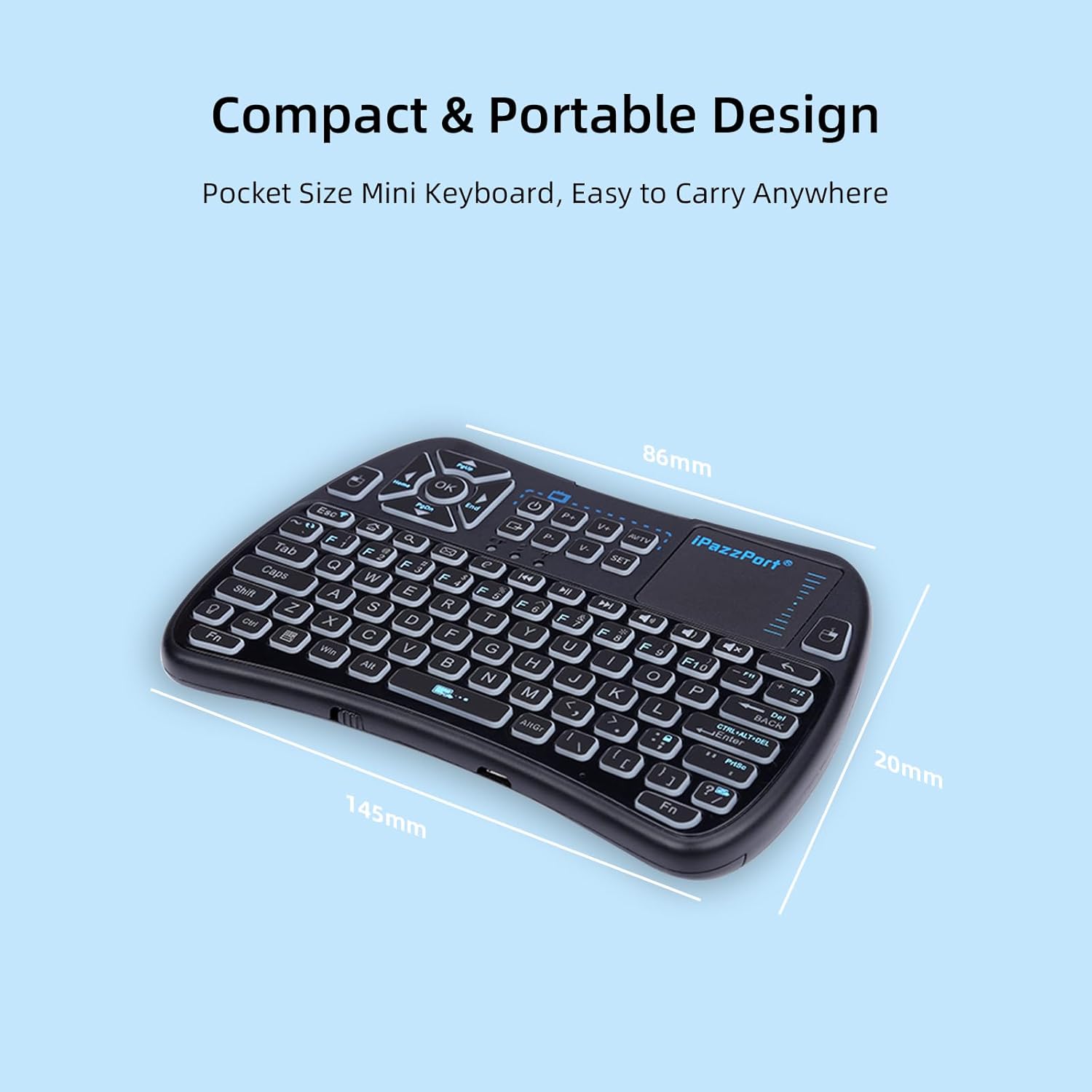
Image: The iPazzPort keyboard with dimensions (145mm x 86mm x 20mm) highlighting its compact and portable design.
9. Informacje o gwarancji
This iPazzPort product comes with a 1-letnia gwarancja producenta from the date of purchase. The warranty covers defects in materials and workmanship under normal use. It does not cover damage caused by misuse, accidents, unauthorized modifications, or external causes. Please retain your proof of purchase for warranty claims.
10. Wsparcie
For technical support, warranty claims, or further assistance, please contact iPazzPort customer service through the retailer's platform or visit the official iPazzPort website. Please have your model number (61SM) and purchase details ready when contacting support.