
1. Wprowadzenie
The WatchGuard Firebox T185 is a high-performance tabletop firewall designed to provide enterprise-grade security for branch offices and retail environments. This device handles demanding traffic loads and offers flexible connectivity options, including SFP+ fiber, 2.5Gb, and 1Gb Ethernet ports. It integrates advanced threat protection, VPN support, and SD-WAN capabilities to ensure secure and efficient network operations.
2. Informacje dotyczące bezpieczeństwa
- Przed przystąpieniem do obsługi urządzenia przeczytaj wszystkie instrukcje.
- Zapewnij odpowiednie uziemienie, aby zapobiec porażeniu prądem.
- Nie narażaj urządzenia na działanie wilgoci ani ekstremalnych temperatur.
- Używaj wyłącznie zasilacza dołączonego do urządzenia.
- Nie otwierać urządzenia casing; serwisowanie należy zlecić wykwalifikowanemu personelowi.
- Secure the device physically using the Kensington Lock slot to prevent theft.
3. Zawartość opakowania
Sprawdź, czy w opakowaniu znajdują się wszystkie elementy:
- WatchGuard Firebox T185 Appliance
- Zasilacz
- Kabel Ethernet
- Szybki przewodnik
4. Przekroczenie fizyczneview
Familiarize yourself with the ports, indicators, and features of your Firebox T185.

This image displays the WatchGuard Firebox T185, highlighting its front and rear panels. The front panel features LED indicators for status and mode. The rear panel includes a DC power input, two USB 3.2 ports, one O/WAN 1/LAN port, four 1 Gbps LAN ports (ports 2-5), two 2.5 Gbps PoE ports (ports 6-7), one 10 Gbps SFP+ port, a reset button, and a power switch. A Kensington lock slot is also visible.

The WatchGuard Firebox T185 is shown held in a hand, illustrating its compact tabletop form factor suitable for various environments.

Szczegółowy view of the rear panel of the Firebox T185, showing the power input, USB ports, 1GbE LAN ports, 2.5GbE PoE ports, and the SFP+ port.
Wskaźniki LED
Diody LED na panelu przednim wyświetlają informacje o stanie urządzenia:
- Dioda LED stanu: Indicates the operational status of the device.
- Attn LED: Alerts to system warnings or errors.
- Dioda trybu: Pokazuje aktualny tryb pracy.
- Diody LED portów: Wskaż status łącza i aktywność każdego portu sieciowego.
5. Konfiguracja początkowa
- Rozpakuj urządzenie: Carefully remove the Firebox T185 and all accessories from the packaging.
- Podłącz kable sieciowe:
- Connect your internet source (modem or upstream router) to the O/WAN 1/LAN port.
- Podłącz wewnętrzne urządzenia sieciowe (przełączniki, komputery) do Porty LAN (2-5). For higher speeds, use the 2.5 Gbps PoE ports (6-7) lub Port SFP+ w razie potrzeby.
- Podłącz zasilanie: Plug the power adapter into the device's power input and then into a power outlet. Turn on the power switch.
- Włączanie: The device will power on automatically. Observe the LED indicators for boot-up status.
- Konfiguracja wstępna: Uzyskaj dostęp do urządzenia web interface or use WatchGuard Cloud for initial configuration. Refer to the Quick Start Guide for default IP addresses and login credentials.
W tym filmie prezentowany jest produktview of the WatchGuard Firebox T185, demonstrating its features and potential deployment scenarios. It highlights the device's physical aspects and connectivity options.
6. Instrukcja obsługi
Once configured, the Firebox T185 operates continuously to protect your network. Management is typically performed through the WatchGuard Cloud platform or a local web interfejs.
- Monitorowanie: Regularly check the device status through the WatchGuard Cloud dashboard or local interface for alerts and performance metrics.
- Aktualizacje oprogramowania układowego: Keep the device firmware updated to ensure the latest security patches and features. Follow WatchGuard's official update procedures.
- Połączenia VPN: Utilize the VPN features for secure remote access or site-to-site connectivity as configured.
- SD-WAN: Leverage SD-WAN capabilities for optimized traffic routing and network resilience.
7. Konserwacja
- Regularne czyszczenie: Keep the device free from dust. Use a soft, dry cloth to clean the exterior. Do not use liquid cleaners.
- Wentylacja: Zapewnij odpowiedni przepływ powietrza wokół urządzenia, aby zapobiec przegrzaniu. Nie blokuj otworów wentylacyjnych.
- Zarządzanie oprogramowaniem sprzętowym: Periodically check for and apply firmware updates as recommended by WatchGuard.
- Kopia zapasowa konfiguracji: Regularly back up your device configuration to prevent data loss in case of an issue.
8. Rozwiązywanie Problemów
- Brak zasilania:
- Check the power cable connection and ensure the power outlet is functional. Verify the power switch is in the 'On' position.
- Brak połączenia sieciowego:
- Verify all Ethernet cables are securely connected. Check the status of the port LEDs. Ensure your internet service is active. Review network configuration settings.
- Niska wydajność:
- Check network traffic and resource utilization through the management interface. Ensure firmware is up-to-date. Consider reviewing security policies for potential bottlenecks.
- Przegrzanie urządzenia:
- Ensure the device is placed in a well-ventilated area. Clear any dust from the ventilation openings.
9. Specyfikacje techniczne
| Funkcja | Wartość |
|---|---|
| IPS Throughput (full scan) | 2.40 Gb/s |
| Firewall Throughput (IMIX) | 7.90 Gb/s |
| VPN Throughput (IMIX) | 1.14 Gb/s |
| HTTPS (IPS enabled, full scan) | 1.00 Gb/s |
| Interfejsy sieciowe | 4 x 1 GbE, 4 x 2.5 GbE, 1 x SFP/SFP+ |
| Interfejsy wejścia/wyjścia | 1 Serial/2 USB-A 3.2 |
| Nazwa modelu | Ogniwo WatchGuard T185 |
| Funkcja specjalna | UTM, VPN Support, Integrated SD-WAN |
| Zalecane zastosowania | Biznes |
| Technologia łączności | Ethernet, SFP+ |
| Waga przedmiotu | 6.8 funtów |
| System operacyjny | Sprzęt ognioodporny |
| Data Transfer Rate (UTM) | 1830 megabitów na sekundę |
| Maksymalna szybkość przesyłania danych w górę | 1830 megabitów na sekundę |
| Przepustowość portu LAN | 2500 Mb/s |
| Modem Compatible | NIE |
| Zasięg | Software and emergency support |
| UPC | 654522437150 |
| Producent | Strażnik |
| Numer części producenta | WGT185000+WGT1850063 |

This image displays a table detailing key performance specifications for the WatchGuard Firebox T185, including IPS, Firewall, VPN, and HTTPS throughputs, as well as network and I/O interfaces.
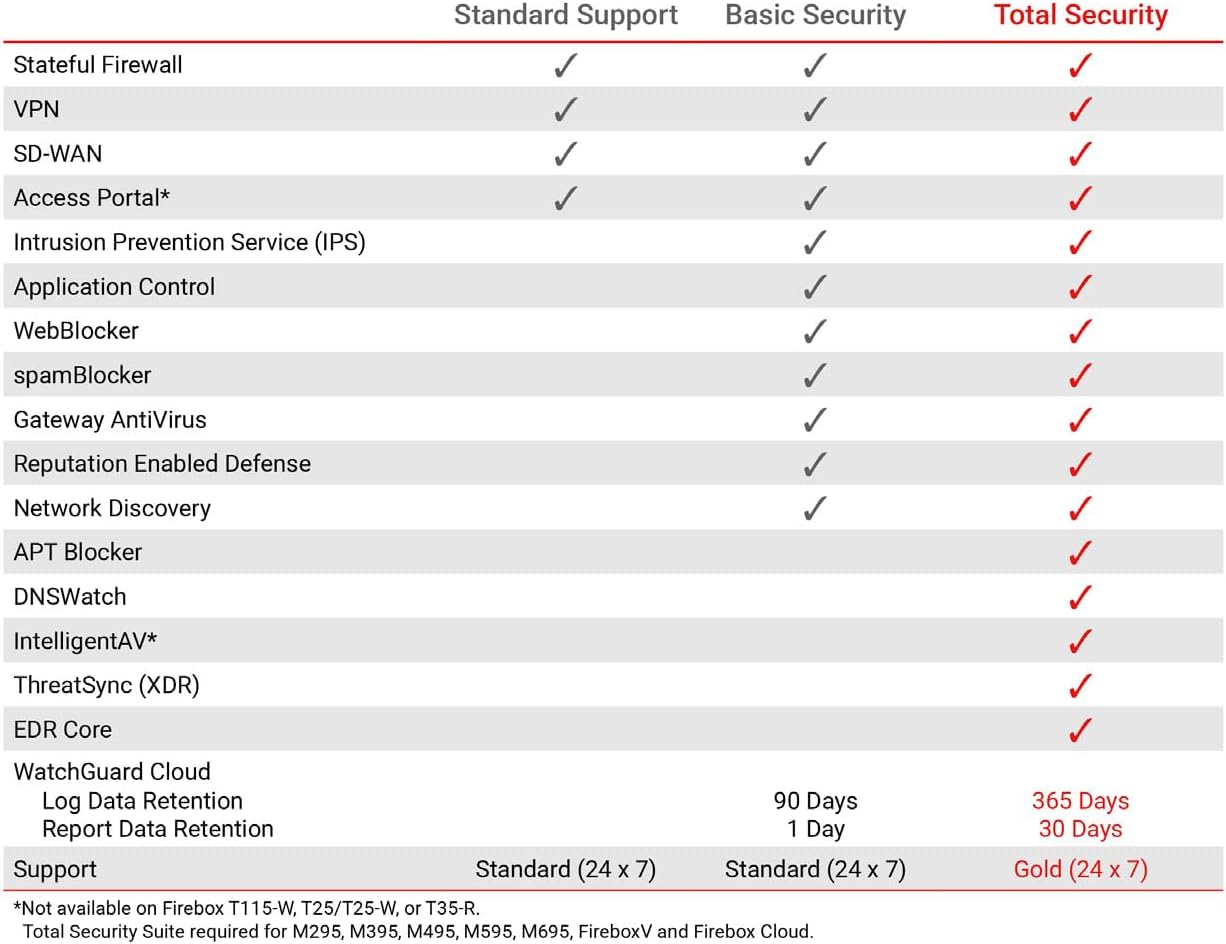
This table compares the security features included with Standard Support, Basic Security Suite, and Total Security Suite for the WatchGuard Firebox T185, showing which features are enabled for each option.
10. Gwarancja i wsparcie
The WatchGuard Firebox T185 comes with a 3-year Standard Support license (WGT185003).
- Wsparcie standardowe: Provides software updates and 24x7 emergency technical assistance, along with business-hours support for routine inquiries.
- Plany ochrony: Additional protection plans may be available, such as a 4-Year Protection Plan or a Complete Protect monthly plan. Refer to your purchase documentation for details.
- Wsparcie producenta: Aby uzyskać dalszą pomoc, odwiedź oficjalną stronę WatchGuard support webstrona lub skontaktuj się z ich obsługą klienta.