
1. Wprowadzenie
The HTVRONT A300 Auto Hat Heat Press Machine is designed for efficient and precise heat transfers onto various hat types. This automatic press simplifies the heat transfer process, making it suitable for both beginners and experienced crafters. This manual provides detailed instructions for safe and effective operation, maintenance, and troubleshooting.
2. Informacje dotyczące bezpieczeństwa
- Caution: Hot Surface. Avoid Contact. The heat plate reaches high temperatures during operation. Always use the provided heat-resistant gloves when handling the machine or materials during and immediately after use.
- Upewnij się, że urządzenie jest umieszczone na stabilnej i odpornej na ciepło powierzchni.
- Trzymać z dala od dzieci i zwierząt domowych.
- Nie obsługuj urządzenia mokrymi rękami ani w pobliżu wody.
- Unplug the machine when not in use or before cleaning and maintenance.
- Do not attempt to disassemble or repair the machine yourself. Contact customer support for assistance.
3. Zawartość opakowania
Sprawdź, czy w opakowaniu znajdują się wszystkie elementy:
- HTVRONT A300 Auto Hat Heat Press Machine (x1)
- Large Hat Platen (Pre-Installed) (x1)
- Small Hat Platen (x1)
- Przewód zasilający (x1)
- Heat-Resistant Gloves (x1 pair)
- User Guide Envelope (x1)

4. Funkcje produktu
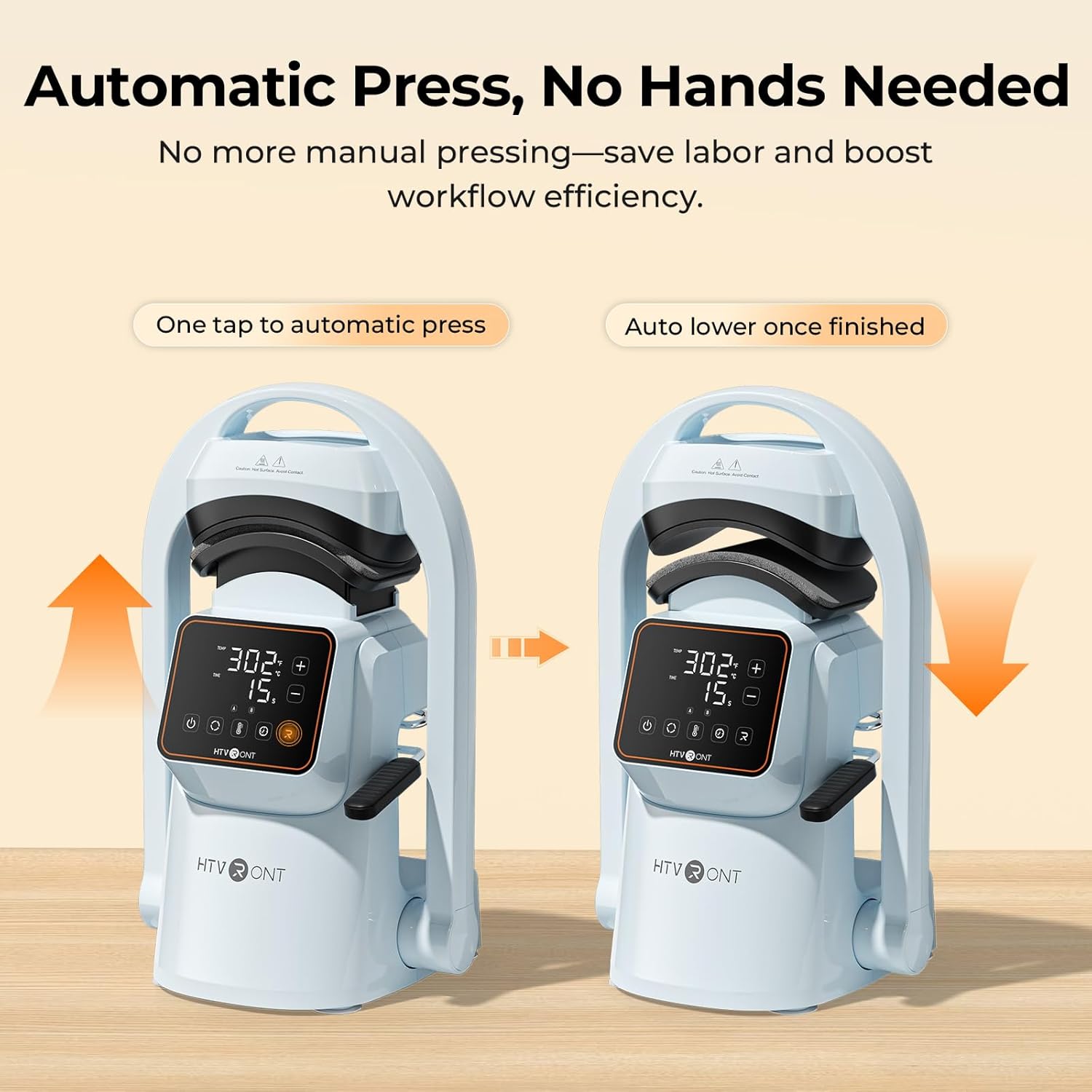
- One-Touch Automatic Press: The machine automatically lowers and lifts, applying consistent pressure and timing with a single touch, reducing manual effort.
- Silny nacisk: Delivers over 176 lb (80 kg) of pressure, suitable for various transfer materials including Hotfix rhinestones, embroidered patches, DTF transfer film, puff heat transfer vinyl, and sublimation paper.
- Dual Hat Platens: Includes two quick-swap platens for adult and children's hat sizes, ensuring even pressure and alignment for different cap styles.
- Inteligentne tryby ustawień wstępnych: Features two customizable preset modes for saving preferred temperature and time settings, simplifying batch production.
- Precise Temperature & Time Control: Intuitive touchscreen allows precise adjustment of temperature (104–410°F / 40–210°C) and time (1–999 seconds).
- Równomierne rozprowadzanie ciepła: Cast-aluminum heat plate heats rapidly and distributes heat uniformly, preventing cold spots. The PTFE coating helps prevent sticking.
- Kompaktowa i lekka konstrukcja: Łatwe do przechowywania i transportu.
- Silne przyssawki: Ensures stability on your workspace during operation.
- Automatyczne wyłączenie: Automatically powers off after 15 minutes of inactivity for safety.


5. Konfiguracja
- Rozpakowywanie: Ostrożnie wyjmij wszystkie elementy z opakowania. Zachowaj opakowanie do późniejszego przechowywania lub transportu.
- Umieszczenie: Place the HTVRONT A300 on a flat, stable, and heat-resistant surface. The integrated suction cups on the base will help secure the machine.
- Podłączenie zasilania: Connect the power cord to the machine and then to a standard electrical outlet.
- Platen Installation: The large hat platen is typically pre-installed. To swap platens, simply remove the current platen by unscrewing it and snap the desired platen into place. Ensure it is securely fastened.

6. Instrukcja obsługi
- Włączanie: Press the power button on the touchscreen display to turn on the machine.
- Ustaw temperaturę i czas: Use the intuitive touchscreen to adjust the temperature and time settings according to your transfer material's requirements. You can also select one of the two preset modes (A or B) for quick setup.
- Prepare the Hat: Pull back the handle to open the press. Place your hat onto the platen, ensuring it is centered and smooth. Use the hat stretcher (if applicable) to flatten the hat surface for optimal pressing.
- Position Transfer Material: Carefully place your DTF film, embroidery patch, sublimation paper, or other transfer material onto the desired area of the hat.
- Inicjacja prasy: Push the handle forward to engage the lower platen. Press the 'Go' button (often indicated by 'R' or a play icon) on the touchscreen. The machine will automatically lower the heat plate, apply pressure, and begin the countdown.
- Ukończenie: Once the timer finishes, the machine will beep, and the heat plate will automatically lift.
- Zdejmij kapelusz: Pull back the handle to fully open the press. Carefully remove the hat using the heat-resistant gloves. Allow the transfer to cool before peeling (if required by your material).


Quick Reference Chart for Heat Transfer Settings
| Przybory | Włókienniczy | Temp | Czas | Notatka |
|---|---|---|---|---|
| Czysty winyl termotransferowy | 100% Cotton, Polycotton, Polyester, etc. | 145°C/293°F | 15s | Zimny Peeling |
| Giltter Heat Transfer Vinyl | 100% Cotton, Polycotton, Polyester, etc. | 150°C/302°F | 15s | Zimny Peeling |
| Holograficzny winyl termotransferowy | 100% Cotton, Polycotton, Polyester, etc. | 150°C/302°F | 15s | Zimny Peeling |
| Kameleonowy winyl termotransferowy | 100% Cotton, Polycotton, Polyester, etc. | 145°C/293°F | 15s | Zimny Peeling |
| Metaliczny winyl termotransferowy | 100% Cotton, Polycotton, Polyester, etc. | 140°C/284°F | 10s | Zimny Peeling |
| Drukowany winyl termotransferowy | 100% Cotton, Polycotton, Polyester, etc. | 145°C/293°F | 15s | Zimny Peeling |
| Odblaskowy winyl termotransferowy | 100% Cotton, Polycotton, Polyester, etc. | 150°C/302°F | 15s | Zimny Peeling |
| Flock Heat Transfer Vinyl | 100% Cotton, Polycotton, Polyester, etc. | 150°C/302°F | 15s | Zimny Peeling |
| Puff Folia termotransferowa | 100% Cotton, Polycotton, Polyester, etc. | 155°C/311°F | 15s | Gorący peeling |
| Papier termotransferowy do ciemnych tkanin | 100% Cotton, Polycotton, Polyester, etc. | 160°C/320°F | 20s | Zimny Peeling |
| Papier termotransferowy do lekkich tkanin | 160°C/320°F | 20s | Zimny Peeling | |
| Papier sublimacyjny | Polycotton, 100% Polyester, etc. | 200°C/392°F | 40s | Gorący peeling |
| Folia transferowa DTF | 100% Cotton, Polycotton, Polyester, etc. | 150°C/302°F | 15s | Zimny Peeling |
| Embroidered Patches | 100% Cotton, Polycotton, Polyester, etc. | 170°C/338°F | 20s | Zimny Peeling |
| Hotfix Rhinestones | 100% Cotton, Polycotton, Polyester, etc. | 175°C/347°F | 20s |
7. Konserwacja
- Cleaning the Heat Plate: After the machine has cooled completely, wipe the PTFE-coated heat plate with a soft, damp cloth to remove any residue. Do not use abrasive cleaners or sharp objects that could damage the coating.
- Ogólne sprzątanie: Przetrzyj zewnętrzną część urządzenia suchą lub lekko wilgotną szmatką.amp płótno.
- Składowanie: Gdy urządzenie nie jest używane, przechowuj je w suchym i wolnym od kurzu pomieszczeniu.
8. Rozwiązywanie Problemów
If you encounter issues with your HTVRONT A300, refer to the following common problems and solutions:
- Maszyna się nie włącza: Ensure the power cord is securely plugged into both the machine and a working electrical outlet. Check if the outlet has power.
- Nierównomierne przenoszenie ciepła: Verify that the hat is placed smoothly on the platen and that the transfer material is flat. Ensure the correct temperature and time settings are used for your specific material.
- Transfer Material Not Sticking: Double-check the recommended temperature, time, and pressure settings for your material. Ensure the material is compatible with heat pressing.
- Machine Not Pressing Automatically: Ensure the handle is fully engaged and the 'Go' button has been pressed.
For further assistance, please contact HTVRONT customer support.
9. Specyfikacje
| Funkcja | Szczegół |
|---|---|
| Marka | HTVRONT |
| Model | A300 |
| Tworzywo | Aluminium |
| Kolor | Niebieski |
| Wymiary produktu (dł. x szer. x wys.) | 17.72" x 12.4" x 11.22" |
| Rozmiar płyty grzewczej | 5.70" x 3.68" x 2.28" (14.52 x 9.36 x 5.80 cm) |
| Hat Platen Sizes | Small: 6.69" x 2.76" (7 x 17 cm) / Large: 5.9" x 3.15" (8 x 15 cm) |
| Moc | 350 W |
| Zakres temperatur | 104–410°F / 40–210°C |
| Zakres czasu | 1–999 sekund |
| Maksymalne ciśnienie | ≥ 176 lb (80 kg) |
10. Gwarancja i wsparcie
The HTVRONT A300 Auto Hat Heat Press Machine comes with a 1-letnia gwarancja od daty zakupu. Niniejsza gwarancja obejmuje wady produkcyjne i usterki powstałe podczas normalnego użytkowania.
For warranty claims, technical support, or any questions regarding the product, please contact HTVRONT customer service through their official weblub u sprzedawcy, u którego produkt został zakupiony. Kontaktując się z pomocą techniczną, przygotuj dowód zakupu i numer modelu produktu.