
Wstęp
Welcome to the world of robotics with your new Xtrem Bots Bionic Robot! This interactive robot is designed to provide an engaging and educational experience, allowing users to explore basic programming concepts and remote control operation. With its versatile movement modes, LED lights, and robotic sounds, the Bionic Robot offers hours of interactive fun.

Image: The Xtrem Bots Bionic Robot in white and green, standing next to its white remote control.
Zawartość opakowania
- 1 x Xtrem Bots Bionic Robot (Model XT3803418)
- 1 x Pilot zdalnego sterowania
- Instrukcja obsługi (ten dokument)
Organizować coś
1. Instalacja baterii
The Xtrem Bots Bionic Robot requires 2 AA batteries (included) for operation.
- Znajdź komorę baterii z tyłu robota.
- Za pomocą małego śrubokręta (nie ma go w zestawie) otwórz pokrywę komory baterii.
- Włóż 2 baterie AA, zwracając uwagę na prawidłową polaryzację (+/-).
- Załóż pokrywę komory baterii i zabezpiecz ją śrubą.
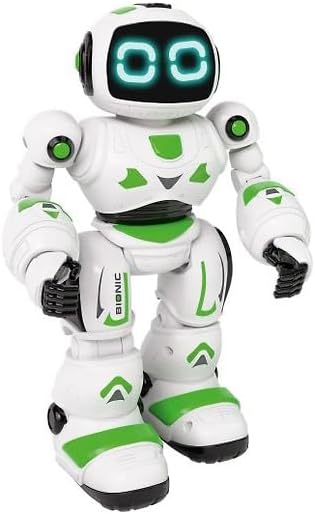
Obraz: Przód view of the Xtrem Bots Bionic Robot, showing its design.
2. Włączanie/wyłączanie zasilania
- To power on the robot, locate the power switch on its back and slide it to the "ON" position.
- To power off the robot, slide the power switch to the "OFF" position.
- Ensure the remote control also has batteries installed and is powered on to establish a connection.
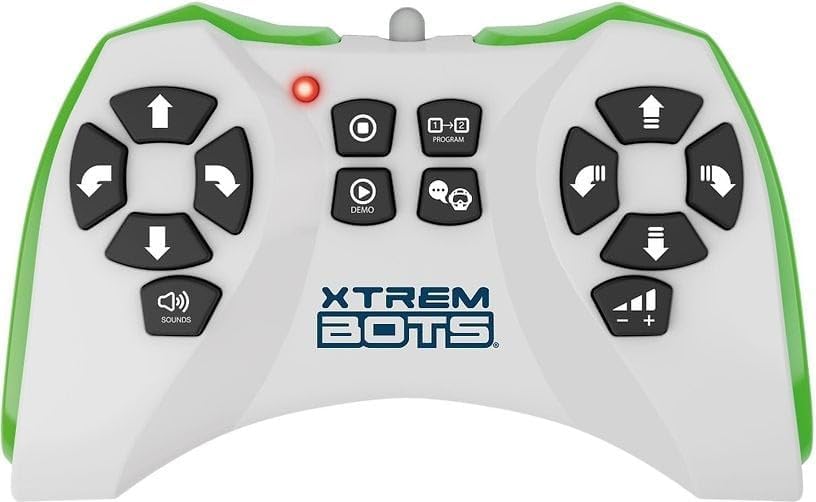
Image: The remote control for the Xtrem Bots Bionic Robot, showing various buttons for movement and functions.
Instrukcja obsługi
Funkcje pilota zdalnego sterowania
The remote control allows you to command your Bionic Robot with various actions. Familiarize yourself with the buttons and their corresponding functions:
- Sterowanie ruchem: Use the directional buttons to make the robot move forward, backward, turn left, and turn right.
- Tryb slajdów: The robot can perform sliding movements.
- Tryb spaceru: The robot can perform walking movements.
- Programowanie: Utilize the programming function to create sequences of up to 20 different actions.
- Światła LED: The robot's eyes feature LED lights that illuminate during operation.
- Robotic Sound: The robot produces various robotic sounds.
Funkcje programowania
To program a sequence of actions:
- Press the "Program" button on the remote control.
- Input your desired sequence of movements and actions (up to 20 steps).
- Press the "Program" button again to execute the programmed sequence.
Video: Demonstration of a remote control robot's programmable functions, including movement, sounds, and gesture sensing.
Konserwacja
- Czyszczenie: Przetrzyj robota i pilota suchą, miękką ściereczką. Nie używaj wody ani środków czyszczących.
- Składowanie: Store the robot and remote control in a cool, dry place away from direct sunlight when not in use. Remove batteries if storing for extended periods.
- Pielęgnacja baterii: Zawsze używaj nowych baterii zalecanego typu. Nie mieszaj starych i nowych baterii ani baterii różnych typów.
Rozwiązywanie problemów
| Problem | Możliwa przyczyna | Rozwiązanie |
|---|---|---|
| Robot nie odpowiada. | Batteries are low or incorrectly installed. Remote control is off or out of range. | Check and replace batteries in both robot and remote. Ensure remote is within operating range. Power cycle both devices. |
| Robot porusza się chaotycznie. | Interference from other electronic devices. Low battery power. | Przenieś się w miejsce, gdzie jest mniej zakłóceń elektronicznych. Wymień baterie. |
| Programming sequence is incorrect. | Incorrect button presses during programming. | Clear the current program and re-enter the sequence carefully. |
Specyfikacje
| Funkcja | Szczegół |
|---|---|
| Numer modelu | XT3803418 |
| Marka | Xtrem Bots |
| Wymiary | Wymiary 30 x 20 x 15 cm |
| Waga | 500 gramów |
| Tworzywo | Plastikowy |
| Kolor | Zielony |
| Typ baterii | 2 baterie AA (w zestawie) |
| Wymagany montaż | NIE |
| Cechy specjalne | LED Lights, Robotic Sound, Programmable (up to 20 functions), Walk and Slide Movement Modes |
| Cel edukacyjny | Introduce children to programming concepts and provide an educational, fun experience. |
Informacje dotyczące bezpieczeństwa
- Nie nadaje się dla dzieci poniżej 3 lat ze względu na małe części.
- Podczas zabawy zaleca się nadzór osoby dorosłej.
- Do not operate near stairs, water, or other hazards.
- Do not attempt to modify or disassemble the robot or remote control.
- Baterie należy utylizować zgodnie z lokalnymi przepisami.
Gwarancja i wsparcie
For warranty information or technical support, please refer to the contact details provided on the product packaging or visit the official Xtrem Bots webstrona.