
1. Wprowadzenie
This manual provides detailed instructions for the setup, operation, and maintenance of your DinoFire RF 2.4GHz Wireless Presentation Clicker. This device is designed to enhance your presentations by offering seamless control over slides and a convenient green laser pointer.
2. Funkcje produktu
- Plug & Play Connectivity: No software or drivers required. Simply plug the USB receiver into your computer.
- Green Laser Pointer: A bright green laser for clear highlighting of presentation content.
- Akumulator: Built-in 300mAh battery, fully rechargeable in approximately 2.5 hours, providing weeks of use.
- Essential Presentation Controls: Intuitive buttons for page up/down, full screen, and black screen functions.
- Ergonomiczna konstrukcja: Comfortable to hold with clearly spaced buttons for confident operation.
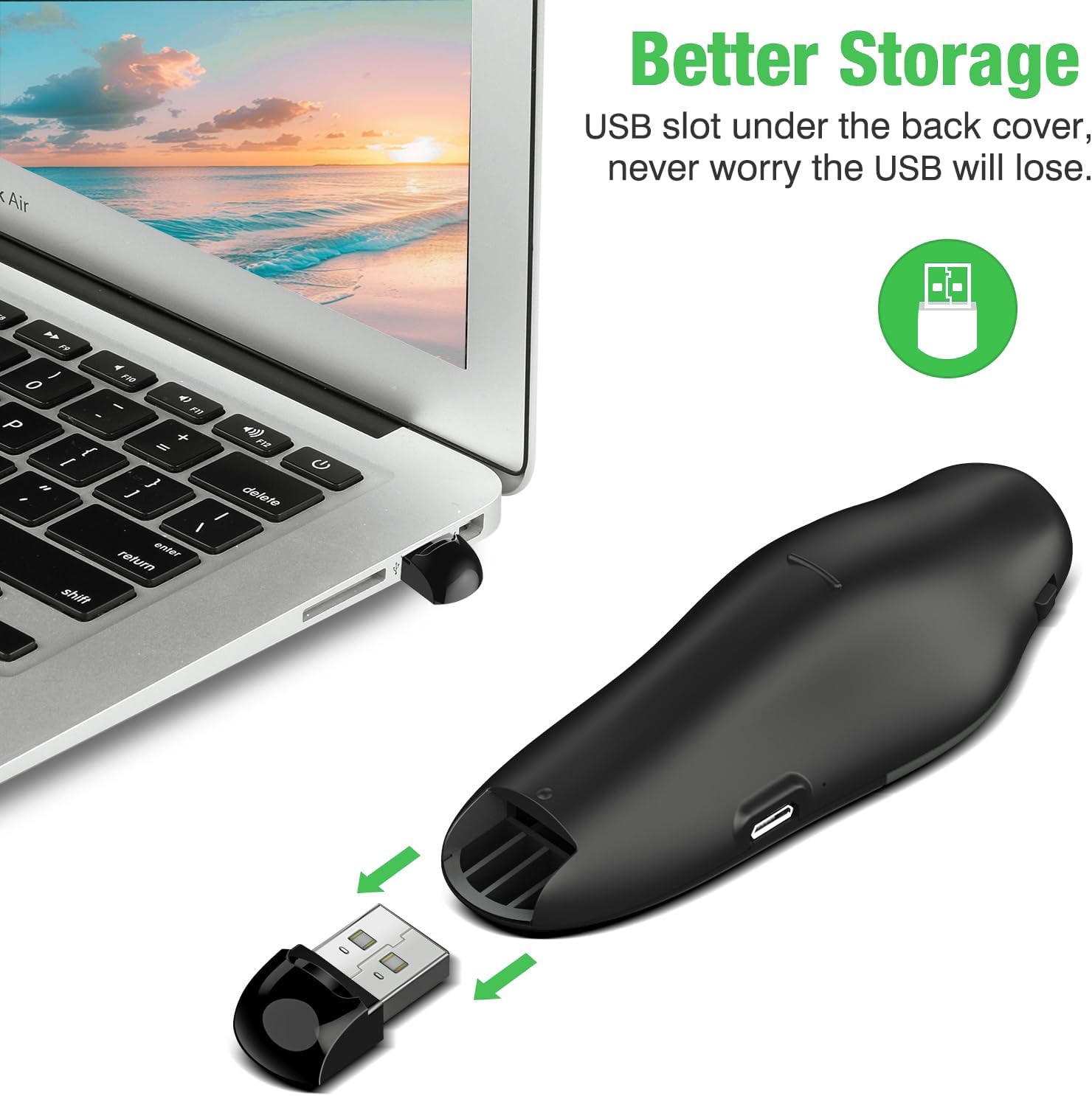
- Zintegrowana pamięć odbiornika USB: The USB receiver stores securely inside the remote to prevent loss.
- Zasięg bezprzewodowy: 2.4GHz wireless connection offers a control range of up to 115 feet (approximately 35 meters).
3. Instrukcje konfiguracji
- Obciążenie prezentera: Before first use, ensure the presentation clicker is fully charged. Connect the clicker to a USB power source using the provided Micro USB cable. A full charge takes approximately 2.5 hours.
- Pobierz odbiornik USB: Open the battery compartment or the designated storage slot on the back of the clicker to retrieve the USB receiver.
- Podłącz odbiornik: Plug the USB receiver into an available USB port on your computer or laptop. The system will automatically detect and install the necessary drivers.
- Włączanie: Locate the power switch on the side of the clicker and slide it to the 'ON' position.
4. Instrukcja obsługi
Once the USB receiver is connected and the clicker is powered on, you can begin controlling your presentation.
- Strona w górę/w dół: Use the arrow buttons (usually left/right or up/down arrows) to navigate through your presentation slides.
- Green Laser Pointer: Press and hold the central button (often marked with a triangle or laser icon) to activate the green laser pointer. Release the button to turn off the laser.
- Pełny ekran/Czarny ekran: The clicker features dedicated buttons for entering full-screen mode or blacking out the screen to redirect audience attention. Refer to the button icons for specific functions.

5. Informacje o baterii i ładowaniu
The DinoFire Presentation Clicker is equipped with a long-lasting 300mAh rechargeable battery.
- Ładowanie: Connect the clicker to any standard USB port using the included Micro USB cable. The charging indicator light will show the charging status.
- Czas ładowania: Pełne naładowanie trwa zazwyczaj około 2.5 godzin.
- Czas pracy baterii: A fully charged battery can last for several weeks, depending on usage.

6. Konserwacja i przechowywanie
- Czyszczenie: Use a soft, dry cloth to clean the surface of the clicker. Avoid using harsh chemicals or abrasive materials.
- Składowanie: When not in use, turn off the clicker to conserve battery life. Store the USB receiver securely within the clicker's designated compartment to prevent loss. Keep the device in a cool, dry place away from direct sunlight and extreme temperatures.

7. Rozwiązywanie Problemów
- Urządzenie nie odpowiada:
- Sprawdź, czy odbiornik USB jest prawidłowo podłączony do działającego portu USB.
- Check if the clicker is powered on.
- Verify the clicker's battery level and recharge if necessary.
- Spróbuj podłączyć odbiornik USB do innego portu USB lub innego komputera, aby wykluczyć problemy z portem.
- Wskaźnik laserowy nie działa:
- Ensure the clicker is powered on and fully charged.
- Press and hold the laser button firmly.
- Ograniczony zasięg:
- Ensure there are no significant obstructions (e.g., walls, large metal objects) between the clicker and the USB receiver.
- Move closer to the computer if possible.
- Avoid using the clicker near other 2.4GHz wireless devices that might cause interference.
8. Specyfikacje
| Funkcja | Szczegół |
|---|---|
| Marka | DinoFire |
| Technologia łączności | Radio Frequency (RF 2.4GHz) |
| Kompatybilne urządzenia | laptop, komputer |
| Funkcja specjalna | Lightweight, Rechargeable, Green Laser |
| Maksymalna liczba obsługiwanych urządzeń | 1 |
| Waga przedmiotu | 2.08 uncji |
| Wymiary opakowania | 4.72 x 2.4 x 1.26 cala |
9. Gwarancja i wsparcie
For warranty information and customer support, please refer to the product packaging or contact DinoFire customer service directly. Keep your purchase receipt for warranty claims.