
Bikevee Bikevee Cycling GPS Computer & Bikevee Out Front Mount
Instrukcja obsługi
Bikevee Wireless Cycling GPS Computer
Model: Bikevee Cycling GPS Computer & Out Front Mount
1. Wprowadzenie
This manual provides detailed instructions for the Bikevee Wireless Cycling GPS Computer, a device designed to track and display various cycling data. It features a 2.4-inch LCD display with auto backlight, IPX7 waterproofing, and multi-satellite GPS tracking for accurate data collection.
1.1 Główne cechy
- Dłuższa żywotność baterii: Equipped with a 650mAh rechargeable battery, providing up to 28 hours of continuous use.
- Precision GPS Tracking: Utilizes 5-satellite systems (GPS, BDS, GLONASS, Galileo, QZSS) for stable and accurate signal reception.
- Trwałe i wodoodporne: IPX7 waterproof rating ensures resistance to rain and splashes.
- Wyczyść wyświetlacz: 2.4-inch LCD screen with automatic backlight for visibility in various lighting conditions.
- Dane kompleksowe: Tracks speed (MPH/KM/H), distance, time, temperature, altitude, gradient, and more.
1.2 Zawartość pudełka
Sprawdź, czy w opakowaniu znajdują się wszystkie komponenty:
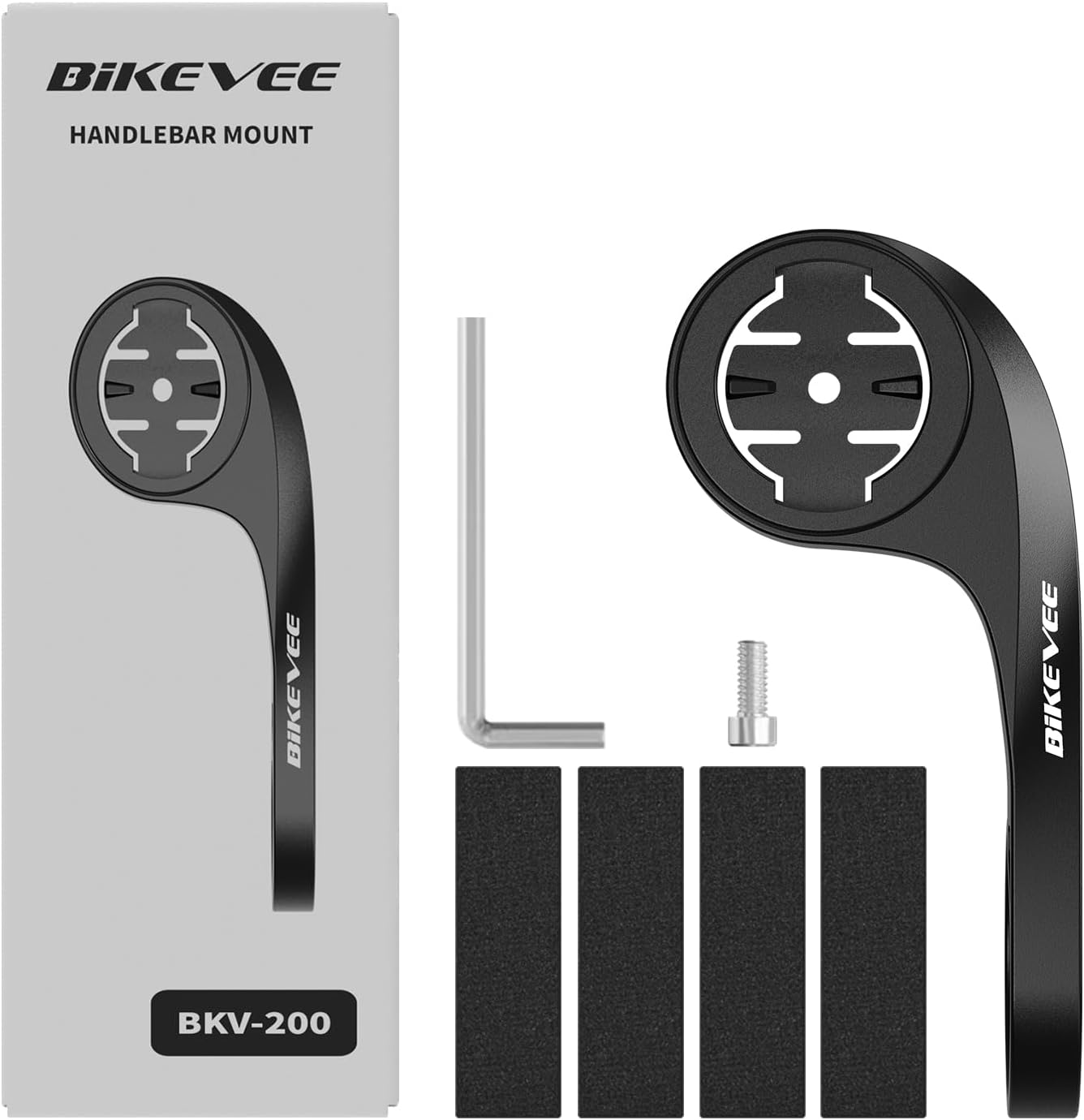
Figure 1.1: Package Contents. Includes Bike Computer, Charging Cable, Rubber Rings, Mount, Rubber Pad, and User Manual.
- Bikevee GPS Cycling Computer
- Standardowy uchwyt rowerowy
- Out Front Mount
- Podkładki gumowe
- Kabel ładujący (typ C)
- Pierścienie gumowe do montażu mocowań
- Instrukcja obsługi
2. Konfiguracja i instalacja
2.1 Ładowanie urządzenia
Before first use, fully charge the Bikevee GPS Computer. Connect the provided Type-C charging cable to the device's charging port and a USB power source. The battery indicator on the screen will show charging status.
2.2 Montaż urządzenia
The Bikevee GPS Computer comes with both a standard bike mount and an out front mount. Choose the mount that best suits your preference and bicycle setup.
2.2.1 Standard Bike Mount Installation
- Place the rubber pad on your bicycle's handlebar or stem.
- Umieść standardowy uchwyt rowerowy na gumowej podkładce.
- Secure the mount using the provided rubber rings, wrapping them around the handlebar/stem and hooking them onto the mount.
- Align the Bikevee GPS Computer with the mount's grooves and twist clockwise until it locks into place.
2.2.2 Out Front Mount Installation

Figure 2.1: Bikevee Out Front Mount.
- Place the rubber pad around your bicycle's handlebar where you intend to install the mount.
- Position the out front mount over the rubber pad.
- Use the provided Allen key to tighten the screw on the mount's clamp around the handlebar until it is secure.
- Align the Bikevee GPS Computer with the mount's grooves and twist clockwise until it locks into place.
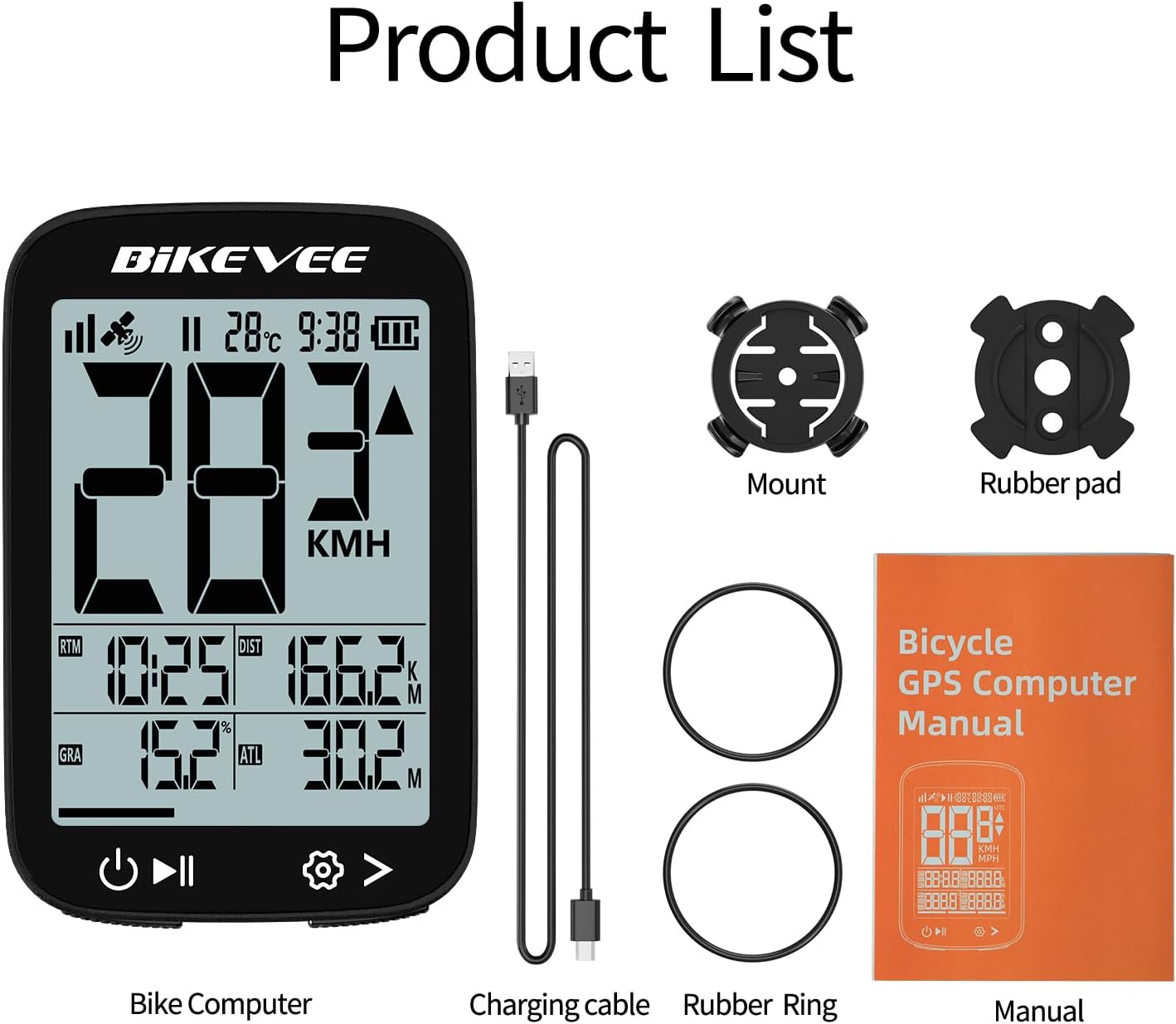
Figure 2.2: Handlebar Mount Components.
2.3 Pierwsze włączenie i ustawienia
- Włączanie: Press and hold the power button (usually located at the bottom left) until the screen illuminates.
- Wybór jednostki: Upon first power-on or after a reset, you may be prompted to select your preferred unit of measurement (MPH or KM/H). Use the navigation buttons to select and confirm.
- Namierzanie GPS: Take the device outdoors to an open area to allow it to acquire GPS satellite signals. This may take a few moments. A stable GPS signal icon will appear once connected.
3. Instrukcja obsługi
3.1 Podstawowa obsługa
- Włączanie/wyłączanie: Naciśnij i przytrzymaj lewy przycisk, aby włączyć lub wyłączyć zasilanie.
- Start/Pauza/Zatrzymanie jazdy: Press the middle button to start recording a ride. Press again to pause. Press and hold to stop and save the ride data.
- Page Switching: Use the right button to cycle through different data display pages.
- Podświetlenie: The device features an automatic backlight that adjusts based on ambient light conditions.
3.2 Data Display and Interpretation
The Bikevee GPS Computer displays up to 14 types of cycling data, providing comprehensive insights into your ride.
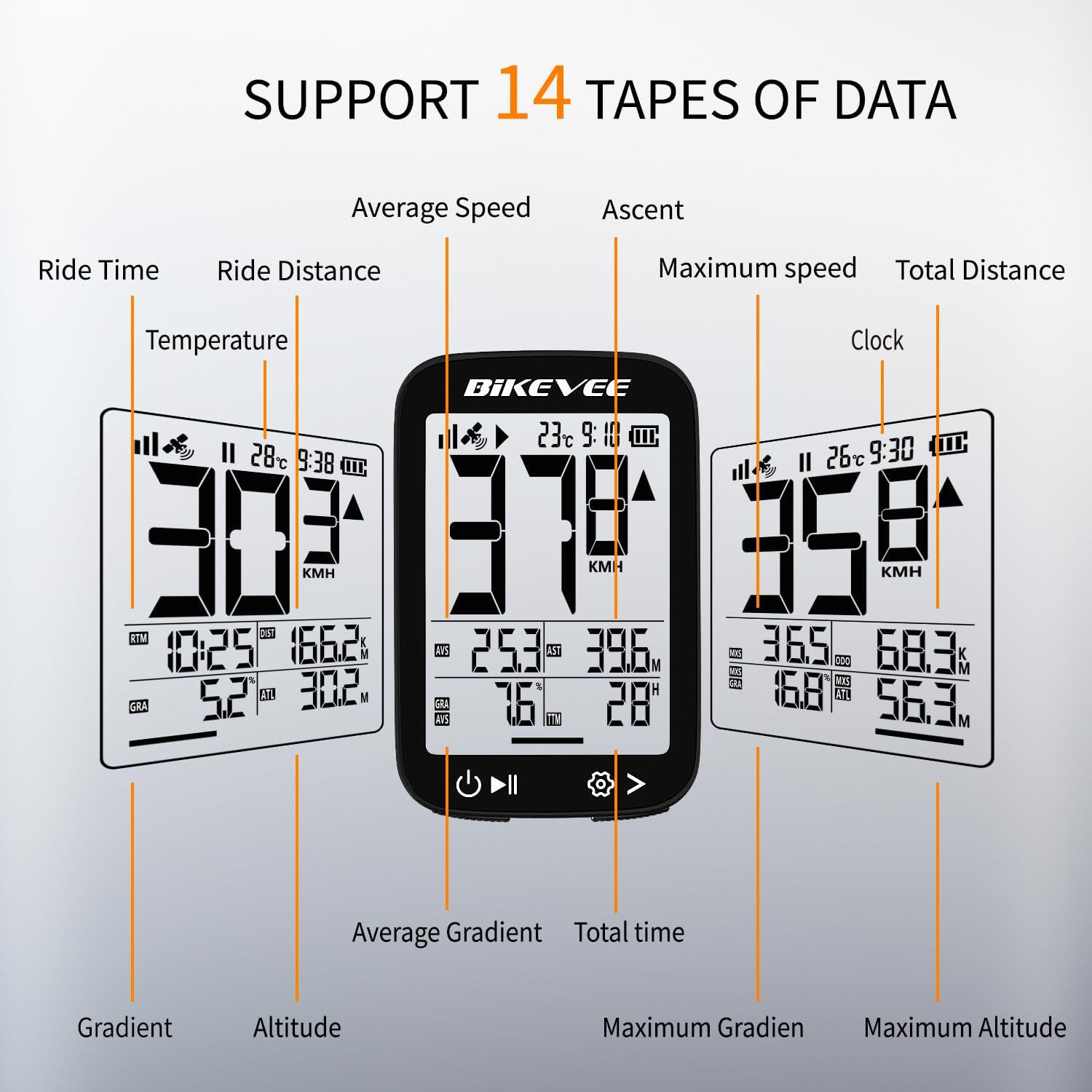
Figure 3.1: Supported Data Types Display.
- Obecna prędkość: Displays your real-time speed (MPH or KM/H).
- Średnia prędkość: The average speed for the current ride.
- Maksymalna prędkość: The highest speed recorded during the current ride.
- Czas jazdy: Duration of the current active ride.
- Ride Distance: Dystans pokonany podczas bieżącego przejazdu.
- Całkowity dystans (licznik kilometrów): Cumulative distance recorded by the device.
- Temperatura: Temperatura otoczenia.
- Zegar: Aktualny czas.
- Wzlot: Total elevation gained during the ride.
- Gradient: Current incline or decline percentage.
- Wysokość: Current elevation above sea level.

Figure 3.2: Display Icons and Their Meanings.
- Sygnał satelitarny: Wskazuje siłę sygnału GPS.
- IPX7: Confirms waterproof rating.
- Poziom naładowania baterii: Pokazuje poziom naładowania baterii.
- Automatyczne podświetlenie: Indicates auto backlight feature is active.
- Typ C: Denotes the charging port type.
- Speed Comparison: Arrow indicates if current speed is higher or lower than average speed.
4. Konserwacja i pielęgnacja
4.1 Czyszczenie urządzenia
Aby zachować optymalną wydajność i wygląd urządzenia, należy je regularnie czyścić:
- Przetrzyj ekran i obudowę miękką szmatką.amp płótno.
- Avoid using abrasive cleaners, solvents, or chemical sprays, as these can damage the device's surface or internal components.
- Ensure the charging port cover is securely closed to prevent dust and water ingress.
4.2 Wodoodporność (IPX7)

Figure 4.1: IPX7 Waterproof Feature.
The Bikevee GPS Computer has an IPX7 waterproof rating, meaning it is protected against temporary immersion in water (up to 1 meter for 30 minutes). However, it is important to note:
- Nie zanurzaj urządzenia w wodzie na dłuższy czas.
- Unikaj strumieni wody pod wysokim ciśnieniem.
- Ensure the charging port cover is sealed before exposure to water.
4.3 Pielęgnacja i przechowywanie baterii
- Przechowuj urządzenie w chłodnym, suchym miejscu, gdy nie jest używane.
- Unikaj wystawiania urządzenia na działanie ekstremalnych temperatur (wysokich lub niskich) przez dłuższy czas.
- W przypadku długotrwałego przechowywania naładuj akumulator do poziomu około 50%, aby wydłużyć jego żywotność.
5. Rozwiązywanie Problemów
If you encounter issues with your Bikevee GPS Computer, refer to the following common problems and solutions:
| Problem | Możliwa przyczyna | Rozwiązanie |
|---|---|---|
| Urządzenie nie włącza się. | Niski poziom naładowania baterii. | Naładuj urządzenie do pełna przy użyciu dołączonego kabla typu C. |
| No GPS signal or inaccurate readings. | Przeszkoda view nieba; początkowe przejęcie sygnału. | Move to an open outdoor area. Wait a few minutes for signal acquisition. Avoid dense forests or tunnels. |
| Wyświetlacz jest słaby lub nieczytelny. | Auto backlight setting; low battery. | Ensure sufficient battery charge. The backlight adjusts automatically; try moving to a different lighting condition. |
| Urządzenie zawiesza się lub przestaje reagować. | Błąd oprogramowania. | Perform a soft reset by pressing and holding the power button for 10-15 seconds until the device restarts. |
6. Specyfikacje
Detailed technical specifications for the Bikevee Wireless Cycling GPS Computer:

Figure 6.1: Device Dimensions and Weight.
- Model: Bikevee Cycling GPS Computer
- Wyświetlacz: 2.4-inch LCD, Automatic Backlight
- Bateria: Akumulator litowo-jonowy 650 mAh
- Czas pracy baterii: Do 28 godzin (ciągłe użytkowanie)
- Systemy GPS: GPS, BDS, GLONASS, Galileo, QZSS (5-satellite tracking)
- Stopień wodoodporności: IPX7
- Wymiary: Approximately 70mm (Height) x 45mm (Width) / 2.76in x 1.77in
- Waga: Approximately 50g / 0.11lb
- Port ładowania: USB Typ C
- Data Types Supported: 14 types (e.g., Speed, Distance, Time, Temperature, Altitude, Gradient)
7. Informacje o gwarancji
The Bikevee Wireless Cycling GPS Computer is covered by a limited manufacturer's warranty. This warranty typically covers defects in materials and workmanship under normal use. Please retain your proof of purchase for warranty claims.
For specific warranty terms and conditions, including duration and coverage details, please refer to the warranty card included with your product or contact Bikevee customer support directly.
8. Obsługa klienta
If you have any questions, require technical assistance, or need to report an issue with your Bikevee Wireless Cycling GPS Computer, please contact our customer support team.
- Wsparcie online: Visit the official Bikevee webwitryna z odpowiedziami na często zadawane pytania, poradnikami rozwiązywania problemów i formularzami kontaktowymi.
- Wsparcie e-mailowe: Zapoznaj się z opakowaniem produktu lub oficjalnym webstrona zawierająca adres e-mail działu obsługi klienta.
When contacting support, please be prepared to provide your product model number (Bikevee Cycling GPS Computer) and a detailed description of the issue.
Ask a question about this manual
Ask about setup, troubleshooting, compatibility, parts, safety, or missing instructions. Manuals+ will review the question and use this page’s manual context to help answer it.