
Wstęp
This manual provides detailed instructions for the proper use and maintenance of your ORDRO M5 Handheld Camcorder. Please read this manual thoroughly before operating the device to ensure optimal performance and longevity.
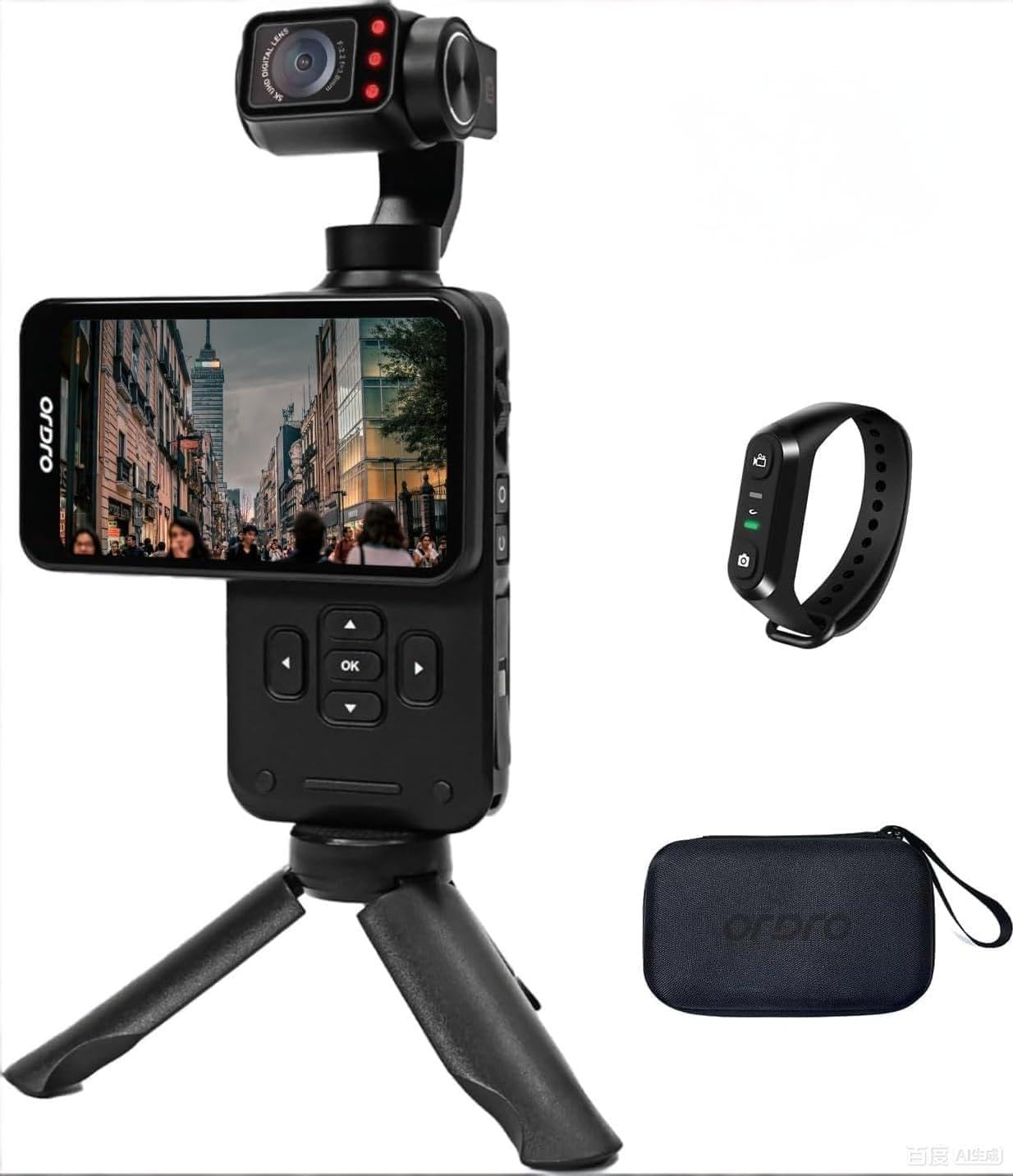
Figure 1: ORDRO M5 Handheld Camcorder Overview
1. Konfiguracja
1.1 Ładowanie akumulatora
The ORDRO M5 camcorder is equipped with a built-in battery. Before first use, fully charge the device. Connect the camcorder to a power source using the provided USB cable. The charging indicator will illuminate during charging and turn off when complete. A full charge provides approximately 150 minutes of 4K/60FPS recording time.

Figure 2: Charging the ORDRO M5 Camcorder
1.2 Wkładanie karty Micro SD
The camcorder supports Micro SD cards for storage. Locate the Micro SD card slot, typically on the side or bottom of the device. Insert the card with the gold contacts facing down until it clicks into place. Ensure the card is rated V60 or higher for optimal 5K video recording performance. A 64GB card is typically included.
1.3 Włączanie/wyłączanie
To power on the camcorder, press and hold the power button until the screen illuminates. To power off, press and hold the power button again until the device shuts down.
2. Instrukcja obsługi
2.1 Podstawowe nagrywanie
After powering on, the camcorder enters standby mode. Press the record button to start recording. Press it again to stop. The device supports 5K at 30fps and 4K at 60fps video resolutions.
2.2 3.5-inch Rotating Touch Screen
The 3.5-inch IPS touch screen allows for intuitive control and framing. It can be rotated to switch between horizontal (16:9) and vertical (9:16) shooting orientations, ideal for various platforms like YouTube and TikTok.

Figure 3: Horizontal and Vertical Screen Rotation
2.3 3-Axis Mechanical Gimbal Stabilization
The integrated 3-axis mechanical gimbal provides stable and smooth video footage, even during movement such as hiking or running. This reduces camera shake significantly compared to electronic stabilization.

Figure 4: Gimbal Stabilization in Action
Tryby gimbala:
- Tryb PF (śledzenie panoramy): The camera pans horizontally while maintaining a stable vertical axis.
- Tryb TF (śledzenie przechyłu): The camera tilts vertically while maintaining a stable horizontal axis.
- Tryb L (tryb blokady): The camera maintains a fixed orientation, locking both pan and tilt.
- Tryb POV (pełne śledzenie): The camera follows all movements of the handle (pan, tilt, roll).
- PTZ (Pan-Tilt-Zoom): Allows for controlled movement of the camera's pan, tilt, and zoom functions. Speed settings include Smooth, Regular, and Sport.
2.4 Face Tracking
Activate face tracking by touching the screen to select a face. The camcorder will then automatically lock onto and follow the detected face, keeping it centered in the frame.

Figure 5: Face Tracking Functionality
2.5 Widzenie nocne w podczerwieni
For recording in low-light or dark conditions, activate the infrared night vision function. The camcorder utilizes built-in IR lights to capture clear black and white footage in environments with minimal ambient light.

Figure 6: Infrared Night Vision Operation
2.6 Wide Dynamic Range (WDR) and AE-L Exposure Lock
- WDR: Enhances image quality by capturing more detail in both bright and dark areas of a scene, preventing overexposure in highlights and underexposure in shadows.
- AE-L (blokada ekspozycji): Locks the exposure settings to prevent automatic adjustments, useful in scenes with challenging lighting conditions or when consistent exposure is desired.
2.7 dodatkowych funkcji
- Obiektyw szerokokątny 120°: Rejestruje szersze pole view, suitable for vlogging, landscapes, and group shots.
- Zdjęcia poklatkowe: Records a sequence of images over time and compiles them into a video.
- Ciągłe strzelanie: Wykonuje wiele zdjęć jedno po drugim.
- Długi czas naświetlania: Allows for extended shutter speeds to capture more light in dark environments or create motion blur effects.
- Balans bieli: Adjusts color temperature to ensure accurate color reproduction under different lighting conditions.
- Zwolnione tempo: Records video at a higher frame rate to play back in slow motion.
- Kompensacja ekspozycji EV: Manually adjusts the exposure level to brighten or darken the image.
3. Konserwacja
3.1 Czyszczenie
- Do czyszczenia obudowy kamery należy używać miękkiej, suchej ściereczki.
- Do czyszczenia soczewek i ekranu należy używać specjalnej ściereczki i płynu do czyszczenia soczewek. Unikać materiałów ściernych.
- Nie należy używać silnych detergentów ani rozpuszczalników.
3.2 Przechowywanie
- Przechowuj kamerę w chłodnym, suchym miejscu, z dala od bezpośredniego światła słonecznego i ekstremalnych temperatur.
- Remove the Micro SD card if storing for extended periods.
- Aby zachować sprawność akumulatora przed długotrwałym przechowywaniem, należy upewnić się, że jest on częściowo naładowany (około 50%).
4. Rozwiązywanie Problemów
4.1 Typowe problemy i rozwiązania
- Kamera się nie włącza:
- Upewnij się, że bateria jest w pełni naładowana.
- Naciśnij i przytrzymaj przycisk zasilania przez kilka sekund.
- Cannot record video:
- Sprawdź, czy karta Micro SD jest prawidłowo włożona.
- Sprawdź, czy na karcie Micro SD jest wystarczająca ilość wolnego miejsca.
- Ensure the Micro SD card is not write-protected.
- Wideotage is shaky despite gimbal:
- Ensure the gimbal is calibrated correctly (refer to device settings).
- Avoid extreme or sudden movements that exceed the gimbal's stabilization capabilities.
- Słaba jakość obrazu przy słabym oświetleniu:
- Activate Infrared Night Vision mode.
- Adjust EV exposure compensation if necessary.
- Ekran dotykowy nie reaguje:
- Restart the camcorder.
- Upewnij się, że ekran jest czysty i suchy.
5. Specyfikacje
| Funkcja | Szczegół |
|---|---|
| Marka | ORDRO |
| Numer modelu | WXM5 |
| Rozdzielczość przechwytywania wideo | 5K (5120 Pixels), 4K |
| Technologia czujnika fotograficznego | CMOS (1/2.5 cala) |
| Efektywna rozdzielczość obrazu nieruchomego | 48 MP |
| Stabilizacja obrazu | 3-osiowy mechaniczny gimbal |
| Rozmiar ekranu | 3.5-inch IPS Touch Screen (Rotatable) |
| Typ soczewki | 120° Wide Angle (Minimum/Maximum Focal Length: 3mm, Minimum/Maximum Aperture: 2.2f) |
| Typ pamięci flash | Micro SD (V60, UHS Speed Class 3 recommended) |
| Format przechwytywania wideo | MP4 |
| Obsługiwany format audio | AAC, MP3 |
| Średnia żywotność baterii | 150 minutes (4K/60FPS) |
| Technologia łączności | USB |
| Cechy specjalne | IR Night Vision, WDR, Face Tracking, Time-Lapse, Continuous Shooting, AE-L Exposure Lock, Long Exposure, White Balance, Slow Motion, EV Exposure Compensation |
| Współczynnik kształtu | Ręczny |
| Poziom wodoodporności | Nie jest wodoodporny |
6. Informacje o gwarancji
The ORDRO M5 Handheld Camcorder comes with a 1-letnia gwarancja producenta od daty zakupu. Niniejsza gwarancja obejmuje wady materiałowe i wykonawcze powstałe w wyniku normalnego użytkowania. Nie obejmuje ona uszkodzeń spowodowanych niewłaściwym użytkowaniem, wypadkami, nieautoryzowanymi modyfikacjami ani klęskami żywiołowymi.
Please retain your proof of purchase for warranty claims. For detailed warranty terms and conditions, refer to the official ORDRO webodwiedź witrynę lub skontaktuj się z działem obsługi klienta.
7. Obsługa klienta
If you encounter any issues or have questions regarding your ORDRO M5 camcorder that are not addressed in this manual, please contact ORDRO customer support. Contact information can typically be found on the official ORDRO webmiejscu lub na opakowaniu produktu.
When contacting support, please have your product model number (WXM5) and purchase details ready.