
Wstęp
This manual provides detailed instructions for the setup, operation, and maintenance of your Feihe SR-16ST 15.6-inch Smart TV with integrated Bluetooth Speaker and Karaoke System. Please read this manual thoroughly before using the product to ensure proper function and to maximize your user experience. Keep this manual for future reference.
Produkt ponadview
The Feihe SR-16ST is a versatile entertainment system combining a 15.6-inch Full HD Smart TV with a powerful Bluetooth speaker and a karaoke function. It features a retro-style design with modern capabilities, including Android TV, Chromecast built-in, and Google Assistant voice control. It is designed for various environments such as home, RVs, or camping, requiring a nearby power source for operation.

Image: The Feihe SR-16ST unit, showcasing its 15.6-inch screen, integrated speaker, control knobs, and two wireless microphones.
Główne cechy:
- 15.6-inch Full HD Smart TV: Features Android TV with built-in Chromecast and Google Assistant voice control.
- 200W Peak Power Bluetooth Speaker: Equipped with four 2-inch tweeters and two 5-inch woofers for immersive audio, supporting Bluetooth 5.3.
- System karaoke: Includes two wireless microphones for entertainment. Bass and treble settings are adjustable.
- Retro-Style Design: Combines a classic aesthetic with modern 1080p display technology.
- Wiele opcji łączności: HDMI, USB, AUX inputs, and an external ATSC tuner for live television.
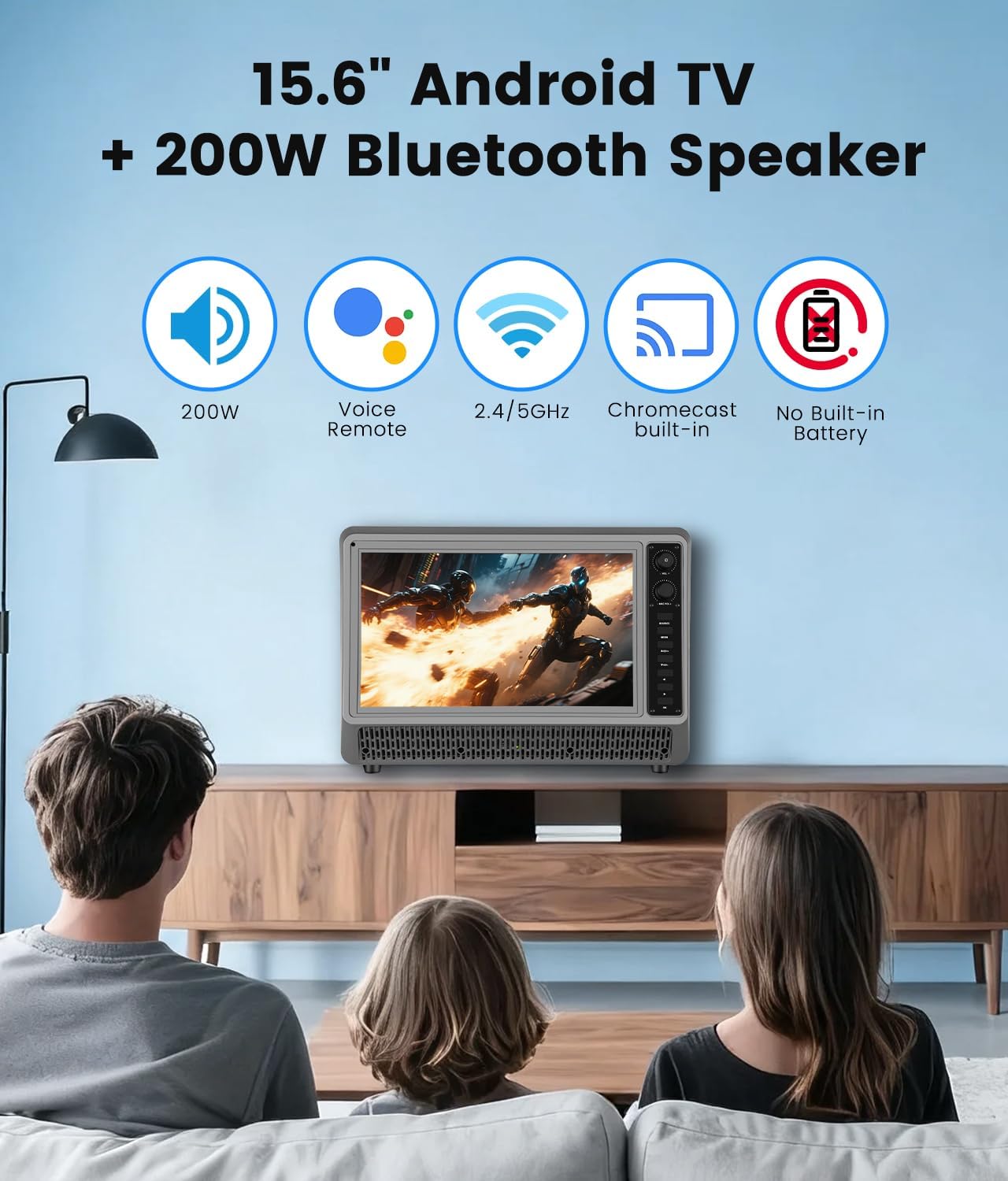
Image: Visual representation of the product's core features, including Android TV, Bluetooth speaker, voice remote, Wi-Fi, Chromecast, and the absence of a built-in battery.
Co jest w pudełku
Carefully unpack your Feihe SR-16ST and ensure all items listed below are present:
- 15.6 inch Small Smart TV with Speaker System
- Zdalne sterowanie
- Zasilacz sieciowy
- 2x mikrofony bezprzewodowe
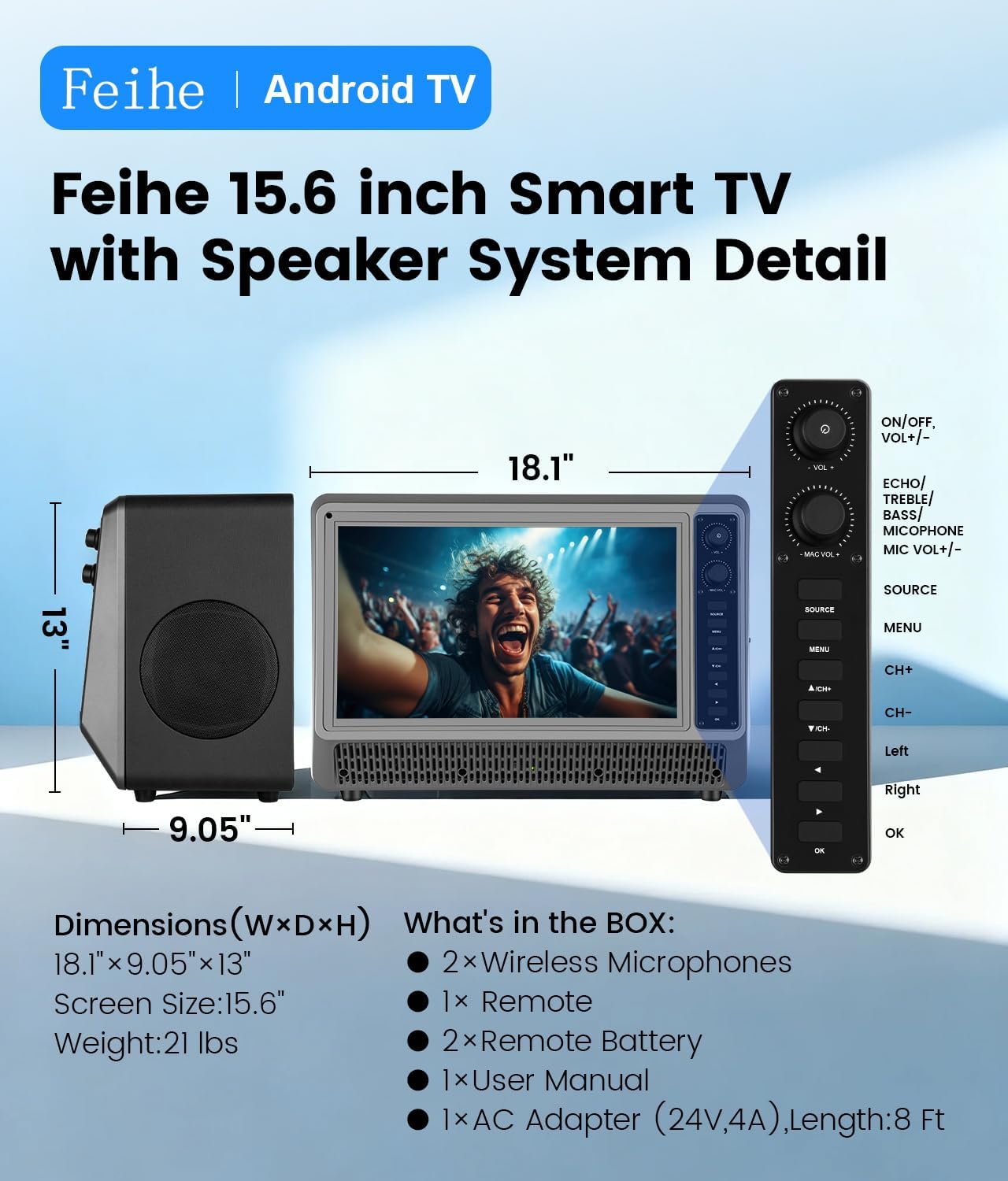
Image: A diagram illustrating the product dimensions and listing the contents of the package.
Przewodnik po konfiguracji
1. Podłączenie zasilania
- Place the Feihe SR-16ST on a stable, flat surface.
- Connect the AC adapter to the power input port on the back of the unit.
- Plug the AC adapter into a standard 110V AC power outlet. The unit requires a continuous power source as it does not have a built-in battery.
2. Initial Android TV Setup
- Press the Power button on the unit or the remote control to turn on the TV.
- Follow the on-screen instructions to complete the initial setup, which includes selecting your language, connecting to a Wi-Fi network (2.4GHz or 5GHz supported), and signing in with your Google account.
- The Google Assistant voice control remote will guide you through its pairing process during the initial setup.
3. Konfiguracja mikrofonu bezprzewodowego
- Włóż baterie do mikrofonów bezprzewodowych (baterie nie są dołączone).
- Turn on the microphones. The TV system should automatically detect and connect to them.
- Adjust microphone volume and echo settings using the controls on the unit or remote.
Instrukcja obsługi
1. Podstawowa obsługa telewizora
- Włączanie/wyłączanie: Use the power button on the unit or remote.
- Nawigacja: Use the directional pad and OK button on the remote to navigate the Android TV interface.
- Wybór wejścia: Press the "Source" button on the remote to switch between HDMI, AUX, USB, and ATSC tuner inputs.
- Asystent Google: Press the Google Assistant button on the remote and speak your commands for content search, app control, and more.
2. Obsługa głośnika Bluetooth
- Łączenie w pary:
- Sprawdź, czy Bluetooth jest włączony na Twoim smartfonie, tablecie lub laptopie.
- On the Feihe SR-16ST, navigate to the Bluetooth settings or select the Bluetooth input source.
- Szukaj "KT-010" (or similar device name) on your external device and pair.
- Sterowanie dźwiękiem: Adjust volume using the TV remote or the dedicated volume knob on the unit. The speaker system provides 200W peak power with deep bass and clear treble.
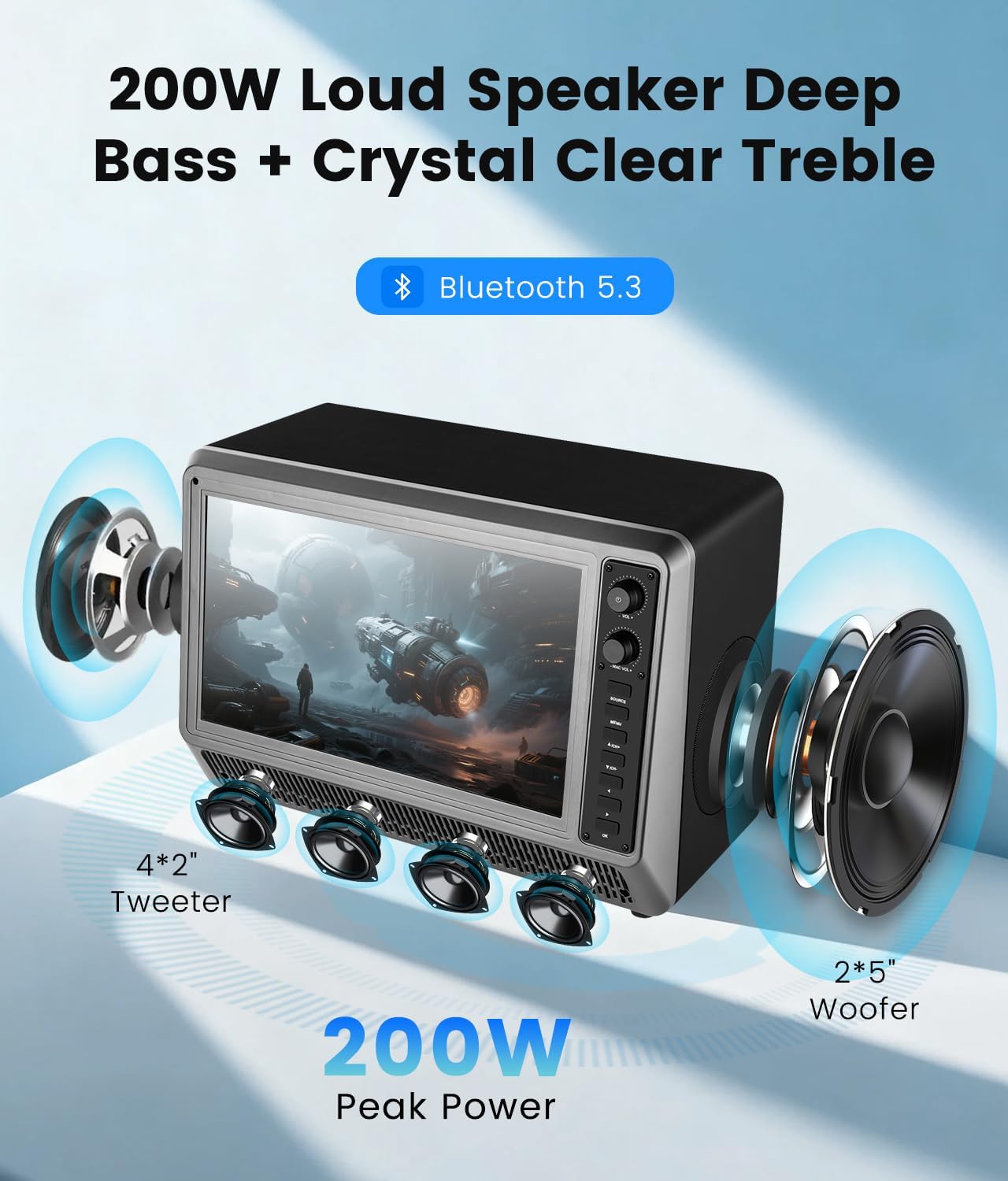
Obraz: Wybuch view illustrating the speaker configuration with tweeters and woofers, emphasizing the audio power.
3. Karaoke System Operation
- Użycie mikrofonu: Once paired, the wireless microphones are ready for use.
- Dostosowanie dźwięku: Use the dedicated controls on the unit or remote to adjust microphone volume, echo, bass, and treble settings for optimal karaoke performance.
- Notatka: The system does not support lyric display directly. You will need to use a separate app or source for lyrics.

Image: A group of people using the Feihe SR-16ST for karaoke, illustrating the wireless microphone functionality and Bluetooth range.
4. Opcje łączności
- HDMI: Connect external devices such as gaming consoles or streaming sticks.
- USB: Odtwarzaj media files z dysku USB.
- AUX: Podłącz urządzenia audio za pomocą kabla audio 3.5 mm.
- Tuner ATSC: Connect an antenna to receive live over-the-air television broadcasts.
- Wbudowany Chromecast: Cast content directly from compatible apps on your smartphone or tablet.
- OTG (w podróży): Supports USB OTG for connecting peripherals.
- Słuchawka: Podłącz słuchawki do prywatnego słuchania.
Ważna uwaga dotycząca zgodności:
- This TV is not compatible with Xfinity, Comcast, Verizon, Spectrum, or DirecTV Cable Services.
- The remote control is not compatible with Fire Stick or Roku devices.

Image: An illustration detailing the available input and output ports on the rear of the unit.
Konserwacja
- Czyszczenie ekranu: Używaj miękkiej, niepozostawiającej włókien ściereczki przeznaczonej specjalnie do ekranów urządzeń elektronicznych. Nie używaj silnych środków chemicznych ani materiałów ściernych.
- Czyszczenie urządzenia: Wipe the exterior with a soft, dry cloth. Avoid getting moisture into any openings.
- Składowanie: Jeśli urządzenie będzie przechowywane przez dłuższy czas, należy odłączyć je od zasilania i przechowywać w chłodnym, suchym miejscu.
Rozwiązywanie problemów
| Problem | Możliwa przyczyna | Rozwiązanie |
|---|---|---|
| Brak zasilania | Kabel zasilający nie jest podłączony; gniazdko nie działa. | Ensure AC adapter is securely connected to the unit and a working power outlet. |
| Brak obrazu/dźwięku | Incorrect input source selected; external device not connected properly. | Press the "Source" button to select the correct input. Check all cable connections. |
| Urządzenie Bluetooth nie łączy się | Bluetooth not enabled on external device; device too far. | Ensure Bluetooth is active on your device. Move the device closer to the Feihe SR-16ST (within 50ft). |
| Mikrofony nie działają | Microphones not powered on; batteries low. | Turn on microphones. Replace batteries if needed. |
| Cannot connect to cable services (Xfinity, etc.) | Product incompatibility. | This product is not designed to be compatible with these specific cable services. Use the ATSC tuner for over-the-air broadcasts or other input methods. |
Specyfikacje
| Funkcja | Szczegół |
|---|---|
| Marka | Feihe |
| Numer modelu | SR-16ST |
| Rozmiar ekranu | 15.6 cali |
| Technologia wyświetlania | PROWADZONY |
| Rezolucja | 1080p Full HD |
| Częstotliwość odświeżania | 60 Hz |
| Proporcje obrazu | 16:9 |
| Wyjście głośnika | Moc szczytowa 200 W. |
| Wersja Bluetooth | 5.3 |
| Łączność | HDMI, USB, AUX, Bluetooth, Wi-Fi (2.4/5GHz), OTG, Earphone |
| Cechy specjalne | Android TV, Chromecast Built-in, Google Assistant Voice Remote, Wireless Microphones, ATSC Tuner, Retro-Style Design |
| Moc wejściowa | 110 V (AC) |
| Pobór mocy | 96 watów |
| Wymiary produktu (szer. x gł. x wys.) | 18.11" x 9.05" x 12.99" |
| Waga przedmiotu | 27.8 funta |

Image: The retro design of the Feihe SR-16ST, highlighting its 1080p display and tactile quality.
Gwarancja i wsparcie
Feihe provides a one-year warranty for the SR-16ST Smart TV with Bluetooth Speaker and Karaoke System. This warranty covers manufacturing defects and ensures responsive customer support.
If you encounter any issues or have questions regarding your product, please contact Feihe customer support. Refer to the product packaging or the official Feihe webna tej stronie znajdziesz najbardziej aktualne dane kontaktowe.