
1. Wprowadzenie
This manual provides detailed instructions for setting up, operating, maintaining, and troubleshooting your AWOW AK10 Pro Mini PC. Please read this manual thoroughly before using the device to ensure proper functionality and to maximize your user experience.
2. Co znajduje się w pudełku
Po otwarciu opakowania należy sprawdzić, czy wszystkie wymienione poniżej elementy znajdują się w opakowaniu i są w dobrym stanie:
- AWOW AK10 Pro Mini PC
- Zasilacz
- Kabel HDMI
- Screws for internal drive installation
- Instrukcja obsługi (ten dokument)
3. Koniec produktuview
The AWOW AK10 Pro is a compact and efficient mini PC designed for various applications, including home, office, and educational use. It features an Intel N100 processor, 8GB RAM, and a 256GB PCIe 3.0 SSD, supporting 4K display output and multiple connectivity options.
3.1 Główne cechy
- Edytor: Intel N100 Quad-Core (do 3.4 GHz)
- Pamięć: 8GB DDR4 RAM (3200MHz)
- Składowanie: 256GB PCIe 3.0 SSD (expandable up to 4TB with M.2 SSD + 2.5" SATA drive)
- Grafika: Intel UHD Graphics with 4K@60Hz dual display support (HDMI 2.0, DisplayPort 1.4)
- Łączność: Dual-band 802.11ac WiFi (2.4GHz/5GHz), Bluetooth 5.2, Gigabit Ethernet
- Porty: USB 3.2 x2, USB 2.0 x2, HDMI, DisplayPort, RJ45 Gigabit Ethernet, 2-in-1 Audio Jack, DC 12V Power Input, CMOS CLR button
3.2 Identyfikacja komponentów
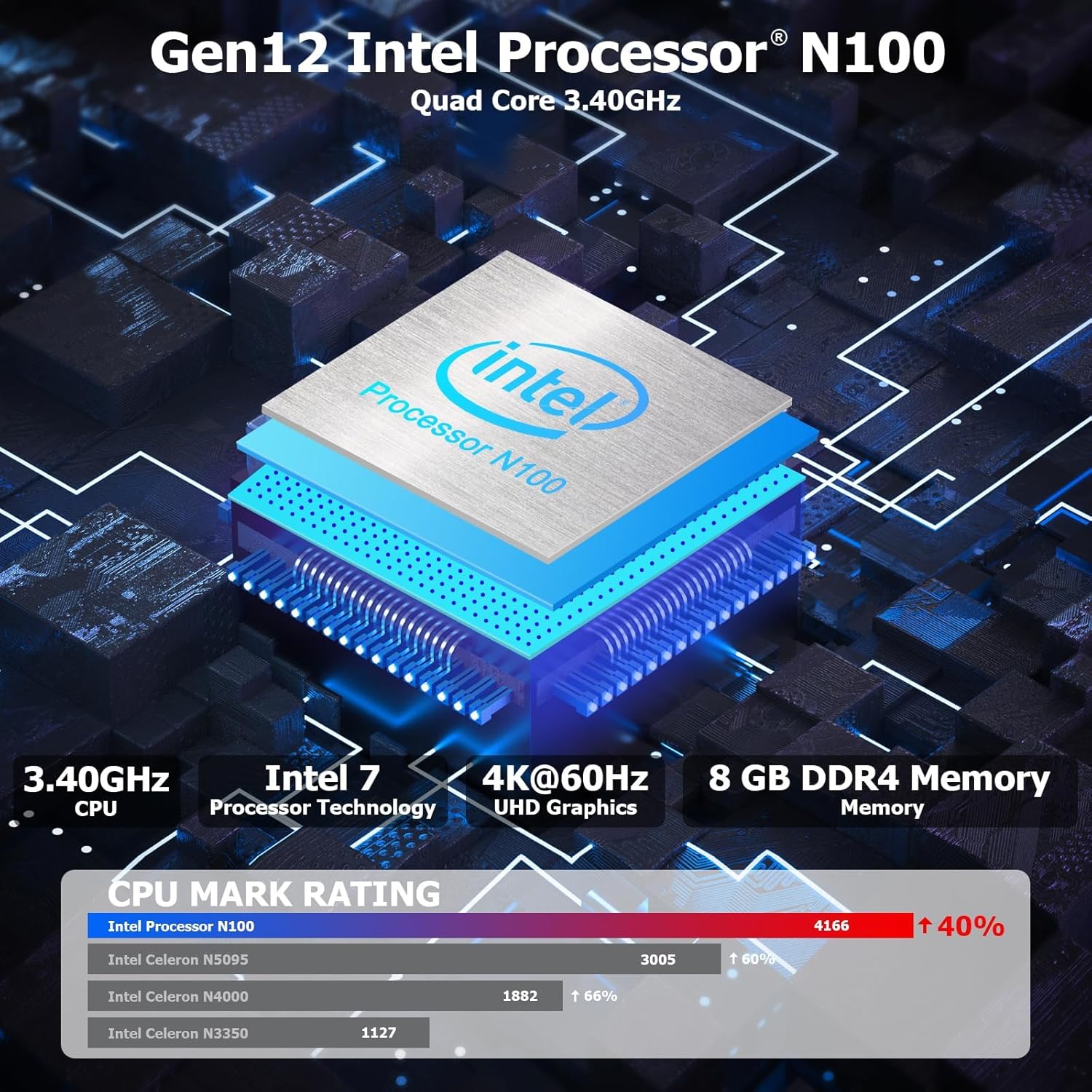
Rysunek 3.1: Wewnętrzny view highlighting the Intel N100 processor, 4K@60Hz capability, and 8GB DDR4 memory, along with a CPU Mark Rating comparison.
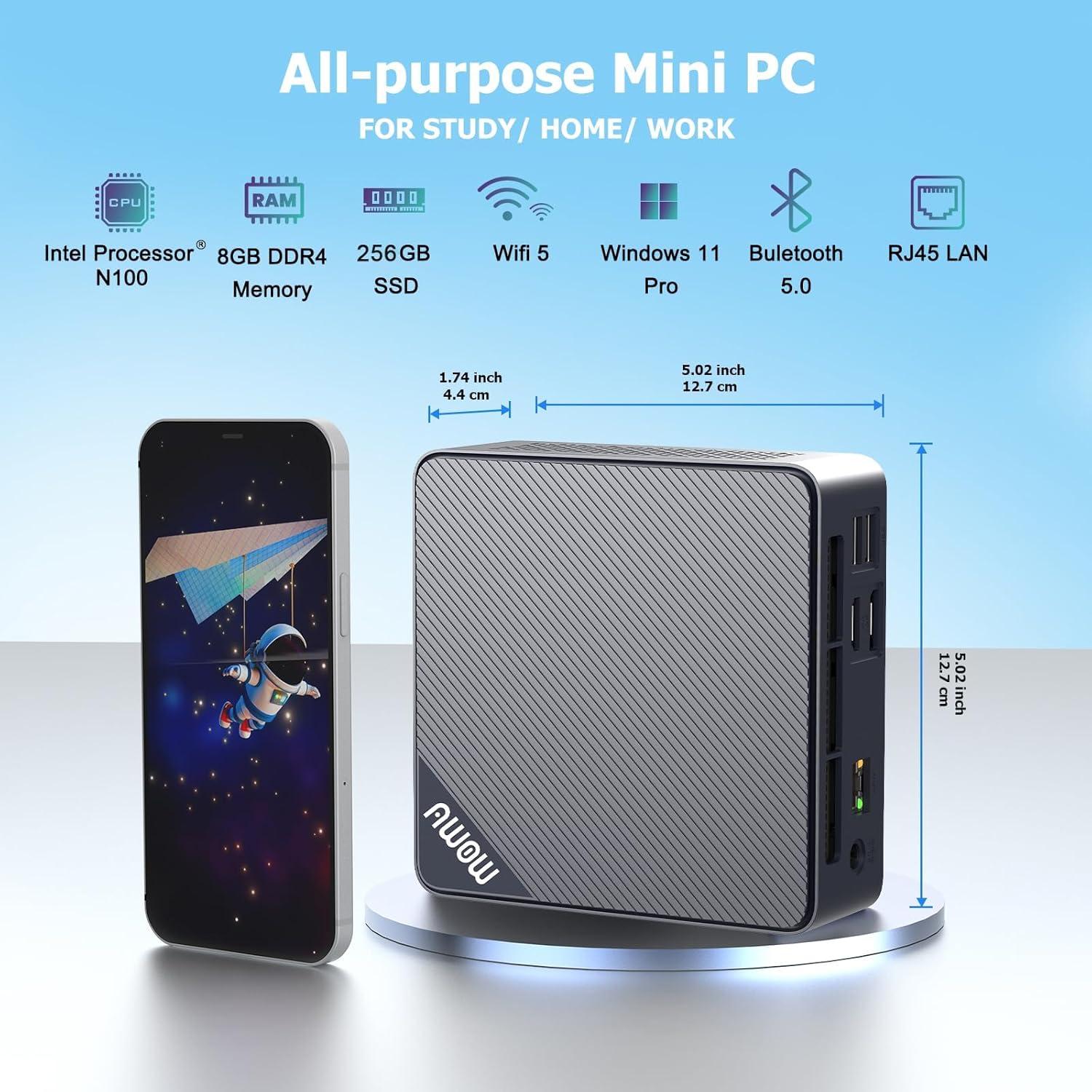
Rysunek 3.2: Przód i bok view of the AWOW Mini PC, illustrating its compact dimensions (4.9 x 4.9 x 1.7 inches) and key features like Intel N100 CPU, 8GB DDR4, 256GB SSD, WiFi 5, and Bluetooth 5.0.

Rysunek 3.3: Detailed diagram of the AWOW Mini PC's ports, including USB 3.2 x2, 2-in-1 Audio, Power Button, CMOS CLR, DC 12V, RJ45, HDMI, DisplayPort, and USB 2.0 x2.
4. Instrukcje konfiguracji
Follow these steps to set up your AWOW AK10 Pro Mini PC:
- Podłącz do zasilania: Insert the DC 12V power adapter into the power input port on the mini PC, then plug the adapter into a power outlet.
- Połącz z wyświetlaczem: Connect your monitor(s) to the mini PC using either the HDMI 2.0 port or the DisplayPort 1.4. For dual display setup, use both ports.
- Podłącz urządzenia peryferyjne: Plug in your USB keyboard and mouse into the available USB 2.0 or USB 3.2 ports.
- Połączenie sieciowe (opcjonalnie): For a wired internet connection, connect an Ethernet cable from your router or modem to the RJ45 Gigabit Ethernet port. For wireless, ensure your WiFi network is available.
- Włączanie: Naciśnij przycisk zasilania znajdujący się z przodu minikomputera. Zaświeci się kontrolka zasilania.
- Początkowe ustawienia: Follow the on-screen instructions to complete the operating system setup (e.g., Windows 11 initial configuration).
5. Instrukcja obsługi
5.1 Podstawowa obsługa
- Włączanie/wyłączanie: Press the power button to turn on the device. To shut down, use the operating system's shutdown function. A short press on the power button can also put the PC to sleep.
- Uruchom ponownie: Użyj funkcji ponownego uruchomienia systemu operacyjnego.
- Dostęp do BIOS-u: To enter the BIOS settings, press the USUNĄĆ key repeatedly during startup. To select a boot device, press F7 podczas uruchamiania.
5.2 Konfiguracja podwójnego wyświetlacza
The AWOW AK10 Pro supports dual 4K@60Hz displays via its HDMI 2.0 and DisplayPort 1.4 outputs. After connecting both monitors, you can configure display settings within your operating system (e.g., Windows Display Settings) to extend or duplicate your desktop.

Rysunek 5.1: Example of a dual monitor setup, demonstrating extended desktop functionality for increased productivity.
5.3 Rozszerzenie pamięci masowej
The mini PC's storage can be expanded. It supports an additional 2.5-inch SATA SSD/HDD (up to 2TB) and an M.2 SSD (up to 2TB). To install an additional drive:
- Upewnij się, że mini PC jest wyłączony i odłączony od źródła zasilania.
- Carefully open the chassis. Refer to the product's official support resources or contact AWOW service for detailed instructions on opening the case to avoid damage.
- Install the 2.5-inch SATA drive or M.2 SSD into the designated slot. Use the provided screws for secure installation.
- Close the chassis and reconnect power. The new drive may need to be initialized and formatted within the operating system's Disk Management utility before use.
6. Konserwacja
- Czyszczenie: Regularly clean the exterior of the mini PC with a soft, dry cloth. Use compressed air to clear dust from ventilation grilles to ensure proper airflow and prevent overheating. Do not use liquid cleaners directly on the device.
- Aktualizacje oprogramowania: Aktualizuj system operacyjny i sterowniki, aby zapewnić sobie optymalną wydajność i bezpieczeństwo.
- Zarządzanie pamięcią masową: Okresowo sprawdzaj wykorzystanie pamięci masowej i usuwaj niepotrzebne files w celu utrzymania szybkości systemu.
- Warunki środowiskowe: Operate the mini PC in a well-ventilated area, away from direct sunlight, heat sources, and excessive moisture.
7. Rozwiązywanie Problemów
If you encounter issues with your AWOW AK10 Pro Mini PC, refer to the following common problems and solutions:
- No Power / System Does Not Boot:
- Upewnij się, że zasilacz jest prawidłowo podłączony zarówno do minikomputera, jak i do sprawnego gniazdka elektrycznego.
- Sprawdź, czy gniazdko elektryczne działa prawidłowo, podłączając do niego inne urządzenie.
- If the issue persists, try pressing the CMOS CLR button (if available and accessible) to reset BIOS settings.
- Brak obrazu na monitorze:
- Check that the HDMI or DisplayPort cable is securely connected to both the mini PC and the monitor.
- Sprawdź, czy monitor jest włączony i ustawiony na prawidłowe źródło sygnału wejściowego (HDMI/DP).
- Jeżeli to możliwe, przeprowadź test przy użyciu innego kabla lub monitora.
- Noisy Fan:
- Ensure the mini PC is placed in a well-ventilated area and that the air vents are not obstructed.
- Clean any dust accumulation from the vents using compressed air.
- If the fan noise is excessive or constant, it may indicate a hardware issue. Contact AWOW support.
- External Drives Not Recognized:
- Ensure the external drive is properly connected and powered (if required).
- Check Disk Management in your operating system to see if the drive is detected but needs initialization or formatting.
- Try connecting the drive to a different USB port or another computer to rule out drive issues.
8. Specyfikacje
| Funkcja | Szczegół |
|---|---|
| Model | AK10Pro |
| Edytor | Intel N100 (Quad-Core, up to 3.4 GHz) |
| Koprocesor graficzny | Grafika Intel UHD |
| BARAN | 8 GB LPDDR4 (3200MHz) |
| Składowanie | 256 GB PCIe 3.0 SSD |
| Możliwość rozbudowy pamięci masowej | Up to 2TB M.2 SSD + Up to 2TB 2.5" SATA Drive |
| Maksymalna rozdzielczość ekranu | 4K (3840x2160) |
| Wyjście wideo | HDMI 2.0, DisplayPort 1.4 (Dual Display Support) |
| Łączność bezprzewodowa | 802.11ac WiFi (2.4GHz/5GHz), Bluetooth 5.2 |
| Łączność przewodowa | Gigabitowy Ethernet (RJ45) |
| Porty USB | 2x USB 3.2, 2x USB 2.0 |
| Porty audio | 2-in-1 Audio Jack |
| System operacyjny | System operacyjny (zazwyczaj preinstalowany Windows 11 Pro) |
| Wymiary (dł. x szer. x wys.) | 4.9 x 4.9 x 1.7 cala (12.5 x 12.5 x 4.3 cm) |
| Waga przedmiotu | 1.74 funtów (0.79 kg) |
9. Gwarancja i wsparcie
AWOW is committed to providing excellent customer service and technical support for your product.
- Serwis posprzedażowy: AWOW offers comprehensive after-sales service.
- Wsparcie techniczne: 24/7 technical support is available from experienced computer experts to assist with any technical issues.
- Local Customer Service: Local customer service is available during business hours (9:00 am to 5:00 pm EST).
- OEM Customization: Pre-sales services for OEM customization are also available.
- For support, please refer to the contact information provided with your purchase or visit the official AWOW webstrona.