
Wstęp
Dziękujemy za zakupasing the AGPTEK M6U MP3 Player. This device is designed to provide a high-quality portable audio experience with its 64GB internal storage and Bluetooth 5.3 connectivity. This manual will guide you through the setup, operation, and maintenance of your new MP3 player to ensure optimal performance and longevity.
Zawartość opakowania
Proszę sprawdzić, czy w paczce znajdują się następujące elementy:
- AGPTEK M6U MP3 Player (1 unit)
- USB Type-C Cable (for data transfer and charging) (1 unit)
- Wired Earphones (can be used as FM antenna) (1 unit)
- User Manual (multi-language, including English) (1 unit)
Produkt ponadview
The AGPTEK M6U MP3 Player features a sleek design with a 2.4-inch LCD screen and intuitive controls. Familiarize yourself with the device's physical components.

Obraz: The AGPTEK M6U MP3 Player, showcasing its compact size and user interface. The device is held in a hand, highlighting its portability and the layout of its screen and physical control buttons.
The player is equipped with a durable zinc alloy body, providing a comfortable grip. It features a responsive display for easy navigation through menus and media files.
Organizować coś
1. Ładowanie urządzenia
Before initial use, fully charge the MP3 player. Connect the provided USB Type-C cable to the player's charging port and the other end to a USB power adapter (not included) or a computer's USB port.
- Pełne naładowanie trwa zazwyczaj od 2 do 2.5 godzin.
- The battery charges to 80% capacity in approximately 1.5 hours.
- A fully charged battery provides up to 40 hours of music playback.

Obraz: The AGPTEK M6U MP3 Player displaying its battery charging status and indicating a long playback time. The image visually represents the charging process and extended battery life.
2. Włączanie/wyłączanie zasilania
- Włączanie: Press and hold the Power button (usually located on the side) until the screen lights up.
- Aby wyłączyć: Naciśnij i przytrzymaj przycisk zasilania, aż na ekranie pojawi się opcja wyłączenia, a następnie potwierdź.
3. Przesyłanie muzyki Files
Connect the MP3 player to your computer using the provided USB Type-C cable. The player will appear as a removable disk drive. You can then drag and drop your music files (FLAC, MP3, WMA, WAV, APE, ACELP, AAC, Audible, OGG) directly into the player's storage.

Obraz: The AGPTEK M6U MP3 Player screen showing various album covers and music playback information, with an overlay indicating internal memory. This illustrates the player's capacity for storing thousands of songs.
The player comes with 64GB of internal memory. You can also expand storage using a microSD card.
4. Parowanie Bluetooth
To connect your AGPTEK M6U to Bluetooth headphones or speakers:
- Go to the Bluetooth menu on your MP3 player.
- Włącz Bluetooth.
- Przełącz słuchawki/głośnik Bluetooth w tryb parowania.
- Select your device from the list of available devices on the MP3 player's screen.
- The player supports automatic reconnection to previously paired devices upon power-on.
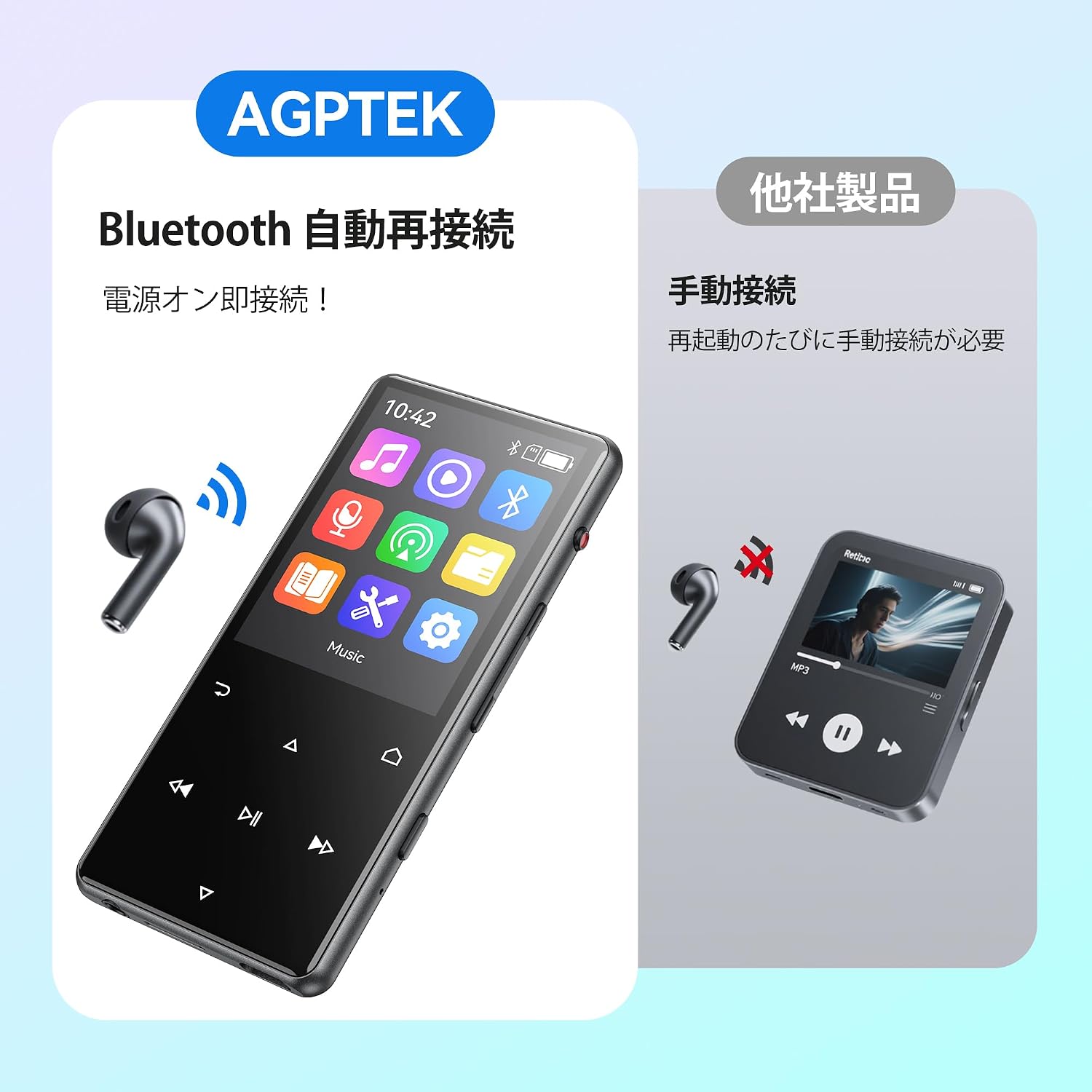
Obraz: The AGPTEK M6U MP3 Player connected wirelessly to a pair of Bluetooth earbuds, illustrating the automatic reconnection feature. The screen shows the Bluetooth icon, indicating an active connection.
Instrukcja obsługi
1. Podstawowa nawigacja
Use the touch screen or physical buttons (Play/Pause, Next/Previous, Volume) to navigate through menus and control playback. The interface is designed for intuitive use.
2. Odtwarzanie muzyki
Z menu głównego wybierz „Muzyka”, aby przeglądać pliki audio files. You can sort by artist, album, genre, or view all songs. Tap a song to begin playback.
- Naciśnij przycisk Odtwarzaj/Pauza, aby rozpocząć lub wstrzymać odtwarzanie muzyki.
- Użyj przycisków Następny/Poprzedni, aby pominąć utwory.
- Dostosuj głośność za pomocą specjalnych regulatorów głośności.
3. Nagrywanie głosu
The AGPTEK M6U features a one-key recording function, allowing you to quickly capture audio. This is useful for lectures, meetings, or personal notes.

Obraz: The AGPTEK M6U MP3 Player screen showing an active recording session, indicated by a large microphone icon and a filename. This highlights the device's one-key recording capability, useful for capturing ideas or discussions instantly.
To start a recording, locate the dedicated recording button (if available, otherwise navigate through the menu). Recordings are saved in MP3 or WAV format.
4.Radio FM
To use the FM radio function, connect the wired earphones to the player. The earphones act as an antenna. Navigate to the FM Radio application from the main menu, then scan for available stations.
5. Ustawienia
Access the "Settings" menu to customize various aspects of your player, including display brightness, language, date and time, equalizer settings, and system information.
Konserwacja
- Czyszczenie: Do czyszczenia urządzenia używaj miękkiej, suchej ściereczki. Unikaj płynnych środków czyszczących i materiałów ściernych.
- Składowanie: Przechowuj odtwarzacz w chłodnym, suchym miejscu, z dala od bezpośredniego światła słonecznego i ekstremalnych temperatur.
- Pielęgnacja baterii: Aby przedłużyć żywotność baterii, unikaj częstego całkowitego rozładowywania. Ładuj ją regularnie, nawet jeśli nie jest używana przez dłuższy czas.
- Aktualizacje oprogramowania: Periodically check the official AGPTEK webodwiedź tę witrynę, aby uzyskać dostęp do aktualizacji oprogramowania sprzętowego, które zapewnią optymalną wydajność i nowe funkcje.
Rozwiązywanie problemów
| Problem | Rozwiązanie |
|---|---|
| Urządzenie nie włącza się. | Ensure the battery is charged. Connect the player to a power source for at least 10 minutes, then try powering on again. |
| Nie można połączyć się ze słuchawkami Bluetooth. | Make sure Bluetooth is enabled on both the player and the headphones. Put headphones in pairing mode. Ensure they are within range and not connected to another device. |
| Muzyka files nie są rozpoznawane. | Sprawdź, czy to muzyka files are in a supported format (FLAC, MP3, WMA, WAV, APE, ACELP, AAC, Audible, OGG). Ensure files are transferred correctly to the player's internal storage or microSD card. |
| Ekran nie reaguje. | Try restarting the device. If the issue persists, a factory reset might be necessary (note: this will erase all data). |
Specyfikacje
| Funkcja | Szczegół |
|---|---|
| Marka | Talkie |
| Numer modelu | M6U |
| Pamięć wewnętrzna | 64 GB |
| Rozmiar ekranu | 2.4 cali |
| Technologia wyświetlania | LCD |
| Technologia łączności | USB, Bluetooth 5.3 |
| Kompatybilne urządzenia | PC, Headphones |
| Typ nośnika | microSD Card (expandable storage) |
| Obsługiwane formaty audio | FLAC, MP3, WMA, WAV, APE, ACELP, AAC, Audible, OGG |
| Obsługiwane formaty nagrywania | MP3, WAV |
| Obsługiwane formaty wideo | AMV, AVI (240*320) |
| Czas pracy baterii (średni) | Do 40 godzin |
| Kolor | Czarny |
| Pochodzenie | Chiny |
Gwarancja i wsparcie
The AGPTEK M6U MP3 Player comes with a 180-day warranty from the date of purchase. This warranty covers manufacturing defects under normal use.
For technical support, warranty claims, or further assistance, please contact AGPTEK customer service through their official website or the retailer where you purchased the product. Please have your model number (M6U) and proof of purchase ready when contacting support.
Ważne informacje dotyczące bezpieczeństwa
- Nie wystawiaj urządzenia na działanie ekstremalnych temperatur, bezpośredniego światła słonecznego i wysokiej wilgotności.
- Unikaj upuszczania i narażania urządzenia na silne uderzenia.
- Nie próbuj samodzielnie demontować ani naprawiać urządzenia. Spowoduje to unieważnienie gwarancji.
- Używaj wyłącznie zatwierdzonych kabli ładujących i akcesoriów.
- Listen to audio at moderate volumes to prevent hearing damage.